HDD freezing periodically

Dacs

New member
Local time
11:15 PM
Messages
15
Location
Brisbane
Hi

None of the solutions to similar problems I've read seems to apply to me:

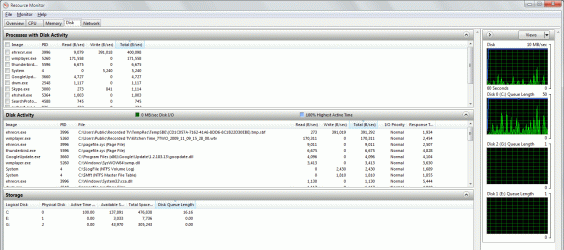
I use my PC for general purpose, but also to record and watch TV which is when this problem occurs: Every 5 or 10 minutes the Disk Activity goes to 100% and the Disk Queue Length goes to 10 - 40ms, but with very little data transfer taking place (often <1MB/s) and low CPU usage. This causes whatever video I'm watching (and everything else) to freeze. Disk Activity stays at 100% for about a minute, then goes back to working normally and everything is fine. See screen capture of Resource Monitor below.

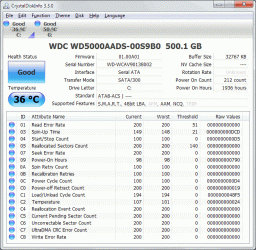
I've run Crystal Disk Info (see screen cap) and HD Tune, and they both report that everything is okay.

System specs:
OS: Windows 7 64-bit pro
HDD: 500GB WD Caviar Green WD5000AADS as my only internal drive.
Motherboard: Gigabyte GA-MA785GM-US2H
CPU: AMD Athlon II X2 240
Memory: Kingston DDR2 800MHz 2GB

Any ideas?
 

Attachments
  • Example2.gif
    Example2.gif
    78.2 KB · Views: 235
  • Disk diagnostics.gif
    Disk diagnostics.gif
    53 KB · Views: 258

My Computer

OS
Windows 7 professional 64-bit
CPU
AMD Athlon 2x 240
Motherboard
Gigabyte GA-MA785GM-US2H
Memory
Kingston 1 x 2GB DDR2 800MHz
Graphics Card(s)
Integrated ATI Radeon HD 4200
Sound Card
Integrated
Monitor(s) Displays
Viewsonic VX2240w-2
Screen Resolution
1680 x 1050
Hard Drives
500GB Western Digital WD5000AADS, SATAii Green Power 7200RPM 32MB Cache
PSU
EarthWatts 380W
Case
Antec NSK4480B-II
Internet Speed
ADSL2+ 18Mbps
Other Info
Wireless networking card: TP-Link PCI WN651G
1) Put in more RAM, 2GB isn't enough for normal multitasking.

2) What is the first process listed in resmon.exe?
 

My Computer

Computer Manufacturer/Model Number
Sony Vaio Z46GDU
OS
Windows 7 Ultimate x86-64
CPU
[email protected] 1066MHz FSB
Motherboard
Sony branded
Memory
6GB DDR3 1066MHz
Graphics Card(s)
9300M GS 256MB Dedicated (Speed) + Intel4500MHD (Stamina)
Sound Card
Realtek HD Audio
Monitor(s) Displays
13.1' WXGA
Screen Resolution
1600x900
Hard Drives
320GB 7200RPM w/ 16MB cache
Internet Speed
1MB/s
Hi Frostmourne

You could be right about more RAM, but I didn't think that it was the cause of the problem because it generally shows about 80% used, even when it has the disk activity problem. If the problem was because of page swapping I would have expected a much higher disk transfer rate.

The first process in resmon (ehrecvr.exe) is the TV receiver/recorder, which is writing a temporary video file.

If no one has any alternative theories I will go get some more RAM and see if helps.
 

My Computer

OS
Windows 7 professional 64-bit
CPU
AMD Athlon 2x 240
Motherboard
Gigabyte GA-MA785GM-US2H
Memory
Kingston 1 x 2GB DDR2 800MHz
Graphics Card(s)
Integrated ATI Radeon HD 4200
Sound Card
Integrated
Monitor(s) Displays
Viewsonic VX2240w-2
Screen Resolution
1680 x 1050
Hard Drives
500GB Western Digital WD5000AADS, SATAii Green Power 7200RPM 32MB Cache
PSU
EarthWatts 380W
Case
Antec NSK4480B-II
Internet Speed
ADSL2+ 18Mbps
Other Info
Wireless networking card: TP-Link PCI WN651G
80% usage is pushing it. Also, that hard drive is a green drive, which isn't a good idea as it can slow down its spin speed, slowing down whatever you are doing too. I would:

1) Close all apps and reboot

2) Run Disk Defrag and then chkdsk.

3) Install the latest chipset drivers for your motherboard from Gigabyte's site (great board choice by the way for your setup).

4) Install all your other drivers with the guide in my sig.

5) Post a screenshot of the msconfig startup tab.

This is custom built right?
 

My Computer

Computer Manufacturer/Model Number
Sony Vaio Z46GDU
OS
Windows 7 Ultimate x86-64
CPU
[email protected] 1066MHz FSB
Motherboard
Sony branded
Memory
6GB DDR3 1066MHz
Graphics Card(s)
9300M GS 256MB Dedicated (Speed) + Intel4500MHD (Stamina)
Sound Card
Realtek HD Audio
Monitor(s) Displays
13.1' WXGA
Screen Resolution
1600x900
Hard Drives
320GB 7200RPM w/ 16MB cache
Internet Speed
1MB/s
OK
1) Have tried that a couple of times, but still have the problem
2) Have checked disk defrag, but it says 0% fragmentation. Will run chkdsk.
3) Glad you approve of the MB :-) Will check for latest drivers there
4) Will install other drivers from your sig's site
5) Only startups in MSConfig are AVG antivirus and the #@$%@#$% Java Update Scheduler which I've deleted a thousand times and will delete again.

Yes, custom built.

I'll be back.
 

My Computer

OS
Windows 7 professional 64-bit
CPU
AMD Athlon 2x 240
Motherboard
Gigabyte GA-MA785GM-US2H
Memory
Kingston 1 x 2GB DDR2 800MHz
Graphics Card(s)
Integrated ATI Radeon HD 4200
Sound Card
Integrated
Monitor(s) Displays
Viewsonic VX2240w-2
Screen Resolution
1680 x 1050
Hard Drives
500GB Western Digital WD5000AADS, SATAii Green Power 7200RPM 32MB Cache
PSU
EarthWatts 380W
Case
Antec NSK4480B-II
Internet Speed
ADSL2+ 18Mbps
Other Info
Wireless networking card: TP-Link PCI WN651G
Uninstall AVG with a removal tool too. It is junk - use Microsoft Security Essentials. Now I'd put in another 2GB stick, same as your first one. Then after all this take another look at your performance.
 

My Computer

Computer Manufacturer/Model Number
Sony Vaio Z46GDU
OS
Windows 7 Ultimate x86-64
CPU
[email protected] 1066MHz FSB
Motherboard
Sony branded
Memory
6GB DDR3 1066MHz
Graphics Card(s)
9300M GS 256MB Dedicated (Speed) + Intel4500MHD (Stamina)
Sound Card
Realtek HD Audio
Monitor(s) Displays
13.1' WXGA
Screen Resolution
1600x900
Hard Drives
320GB 7200RPM w/ 16MB cache
Internet Speed
1MB/s
I've gone to the Gigabyte web page with updates for Windows 7 64-bit drivers for this motherboard.

A lot the updates look like bloat to me - Is there any way just to update the necessary drivers?
Here's what there is:

Audio
Realtek Function driver for Realtek Azalia audio chip
Have downloaded and installed. It updated the audio driver but also added a whole lot of stuff I really don't need like environment sound effects.

Chipset / VGA / SATA RAID
AMD Chipset Driver (include chipset\sata raid\vga driver)
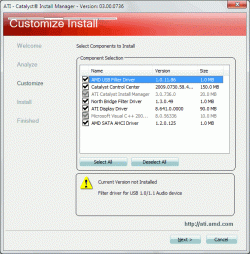
Have downloaded and started the setup ("ATI Catalyst"). But that wants to install 7 components (see screen cap). I'm not sure what is really necessary to install here just to update drivers. I don't think I'll need legacy support for USB 1.0 audio devices, the Catalyst Control Center so I'll leave those out.
But do I need the "North Bridge Filter Driver" and the "AMD SATA AHCI Driver"?
Unfortunately the ATI Catalyst Install Manager is a forced-install component.

LAN
Realtek Ethernet Diagnostic Utility
Don't think I need to install this

SATA RAID
AMD SATA AHCI Driver
I guess this is an important one?
AMD SATA RAID Driver
Not using RAID - Do I need to install this?
 

Attachments

  • ATICatalyst.gif
    ATICatalyst.gif
    28.3 KB · Views: 133

My Computer

OS
Windows 7 professional 64-bit
CPU
AMD Athlon 2x 240
Motherboard
Gigabyte GA-MA785GM-US2H
Memory
Kingston 1 x 2GB DDR2 800MHz
Graphics Card(s)
Integrated ATI Radeon HD 4200
Sound Card
Integrated
Monitor(s) Displays
Viewsonic VX2240w-2
Screen Resolution
1680 x 1050
Hard Drives
500GB Western Digital WD5000AADS, SATAii Green Power 7200RPM 32MB Cache
PSU
EarthWatts 380W
Case
Antec NSK4480B-II
Internet Speed
ADSL2+ 18Mbps
Other Info
Wireless networking card: TP-Link PCI WN651G
Frostmourne, I've just read on your sig link page where you say "Don't bother with driver programs."
I think we're on the same track there.

And I've replaced AVG with MS Security Essentials as you suggested.
 

My Computer

OS
Windows 7 professional 64-bit
CPU
AMD Athlon 2x 240
Motherboard
Gigabyte GA-MA785GM-US2H
Memory
Kingston 1 x 2GB DDR2 800MHz
Graphics Card(s)
Integrated ATI Radeon HD 4200
Sound Card
Integrated
Monitor(s) Displays
Viewsonic VX2240w-2
Screen Resolution
1680 x 1050
Hard Drives
500GB Western Digital WD5000AADS, SATAii Green Power 7200RPM 32MB Cache
PSU
EarthWatts 380W
Case
Antec NSK4480B-II
Internet Speed
ADSL2+ 18Mbps
Other Info
Wireless networking card: TP-Link PCI WN651G
Sorry for the delay. I meant install the chipset/VGA driver etc and that's it. The audio is OK although the general driver from Realtek is better. The SATA/RAID driver you definitely don't need. So the chipset only. Flash the BIOS too. Now thats done, install the memory, and yes you need everything recommended by the chipset installer.
 

My Computer

Computer Manufacturer/Model Number
Sony Vaio Z46GDU
OS
Windows 7 Ultimate x86-64
CPU
[email protected] 1066MHz FSB
Motherboard
Sony branded
Memory
6GB DDR3 1066MHz
Graphics Card(s)
9300M GS 256MB Dedicated (Speed) + Intel4500MHD (Stamina)
Sound Card
Realtek HD Audio
Monitor(s) Displays
13.1' WXGA
Screen Resolution
1600x900
Hard Drives
320GB 7200RPM w/ 16MB cache
Internet Speed
1MB/s
I've installed the updated drivers. But after doing that and replacing AVG with MS Security Essentials, the memory usage seemed higher and the problem worse.

Now I've added another 2GB memory to give 4GB total, and run Chkdsk with the repair option.
Only thing I haven't done yet is updated the BIOS.
Will see how things go now.

But I still don't understand why the disk activity would be 100% without much data transfer happening. If it was due to memory paging I would have expected high data transfer.
 

My Computer

OS
Windows 7 professional 64-bit
CPU
AMD Athlon 2x 240
Motherboard
Gigabyte GA-MA785GM-US2H
Memory
Kingston 1 x 2GB DDR2 800MHz
Graphics Card(s)
Integrated ATI Radeon HD 4200
Sound Card
Integrated
Monitor(s) Displays
Viewsonic VX2240w-2
Screen Resolution
1680 x 1050
Hard Drives
500GB Western Digital WD5000AADS, SATAii Green Power 7200RPM 32MB Cache
PSU
EarthWatts 380W
Case
Antec NSK4480B-II
Internet Speed
ADSL2+ 18Mbps
Other Info
Wireless networking card: TP-Link PCI WN651G
I had the same problem (with an intel chipset though) Installing the Intel Matrix Storage Manager fixed it for me. Try looking for similar software for AMD systems
 

My Computer

OS
Windows 7
I'd buy a Seagate Barracuda 7200.12 1TB and image 7 onto it. That green drive seems to be skewing performance.
 

My Computer

Computer Manufacturer/Model Number
Sony Vaio Z46GDU
OS
Windows 7 Ultimate x86-64
CPU
[email protected] 1066MHz FSB
Motherboard
Sony branded
Memory
6GB DDR3 1066MHz
Graphics Card(s)
9300M GS 256MB Dedicated (Speed) + Intel4500MHD (Stamina)
Sound Card
Realtek HD Audio
Monitor(s) Displays
13.1' WXGA
Screen Resolution
1600x900
Hard Drives
320GB 7200RPM w/ 16MB cache
Internet Speed
1MB/s
Aghh! Id just written a long reply here and when I clicked post, got the message that my token had expired. Hit the back button but my reply was gone. :mad:

So here we go again.

Adding new memory has improved the problem but not got rid of it. I guess the improvement is only because more data is cached and there is less page swapping required.

I ran Western Digital Data Lifeguard diagnostic extended test on the drive and it showed all-clear.

The Caviar Green drive should be more than capable for my use, and I chose that one for its quiet operation and energy efficiency, since the PC is in my lounge and on 24/7.

It worked fine for the first few months after I built the system in October 2009 - It's just the last couple of months that it's had the "100% activity" problem. The PC is a basic system with pretty-much default settings. Not overclocked and no dubious software.

I haven't changed anything fundamental since I built it, but of course there could still be many causes: Hardware fault, automatic windows or driver updates, problem showing up because hard drive is fuller or more applications running, etc.

Any suggestions for another hard drive diagnostic I could try that won't wipe data?

Hardi, I looked at Intel Matrix Storage Manager. It is a manager for a RAID setup which I am not using. I have installed the latest drivers for the onboard SATA though.

Edit: I haven't updated the BIOS yet because it's a risk and hassle, and the change log only mentions updates that do not relate this at all.
 

My Computer

OS
Windows 7 professional 64-bit
CPU
AMD Athlon 2x 240
Motherboard
Gigabyte GA-MA785GM-US2H
Memory
Kingston 1 x 2GB DDR2 800MHz
Graphics Card(s)
Integrated ATI Radeon HD 4200
Sound Card
Integrated
Monitor(s) Displays
Viewsonic VX2240w-2
Screen Resolution
1680 x 1050
Hard Drives
500GB Western Digital WD5000AADS, SATAii Green Power 7200RPM 32MB Cache
PSU
EarthWatts 380W
Case
Antec NSK4480B-II
Internet Speed
ADSL2+ 18Mbps
Other Info
Wireless networking card: TP-Link PCI WN651G
Run the Short DST in Seagate Seatools.
 

My Computer

Computer Manufacturer/Model Number
Sony Vaio Z46GDU
OS
Windows 7 Ultimate x86-64
CPU
[email protected] 1066MHz FSB
Motherboard
Sony branded
Memory
6GB DDR3 1066MHz
Graphics Card(s)
9300M GS 256MB Dedicated (Speed) + Intel4500MHD (Stamina)
Sound Card
Realtek HD Audio
Monitor(s) Displays
13.1' WXGA
Screen Resolution
1600x900
Hard Drives
320GB 7200RPM w/ 16MB cache
Internet Speed
1MB/s
OK, I ran the Short DST in Seagate SeaTools and it passed. I even ran it WHILE the disk activity was up at 100% and disk response times at around 5000mS. The test took longer but it again passed with no problems.

I found a similar thread on the Microsoft forum:
Member "DayTripper75" had exactly the same problem with the same model hard drive, which also developed after a month and got progressively worse. Maybe this thing is like a degenerative disease for hard drives :(

But it doesn't seem to be a common problem with this model drive.
I'm still hoping to find a diagnostic that reproduces and identifies the fault.
 

My Computer

OS
Windows 7 professional 64-bit
CPU
AMD Athlon 2x 240
Motherboard
Gigabyte GA-MA785GM-US2H
Memory
Kingston 1 x 2GB DDR2 800MHz
Graphics Card(s)
Integrated ATI Radeon HD 4200
Sound Card
Integrated
Monitor(s) Displays
Viewsonic VX2240w-2
Screen Resolution
1680 x 1050
Hard Drives
500GB Western Digital WD5000AADS, SATAii Green Power 7200RPM 32MB Cache
PSU
EarthWatts 380W
Case
Antec NSK4480B-II
Internet Speed
ADSL2+ 18Mbps
Other Info
Wireless networking card: TP-Link PCI WN651G
SATA RAID
AMD SATA AHCI Driver
I guess this is an important one?
AMD SATA RAID Driver
Not using RAID - Do I need to install this?

If your board is set to AHCI mode, then Yes.

7 normally installs the MS AHCI driver by default, that does OK, but i would update it to the latest version.


The Green Drive will seem somewhat slower at times to respond as they go into a energy saving mode.

They are good drives for DATA storage, but I do not think id use one for the OS. Unless you do not mind the second delay waiting for it to spin up again coming out of power saving mode.

How full the drive is will impact performance further.
 

My Computer

Computer Manufacturer/Model Number
Custom (Self Build)
OS
Windows 7 Home Premium 64bit
CPU
Intel Core i7 2700k
Motherboard
eVGA P67 SLI
Memory
8GB Mushkin Redline Ridgebacks @1866
Graphics Card(s)
EVGA GTX570 SC
Sound Card
XiFi Titanium HD
Monitor(s) Displays
LG W2453V
Screen Resolution
1920x1080
Hard Drives
Intel 320 80GB -- Intel X25-V 40GB --WD Black 1TB x2 -- WD Blue 640GB
PSU
Seasonic x750
Case
Corsair 600T SE White
Cooling
eVGA Superclocked CPU Cooler
Keyboard
Saitek Cyborg
Antivirus
Kaspersky
Browser
IE
Other Info
LG BD/DVD
Thanks Wishmaster.
I installed the AMD SATA AHCI driver, but from what I see in Device manager it only updates the driver for the IDE ATA/ATAPI controllers. Updating it made no improvement.

This 100% activity problem is definitely not related to the drive being in sleep mode and taking a couple of seconds to spin up again. It suddenly goes haywire while in use, with 100% disk activity and low transfer speeds (<1MB/s). But WD and Seagate diagnostics say it's all okay.
The drive is formatted with NTFS, 75% full with 0% fragmentation.
 

My Computer

OS
Windows 7 professional 64-bit
CPU
AMD Athlon 2x 240
Motherboard
Gigabyte GA-MA785GM-US2H
Memory
Kingston 1 x 2GB DDR2 800MHz
Graphics Card(s)
Integrated ATI Radeon HD 4200
Sound Card
Integrated
Monitor(s) Displays
Viewsonic VX2240w-2
Screen Resolution
1680 x 1050
Hard Drives
500GB Western Digital WD5000AADS, SATAii Green Power 7200RPM 32MB Cache
PSU
EarthWatts 380W
Case
Antec NSK4480B-II
Internet Speed
ADSL2+ 18Mbps
Other Info
Wireless networking card: TP-Link PCI WN651G
Solved this problem at last:
I bought a 500GB Seagate Barracuda ST3500418AS drive (also quite a "green" drive), cloned all the data from my WD Caviar Green drive, and swapped them over. No more problems.

The strange thing is that I cannot find any fault with the WD drive using disk diagnostics - The problem only shows up in ordinary usage. I ran Bart's Stuff Test which writes and reads from the disk intensively, and left it going for about 12 hours and there was no problem.

I guess I'll just have to keep the WD drive as extra space now.
 

My Computer

OS
Windows 7 professional 64-bit
CPU
AMD Athlon 2x 240
Motherboard
Gigabyte GA-MA785GM-US2H
Memory
Kingston 1 x 2GB DDR2 800MHz
Graphics Card(s)
Integrated ATI Radeon HD 4200
Sound Card
Integrated
Monitor(s) Displays
Viewsonic VX2240w-2
Screen Resolution
1680 x 1050
Hard Drives
500GB Western Digital WD5000AADS, SATAii Green Power 7200RPM 32MB Cache
PSU
EarthWatts 380W
Case
Antec NSK4480B-II
Internet Speed
ADSL2+ 18Mbps
Other Info
Wireless networking card: TP-Link PCI WN651G
I have/had the same issue

Hey, I just wanted to post as well that I have the exact same issue you described Dacs. The problem is the drive and there's no point trying anything else (save stopping windows and all apps from writing to the drive as frequently, which will be my last attempt with this).

OS: Win 7 x64
HDD: WD5000AADS
Memory: 4GB
CPU: E7500

The OS will completely lockup (however if you have Resource Monitor open then that is the only unfrozen window, I was confused if it was memory or hdd for a long time) and the Disk Queue Length will spike like 40+ for a while, after that everything is fine... The and hibernating is a joke (it's faster to just shutdown then turn on).

I did find this link with mention about 'a transitional point from 512-byte sectors to 4096-byte sectors' (looks like a copy paste of this threads first post).

It looks like the only fix is a new HDD. Luckily this will now be my backup drive.
This is something completely unexpected from a 32MB Cache 5400k RPM drive.
 

My Computer

OS
Windows 7
Hi brandonb. Thanks for the link. It looks like that could be the cause of the problem.
Four months on and I'm still using the WD drive as secondary storage and backup, and it's working okay for that.
But I'd prefer to have a drive I can rely on, and like you say it's not expected from a popular WD drive like this. I've always rated WD drives highly but this has taken them down a few notches in my book.
 

My Computer

OS
Windows 7 professional 64-bit
CPU
AMD Athlon 2x 240
Motherboard
Gigabyte GA-MA785GM-US2H
Memory
Kingston 1 x 2GB DDR2 800MHz
Graphics Card(s)
Integrated ATI Radeon HD 4200
Sound Card
Integrated
Monitor(s) Displays
Viewsonic VX2240w-2
Screen Resolution
1680 x 1050
Hard Drives
500GB Western Digital WD5000AADS, SATAii Green Power 7200RPM 32MB Cache
PSU
EarthWatts 380W
Case
Antec NSK4480B-II
Internet Speed
ADSL2+ 18Mbps
Other Info
Wireless networking card: TP-Link PCI WN651G
Back
Top