Hdd gone-ish, trying to repair partitions.

Kalorvoe

New member
Local time
10:18 PM
Messages
23
Had a virus the other day. I cleaned it with avg, all seemed well.
A couple of days later my PC (win7 64) became completely unresponsive, I had to pull the plug. Now it won't start up. Win7 repair cant see the installation and says it can't automatically fix it. If I go into command prompt the c drive is not there, and if i do a diskpart it says there are no volumes. Fdisk endlessly says to restart so it can fix it, but never does. I'm thinking the partition table is corrupt.

So I heard about partition wizard, got its bootable cd and ran it. It can see the c drive with 2 partitions. If I do a full scan I can see about another 29 ones mark Lost/Deleted, including a few marked "Boot". If I tick these to restore them, the biggest partition (that can be seen without the full scan) is then marked "overlapped".

As You can see, I know just enough to be dangerous. I'm trying to at least get the drive viewable from the Windows 7 repair tools (no I don't have a restore point or image). This forum also says partition wizard is obsolete, but it can see things Win7 tools can't.

Can anyone give me some direction on how to repair the partitions so the drive can be accessed and repaired?
 
Last edited:

My Computer My Computer

At a glance

Windows 7 64
Computer type
PC/Desktop
OS
Windows 7 64
Do you mean MiniTools Partition Wizard? ( I presume you are wrongly calling it as Partition Magic)

If you are running the Partition Wizard Home Edition 8.1.1 from a bootable CD or pen drive and further running the Partition Recovery Wizard in it:

Can you upload snap shots of how your drive looks like a) first in Partition Wizard and then b)after a Quick Scan running Partition Recovery Wizard. ( Only if Quick Scan fails to show any partitions, we need to do a Full Scan.) So first only a after-a-Quick Scan snap.

You may have to use a camera or mobile phone camera to capture the shots but make sure those shots are readable.
 

My Computer My Computer

At a glance

Windows 7 Home Premium 32 bit
OS
Windows 7 Home Premium 32 bit
Yes, you're correct (renamed to wizard in above post).

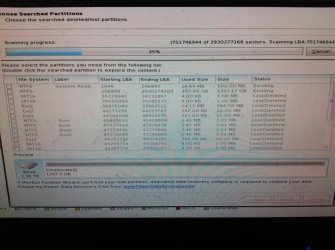
Here's what it looks like now. Before I started scanning it only saw the top 2 ("existing") partitions:

photostream
 

My Computer My Computer

At a glance

Windows 7 64
Computer type
PC/Desktop
OS
Windows 7 64
OK, good enough. ( Though I had to struggle to read it.:))

Is yours a 1.5TB drive?

Select only the top two partitions which show as existing.

Now see the Preview Disk Map. If it shows your full drive with two partitions with no unallocated space , go ahead and click on Finish.

And then click on Apply in the tool bar for the changes to take effect.

I think you should be through.
 

My Computer My Computer

At a glance

Windows 7 Home Premium 32 bit
OS
Windows 7 Home Premium 32 bit
Thanks for replying. I did as you suggested (cancelling the rest of the scan), but after I clicked finish I couldn't apply, it said there were no pending operations??
 
Last edited:

My Computer My Computer

At a glance

Windows 7 64
Computer type
PC/Desktop
OS
Windows 7 64
Do not cancel the scan.

The scan should complete.

Now do a Quick scan. Let it complete.( Remember, do a Full Scan only if Quick Scan does not show that two existing partitions)

If it shows the two existing partitions put a tick mark against them, check the preview disk map to confirm that your full drive is shown , click on Finish and then Apply.

Normally there should be no need to repair anything.
 

My Computer My Computer

At a glance

Windows 7 Home Premium 32 bit
OS
Windows 7 Home Premium 32 bit
Ok did a quick scan and it's just like before: I tick both partitions and finish, but Apply is disabled.
Maybe partitions is barking up the wrong tree? Could there be another reason that a diskpart list disk shows no drives?
 

My Computer My Computer

At a glance

Windows 7 64
Computer type
PC/Desktop
OS
Windows 7 64
Can you post the screenshot of partitions shown by Quick Scan and after you tick both?

I know your bedtime is fast approaching and I shall come back after you wake up and subsequently I wake up..:)

I would also like you to run Full Scan, allow it complete, select the two existing partitions and try again.

Broadly my action plan next will be to rebuild MBR using the same Partition Wizard. (You can see Rebuild MBR, on the left Pane)

But that only after the Full Scan trial is completed and it proves ineffective.

( There can be two reasons for the HDD not booting. a corrupted MBR code in the first sector or a corrupted partition table again in the same first sector.)
 

My Computer My Computer

At a glance

Windows 7 Home Premium 32 bit
OS
Windows 7 Home Premium 32 bit
Wow, you're so considerate!

I added the quick scan screenshot:
photostream


It only takes a second to run, is that what you expect?

Now To run a full scan. Will update in 12+ hrs :)

Thanks again, I really appreciate it.
 

My Computer My Computer

At a glance

Windows 7 64
Computer type
PC/Desktop
OS
Windows 7 64
OK, the Quick scan and the preview of the disk map looks alright. If with all that you can't Finish and then apply, then we sure have to do rebuild the MBR.

( You can double click on the large 1300MB partition and you should be able to see all the files in it. So not to worry.)

To rebuild MBR:

On the Partition Wizard Main Screen, click on the extreme left side over the drive Icon to select the full drive and then click on the Rebuild MBR on the left Pane and complete the process. ( If necessary that is if it shows under Pending Operations, click on Apply to complete the process.)

24-05-2014 19-12-02.jpg

Close Partition Wizard , reboot and check whether you are able to boot your PC.
 

My Computer My Computer

At a glance

Windows 7 Home Premium 32 bit
OS
Windows 7 Home Premium 32 bit
Finished the scan and like before I ticked the top 2 and finished but couldn't apply (because all the ones I ticked were already existing).

Followed the mbr steps and rebooted, but it still BSODs at the "starting windows" screen.
 

My Computer My Computer

At a glance

Windows 7 64
Computer type
PC/Desktop
OS
Windows 7 64
Where are the attachments showing the PW drive map which you refer to throughout the thread?
 
Where are the attachments showing the PW drive map which you refer to throughout the thread?

Greg, you came in at the right time.

Click on the Image placement X and it will take you to icloud where you can see the images.

In Op's case the partition table in the first sector is in tact.

Since rebuild MBR did not work, I would suspect a boot sector virus which is preventing it.

I would also think that he should now resort to fixmbr running the recovery console since fix MBR retains the existing partition table.

And now you are the best person to lead him doing that or anyother process that you may think best. ( that's not my cup of tea and that's why I said you came in at the right time. I shall now take a back seat. :))
 

My Computer My Computer

At a glance

Windows 7 Home Premium 32 bit
OS
Windows 7 Home Premium 32 bit
I see no such X to click to see the screenshots. I see empty spaces where he refers to their locations in two posts.

But I trust your expertise with interpreting PW's Recovery Wizard's findings and it seems the partition table is scrambled beyond repair.

I'd wipe the HD with Diskpart Clean Command to Clean Install Windows 7.

What was the exact infection?
 
Partition Wizard showed all his partitions in tact. That's why it refused to rewrite since it was already existing. I just confirmed it by zeroing only the MBR code in the first sector and then running PW.

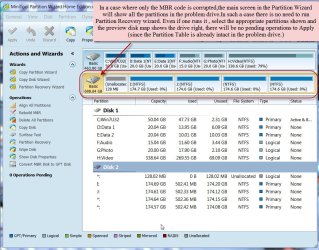
The main Screen of Partition Wizard showed all the partitions and just as in the case of OP, the partition table cannot be rewritten (since it is already present) after running the Quick Scan, selecting the partitions and hitting Finish. There was no Pending Operation that could be applied.

25-05-2014 08-21-51.jpg

If the OP now confirms that the main screen of PW shows his drive as it would normally show with all partitions, then it is only the MBR which has to be fixed - which PW was unable to.

So ,IMO, the OP should go ahead with bootrec.exe /fixmbr.

How To Restore The Master Boot Record | AVG Forums

Windows Vista/7

1. Follow this MS knowledge base article.
2. Instead of using plain Bootrec.exe command as described in step 7 of the above linked MS article, type this:

bootrec.exe /fixmbr (This will only rewrite the MBR code leaving the existing partition table intact)
3. Press Enter.
4. Restart the computer.

or create the AVG rescue CD and follow the procedure in the referenced article in the AVG Forum.
 

My Computer My Computer

At a glance

Windows 7 Home Premium 32 bit
OS
Windows 7 Home Premium 32 bit
Sure wish I could see the screenshots you were able to see. The OP was in the thread when I asked to see them and just merrily went on his way.

Bootrec is just one minor command automated by Startup Repair. None of them will work to boot Win7 if System Reserved or C is not marked Active. Once you've confirmed the Partition Marked Active run Startup Repair - Run 3 Separate Times .

This and everything else possible to start Win7 is covered in Troubleshooting Windows 7 Failure to Start

If I could see the closely-held screenshots it might even be easy to spot. I waited several hours and am going to bed.
 
Last edited:
I can't remember the name of the virus :(
BSOD is giving PROCESS1_INITIALIZATION_FAILED (even in safe mode with command prompt).

Partition wizard shows the 2 Partitions as they should be, and double clicking on them shows the relevant files. windows repair can't see the drive though- diskpart's list disk and list part both show nothing, so I doubt I can even do a clean.

Similarly, bootrec /fix mbr just gives "the system cannot find the file specified".

Startup repair gives "Windows 7 cannot repair this computer automatically".

If partition wizard can see the drive, why cant Win7 repair tools?
 

My Computer My Computer

At a glance

Windows 7 64
Computer type
PC/Desktop
OS
Windows 7 64
The OP was in the thread when I asked to see them and just merrily went on his way.
.

Sorry, did you try to chat or something? My apologies. I'm only able to check for replies sporadically and I didn't see your request.

I dont know why the link was visible to some forum users and not others. Here's the photo stream URL in plain text: https://www.icloud.com/photostream/#ABJtdOXmGGu3NU
 

My Computer My Computer

At a glance

Windows 7 64
Computer type
PC/Desktop
OS
Windows 7 64
Sure.

image.jpg
 

My Computer My Computer

At a glance

Windows 7 64
Computer type
PC/Desktop
OS
Windows 7 64
Back
Top