Solved HDD Partitioning

sagaman

New member
Local time
12:17 PM
Messages
5
Hi...
Need some advise on the following :
1. To do it using Win 7 utilities,i.e. Disk Management; or,
2. The conventional way ,i.e. format the HDD and do a clean installation and partitioning.

What is the pro's and con's?

Thks
 

My Computer

OS
Home Premium 64bit
Hi sagaman and welcome to Seven Forums!

What's your goal?
 

My Computer

Computer Manufacturer/Model Number
Custom Build
OS
Windows 7 Ultimate x64 SP1 clean install
CPU
AMD Athlon 64 X2 6400+
Motherboard
Asus M2N-E SLI
Memory
4 GB
Graphics Card(s)
2 x NVidia Geforce 8600 GTS
Sound Card
Trust 5.1 Surround USB
Monitor(s) Displays
Benq FP931 19"
Screen Resolution
1280x1024@32bit@75MHz
Hard Drives
1 x Western Digital 500GB SATA (OS installation), 2 x Seagate 320GB SATA, 1 x Seagate 250GB IDE (in external USB box), 1 x TrekStor 750GB USB
PSU
650W
Keyboard
Logitech Cordless Desktop EX 100
Mouse
Logitech Cordless Optical
Internet Speed
8192 kbps / 640 kbps

My Computer

Computer Manufacturer/Model Number
HP, Dell, Gateway, Toshiba - 4 laptops and 2 desktops
OS
Vista, Windows7, Mint Mate, Zorin, Windows 8
CPU
from 1.6GHz Duo to i7
Monitor(s) Displays
2x HP w2207
Hard Drives
5x HDD, 7x SSD, 12x Externals
Keyboard
with trackball - no mices
Mouse
Trackball mice
Internet Speed
DSL 6000
If it is a clean install, I prefer to have the drives blank and unpartitioned when I start the Windows setup.
 

My Computer

OS
Windows 7 Ultimate x64 SP1
CPU
Intel Core i7-2600
Motherboard
Gigabyte GA-P67A-UD3P-B3
Memory
12 GB Patriot Extreme DDR3-1333
Graphics Card(s)
Nvidia GTX 470
Monitor(s) Displays
Dell UltraSharp 2209WA
Hard Drives
OCZ Agility3 240 GB, WD5001AALS, WD7501AALS
PSU
OCZ ModStream 700W
Case
CoolerMaster HAF 912 Advanced
Cooling
CoolerMaster Hyper 212 Plus

My Computer

Computer Manufacturer/Model Number
HP Pavilion Elite 495UK
OS
Windows 7 Ultimate SP1 64-Bit
CPU
Intel Core i7 870 @ 2.93GHz
Motherboard
MSI 2A9C (CPU1)
Memory
8Gb Dual-Channel DDR3 @ 664MHz
Graphics Card(s)
nVidia GeForce GTX 460 1024MB dedicated RAM
Sound Card
Realtek HD Audio
Monitor(s) Displays
HP2310i
Screen Resolution
1920 x 1080
Hard Drives
1x1954GB Hitachi HDS22020ALA 330 (RAID), 1x1954GB Hitachi External for backup and storage
PSU
460W
Case
HP Elite
Cooling
Air cooled
Keyboard
Logitech K750 solar-powered keyboard
Mouse
Logitech Wireless M180 mouse
Internet Speed
2Mb
Other Info
Pure Avanti Flow Internet Radio with iPod Dock, 64Gb iPod, HP USB Speakers, Sony MDR-V500 Headphones, Sony Vaio F-Series Laptop
If it is a clean install, I prefer to have the drives blank and unpartitioned when I start the Windows setup.

Me too - I always install on unallocated space.
 

My Computer

Computer Manufacturer/Model Number
Asus N73SV
OS
Windows 7 x64 Ultimate SP1
CPU
Core i7-2630QM
Motherboard
Intel HM 65
Memory
6 GB DDR3
Graphics Card(s)
Nvidia GT 540M / Intel HD 3000 - Optimus switching
Sound Card
HD Audio (Intel Azalia/Realtek) ALC269
Monitor(s) Displays
LED flat panel
Screen Resolution
1920 x 1080
Hard Drives
2x Seagate Momentus 640 GB - 1,28 TB in total
Internet Speed
4 MB/256 kbps
Other Info
External HDs

WD Elements 1,5 TB
WD MyBook 500 GB
Thks for all the advise and input.
Actually, I just bought a new lap top installed with Win7 Home Premium. However, it came with just C Drive - 500Gb. And I want to make a new partition - D Drive for data storage. I was informed by Customer Support that if you use W7 - Disk Management utilities ; there is a 50:50 chances that Window can be corrupted when I boot the system. Therefore, it was suggested to reformat the HDD and do a new clean installation complete with new partition.

So, I need some advise which is the best option? Does anyone have any problem when using disk management to do partitioning? If possible, I don't want to do reformat. Thks
 

My Computer

OS
Home Premium 64bit
Disk Management works very well judging by reports on this forum. I've never had a problem with it.

DM may not allow you to shrink C as much as you would like, in which case you can use a third party utility. You'll have to try it see see how much shrinkage it will allow in your case.
 

My Computer

Computer type
PC/Desktop
Computer Manufacturer/Model Number
Ignatz Special; 4 speed manual gearbox; factory air conditioning; one of one
OS
Windows 7 Home Premium SP1, 64-bit
CPU
Intel Skylake i5-6600K, not overclocked
Motherboard
AsRock Z170M Extreme 4, micro ATX
Memory
8 GB HyperX DDR4-2666 (2 x 4 GB)
Graphics Card(s)
none; graphics are integrated on CPU
Sound Card
onboard: Realtek ALC1150; external: USB Behringer UF0-202
Monitor(s) Displays
Dell S2340M 23 inch IPS
Screen Resolution
1600 x 900
Hard Drives
System: Crucial MX100 series SSD, 128 GB;
Data: Samsung Spinpoint 103SJ, 1 TB;
Backup: WD Caviar Green WD30EZRX-00D8PB0, 3 TB
PSU
Rosewill SilentNight 500 watt fanless, semi-modular
Case
Antec Solo II
Cooling
Noctua NH-U12S; Noctua F12 intake, Noctua S12A exhaust
Keyboard
Microsoft 200 6JH-00001 USB
Mouse
Dell or Microsoft optical wired; USB
Antivirus
Microsoft Security Essentials and Malwarebytes Premium
Browser
Pale Moon
Other Info
All fans PWM; speeds at idle: CPU circa 500 rpm; intake circa 600 rpm; exhaust circa 600 rpm; CPU temps 27 idle and 47 C load in a warm room (27 C/81 F) when running Intel Extreme Tuning Utility stress test.
   Information
We always assume you have made your Recovery Disks using the OEM manufacturer's app the first day you had your new PC.
& made the Startup Repair CD.


When you first started up your new notebook, why did you not use the partitioning option from the OEM manufacturer app?

Take a look at whs's video:
http://www.sevenforums.com/tutorials/72427-data-partition.html

For better help with problems, Can you post your specs.
http://www.sevenforums.com/general-discussion/22550-filling-out-system-specs.html
http://www.sevenforums.com/hardware-devices/6936-dont-know-what-hardware-you-have.html
VistaForums SysInfo Tool - Vista Forums
 

My Computer

OS
ME/XP/Vista/Win7
there is a 50:50 chances that Window can be corrupted
That is a bunch of Bull. But to be on the safe side, I suggest you first post an full image of your Disk Management. Chances are that you have several hidden primary partitions and if you already have 4 primary partitions, we have to do some finagling first before you can create any more partitions. Else you will indeed get into trouble.
 
Last edited:

My Computer

Computer Manufacturer/Model Number
HP, Dell, Gateway, Toshiba - 4 laptops and 2 desktops
OS
Vista, Windows7, Mint Mate, Zorin, Windows 8
CPU
from 1.6GHz Duo to i7
Monitor(s) Displays
2x HP w2207
Hard Drives
5x HDD, 7x SSD, 12x Externals
Keyboard
with trackball - no mices
Mouse
Trackball mice
Internet Speed
DSL 6000
Use the Snipping tool in Start Menu to post up your maximized Disk Management window showing all listings and map.

You may already have four Primary partitions and be at risk of accidentally converting to Dynamic disk if it isn't planned carefully.

As suggested Disk Mgmt is safest for the operations it will do and if it will shrink enough, then free Partition Wizard bootable CD is next best with great flexibility and reliabiity.
 

My Computer

Computer Manufacturer/Model Number
Custom Build
OS
Windows 7 Ultimate x64 SP1 clean install
CPU
AMD Athlon 64 X2 6400+
Motherboard
Asus M2N-E SLI
Memory
4 GB
Graphics Card(s)
2 x NVidia Geforce 8600 GTS
Sound Card
Trust 5.1 Surround USB
Monitor(s) Displays
Benq FP931 19"
Screen Resolution
1280x1024@32bit@75MHz
Hard Drives
1 x Western Digital 500GB SATA (OS installation), 2 x Seagate 320GB SATA, 1 x Seagate 250GB IDE (in external USB box), 1 x TrekStor 750GB USB
PSU
650W
Keyboard
Logitech Cordless Desktop EX 100
Mouse
Logitech Cordless Optical
Internet Speed
8192 kbps / 640 kbps
HDD.JPG

Hi, Thks for all the advise. It has been very helpful.

Anyway, this is the full view of my OS (C) . Can I make a new partition of 250 GB? And which is the best utilities to use; DM (Win7) or Minitool Free Partition Mgr?

Rgds
 

My Computer

OS
Home Premium 64bit
You are OK, you have only 3 primaries. I would use Disk Management to shrink C and then create a new simple extended partition in the unallocated space you gain.

You will probably not be able to shrink more than appr. 200GBs. If that is not enough, you can resort to Partition Wizard.
 

My Computer

Computer Manufacturer/Model Number
HP, Dell, Gateway, Toshiba - 4 laptops and 2 desktops
OS
Vista, Windows7, Mint Mate, Zorin, Windows 8
CPU
from 1.6GHz Duo to i7
Monitor(s) Displays
2x HP w2207
Hard Drives
5x HDD, 7x SSD, 12x Externals
Keyboard
with trackball - no mices
Mouse
Trackball mice
Internet Speed
DSL 6000
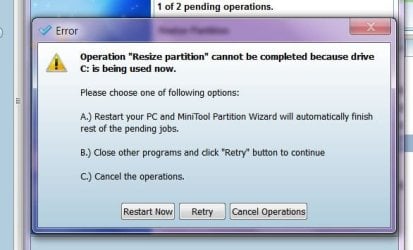
Minitool remarks.JPG

Hi whs,
I choose Partition Wizard in order to shrink more than 200GBs. However, when I execute the program the attached reminder appeared. Should I proceed with option A...Restart Now? Will there be any harm to my 'C' drive?

FYI , the Partition Wizard program is installed in 'C' drive. And I think ; I have already closed all program. Pls advise...

Thks
 

My Computer

OS
Home Premium 64bit
Hmm, you are potentially heading for trouble. Here is what I suggest:

1. As I said before, make images of all partitions on that drive before you proceed. It was with Partition Wizard (which is an excellent program) that I lost all my partitions on one drive once. It was my mistake, but mistakes are easy to make. Fortunately I had all images and could easily rebuild the drive.

There are many imaging options although I prefer this one: http://www.sevenforums.com/tutorials/73828-imaging-free-macrium.html?ltr=I

2. You must not use PW that is installed on your system. Use the bootable CD of PW so that nothing is running from the HDD. It is the last entry on this webpage: Free Download Magic Partition Manager Software - Partition Wizard Online Burn it to a CD and load from the optical reader.
 

My Computer

Computer Manufacturer/Model Number
HP, Dell, Gateway, Toshiba - 4 laptops and 2 desktops
OS
Vista, Windows7, Mint Mate, Zorin, Windows 8
CPU
from 1.6GHz Duo to i7
Monitor(s) Displays
2x HP w2207
Hard Drives
5x HDD, 7x SSD, 12x Externals
Keyboard
with trackball - no mices
Mouse
Trackball mice
Internet Speed
DSL 6000
Always use the free Partition Wizard bootable CD which has never failed in hundreds of complicated partitioning operations we have helped with here.

However when the partitioning can be done using Disk Mgmt, as can be done here, then you should use it as it is failsafe whereas any third party partitioning manager has its risks however small.

Partition or Volume - Shrink
Partition or Volume - Create New

You will want the Extended Logical partition it should offer you, but not a Dynamic one which it should not.
 
Hi All,
I have successfully created a new partition.
Thks for all the feedback and support.
Keep up the good work.
Rgds
 

My Computer

OS
Home Premium 64bit
I think I did mine pretty well. :D Perhaps it should serve as an example :kidding & bragging:
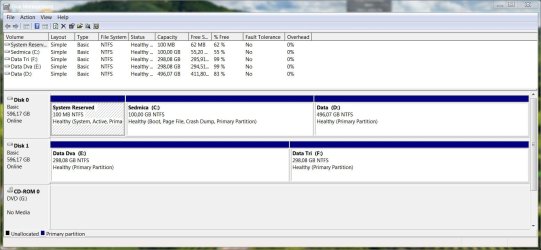
disklayout.JPG
 

My Computer

Computer Manufacturer/Model Number
Asus N73SV
OS
Windows 7 x64 Ultimate SP1
CPU
Core i7-2630QM
Motherboard
Intel HM 65
Memory
6 GB DDR3
Graphics Card(s)
Nvidia GT 540M / Intel HD 3000 - Optimus switching
Sound Card
HD Audio (Intel Azalia/Realtek) ALC269
Monitor(s) Displays
LED flat panel
Screen Resolution
1920 x 1080
Hard Drives
2x Seagate Momentus 640 GB - 1,28 TB in total
Internet Speed
4 MB/256 kbps
Other Info
External HDs

WD Elements 1,5 TB
WD MyBook 500 GB
Back
Top