HDD Raw

recycler

New member
Member
Local time
4:49 AM
Messages
81
hi to the forum
approximately 6 or 7 weeks ago i reported my hdd raw.at the time i was having other problems with my machine:ie corrupt files.i have since performed a factory restore and all is fine now thankfully.at the time i was contacted by Jumanji who advised me once i had done the repairs he would take up the raw disc issue.i am now in a position to take advice on the matter.i need to explain that this will be like walking a high wire to me so patience is requested please.my thanks to all who helped me through my other problems.look forward to hearing from you.

kudos

recycler

EDIT:just a small issue but since i did my factory restore my login username on this forum is not remembered although it is still "ticked".just curious.
 

My Computer

Computer type
Laptop
Computer Manufacturer/Model Number
Samsung S3510
OS
Windows 7 Home Premium 64Bit SP1
CPU
Intel Celeron T3500 @2.10Ghz
Motherboard
Samsung RV410/RV510/S3510/E3510 (U2E1)
Memory
3.00GB Dual ChanelDDR3 @398MHz (6-6-6-15)
Graphics Card(s)
Intel Mobile Intel 4 Series Express Chipset Family
Hard Drives
465GB Western Digital WDC WD 5000BEVT-35 Aorto (SATA)
931 GB Samsung HD 103 SI USB Device (USB (SATA)
Antivirus
McAfee Livesafe
Browser
Google Chrome
I only vaguely remember having advised you so - though I remember your ID :). Since this is a new thread, let us start from scratch.( Apart from making it self-contained, it will also refresh my failing memory :D)

1. Please furnish full details of your drive that had turned RAW. Internal/external, make/manufacturer, Model No etc.,

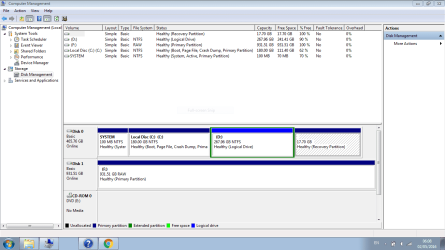
2. Post a full screenshot of Windows Disk Management. ( If it is an external drive, please plug out all other external drives/ pen drives, USB docks/Hubs, Card Readers/USB printers etc., Nothing else into the USB ports except the USB Keyboard/Mouse if you are using one.) Please adhere to the guidelines here to present an untruncated screenshot with all information visible. http://www.sevenforums.com/tutorials/274797-disk-management-post-screen-capture-image.html

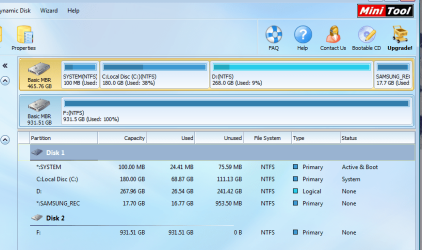
3. Post a screenshot of how your drive looks like in MiniTools Partition Wizard Free edition ( the very first screen when you launch Partition Wizard.)

3. Also tell me how many partitions you had on that drive, Primary/logical

Please take fresh screenshots and post - not the screenshots taken anytime earlier.
 

My Computer

OS
Windows 7 Home Premium 32 bit
Hi Jumanji

firstly sincere thanks for your extremely prompt reply.what we are dealing with here is a 1TB external hdd.now based on your requirements of details i may come up a little short because on checking the rear of the drive ican only find what looks like useless information,but,i will let you decide otherwise.what i can see is the following:Brand name Iomega and the following numbers:31882 100 and LD HD-UP2.i sincerely hope they make more since to you than they do to me.I am enclosing a screenshot as requested and hope it to forum requirements. Capture F.PNG many thanks again my friend,and i look forward to your follow-on.

kudos

recycler

EDIT: stating the obvious but we are talking drive F::o
 

My Computer

Computer type
Laptop
Computer Manufacturer/Model Number
Samsung S3510
OS
Windows 7 Home Premium 64Bit SP1
CPU
Intel Celeron T3500 @2.10Ghz
Motherboard
Samsung RV410/RV510/S3510/E3510 (U2E1)
Memory
3.00GB Dual ChanelDDR3 @398MHz (6-6-6-15)
Graphics Card(s)
Intel Mobile Intel 4 Series Express Chipset Family
Hard Drives
465GB Western Digital WDC WD 5000BEVT-35 Aorto (SATA)
931 GB Samsung HD 103 SI USB Device (USB (SATA)
Antivirus
McAfee Livesafe
Browser
Google Chrome
You did not post the screenshot of Partition Wizard. Never mind.

Run check disk from command prompt.

Open Command prompt. Start > All programs > Accessories > Command Prompt

Type
CHKDSK F: /f /v /r /x Press enter. Note: Replace F: with the actual drive letter of the external drive. Please note there is a space before every /

Allow check disk to complete.

Note:

1. Once started do not interrupt checkdisk for any reason even if it takes a day. Allow it to complete the run uninterrupted..

2. During the time checkdisk runs, do not use your computer for any other purpose. You are banned from using it for as long as checkdisk runs. Hands off.

3. If checkdisk aborts itself, post the exact error message it throws. Better if you post a screenshot.

I am keeping my fingers crossed hoping that this should resolve the problem. Let us see.
 

My Computer

OS
Windows 7 Home Premium 32 bit
My HDD went RAW recently after I zero-filled it and what I did was simply right click on it in Computer and then 'Format'. The drive went back to normal and is working fine now.
 

My Computer

Computer type
PC/Desktop
Computer Manufacturer/Model Number
Custom Build
OS
Windows 7 Ultimate x64
CPU
i3 4130
Motherboard
ASUS H81M-A/BR
Memory
8Gb (2x4)Kingston 1333Mhz KVR13N9S8/4
Graphics Card(s)
nVidia GT430 1Gb
Hard Drives
Main(OS): 128Gb SanDisk Ultra Plus SSD(Solid State Drive)
Secondary(Storage): SATA HDD 1TB 7200rpm
External(USB): 1TB Western Digital
Antivirus
None at the moment
Browser
Firefox(latest as of October 2014), Chrome(same)
hi Jumanji

i notice you are offline as i post this but no problem.my apologies for failing to forward the screenshot from minitools which i am doing now.many thanks for your suggestion which i shall try now .i will post back with the results later.

MiniTools.png

kudos

recycler
 

My Computer

Computer type
Laptop
Computer Manufacturer/Model Number
Samsung S3510
OS
Windows 7 Home Premium 64Bit SP1
CPU
Intel Celeron T3500 @2.10Ghz
Motherboard
Samsung RV410/RV510/S3510/E3510 (U2E1)
Memory
3.00GB Dual ChanelDDR3 @398MHz (6-6-6-15)
Graphics Card(s)
Intel Mobile Intel 4 Series Express Chipset Family
Hard Drives
465GB Western Digital WDC WD 5000BEVT-35 Aorto (SATA)
931 GB Samsung HD 103 SI USB Device (USB (SATA)
Antivirus
McAfee Livesafe
Browser
Google Chrome
hi Jumanji

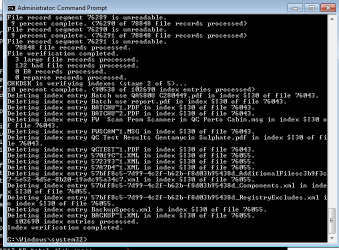
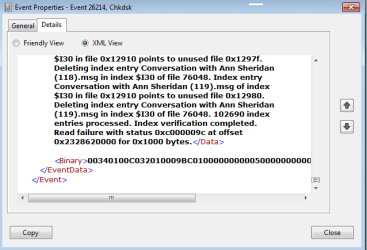
i am posting back to let you know that i ran chkdsk as advised.i fear the news is not good.i will post you a log (hopefully) and let an expert like yourself decide.when i say that i feel its bad news its because firstly the whole process was completed in circa:1hr.secondly i tried to open the disc after chkdsk completed (F:which is actually the disc letter) but got the same message:"You need to format disc before you can use it",so i am not holding out much hope.i also got the "Cyclic redundancy error" message.:mad:i will leave it with you and hope for the best.
kudos

recycler

EDIT: I have made an ass of adding log file please ignore and advise if possible what i am doing wrong.:confused:
 

Attachments

  • CHKDSK Log.png
    CHKDSK Log.png
    11.7 KB · Views: 23
  • CHKDSK Log.zip
    CHKDSK Log.zip
    24.6 KB · Views: 5

My Computer

Computer type
Laptop
Computer Manufacturer/Model Number
Samsung S3510
OS
Windows 7 Home Premium 64Bit SP1
CPU
Intel Celeron T3500 @2.10Ghz
Motherboard
Samsung RV410/RV510/S3510/E3510 (U2E1)
Memory
3.00GB Dual ChanelDDR3 @398MHz (6-6-6-15)
Graphics Card(s)
Intel Mobile Intel 4 Series Express Chipset Family
Hard Drives
465GB Western Digital WDC WD 5000BEVT-35 Aorto (SATA)
931 GB Samsung HD 103 SI USB Device (USB (SATA)
Antivirus
McAfee Livesafe
Browser
Google Chrome
Sorry for the inevitable delay in responding but that is past and let us get cracking.

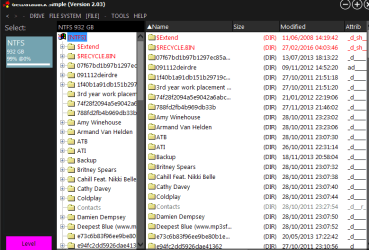
CRC errors is not a good sign. Anyway let us check whether there is any hope on data recovery. Download install and run the demo version of Getdataback Simple. https://www.runtime.org/data-recovery-software.htm Scan your external drive and check whether it shows your files. If it shows, you can also preview the files and check their integrity. ( The free demo version will not allow you to copy unless you buy it but that is not our intention. If it does show your files, we shall embark on free TestDisk to recover the files)

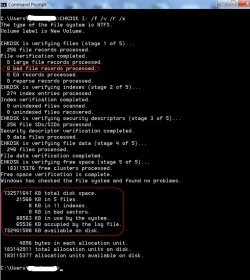
On the Checkdisk run, I was rather complacent. I should have asked you to post the screenshot of the command Window on completion of the checkdisk. That would have given more valuable information on the state of your drive.

04-05-2016 09-03-10.jpg

After the Getdataback run, run checkdisk again and post the screenshot of the Command prompt Window like the one shown above.
 
Last edited:

My Computer

OS
Windows 7 Home Premium 32 bit
Hi Jumanji

finally getting back to you with what i hope is somewhat helpful information.as advised by you i ran Get databack and it looks (i think) somewhat positive.on the other hand i think you should decide that matter since you are better placed than i am.Data Recovered.png

i also ran chkdsk again and i hope you can gather the necessary information from the included screenshot.CHKDSK.png

i hope the attachments included supply at least some of the information you require.if not please advise me on where i may be going wrong.

my sincere thanks for your help,advice and great patience to date it is greatly appreciated.:D

kudos

recycler

EDIT: there is a lot more important stuff on first image other than what is shown.
 

My Computer

Computer type
Laptop
Computer Manufacturer/Model Number
Samsung S3510
OS
Windows 7 Home Premium 64Bit SP1
CPU
Intel Celeron T3500 @2.10Ghz
Motherboard
Samsung RV410/RV510/S3510/E3510 (U2E1)
Memory
3.00GB Dual ChanelDDR3 @398MHz (6-6-6-15)
Graphics Card(s)
Intel Mobile Intel 4 Series Express Chipset Family
Hard Drives
465GB Western Digital WDC WD 5000BEVT-35 Aorto (SATA)
931 GB Samsung HD 103 SI USB Device (USB (SATA)
Antivirus
McAfee Livesafe
Browser
Google Chrome
Indeed the Getdataback screenshot gives hope that atleast some data can be recovered.

I am not sure I am happy with the Chkdisk screenshot but I shall put it in the backburner and get going with data recovery effort.

Please wait till I return. ( I haven't yet taken my shave, shower and breakfast :D)
 

My Computer

OS
Windows 7 Home Premium 32 bit
OK. Try to access your Iomega with Lucid Puppy pendrive.

Lucid Puppy: Download Lucid Puppy (Ubuntu Compatible Build) 5.2.8 ISO from Long-Term-Supported WaryPuppy (LTS)

Rufus: Download the latest version from https://rufus.akeo.ie/

Pendrive: Bacup any data on the pendrive elsewhere. All data in it will be lost when Rufus formats and creates the Lucid Puppy pendrive.

See my post here. http://www.sevenforums.com/hardware...ly-unrecognisable-hard-drive.html#post2936753

Once you have created your Lucid Puppy drive. boot your PC from the pendrive using the one-time boot menu, which will load Lucid Puppy.

Check whether it shows all your files in the IOmega drive. If it does, copy the files to another drive.

On how to use Lucid Puppy go to the topic Recovering files from the non-bootable Internal Drive: in my thread http://www.sevenforums.com/software/198909-lucid-puppy-way-recover-files-non-bootable-computer.html ( Do not read anything above this topic Recovering files from the non-bootable Internal Drive: . Not necessary)
 

My Computer

OS
Windows 7 Home Premium 32 bit
Hi Jumanji

just been reading your most recent post and thank you for all your pointers.much appreciated.this looks to be way over my head so i will come back to it later and try to make sense of it all.you will gather from that statement that i have never attempted anything remotely like this.:o as i said will visit it again and probably haunt you with "how to's"

recycler
 

My Computer

Computer type
Laptop
Computer Manufacturer/Model Number
Samsung S3510
OS
Windows 7 Home Premium 64Bit SP1
CPU
Intel Celeron T3500 @2.10Ghz
Motherboard
Samsung RV410/RV510/S3510/E3510 (U2E1)
Memory
3.00GB Dual ChanelDDR3 @398MHz (6-6-6-15)
Graphics Card(s)
Intel Mobile Intel 4 Series Express Chipset Family
Hard Drives
465GB Western Digital WDC WD 5000BEVT-35 Aorto (SATA)
931 GB Samsung HD 103 SI USB Device (USB (SATA)
Antivirus
McAfee Livesafe
Browser
Google Chrome
Hi again Jumanji

I took a second long look(relative to me) at your informative post and i am wondering based on the amazing steps provided: is my position in reverse of what you stated.what i am saying is: based on the instructions given, your post suggests copying from C: drive to ext drive.am i right? if not please enlighten me.also assuming i get this right can i then format my ext HDD?(after copying files). another question i have: is Rufus really necessary,or,am i missing a whole block of information.just curious because i need to get this right(obviously).like i said please bear with me.

Thank you again for your help and patience.:what:

kudos

recycler
 

My Computer

Computer type
Laptop
Computer Manufacturer/Model Number
Samsung S3510
OS
Windows 7 Home Premium 64Bit SP1
CPU
Intel Celeron T3500 @2.10Ghz
Motherboard
Samsung RV410/RV510/S3510/E3510 (U2E1)
Memory
3.00GB Dual ChanelDDR3 @398MHz (6-6-6-15)
Graphics Card(s)
Intel Mobile Intel 4 Series Express Chipset Family
Hard Drives
465GB Western Digital WDC WD 5000BEVT-35 Aorto (SATA)
931 GB Samsung HD 103 SI USB Device (USB (SATA)
Antivirus
McAfee Livesafe
Browser
Google Chrome
In your case your C drive is not faulty. So you will not do anything with the C drive.

You will plug-in your faulty Iomega drive and another formatted but empty 1TB or greater than 1TB external drive and then boot Lucid Puppy from the pen drive.

Lucid Puppy will show your internal C drive ( each partition will be shown as a drive) with regular HDD symbol and three external drives. External drives will be shown as USB symbols. Look at the first screenshot. You will know how external drives appear. In your case you will have three USB drives showing up. One will be the pendrive from which you are booting, one will be your IOmega external drive and one the empty external drive to which you will copy files. Hover the mouse on each drive and you should be able to identify which one is what by the capacity shown.

You will mount the IOmega 1TB drive and check whether you can access the files. If it shows all your files, then you will mount the other empty external drive and copy the files from your Iomega drive to the other empty drive.

You are not going to format your IOmega drive . If you format you will lose all data.
 

My Computer

OS
Windows 7 Home Premium 32 bit
Back
Top