Solved Headphones plugged to speakers,extremely low sound.

ggmagos

New member
Local time
1:34 AM
Messages
6
I have plugged the headphones to my speakers but the sound is extremely low.
I have tried different headphones it is the same low sound.
These headphones in other devices work perfect.
The speakers also work perfect.What is the problem?Any suggestions?
I have a desktop

Microsoft Windows 7 Home Premium Edition Service Pack 1 (build 7601), 64-bit
CPU:Intel(R) Core(TM) i5-2400 CPU @ 3.10GHz
GPU:AMD Radeon HD 6700 Series

RAM:4.1 GB
Sound Card:AMD High Definition Audio Device
 

My Computer My Computer

At a glance

windows 7 64Intel(R) Core(TM) i5-2400 CPU @ 3.10GHzddr3 4GbytesAmd Radeon 6770 Sapphire 1GB
Computer type
PC/Desktop
OS
windows 7 64
CPU
Intel(R) Core(TM) i5-2400 CPU @ 3.10GHz
Motherboard
Gigabyte Technology HA65M-D2H-B3
Memory
ddr3 4Gbytes
Graphics Card(s)
Amd Radeon 6770 Sapphire 1GB
Sound Card
AMD High Definition Audio Device
Antivirus
Microsoft security eseentials
Are you plugging in the headset to a "headset" jack on the speakers? More on exactly how you are doing it.

Second, AMD High Definition Audio Device is NOT your PC's sound device. The AMD is for HDMI audio.

Your PC sound card would be something such as "RealTek", "Conexant" or similar.

Filling in the "My System Specs" helps us to try and help you.
 

My Computer My Computer

At a glance

Windows 10 64 bitIntel i7 6700K16GB Corsair DominatorIntel CPU Graphics
Computer type
PC/Desktop
Computer Manufacturer/Model Number
My Own Build
OS
Windows 10 64 bit
CPU
Intel i7 6700K
Motherboard
ASUS ROG Maximus VIII Hero
Memory
16GB Corsair Dominator
Graphics Card(s)
Intel CPU Graphics
Sound Card
RealTek
Monitor(s) Displays
27" Dell S2719dgf
Screen Resolution
2560X1440
Hard Drives
1 TB Samsung 850 EVO SSD for Win 10 Pro
500GB Samsung 850 EVO SSD for Win 10 Insider
2 TB drive for backup
PSU
EVGA Supernova 750G2
Case
BeQuiet Silent Base 600
Cooling
Deepcool Captain 120EX
Keyboard
Microsoft Wireless 2000
Mouse
Microsoft wireless
Internet Speed
100 MB/sec (Cable)
Antivirus
Microsoft Defender and Malwarebytes
Browser
Edge/Firefox
Other Info
Cakewalk (Sonar) by BandLab and Studio One 4.1 Pro recording studio software. MOTU 896Mk3 Hybrid recording interface, Frontier Tranzport wireless control unit, Behringer X-Touch Control Surface.
Five USB connected optical drives for CD Audio production using Nero BurningROM
check your computer's volume levels on the sounds mixing console. Also, see if there is a volume knob on the speakers somewhere.
 

My Computer My Computer

At a glance

Microsoft Windows 7 Home Premium 64-bit 7601 ...Pentium(R) Dual-Core CPU E5300 @ 2.60GHz6.00 GBIntel(R) G33/G31 Express Chipset Family
Computer type
PC/Desktop
Computer Manufacturer/Model Number
HP (HP-P6212F)
OS
Microsoft Windows 7 Home Premium 64-bit 7601 Multiprocessor Free Service Pack 1
CPU
Pentium(R) Dual-Core CPU E5300 @ 2.60GHz
Motherboard
PEGATRON CORPORATION Benicia
Memory
6.00 GB
Graphics Card(s)
Intel(R) G33/G31 Express Chipset Family
Sound Card
Realtek High Definition Audio
Monitor(s) Displays
24'' HP WS LCD
Screen Resolution
1920 x 1080 x 32 bits (4294967296 colors) @ 60 Hz
Hard Drives
(1) ATA Hitachi HDT72106 SCSI Disk Device (2) Generic- Compact Flash USB Device (3) Generic- MS/MS-Pro USB Device (4) Generic- SD/MMC USB Device (5) Generic- SM/xD-Picture USB Device (6) Verbatim STORE N GO USB Device
Keyboard
Logitech G510s
Mouse
Logitech Trackball M570
Antivirus
Microsoft Security Essentials / Malwarebytes
Browser
IE / Firefox / Chrome
My computer's volume levels on the sounds mixing console are at 100% everything maxed out.
When I unplug the headphones speakers work fine.Also my headphones have not a knob.

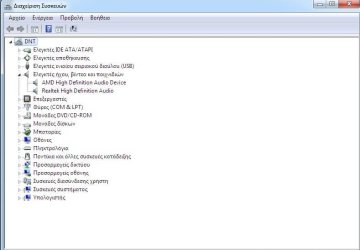
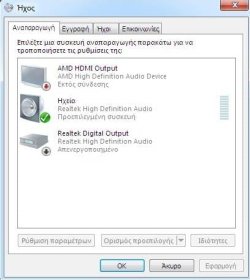
I cannot find nothing except "AMD High Definition Audio Device "when looking for a sound card,device etc on control panel.

The headphones are plugged in the headset jack of my speakers.Thanks again.
 

My Computer My Computer

At a glance

windows 7 64Intel(R) Core(TM) i5-2400 CPU @ 3.10GHzddr3 4GbytesAmd Radeon 6770 Sapphire 1GB
Computer type
PC/Desktop
OS
windows 7 64
CPU
Intel(R) Core(TM) i5-2400 CPU @ 3.10GHz
Motherboard
Gigabyte Technology HA65M-D2H-B3
Memory
ddr3 4Gbytes
Graphics Card(s)
Amd Radeon 6770 Sapphire 1GB
Sound Card
AMD High Definition Audio Device
Antivirus
Microsoft security eseentials
If you are plugging into some type of jack on the speakers, the volume level is controlled by the speaker system.

Don't you have a headphone jack on the PC's case?

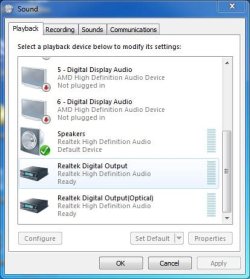
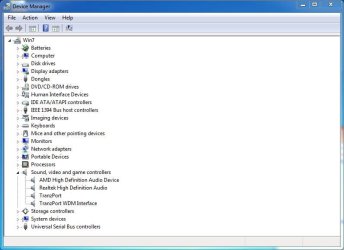
Two sceenshots to post, that will help us understand what you have. First is the Sound Panel, Playback Section and the Device Manager, Sound Section.
http://www.sevenforums.com/tutorials/9733-screenshots-files-upload-post-seven-forums.html

Here are screenshots of my Sound Panel/Playback Section and my Device Manager Sound section, for examples. (Ignore the Tranzport entries. They are used in my recording studio only).
 

Attachments

  • Sound Panel Capture.JPG
    Sound Panel Capture.JPG
    39.2 KB · Views: 16
  • Device Manager Capture.JPG
    Device Manager Capture.JPG
    48.5 KB · Views: 1

My Computer My Computer

At a glance

Windows 10 64 bitIntel i7 6700K16GB Corsair DominatorIntel CPU Graphics
Computer type
PC/Desktop
Computer Manufacturer/Model Number
My Own Build
OS
Windows 10 64 bit
CPU
Intel i7 6700K
Motherboard
ASUS ROG Maximus VIII Hero
Memory
16GB Corsair Dominator
Graphics Card(s)
Intel CPU Graphics
Sound Card
RealTek
Monitor(s) Displays
27" Dell S2719dgf
Screen Resolution
2560X1440
Hard Drives
1 TB Samsung 850 EVO SSD for Win 10 Pro
500GB Samsung 850 EVO SSD for Win 10 Insider
2 TB drive for backup
PSU
EVGA Supernova 750G2
Case
BeQuiet Silent Base 600
Cooling
Deepcool Captain 120EX
Keyboard
Microsoft Wireless 2000
Mouse
Microsoft wireless
Internet Speed
100 MB/sec (Cable)
Antivirus
Microsoft Defender and Malwarebytes
Browser
Edge/Firefox
Other Info
Cakewalk (Sonar) by BandLab and Studio One 4.1 Pro recording studio software. MOTU 896Mk3 Hybrid recording interface, Frontier Tranzport wireless control unit, Behringer X-Touch Control Surface.
Five USB connected optical drives for CD Audio production using Nero BurningROM
The speakers are plugged at the pc tower, and the headphones are plugged at the speakers.
Yes the volume depends from the speakers,but to hear the faintest sound I must turn the speakers up to 100%.
At the 0-70% volume (aproximately) I cannot hear anything from my headphones.If I plug out at 70% volume my headphones then the sound from the speakers will wake up my neighbors.:D
 

Attachments

  • 1.jpg
    1.jpg
    34.6 KB · Views: 0
  • 2.jpg
    2.jpg
    23.9 KB · Views: 14

My Computer My Computer

At a glance

windows 7 64Intel(R) Core(TM) i5-2400 CPU @ 3.10GHzddr3 4GbytesAmd Radeon 6770 Sapphire 1GB
Computer type
PC/Desktop
OS
windows 7 64
CPU
Intel(R) Core(TM) i5-2400 CPU @ 3.10GHz
Motherboard
Gigabyte Technology HA65M-D2H-B3
Memory
ddr3 4Gbytes
Graphics Card(s)
Amd Radeon 6770 Sapphire 1GB
Sound Card
AMD High Definition Audio Device
Antivirus
Microsoft security eseentials

My Computer My Computer

At a glance

Microsoft Windows 7 Home Premium 64-bit 7601 ...Pentium(R) Dual-Core CPU E5300 @ 2.60GHz6.00 GBIntel(R) G33/G31 Express Chipset Family
Computer type
PC/Desktop
Computer Manufacturer/Model Number
HP (HP-P6212F)
OS
Microsoft Windows 7 Home Premium 64-bit 7601 Multiprocessor Free Service Pack 1
CPU
Pentium(R) Dual-Core CPU E5300 @ 2.60GHz
Motherboard
PEGATRON CORPORATION Benicia
Memory
6.00 GB
Graphics Card(s)
Intel(R) G33/G31 Express Chipset Family
Sound Card
Realtek High Definition Audio
Monitor(s) Displays
24'' HP WS LCD
Screen Resolution
1920 x 1080 x 32 bits (4294967296 colors) @ 60 Hz
Hard Drives
(1) ATA Hitachi HDT72106 SCSI Disk Device (2) Generic- Compact Flash USB Device (3) Generic- MS/MS-Pro USB Device (4) Generic- SD/MMC USB Device (5) Generic- SM/xD-Picture USB Device (6) Verbatim STORE N GO USB Device
Keyboard
Logitech G510s
Mouse
Logitech Trackball M570
Antivirus
Microsoft Security Essentials / Malwarebytes
Browser
IE / Firefox / Chrome
my tower has a headphone jack. Does yours?

It has six sockets.
Line in
Line out (where the speakers are plugged)
Mic

and

side,rear,bass.

If I plug my headphones directly to the tower I cannot turn up or down the volume.
Also sometimes I need the speakers sometimes the headphones.
 

My Computer My Computer

At a glance

windows 7 64Intel(R) Core(TM) i5-2400 CPU @ 3.10GHzddr3 4GbytesAmd Radeon 6770 Sapphire 1GB
Computer type
PC/Desktop
OS
windows 7 64
CPU
Intel(R) Core(TM) i5-2400 CPU @ 3.10GHz
Motherboard
Gigabyte Technology HA65M-D2H-B3
Memory
ddr3 4Gbytes
Graphics Card(s)
Amd Radeon 6770 Sapphire 1GB
Sound Card
AMD High Definition Audio Device
Antivirus
Microsoft security eseentials
That is the audio I/O on the REAR of the motherboard.

Most cases (all that I've seen) have headphone and microphone jacks on the FRONT of the case (and a cable that connects to the front panel I/O connection on the motherboard. That is the usual way of connecting headphones. You then control the volume level with the PC's (RealTek) volume control.

Connecting to a jack on the speakers and you are limited to whatever sound level the speakers output, and in this case, possibly a defective headphone output.
 

My Computer My Computer

At a glance

Windows 10 64 bitIntel i7 6700K16GB Corsair DominatorIntel CPU Graphics
Computer type
PC/Desktop
Computer Manufacturer/Model Number
My Own Build
OS
Windows 10 64 bit
CPU
Intel i7 6700K
Motherboard
ASUS ROG Maximus VIII Hero
Memory
16GB Corsair Dominator
Graphics Card(s)
Intel CPU Graphics
Sound Card
RealTek
Monitor(s) Displays
27" Dell S2719dgf
Screen Resolution
2560X1440
Hard Drives
1 TB Samsung 850 EVO SSD for Win 10 Pro
500GB Samsung 850 EVO SSD for Win 10 Insider
2 TB drive for backup
PSU
EVGA Supernova 750G2
Case
BeQuiet Silent Base 600
Cooling
Deepcool Captain 120EX
Keyboard
Microsoft Wireless 2000
Mouse
Microsoft wireless
Internet Speed
100 MB/sec (Cable)
Antivirus
Microsoft Defender and Malwarebytes
Browser
Edge/Firefox
Other Info
Cakewalk (Sonar) by BandLab and Studio One 4.1 Pro recording studio software. MOTU 896Mk3 Hybrid recording interface, Frontier Tranzport wireless control unit, Behringer X-Touch Control Surface.
Five USB connected optical drives for CD Audio production using Nero BurningROM
Ok I think that it is solved.You are right about the two jacks in front.I never used them ,never
even ask why they are there.:o
The headphones are working perfect at the front jack.
Thank you very much for your responces and the time you consumed.Much appreciated.:D
 

My Computer My Computer

At a glance

windows 7 64Intel(R) Core(TM) i5-2400 CPU @ 3.10GHzddr3 4GbytesAmd Radeon 6770 Sapphire 1GB
Computer type
PC/Desktop
OS
windows 7 64
CPU
Intel(R) Core(TM) i5-2400 CPU @ 3.10GHz
Motherboard
Gigabyte Technology HA65M-D2H-B3
Memory
ddr3 4Gbytes
Graphics Card(s)
Amd Radeon 6770 Sapphire 1GB
Sound Card
AMD High Definition Audio Device
Antivirus
Microsoft security eseentials
Glad to hear you found the right jack. :D

Thanks for the rep.
 

My Computer My Computer

At a glance

Windows 10 64 bitIntel i7 6700K16GB Corsair DominatorIntel CPU Graphics
Computer type
PC/Desktop
Computer Manufacturer/Model Number
My Own Build
OS
Windows 10 64 bit
CPU
Intel i7 6700K
Motherboard
ASUS ROG Maximus VIII Hero
Memory
16GB Corsair Dominator
Graphics Card(s)
Intel CPU Graphics
Sound Card
RealTek
Monitor(s) Displays
27" Dell S2719dgf
Screen Resolution
2560X1440
Hard Drives
1 TB Samsung 850 EVO SSD for Win 10 Pro
500GB Samsung 850 EVO SSD for Win 10 Insider
2 TB drive for backup
PSU
EVGA Supernova 750G2
Case
BeQuiet Silent Base 600
Cooling
Deepcool Captain 120EX
Keyboard
Microsoft Wireless 2000
Mouse
Microsoft wireless
Internet Speed
100 MB/sec (Cable)
Antivirus
Microsoft Defender and Malwarebytes
Browser
Edge/Firefox
Other Info
Cakewalk (Sonar) by BandLab and Studio One 4.1 Pro recording studio software. MOTU 896Mk3 Hybrid recording interface, Frontier Tranzport wireless control unit, Behringer X-Touch Control Surface.
Five USB connected optical drives for CD Audio production using Nero BurningROM
Ok I think that it is solved.You are right about the two jacks in front.I never used them ,never
even ask why they are there.:o
The headphones are working perfect at the front jack.
Thank you very much for your responces and the time you consumed.Much appreciated.:D
Your welcome. On my tower there are little graphics of a microphone and a headphone next to each jack. I guess your tower did not have that.
 

My Computer My Computer

At a glance

Microsoft Windows 7 Home Premium 64-bit 7601 ...Pentium(R) Dual-Core CPU E5300 @ 2.60GHz6.00 GBIntel(R) G33/G31 Express Chipset Family
Computer type
PC/Desktop
Computer Manufacturer/Model Number
HP (HP-P6212F)
OS
Microsoft Windows 7 Home Premium 64-bit 7601 Multiprocessor Free Service Pack 1
CPU
Pentium(R) Dual-Core CPU E5300 @ 2.60GHz
Motherboard
PEGATRON CORPORATION Benicia
Memory
6.00 GB
Graphics Card(s)
Intel(R) G33/G31 Express Chipset Family
Sound Card
Realtek High Definition Audio
Monitor(s) Displays
24'' HP WS LCD
Screen Resolution
1920 x 1080 x 32 bits (4294967296 colors) @ 60 Hz
Hard Drives
(1) ATA Hitachi HDT72106 SCSI Disk Device (2) Generic- Compact Flash USB Device (3) Generic- MS/MS-Pro USB Device (4) Generic- SD/MMC USB Device (5) Generic- SM/xD-Picture USB Device (6) Verbatim STORE N GO USB Device
Keyboard
Logitech G510s
Mouse
Logitech Trackball M570
Antivirus
Microsoft Security Essentials / Malwarebytes
Browser
IE / Firefox / Chrome
Your welcome. On my tower there are little graphics of a microphone and a headphone next to each jack. I guess your tower did not have that.

No it did not.They where there without any graphics.
 

My Computer My Computer

At a glance

windows 7 64Intel(R) Core(TM) i5-2400 CPU @ 3.10GHzddr3 4GbytesAmd Radeon 6770 Sapphire 1GB
Computer type
PC/Desktop
OS
windows 7 64
CPU
Intel(R) Core(TM) i5-2400 CPU @ 3.10GHz
Motherboard
Gigabyte Technology HA65M-D2H-B3
Memory
ddr3 4Gbytes
Graphics Card(s)
Amd Radeon 6770 Sapphire 1GB
Sound Card
AMD High Definition Audio Device
Antivirus
Microsoft security eseentials
Back
Top