Solved Headset microphone not working

Pantsface16

New member
Local time
7:33 AM
Messages
4
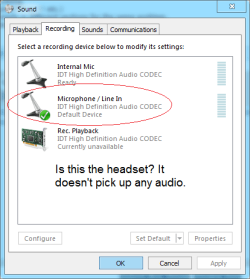
I recently got the SADES SA-708 and to my surprise the microphone was not working. I have tested it on another laptop so I know it's not a problem with my headset. I'm not even sure if my computer is recognizing the headset. Any help would be appreciated.
 

Attachments

  • Help.png
    Help.png
    11.8 KB · Views: 8

My Computer

Computer type
Laptop
Computer Manufacturer/Model Number
Dell Inspiron M5040
OS
Windows 7 Home Premium x64
Graphics Card(s)
AMD Radeon HD 6320 Graphics
Antivirus
Microsoft Security Essentials
Browser
Google Chrome
Normally, the Stereo Mix (may be called System Mixer) is set as the default Recording Device. Then whatever is plugged in can be heard, without having to specifically select a device.

Did you download the driver from the Dell downloads? If not, that is the first thing to do.

Product Support | Dell US

To set the Stereo Mix, in the Recording panel, RIGHT click in an empty space and then click to select show Disabled and Disconnected Devices. Stereo Mix should now show up and you can enable it and make it the Default Recording device. System Mixer is required if you ever want to record audio from the Internet.
Product Support | Dell US

Finally, has this ever worked? or is this the first time you've tried the mic input.
 

My Computer

Computer type
PC/Desktop
Computer Manufacturer/Model Number
My Own Build
OS
Windows 10 64 bit
CPU
Intel i7 6700K
Motherboard
ASUS ROG Maximus VIII Hero
Memory
16GB Corsair Dominator
Graphics Card(s)
Intel CPU Graphics
Sound Card
RealTek
Monitor(s) Displays
27" Dell S2719dgf
Screen Resolution
2560X1440
Hard Drives
1 TB Samsung 850 EVO SSD for Win 10 Pro
500GB Samsung 850 EVO SSD for Win 10 Insider
2 TB drive for backup
PSU
EVGA Supernova 750G2
Case
BeQuiet Silent Base 600
Cooling
Deepcool Captain 120EX
Keyboard
Microsoft Wireless 2000
Mouse
Microsoft wireless
Internet Speed
100 MB/sec (Cable)
Antivirus
Microsoft Defender and Malwarebytes
Browser
Edge/Firefox
Other Info
Cakewalk (Sonar) by BandLab and Studio One 4.1 Pro recording studio software. MOTU 896Mk3 Hybrid recording interface, Frontier Tranzport wireless control unit, Behringer X-Touch Control Surface.
Five USB connected optical drives for CD Audio production using Nero BurningROM
Well, after installing the driver and restarting, the IDT audio manager came up. I tried a lot before to reinstall the driver but it never worked. But this time, I set the audio settings and it works.
Thank you!
 

My Computer

Computer type
Laptop
Computer Manufacturer/Model Number
Dell Inspiron M5040
OS
Windows 7 Home Premium x64
Graphics Card(s)
AMD Radeon HD 6320 Graphics
Antivirus
Microsoft Security Essentials
Browser
Google Chrome
try restart

I had a similar problem with the headphone jack where it was not responding and said it wasn't plugged in, etc.

I restarted and that did the trick
 

My Computer

Computer type
PC/Desktop
OS
windows 7 proffesional
Back
Top