
You are using an out of date browser. It may not display this or other websites correctly.
You should upgrade or use an alternative browser.
You should upgrade or use an alternative browser.
Help and Support does nothing
- Thread starter Hambone1
- Start date

Hi Welcome to Seven Forums .. Do a System Scan and report back the details please ...
http://www.sevenforums.com/tutorials/1538-sfc-scannow-command-system-file-checker.html
Also check this Link ...
Error opening Help in Windows-based programs: "Feature not included" or "Help not supported"
http://www.sevenforums.com/tutorials/1538-sfc-scannow-command-system-file-checker.html
Also check this Link ...
Error opening Help in Windows-based programs: "Feature not included" or "Help not supported"
My Computer
- Computer Manufacturer/Model Number
- W530-3630QM1
- OS
- windows 7 home 64bit
- CPU
- INTEL-CORE I7
- Memory
- 16GB
- Hard Drives
- 750GB
- Browser
- Chrome

Do you have Service Pack 1 installed?
My Computer
- Computer type
- PC/Desktop
- Computer Manufacturer/Model Number
- Custom Build
- OS
- W7 Pro x64 SP1 | W10 Pro IP x64 | W8.1 Pro x64 VM | Linux Mint VM
- CPU
- i7-4790k @ 4GHz (4.4GHz Boost)
- Motherboard
- ASUS Sabertooth Z87 (BIOS Rev 2004)
- Memory
- 16GB DDR3 Kingston HyperX Fury @ 1600MHz CL 9-9-9-27
- Graphics Card(s)
- EVGA GTX 980 Classified
- Sound Card
- Realtek Onboard
- Monitor(s) Displays
- Samsung S27D390
- Screen Resolution
- 1920 x 1080
- Hard Drives
- 240GB Intel 520 Series SSD |
Samsung 850 EVO 120GB SSD |
2TB WD Caviar Black |
2TB WD Caviar Black |
2TB WD Caviar Green
- PSU
- Corsair HX850-80 Gold Modular
- Case
- Cooler Master Silencio 650
- Cooling
- Corsair H80i w/2 x Corsair SP120 | 2 x 120mm Noctua NF-S12B
- Keyboard
- Microsoft Sidewinder X4
- Mouse
- Gigabyte M6900 optical
- Internet Speed
- 152mb
- Antivirus
- F-Secure
- Browser
- Firefox 38.0
- Other Info
- Backup Rig: Win 7 Pro 64-bit | AMD A10-5800k | ASUS F2A85-V Pro | 8GB Samsung DDR3 @1600MHz | 120GB Toshiba SDD | 2TB Seagate HDD | Cooler Master Silencio 550
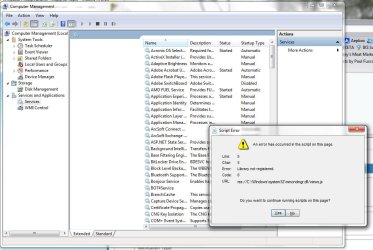
I read someplace to see if it was turned on in services so I went to check and get the error in the picture right when I click services and Help and Support is not listed there either. I just noticed I'm also unable to create another user account.
Attachments
My Computer
- Computer type
- PC/Desktop
- OS
- Windows 7 Ultimate x64
Sorry I forgot to mention that I did that before posting and nothing came up. I mean it ran the scan then the command prompt screen closed when done.
That is not the usual response from an SFC scan.
Did you run the http://www.sevenforums.com/tutorials/783-elevated-command-prompt.html ?
http://www.sevenforums.com/tutorials/1538-sfc-scannow-command-system-file-checker.html
Normally, it will tell you if it found integrity violations and it fixed them or it couldn't fix them, or no integrity violations were found.
You will then have to close it yourself, it doesn't close itself.
My Computer
- Computer type
- PC/Desktop
- Computer Manufacturer/Model Number
- Self Built
- OS
- Win 10 Pro x64
- CPU
- Intel I5-2500K @3.3GHz
- Motherboard
- Asrock P67 Extreme4
- Memory
- 16GB G.Skill Ripjaws X (4x4GB)
- Graphics Card(s)
- EVGA GeForce 750 Ti SC 2GB
- Sound Card
- ASUS Xonar DG 5.1 Channels 24-bit 96KHz PCI Interface Sound
- Monitor(s) Displays
- auria eq2367
- Screen Resolution
- 1920 x 1080
- Hard Drives
- 250GB Samsung 850 EVO SSD
1TB WD Blue
1TB Hitachi
- PSU
- SeaSonic X 650W 80 Plus Gold
- Case
- Corsair Obsidian 750D
- Cooling
- Corsair H60, Three 140mm case fans
- Keyboard
- Logitech Wireless Keyboard K520
- Mouse
- Logitech Wireless Mouse M310
- Internet Speed
- Wave Broadband ~ 100 dn 5 up
- Antivirus
- Windows Defender, Malwarebytes Premium
- Browser
- Edge, IE11, Chrome
- Other Info
- Laptop specs: HP g7-1365dx /
CPU: AMD A6-3420M APU with Radeon(tm) HD Graphics /
RAM: Crucial 8Gb (2x4Gb) /
SSD: Crucial M4-CT128M4SSD2 ATA Device/ FW 000F /
GFX: AMD Radeon HD 6520G /
OS: Windows 10 Pro x64
You can try running it again, that may or may not fix them.
The other options are to upload the CBS logs and see if someone can help you out.
Or a http://www.sevenforums.com/tutorials/3413-repair-install.html
The other options are to upload the CBS logs and see if someone can help you out.
Or a http://www.sevenforums.com/tutorials/3413-repair-install.html
My Computer
- Computer type
- PC/Desktop
- Computer Manufacturer/Model Number
- Self Built
- OS
- Win 10 Pro x64
- CPU
- Intel I5-2500K @3.3GHz
- Motherboard
- Asrock P67 Extreme4
- Memory
- 16GB G.Skill Ripjaws X (4x4GB)
- Graphics Card(s)
- EVGA GeForce 750 Ti SC 2GB
- Sound Card
- ASUS Xonar DG 5.1 Channels 24-bit 96KHz PCI Interface Sound
- Monitor(s) Displays
- auria eq2367
- Screen Resolution
- 1920 x 1080
- Hard Drives
- 250GB Samsung 850 EVO SSD
1TB WD Blue
1TB Hitachi
- PSU
- SeaSonic X 650W 80 Plus Gold
- Case
- Corsair Obsidian 750D
- Cooling
- Corsair H60, Three 140mm case fans
- Keyboard
- Logitech Wireless Keyboard K520
- Mouse
- Logitech Wireless Mouse M310
- Internet Speed
- Wave Broadband ~ 100 dn 5 up
- Antivirus
- Windows Defender, Malwarebytes Premium
- Browser
- Edge, IE11, Chrome
- Other Info
- Laptop specs: HP g7-1365dx /
CPU: AMD A6-3420M APU with Radeon(tm) HD Graphics /
RAM: Crucial 8Gb (2x4Gb) /
SSD: Crucial M4-CT128M4SSD2 ATA Device/ FW 000F /
GFX: AMD Radeon HD 6520G /
OS: Windows 10 Pro x64
will try but How do I upload CBS logs?
You can find them here, C:\Windows\Logs\CBS
Just copy them to the desktop and zip them up, if they are bigger that 8MB you'll have to upload them to something like OneDrive.
If they are under 8MB you can attach them using the paperclip in one of your posts.
My Computer
- Computer type
- PC/Desktop
- Computer Manufacturer/Model Number
- Self Built
- OS
- Win 10 Pro x64
- CPU
- Intel I5-2500K @3.3GHz
- Motherboard
- Asrock P67 Extreme4
- Memory
- 16GB G.Skill Ripjaws X (4x4GB)
- Graphics Card(s)
- EVGA GeForce 750 Ti SC 2GB
- Sound Card
- ASUS Xonar DG 5.1 Channels 24-bit 96KHz PCI Interface Sound
- Monitor(s) Displays
- auria eq2367
- Screen Resolution
- 1920 x 1080
- Hard Drives
- 250GB Samsung 850 EVO SSD
1TB WD Blue
1TB Hitachi
- PSU
- SeaSonic X 650W 80 Plus Gold
- Case
- Corsair Obsidian 750D
- Cooling
- Corsair H60, Three 140mm case fans
- Keyboard
- Logitech Wireless Keyboard K520
- Mouse
- Logitech Wireless Mouse M310
- Internet Speed
- Wave Broadband ~ 100 dn 5 up
- Antivirus
- Windows Defender, Malwarebytes Premium
- Browser
- Edge, IE11, Chrome
- Other Info
- Laptop specs: HP g7-1365dx /
CPU: AMD A6-3420M APU with Radeon(tm) HD Graphics /
RAM: Crucial 8Gb (2x4Gb) /
SSD: Crucial M4-CT128M4SSD2 ATA Device/ FW 000F /
GFX: AMD Radeon HD 6520G /
OS: Windows 10 Pro x64
I've asked someone to look at them for you, it might be a while though.
My Computer
- Computer type
- PC/Desktop
- Computer Manufacturer/Model Number
- Self Built
- OS
- Win 10 Pro x64
- CPU
- Intel I5-2500K @3.3GHz
- Motherboard
- Asrock P67 Extreme4
- Memory
- 16GB G.Skill Ripjaws X (4x4GB)
- Graphics Card(s)
- EVGA GeForce 750 Ti SC 2GB
- Sound Card
- ASUS Xonar DG 5.1 Channels 24-bit 96KHz PCI Interface Sound
- Monitor(s) Displays
- auria eq2367
- Screen Resolution
- 1920 x 1080
- Hard Drives
- 250GB Samsung 850 EVO SSD
1TB WD Blue
1TB Hitachi
- PSU
- SeaSonic X 650W 80 Plus Gold
- Case
- Corsair Obsidian 750D
- Cooling
- Corsair H60, Three 140mm case fans
- Keyboard
- Logitech Wireless Keyboard K520
- Mouse
- Logitech Wireless Mouse M310
- Internet Speed
- Wave Broadband ~ 100 dn 5 up
- Antivirus
- Windows Defender, Malwarebytes Premium
- Browser
- Edge, IE11, Chrome
- Other Info
- Laptop specs: HP g7-1365dx /
CPU: AMD A6-3420M APU with Radeon(tm) HD Graphics /
RAM: Crucial 8Gb (2x4Gb) /
SSD: Crucial M4-CT128M4SSD2 ATA Device/ FW 000F /
GFX: AMD Radeon HD 6520G /
OS: Windows 10 Pro x64

That's odd, I'm not seeing any errors in your CBS log at all. Can you download and install the System Update Readiness Tool please?
Download System Update Readiness Tool for Windows 7 for x64-based Systems (KB947821) [May 2014] from Official Microsoft Download Center
Then run SFC again:
SFC Scan
Tom
Download System Update Readiness Tool for Windows 7 for x64-based Systems (KB947821) [May 2014] from Official Microsoft Download Center
Then run SFC again:
SFC Scan
- Click on the Start
button and in the search box, type Command Prompt

- When you see Command Prompt on the list, right-click on it and select Run as administrator
- When command prompt opens, copy and paste the following commands into it, press enter after each
sfc /scannow
Wait for this to finish before you continue
copy %windir%\logs\cbs\cbs.log "%userprofile%\Desktop\cbs.txt"
copy %windir%\logs\cbs\CheckSUR.persist.log "%userprofile%\Desktop\surt.txt"
- This will create two files, cbs.txt and surt.txt on your Desktop. Please attach these to your next post.
Tom
My Computer
- Computer type
- PC/Desktop
- Computer Manufacturer/Model Number
- Build #1
- OS
- Windows 8.1 Pro x64
- CPU
- Intel i7 3770K @4.5GHz
- Motherboard
- ASUS P8Z77-V PRO
- Memory
- Corsair Vengeance 2x4GB DDR3 1600MHz Low Profile (White)
- Graphics Card(s)
- Gigabyte Radeon HD 7850 (2GB GDDR5)
- Sound Card
- Integrated on motherboard
- Monitor(s) Displays
- 23" LG LCD/LED IPS
- Screen Resolution
- 1920*1080
- Hard Drives
- Samsung EVO 128GB SSD
Seagate Barracuda 2GB 7200rpm
2x Seagate FreeAgent [500gb]
- PSU
- Corsair TX650W V2 (80+ Bronze)
- Case
- NZXT Phantom 410 White
- Cooling
- Corsair H100 Water Cooler
- Keyboard
- Microsoft Desktop 2000 Wireless Keyboard
- Mouse
- Microsoft Desktop 2000 Wireless Mouse
- Internet Speed
- 95 Mb/s Download 70 Mb/s Upload
- Antivirus
- MSE + MBAM Pro
- Browser
- Firefox
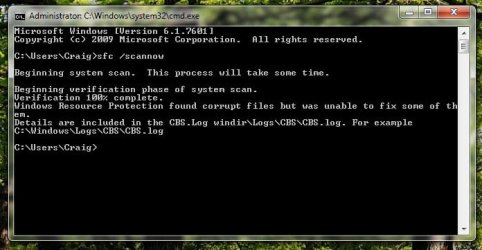
Are you sure SFC is detecting errors? There's no problems at all in your log 
Can you take a screenshot of what SFC says when it finishes please? Attach this to your next post.
Tom
Can you take a screenshot of what SFC says when it finishes please? Attach this to your next post.
Tom
My Computer
- Computer type
- PC/Desktop
- Computer Manufacturer/Model Number
- Build #1
- OS
- Windows 8.1 Pro x64
- CPU
- Intel i7 3770K @4.5GHz
- Motherboard
- ASUS P8Z77-V PRO
- Memory
- Corsair Vengeance 2x4GB DDR3 1600MHz Low Profile (White)
- Graphics Card(s)
- Gigabyte Radeon HD 7850 (2GB GDDR5)
- Sound Card
- Integrated on motherboard
- Monitor(s) Displays
- 23" LG LCD/LED IPS
- Screen Resolution
- 1920*1080
- Hard Drives
- Samsung EVO 128GB SSD
Seagate Barracuda 2GB 7200rpm
2x Seagate FreeAgent [500gb]
- PSU
- Corsair TX650W V2 (80+ Bronze)
- Case
- NZXT Phantom 410 White
- Cooling
- Corsair H100 Water Cooler
- Keyboard
- Microsoft Desktop 2000 Wireless Keyboard
- Mouse
- Microsoft Desktop 2000 Wireless Mouse
- Internet Speed
- 95 Mb/s Download 70 Mb/s Upload
- Antivirus
- MSE + MBAM Pro
- Browser
- Firefox

- Local time
- 5:40 PM
- Messages
- 4,563
I suggest running a repair install
http://www.sevenforums.com/tutorials/3413-repair-install.html
You will not lose any programs or files. Still should make a backup before doing so however.
http://www.sevenforums.com/tutorials/3413-repair-install.html
You will not lose any programs or files. Still should make a backup before doing so however.
My Computer
- Computer type
- PC/Desktop
- Computer Manufacturer/Model Number
- Custom Built
- OS
- Windows 10 Pro
- CPU
- AMD Ryzen 5 2400G Processor with Radeon RX Vega 11 Graphics
- Motherboard
- ASRock X470 Master SLI/AC AM4 AMD Promontory X470 SATA 6Gb/s
- Memory
- G.SKILL Ripjaws V Series 16GB (2 x 8GB) 288-Pin DDR4 SDRAM D
- Graphics Card(s)
- 2047MB NVIDIA GeForce GTX 1060 6GB (EVGA)
- Sound Card
- Motherboard Built in
- Monitor(s) Displays
- Acer R240HY bidx 23.8-Inch IPS HDMI DVI VGA (1920 x 1080) Wi
- Screen Resolution
- 1920 x 1080
- Hard Drives
- 1TB Sandisk SSD PLUS (Main drive)
500 GB Seagate 7200 RPM (Games)
500 GB Western Digital 7200 RPM (Virtual Machines)
- PSU
- CORSAIR TX Series TX650M 650W 80+ Gold Modular Power Supply
- Case
- CORSAIR CARBIDE SPEC-02 Mid-Tower Gaming Case, Red LED Fan
- Cooling
- 220mm, two 120mm, and four 60mm fans
- Keyboard
- Wired Dell keyboard
- Mouse
- Wireless Logitech mouse
- Internet Speed
- 250mb down, 30mb up
- Antivirus
- Panda Cloud Antivirus
- Browser
- Chrome-ish x64
- Other Info
- Your awesome for reading this.
Similar threads


- Replies
- 11
- Views
- 3K