Help changing boot order in Intel BIOS

pare

New member
Member
Local time
5:07 PM
Messages
98
Location
Aruba
Hi everyone.
A little embarrassing but I can not change the boot order in the BIOS of my mobo to boot from the ODD in order to boot from a CD. My mobo is an Intel desktop board DH55TC. Hopefully there is some of you guys who has the same mobo who can give me a little help.
Merry Christmas.
 

My Computer

OS
windows 7 home premium 64bit
CPU
Intel (R) Pentium (R) 4 CPU 3.06 GHz
Motherboard
Gigabyte GA-81865 GME-775
Memory
Ultra 1024 MB PC2700 DDR 333 MHz (2 RAM)
Graphics Card(s)
Nvidia Geforce 6200 256 Mbytes
Sound Card
Realtek AC'97 Audio
Monitor(s) Displays
Generic PnP monitor
Screen Resolution
1024*768 @ 75 Hz
Hard Drives
Seagate ST3320620AS 320 GB Serial ATA
Case
PC312 Lyra Super Case
Internet Speed
100 Mbps
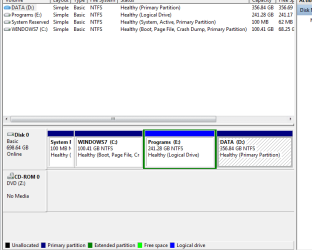
Capture 1.PNG

Thanks Greg, for helping me out with the boot issue. I did it with the F10 command.

This is how my partitions looks like now. I did it with the partition wizard.
It is a verry nice program. Thanks for recommending it. The only thing,
I forgot to do a backup, but thankfully it went well.
Are there any suggestions? Everything is welcome!
O, about the data partition. Can I just go on and dump stuff on it or is there something I should do first. Like shuffle my personal folder and documents, music,pictures folder from C partition to D partition??
Thanks again guys.
 

My Computer

OS
windows 7 home premium 64bit
CPU
Intel (R) Pentium (R) 4 CPU 3.06 GHz
Motherboard
Gigabyte GA-81865 GME-775
Memory
Ultra 1024 MB PC2700 DDR 333 MHz (2 RAM)
Graphics Card(s)
Nvidia Geforce 6200 256 Mbytes
Sound Card
Realtek AC'97 Audio
Monitor(s) Displays
Generic PnP monitor
Screen Resolution
1024*768 @ 75 Hz
Hard Drives
Seagate ST3320620AS 320 GB Serial ATA
Case
PC312 Lyra Super Case
Internet Speed
100 Mbps
Looks good, however I would not move installed programs off the OS partition or install programs to any other than the OS partition as they write registry keys which intergrate them into Win7.

A good arrangement for data partitions (unless you want to use them for storage only) is to move the User folders there using this method: http://www.sevenforums.com/tutorials/18629-user-folders-change-default-location.html

This keeps the OS/Programs backup image lean so if it becomes sluggish or irreparable you can reimage it in 20 minutes and your User data is ready and current in its own partition "vault" - which should also be backed up more frequently:
http://www.sevenforums.com/tutorials/663-backup-complete-computer-create-image-backup.html
http://www.sevenforums.com/tutorials/615-backup-user-system-files.html
 
Confusion about the backup system image.
Where should I save the system image (backup)? On the D: data partition? Can I save it on the new created logical partition that I named programs? If I save it on the D: data partition will I have to move the user folder from C: to the data partition first?
 

My Computer

OS
windows 7 home premium 64bit
CPU
Intel (R) Pentium (R) 4 CPU 3.06 GHz
Motherboard
Gigabyte GA-81865 GME-775
Memory
Ultra 1024 MB PC2700 DDR 333 MHz (2 RAM)
Graphics Card(s)
Nvidia Geforce 6200 256 Mbytes
Sound Card
Realtek AC'97 Audio
Monitor(s) Displays
Generic PnP monitor
Screen Resolution
1024*768 @ 75 Hz
Hard Drives
Seagate ST3320620AS 320 GB Serial ATA
Case
PC312 Lyra Super Case
Internet Speed
100 Mbps
You can save images anywhere you have space EXCEPT on the partition you are imaging. That is--if you are imaging C, you can't save that image on C.

Normally, you should consider image files as "data" and save them on a data drive and back them up just like they were prized photos, videos, or other documents.

Images are just another file and have nothing to do with your user folder.

Not sure why you made a separate "programs" partition.
 

My Computer

Computer type
PC/Desktop
Computer Manufacturer/Model Number
Ignatz Special; 4 speed manual gearbox; factory air conditioning; one of one
OS
Windows 7 Home Premium SP1, 64-bit
CPU
Intel Skylake i5-6600K, not overclocked
Motherboard
AsRock Z170M Extreme 4, micro ATX
Memory
8 GB HyperX DDR4-2666 (2 x 4 GB)
Graphics Card(s)
none; graphics are integrated on CPU
Sound Card
onboard: Realtek ALC1150; external: USB Behringer UF0-202
Monitor(s) Displays
Dell S2340M 23 inch IPS
Screen Resolution
1600 x 900
Hard Drives
System: Crucial MX100 series SSD, 128 GB;
Data: Samsung Spinpoint 103SJ, 1 TB;
Backup: WD Caviar Green WD30EZRX-00D8PB0, 3 TB
PSU
Rosewill SilentNight 500 watt fanless, semi-modular
Case
Antec Solo II
Cooling
Noctua NH-U12S; Noctua F12 intake, Noctua S12A exhaust
Keyboard
Microsoft 200 6JH-00001 USB
Mouse
Dell or Microsoft optical wired; USB
Antivirus
Microsoft Security Essentials and Malwarebytes Premium
Browser
Pale Moon
Other Info
All fans PWM; speeds at idle: CPU circa 500 rpm; intake circa 600 rpm; exhaust circa 600 rpm; CPU temps 27 idle and 47 C load in a warm room (27 C/81 F) when running Intel Extreme Tuning Utility stress test.
Hi ignatzatsonic,
I just gave it a name but are not sure jet what to do with it. It became unallocated
when I resized my C: partition that was to big in my opinion.
I might leave it like that until I decide to convert it into primary to put another OS on it.
Thanks for your support.
 

My Computer

OS
windows 7 home premium 64bit
CPU
Intel (R) Pentium (R) 4 CPU 3.06 GHz
Motherboard
Gigabyte GA-81865 GME-775
Memory
Ultra 1024 MB PC2700 DDR 333 MHz (2 RAM)
Graphics Card(s)
Nvidia Geforce 6200 256 Mbytes
Sound Card
Realtek AC'97 Audio
Monitor(s) Displays
Generic PnP monitor
Screen Resolution
1024*768 @ 75 Hz
Hard Drives
Seagate ST3320620AS 320 GB Serial ATA
Case
PC312 Lyra Super Case
Internet Speed
100 Mbps
Hi ignatzatsonic,
I just gave it a name but are not sure jet what to do with it. It became unallocated
when I resized my C: partition that was to big in my opinion.
I might leave it like that until I decide to convert it into primary to put another OS on it.
Thanks for your support.

OK.

You could have just left it as unallocated as well. My only concern was that you were thinking about installing applications to it--which is generally frowned on. No problem if you put data on it, but then you would have 2 data partitions.

That would be OK, but it's generally preferable (from a space management/efficiency standpoint) to minimize the number of partitions when possible---otherwise, you will guess wrong about their rates of growth and end up running short on space in one partition, even though you have gobs of space in another partition.

You can always delete it, but as your Disk Management picture looks now, you would have to use a third party application to add the space from the "Programs" partition to D. Disk Management cannot expand a partition into unallocated space to the LEFT. It can to the right.
 

My Computer

Computer type
PC/Desktop
Computer Manufacturer/Model Number
Ignatz Special; 4 speed manual gearbox; factory air conditioning; one of one
OS
Windows 7 Home Premium SP1, 64-bit
CPU
Intel Skylake i5-6600K, not overclocked
Motherboard
AsRock Z170M Extreme 4, micro ATX
Memory
8 GB HyperX DDR4-2666 (2 x 4 GB)
Graphics Card(s)
none; graphics are integrated on CPU
Sound Card
onboard: Realtek ALC1150; external: USB Behringer UF0-202
Monitor(s) Displays
Dell S2340M 23 inch IPS
Screen Resolution
1600 x 900
Hard Drives
System: Crucial MX100 series SSD, 128 GB;
Data: Samsung Spinpoint 103SJ, 1 TB;
Backup: WD Caviar Green WD30EZRX-00D8PB0, 3 TB
PSU
Rosewill SilentNight 500 watt fanless, semi-modular
Case
Antec Solo II
Cooling
Noctua NH-U12S; Noctua F12 intake, Noctua S12A exhaust
Keyboard
Microsoft 200 6JH-00001 USB
Mouse
Dell or Microsoft optical wired; USB
Antivirus
Microsoft Security Essentials and Malwarebytes Premium
Browser
Pale Moon
Other Info
All fans PWM; speeds at idle: CPU circa 500 rpm; intake circa 600 rpm; exhaust circa 600 rpm; CPU temps 27 idle and 47 C load in a warm room (27 C/81 F) when running Intel Extreme Tuning Utility stress test.
Well, right now I am considering what it is that I really want on the long-term.
Hopefully I am not at the point of no return. For now I will leave the logical partition alone. If I run out of space on the data (primary) partition, from what I understand (I hope I did well) I still can add space to it by taking a little away from the logical partition, using a third party application. Do you mean partition wizard? This partition wizard, could I have installed it on the data partition or is this, one that has to be installed on the OS partition? Pardon my ignorance!
 

My Computer

OS
windows 7 home premium 64bit
CPU
Intel (R) Pentium (R) 4 CPU 3.06 GHz
Motherboard
Gigabyte GA-81865 GME-775
Memory
Ultra 1024 MB PC2700 DDR 333 MHz (2 RAM)
Graphics Card(s)
Nvidia Geforce 6200 256 Mbytes
Sound Card
Realtek AC'97 Audio
Monitor(s) Displays
Generic PnP monitor
Screen Resolution
1024*768 @ 75 Hz
Hard Drives
Seagate ST3320620AS 320 GB Serial ATA
Case
PC312 Lyra Super Case
Internet Speed
100 Mbps
You can have data folders in any place on the system and even on USB attached disks (but not USB sticks and SD cards) that can be incuded into the libraries. Just right click on the folder in e.g. the data partiton and "Include in library". That creates a new library folder.
Else you can move your default library folders to the data partition as per the link that Greg recomended. In that case make sure you move folders to predefined folders in the data partition and NOT to the partition itself - that creates a mess.
 

My Computer

Computer Manufacturer/Model Number
HP, Dell, Gateway, Toshiba - 4 laptops and 2 desktops
OS
Vista, Windows7, Mint Mate, Zorin, Windows 8
CPU
from 1.6GHz Duo to i7
Monitor(s) Displays
2x HP w2207
Hard Drives
5x HDD, 7x SSD, 12x Externals
Keyboard
with trackball - no mices
Mouse
Trackball mice
Internet Speed
DSL 6000
If installed on the hard disk, Partition Wizard would typically be installed in C:\Program Files, just like any other program.

But its a pretty good idea to download the boot disk version of it. That's an ISO file. Then you burn that ISO file to a CD. You can then boot your PC from that CD and run Partition Wizard, just as if it were installed on your C drive.


Free Download Magic Partition Manager Software - Partition Wizard Online


The "regular" version to install on C is at the top of the list at the above link. The "bootable disk" version is at the bottom. They have the same functionality as far as I know.
 

My Computer

Computer type
PC/Desktop
Computer Manufacturer/Model Number
Ignatz Special; 4 speed manual gearbox; factory air conditioning; one of one
OS
Windows 7 Home Premium SP1, 64-bit
CPU
Intel Skylake i5-6600K, not overclocked
Motherboard
AsRock Z170M Extreme 4, micro ATX
Memory
8 GB HyperX DDR4-2666 (2 x 4 GB)
Graphics Card(s)
none; graphics are integrated on CPU
Sound Card
onboard: Realtek ALC1150; external: USB Behringer UF0-202
Monitor(s) Displays
Dell S2340M 23 inch IPS
Screen Resolution
1600 x 900
Hard Drives
System: Crucial MX100 series SSD, 128 GB;
Data: Samsung Spinpoint 103SJ, 1 TB;
Backup: WD Caviar Green WD30EZRX-00D8PB0, 3 TB
PSU
Rosewill SilentNight 500 watt fanless, semi-modular
Case
Antec Solo II
Cooling
Noctua NH-U12S; Noctua F12 intake, Noctua S12A exhaust
Keyboard
Microsoft 200 6JH-00001 USB
Mouse
Dell or Microsoft optical wired; USB
Antivirus
Microsoft Security Essentials and Malwarebytes Premium
Browser
Pale Moon
Other Info
All fans PWM; speeds at idle: CPU circa 500 rpm; intake circa 600 rpm; exhaust circa 600 rpm; CPU temps 27 idle and 47 C load in a warm room (27 C/81 F) when running Intel Extreme Tuning Utility stress test.
Hi guys,
I posted the reply and I went to sleep. I was verry tired. I just saw your reaction. Sorry!
I downloaded the "bootable disk" version and burned it to a CD luckily.
Right now I am at another stage. My AVG antivirus free edition just expired.
I want to get rid off it so I can install Microsoft Security Essential.
I am studying Revo uninstaller (I saw Mr. WHS's video a couple of times)
I will go for it but right now it is time to hit the bed. I will keep you guys informed.
I might have more questions. I love this forum and of course you guys.
 

My Computer

OS
windows 7 home premium 64bit
CPU
Intel (R) Pentium (R) 4 CPU 3.06 GHz
Motherboard
Gigabyte GA-81865 GME-775
Memory
Ultra 1024 MB PC2700 DDR 333 MHz (2 RAM)
Graphics Card(s)
Nvidia Geforce 6200 256 Mbytes
Sound Card
Realtek AC'97 Audio
Monitor(s) Displays
Generic PnP monitor
Screen Resolution
1024*768 @ 75 Hz
Hard Drives
Seagate ST3320620AS 320 GB Serial ATA
Case
PC312 Lyra Super Case
Internet Speed
100 Mbps
Hi guys,
I posted the reply and I went to sleep. I was verry tired. I just saw your reaction. Sorry!
I downloaded the "bootable disk" version and burned it to a CD luckily.
Right now I am at another stage. My AVG antivirus free edition just expired.
I want to get rid off it so I can install Microsoft Security Essential.
I am studying Revo uninstaller (I saw Mr. WHS's video a couple of times)
I will go for it but right now it is time to hit the bed. I will keep you guys informed.
I might have more questions. I love this forum and of course you guys.
Revo is good, but for the AV programs you should use the AV uninstallers. Here is the one for AVG: AVG - Download tools
 

My Computer

Computer Manufacturer/Model Number
HP, Dell, Gateway, Toshiba - 4 laptops and 2 desktops
OS
Vista, Windows7, Mint Mate, Zorin, Windows 8
CPU
from 1.6GHz Duo to i7
Monitor(s) Displays
2x HP w2207
Hard Drives
5x HDD, 7x SSD, 12x Externals
Keyboard
with trackball - no mices
Mouse
Trackball mice
Internet Speed
DSL 6000
Hi WHS and thank you verry much for your assistance.
How to tell which version to download. The 32 bit or the 64 bit.
The AVG I have is version 10.0.1170
Any one???
 

My Computer

OS
windows 7 home premium 64bit
CPU
Intel (R) Pentium (R) 4 CPU 3.06 GHz
Motherboard
Gigabyte GA-81865 GME-775
Memory
Ultra 1024 MB PC2700 DDR 333 MHz (2 RAM)
Graphics Card(s)
Nvidia Geforce 6200 256 Mbytes
Sound Card
Realtek AC'97 Audio
Monitor(s) Displays
Generic PnP monitor
Screen Resolution
1024*768 @ 75 Hz
Hard Drives
Seagate ST3320620AS 320 GB Serial ATA
Case
PC312 Lyra Super Case
Internet Speed
100 Mbps
Hi WHS and thank you verry much for your assistance.
How to tell which version to download. The 32 bit or the 64 bit.
The AVG I have is version 10.0.1170
Any one???
I assume you ask about the AVG uninstaller. That depends on the Windows7 you have - 64 or 32bit. It tells you in Computer Properties under "System".
 

My Computer

Computer Manufacturer/Model Number
HP, Dell, Gateway, Toshiba - 4 laptops and 2 desktops
OS
Vista, Windows7, Mint Mate, Zorin, Windows 8
CPU
from 1.6GHz Duo to i7
Monitor(s) Displays
2x HP w2207
Hard Drives
5x HDD, 7x SSD, 12x Externals
Keyboard
with trackball - no mices
Mouse
Trackball mice
Internet Speed
DSL 6000
This AVG download tools tells me that I should try the uninstall feature of the program it self and if it fails repeatedly than I can use this AVG remover from the AVG download tools as a last option.
My question is, will the uninstall feature of the program (AVG antivirus 10.0.1170) that I have right now completely wipe out every file out of the system Including out of the registry???
From what I read, the AVG remover will. Which one do you recommend.
One more thing, is this AVG remover a program? How do I remove this one afterwards? May be with Revo uninstaller? Don't laugh!
 

My Computer

OS
windows 7 home premium 64bit
CPU
Intel (R) Pentium (R) 4 CPU 3.06 GHz
Motherboard
Gigabyte GA-81865 GME-775
Memory
Ultra 1024 MB PC2700 DDR 333 MHz (2 RAM)
Graphics Card(s)
Nvidia Geforce 6200 256 Mbytes
Sound Card
Realtek AC'97 Audio
Monitor(s) Displays
Generic PnP monitor
Screen Resolution
1024*768 @ 75 Hz
Hard Drives
Seagate ST3320620AS 320 GB Serial ATA
Case
PC312 Lyra Super Case
Internet Speed
100 Mbps
If it fails and recommends to use the uninstaller that is on the system, then I recommend to use Revo (but use the advanced (4th) option - you'll see. Revo will first apply the the AVG uninstaller that is on your system and then it will give you the option to remove any leftover files and registry entries.

I myself never dealt with AVG because it is not up to the standards I expect from an AV program. That's why I do not know more details about this particular remover.
 

My Computer

Computer Manufacturer/Model Number
HP, Dell, Gateway, Toshiba - 4 laptops and 2 desktops
OS
Vista, Windows7, Mint Mate, Zorin, Windows 8
CPU
from 1.6GHz Duo to i7
Monitor(s) Displays
2x HP w2207
Hard Drives
5x HDD, 7x SSD, 12x Externals
Keyboard
with trackball - no mices
Mouse
Trackball mice
Internet Speed
DSL 6000
Back
Top