
Potatoninja22
New member
- Local time
- 9:45 PM
- Messages
- 4
Alright, so I had recently installed a custom set of system icons, and I love them. My only problem is the "settings" icon which looks like a cog.
To ensure you understand which I am talking about, heres an image:
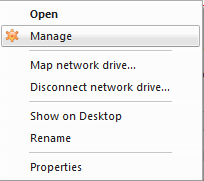
I know how to easily change any normal programs icon, but these icons are the default icons and need a bit of extra tinkering to change them.
If anyone knows how to manually change this cog icon, or knows of a program that allows you to do so, it would be very much appreciated to hear from you.
To ensure you understand which I am talking about, heres an image:
I know how to easily change any normal programs icon, but these icons are the default icons and need a bit of extra tinkering to change them.
If anyone knows how to manually change this cog icon, or knows of a program that allows you to do so, it would be very much appreciated to hear from you.
My Computer
- Computer type
- PC/Desktop
- Computer Manufacturer/Model Number
- Acer
- OS
- Windows 7 Ultimate x64


