
Solved [HELP] Disc Drive Missing

Julius Ceazar

New member
Member
Local time
7:08 AM
Messages
37
My Disc Drive (idk f its the right term) gone missing My Computer.PNG.
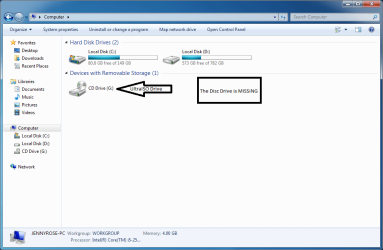
Even if i insert a dvd disc (os installer) it doesnt show nor autoplay. i check the autoplay config and its fine. BUT, when i insert the dvd disc at boot, the installer loads.

my problem is, i cant use my disc drive when windows load.Capture.PNG
Thank you!
 

My Computer

OS
Microsoft Windows 7 Ultimate 32-bit 7601 Multiprocessor Free Service Pack 1
CPU
Intel(R) Core(TM) i5-2500 CPU @ 3.30GHz
Motherboard
ASUSTeK COMPUTER INC. P8H61-M LE
Memory
4.00 GB
Graphics Card(s)
Intel(R) HD Graphics Family
Sound Card
Realtek High Definition Audio
Screen Resolution
1600 x 900 x 32 bits (4294967296 colors) @ 60 Hz
Hard Drives
(1) WDC WD10EARX-00N0YB0 ATA Device (2) Imation Imation USB USB Device
Check your Device Manager. Is your disk drive present? Are they any warning icons associated with the disk drive in Device manager?
 

My Computer

Computer Manufacturer/Model Number
Homemade
OS
Win 7 64 bit professional
CPU
CPU: 3930K @ 4.8 MHz Stable as a rock
Motherboard
ASUS Rampage IV Extreme LGA 2011
Memory
CORSAIR DOMINATOR GT 16GB (4 x 4GB) 240-Pin DDR3
Graphics Card(s)
EVGA SuperClocked+ GeForce GTX 680
Monitor(s) Displays
Dell 3007WFP
Screen Resolution
2560 x 1600
Hard Drives
Vector(256gb) x 2
RevoDrive 3 X2 space (240 GB)
Crucial C300 256 GB SSD
PSU
CORSAIR AX1200i 1200W Digital ATX12V v2.31 and EPS 2.92 SLI
Cooling
Water cooling EK Supremacy ELITE
Mouse
ratZ-7
Other Info
WEI-7.8
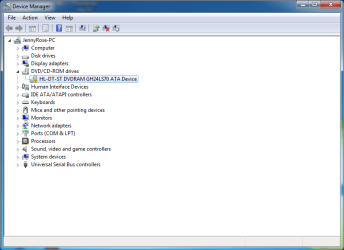
Ohh. by checking on it, it has warning icon, (i think)
Capture.PNG

Please teach me how get it back.
 

My Computer

OS
Microsoft Windows 7 Ultimate 32-bit 7601 Multiprocessor Free Service Pack 1
CPU
Intel(R) Core(TM) i5-2500 CPU @ 3.30GHz
Motherboard
ASUSTeK COMPUTER INC. P8H61-M LE
Memory
4.00 GB
Graphics Card(s)
Intel(R) HD Graphics Family
Sound Card
Realtek High Definition Audio
Screen Resolution
1600 x 900 x 32 bits (4294967296 colors) @ 60 Hz
Hard Drives
(1) WDC WD10EARX-00N0YB0 ATA Device (2) Imation Imation USB USB Device
Check your Device Manager. Is your disk drive present? Are they any warning icons associated with the disk drive in Device manager?

It says "Windows cannot start this hardware device because its configuration information (in the registry) is incomplete or damaged. (Code 19)"
Capture.PNG

What should I do ?!
 

My Computer

OS
Microsoft Windows 7 Ultimate 32-bit 7601 Multiprocessor Free Service Pack 1
CPU
Intel(R) Core(TM) i5-2500 CPU @ 3.30GHz
Motherboard
ASUSTeK COMPUTER INC. P8H61-M LE
Memory
4.00 GB
Graphics Card(s)
Intel(R) HD Graphics Family
Sound Card
Realtek High Definition Audio
Screen Resolution
1600 x 900 x 32 bits (4294967296 colors) @ 60 Hz
Hard Drives
(1) WDC WD10EARX-00N0YB0 ATA Device (2) Imation Imation USB USB Device

My Computer

OS
Microsoft Windows 7 Ultimate 32-bit 7601 Multiprocessor Free Service Pack 1
CPU
Intel(R) Core(TM) i5-2500 CPU @ 3.30GHz
Motherboard
ASUSTeK COMPUTER INC. P8H61-M LE
Memory
4.00 GB
Graphics Card(s)
Intel(R) HD Graphics Family
Sound Card
Realtek High Definition Audio
Screen Resolution
1600 x 900 x 32 bits (4294967296 colors) @ 60 Hz
Hard Drives
(1) WDC WD10EARX-00N0YB0 ATA Device (2) Imation Imation USB USB Device
Congratulations on identifying and researching the problem. Best of luck.
 

My Computer

Computer Manufacturer/Model Number
Homemade
OS
Win 7 64 bit professional
CPU
CPU: 3930K @ 4.8 MHz Stable as a rock
Motherboard
ASUS Rampage IV Extreme LGA 2011
Memory
CORSAIR DOMINATOR GT 16GB (4 x 4GB) 240-Pin DDR3
Graphics Card(s)
EVGA SuperClocked+ GeForce GTX 680
Monitor(s) Displays
Dell 3007WFP
Screen Resolution
2560 x 1600
Hard Drives
Vector(256gb) x 2
RevoDrive 3 X2 space (240 GB)
Crucial C300 256 GB SSD
PSU
CORSAIR AX1200i 1200W Digital ATX12V v2.31 and EPS 2.92 SLI
Cooling
Water cooling EK Supremacy ELITE
Mouse
ratZ-7
Other Info
WEI-7.8
Back
Top