HELP! Everything APPCRASH

I'm gonna just wipe it again and go back to XP. Thx for help.
 

My Computer

OS
Windows 7 RC 7100
CPU
INtel E8400
Memory
4 GB
Graphics Card(s)
8800 GT
Maybe its an hardware problem. try replacing the hdd.
or if it works in XP you could download the RTM and install it :)
 

My Computer

Computer Manufacturer/Model Number
Home Made // LG
OS
Windows 7 RTM x64
CPU
Core 2 Duo E6600 // Core 2 Duo T7300
Motherboard
Abit AB9 Pro // LG Colombia
Memory
4GB DDR2-800 // 2GB DDR2-800 + 1GB DDR2-667
Graphics Card(s)
AMD HD3870 512MB GDDR4 // Nvidia 8600M 256MB GDDR3
Sound Card
Onboard Realtek ALC883
Monitor(s) Displays
Sony 42KDL4000V // 15.2" LCD
Screen Resolution
1920x1080 // 1280x800
Hard Drives
Samsung Spinpoint F1 1TB // 160GB
PSU
OCZ StealthXtreme 600W
Case
Thermalrock Eclipse
Cooling
Xigmatek HDT1283
Mouse
Microsoft-Razer Habu
Internet Speed
8Mbps with IPTV // 8Mbps
I am pulling my hair out here. I can't seem to download anything correctly in Windows 7. I was using it without error for a couple of months, but now I get an APPCRASH on every downloaded program that I try to install. I did a complete reinstall of Windows 7 to fix the problem, but it is still there. I've re-downloaded firefox, itunes, and safari to my desktop, and all three will not let me install them, and they give me this error:

Problem Event Name: APPCRASH
Application Name: iTunesSetup.exe
Application Version: 8.2.1.6
Application Timestamp: 4a5ba5ae
Fault Module Name: iTunesSetup.exe
Fault Module Version: 8.2.1.6
Fault Module Timestamp: 4a5ba5ae
Exception Code: c0000005
Exception Offset: 00009d24
OS Version: 6.1.7100.2.0.0.256.1
Locale ID: 1033
Additional Information 1: 0a9e
Additional Information 2: 0a9e372d3b4ad19135b953a78882e789
Additional Information 3: 0a9e
Additional Information 4: 0a9e372d3b4ad19135b953a78882e789


any ideas????? thanks.

Your installer file corrupted(Like Itunes,Firefox Installer exe file).You ve to collect those installer again.
I ve also faced that problem.
And now I m rolling back Windows 7 to Windows XP SP2 :cry:
 

My Computer

Computer Manufacturer/Model Number
Clone PC
OS
Windows 7 Ultimate x64
CPU
Intel Pentium G2020
Motherboard
Gigabyte B75 Xtreme Gaming
Memory
4GB
Graphics Card(s)
NVIDIA GeForce
Sound Card
Realtek
Monitor(s) Displays
Philips 17, Dell 22
Screen Resolution
1280*1024, 1600*900
Hard Drives
1TB, 1TB, 500GB
Case
SP
Keyboard
Murcury
Mouse
Murcury
Internet Speed
2Mbps Broadband
The thread is almost a year old...I doubt the OP cares :)
 

My Computer

Computer Manufacturer/Model Number
Custom
OS
Windows 7 Ultimate RTM (Technet)
CPU
3.00 gigahertz Intel Core2 Duo E8400
Motherboard
ASUSTeK Computer INC. P5K/EPU Rev 1.xx
Memory
4GB
Graphics Card(s)
ATI Radeon X1950 Pro
Sound Card
Built in HD Audio
Monitor(s) Displays
22" Gateway LCD
Screen Resolution
1920 x 1200
Hard Drives
ST3160023A [Hard drive] (160.04 GB) -- drive 0, rev 8.01, ST3500630AS [Hard drive] (500.11 GB) -- drive 2, rev 3.AAK
ST3500630AS [Hard drive] (500.11 GB) -- drive 1, rev 3.AAK
Keyboard
Logitech G11
Mouse
Microsoft Wireless Laser Mouse 5000
Internet Speed
13.44 Mbps
Please Help

I am pulling my hair out here. I can't seem to download anything correctly in Windows 7. I was using it without error for a couple of months, but now I get an APPCRASH on every downloaded program that I try to install. I did a complete reinstall of Windows 7 to fix the problem, but it is still there. I've re-downloaded firefox, itunes, and safari to my desktop, and all three will not let me install them, and they give me this error:

Problem Event Name: APPCRASH
Application Name: iTunesSetup.exe
Application Version: 8.2.1.6
Application Timestamp: 4a5ba5ae
Fault Module Name: iTunesSetup.exe
Fault Module Version: 8.2.1.6
Fault Module Timestamp: 4a5ba5ae
Exception Code: c0000005
Exception Offset: 00009d24
OS Version: 6.1.7100.2.0.0.256.1
Locale ID: 1033
Additional Information 1: 0a9e
Additional Information 2: 0a9e372d3b4ad19135b953a78882e789
Additional Information 3: 0a9e
Additional Information 4: 0a9e372d3b4ad19135b953a78882e789


any ideas????? thanks.

I also have the same problem with every setup
and only few processes are running i reinstalled OS(Tried different versions) but still no luck...
Capture.PNG

Capture2.PNG
 

My Computer

OS
Windows 7
It works!!!

Uninstall iTunes if it installed, I know there were issues with it in RC build.

Thank you sooooooooooo much Hedrush:cool: I did it and it really works!first uninstall the program which you receive appcrash for it(e.g. photoshop) then you have to uninstall both itunes and quick time, and then it requires a restart. Than keep on installing the program which didnt work before.

wish good luck for all:D
 

My Computer

OS
windows 7 ultimate 32bit
I am very confuse cause when i download ShadowCo correctly it wont work.When i try to open the application and theirs a dailog box come out and it says:

ShadowCo has stopped working

Windows can check online for a solution to the problem.

->Check online for a solution and close the program

->Close the program

View problem details

Problem signature

Problem Event Name: APPCRASH
Application Name: ShadowCO.exe
Application Version: 2007.1210.0.123
Application Timestamp: 48f9441d
Fault Module Name: C3_CORE_DLL.dll
Fault Module Version: 0.0.0.0
Fault Module Timestamp: 48b3ab4b
Exception Code: c0000005
Exception Offset: 000058d1
OS Version: 6.1.7600.2.0.0.256.1
Locale ID: 1033
Additional Information 1: e085
Additional Information 2: e0857937fb9361c2caf73b6fbda51fb9
Additional Information 3: 6b98
Additional Information 4: 6b98a15b3e1e0aac45de2f23a75c4f4c
:mad::mad::mad::mad::mad::mad::mad::mad::mad::shock::shock::shock::shock::cry::cry::cry::cry::cry::cry:lpls help!lpls help!lpls help!lpls help!lpls help!lpls help!lpls help!lpls help!lpls help!lpls help!lpls help!lpls help!lpls help!lpls help!lpls help!lpls help!lpls help!lpls help!lpls help!lpls help!lpls help!lpls help!lpls help!lpls help!lpls help!lpls help!lpls help!lpls help!lpls help!
 
Last edited:

My Computer

Computer Manufacturer/Model Number
ok
OS
Windows 7
CPU
ok
Motherboard
ok
Memory
ok
Graphics Card(s)
ok
Sound Card
ok
Monitor(s) Displays
ok
Hard Drives
ok
Cooling
ok
Are you using the drivers given by the Win7 installer and quickly updated via optional Windows Updates, or are you still under the impression that this is XP and you need to import drivers for no reason to replace the ones which MS spent millions to get into the installer and via Updates?

Do not change the drivers given by installer or quickly updated via optional Windows Updates unless there is a confirmed performance reason to do so.

If you have done so, try to System Restore to before problems occurred or you changed out the drivers. http://www.sevenforums.com/tutorials/700-system-restore.html

Otherwise the appcrash issues are troubleshot by googling repeat error (text and ID#) in Event Viewer>Admin View to find the cause and see how others have resolved them.

Likewise study the Performance log on Advanced Tools page accessed by clicking the WEI score link at Computer>Properties. Look for cued issues at top of Tools page, Generate a System Health Report.

Type "problems" in Start Search box to look for solution to problems sent and not. Win7 is interactive in this way.

Run http://www.sevenforums.com/tutorials/1538-sfc-scannow-command-system-file-checker.html and then if necessary a http://www.sevenforums.com/tutorials/3413-repair-install.html?ltr=R

If all else fails, wipe the HD of all code to try a clean reinstall using these tips to get a perfect install: http://www.sevenforums.com/installation-setup/125874-re-install-windows-7-a.html#post1086729
 
I am pulling my hair out here. I can't seem to download anything correctly in Windows 7. I was using it without error for a couple of months, but now I get an APPCRASH on every downloaded program that I try to install. I did a complete reinstall of Windows 7 to fix the problem, but it is still there. I've re-downloaded firefox, itunes, and safari to my desktop, and all three will not let me install them, and they give me this error:

Problem Event Name: APPCRASH
Application Name: iTunesSetup.exe
Application Version: 8.2.1.6
Application Timestamp: 4a5ba5ae
Fault Module Name: iTunesSetup.exe
Fault Module Version: 8.2.1.6
Fault Module Timestamp: 4a5ba5ae
Exception Code: c0000005
Exception Offset: 00009d24
OS Version: 6.1.7100.2.0.0.256.1
Locale ID: 1033
Additional Information 1: 0a9e
Additional Information 2: 0a9e372d3b4ad19135b953a78882e789
Additional Information 3: 0a9e
Additional Information 4: 0a9e372d3b4ad19135b953a78882e789


any ideas????? thanks.
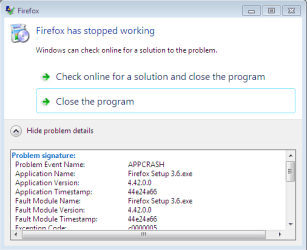
I get the same thing and I reformated and it worked BUT when u reformat u have to delete the system reserved partition on the drive too like when it asked u to pick a drive to install to delete the main drive u useing AND the system reserve partition for that drive too and let it make a new system partition when u choose to make NEW partition to install windows onto and it will work just don't reinstall any of ur programs delete them incase there infected and re download them that's what i did and i don't get the app crash anymore cause i thinkg somethine saves the virus? or what ever that is makeing everythin crash is saved onto that system partision k hope this helps u it did with me :)
 

My Computer

OS
Windows 7 Ultimate 32bit
Appcrash help!!

I am currently receiving the following:

Problem signature:
Problem Event Name: APPCRASH
Application Name: explorer.exe
Application Version: 6.1.7601.17514
Application Timestamp: 4ce796f3
Fault Module Name: fdWNet.dll
Fault Module Version: 6.1.7600.16385
Fault Module Timestamp: 4a5bc1b4
Exception Code: c0000005
Exception Offset: 00003337
OS Version: 6.1.7601.2.1.0.256.1
Locale ID: 1033
Additional Information 1: a7aa
Additional Information 2: a7aa91f17ea749d42a4de3b390fa5b3d
Additional Information 3: a7aa
Additional Information 4: a7aa91f17ea749d42a4de3b390fa5b3d
 

My Computer

OS
Windows 7
I am currently receiving the following:

Problem signature:
Problem Event Name: APPCRASH
Application Name: explorer.exe
Application Version: 6.1.7601.17514
Application Timestamp: 4ce796f3
Fault Module Name: fdWNet.dll
Fault Module Version: 6.1.7600.16385
Fault Module Timestamp: 4a5bc1b4
Exception Code: c0000005
Exception Offset: 00003337
OS Version: 6.1.7601.2.1.0.256.1
Locale ID: 1033
Additional Information 1: a7aa
Additional Information 2: a7aa91f17ea749d42a4de3b390fa5b3d
Additional Information 3: a7aa
Additional Information 4: a7aa91f17ea749d42a4de3b390fa5b3d
Please make a separate thread, so we can further assist you with your problem.
 

My Computer

Computer type
PC/Desktop
Computer Manufacturer/Model Number
HP Pavilion P7-1010
OS
Windows 7 Professional x64 Service Pack 1
CPU
AMD Athlon X4 645
Motherboard
Foxxcon N-Alvorix RS880
Memory
6GB DDR3 1066
Graphics Card(s)
Sapphire Radeon HD 5670 512MB GDDR5
Sound Card
Realtek Integrated Audio
Monitor(s) Displays
HP 2011x
Screen Resolution
1600x900
Hard Drives
1. Crucial M4 128GB SSD
2. 1TB Seagate Barracuda 7200.12 RPM
3. 1TB Western Digital Caviar Green 5400RPM
PSU
Seasonic S12 II Bronze 380 Watt
Case
HP OEM
Cooling
Coolermaster Heatsink, AVC Case Fan
Keyboard
HP OEM- Made by Chicony
Mouse
HP OEM- Made by Logitech
Internet Speed
20MBit Down/4 Up
Antivirus
Microsoft Security Essentials
Browser
Internet Explorer 10
I'm pretty sure now it's a virus or malware.

For the last time, I reformat my hard drive and reinstall my windows. Instead of installing the programs from the source file from my other hard drives, i downloaded the software one by one from the internet. and up until now, there's no appcrash. it seems that the virus or malware infect the .exe so it causes the appcrash..
 

My Computer

Computer type
PC/Desktop
Computer Manufacturer/Model Number
Lenovo 3000Y400
OS
Windows 7 Ultimate x86
This thread is getting lots of google hits for AppCrash since before Win7 was released so needs to be updated. But to get more specific help you'd want to start a new thread.

Sounds like a good plan bangades. We call that a diagnostic install.

Follow the steps for a perfect Clean Reinstall - Factory OEM Windows 7,

But after install only install the Network driver to get online, then enable Automatically deliver drivers via Windows Update (Step 3) and do all rounds of Important and Optional Windows Updates.

After each reboot for Updates, test performance long enough to know its okay, then Check for Updates again until all of them are done and no more are offered.

Then do the same with Programs, one by one with testing in between each.

At the point where the problem surfaces, post back a new thread with the culprit you've isolated, System Restore to before it was installed or changed.

Once you have a stable install all set up, save a backup image so you can reimage if it becomes irreparable again. Backup Complete Computer - Create an Image Backup

To test hardware and go over an install after its set up use the Troubleshooting Steps for Windows 7
 
Back
Top
