Help for Logitech H340 Headset

Janesdf

New member
Member
Local time
8:57 PM
Messages
94
Hi,

The mic on my Logitech H340 headset stopped working on my Win 7 pc. It worked fine until yesterday, then suddenly stopped.

I unplugged the mic from its usb port and tried every other port on my pc, the mic still does not work.

I checked the (Hardware/Sound) preferences, which originally showed the mic as Logitech H340 headset. Once it stopped working, the preferences now list it as USB Audio. While in preferences, I found that the mic level was set to 0, I slid the arrow to about 60%, clicked OK as the "Apply" button is dimmed. The mic still did not work.

Then, I ran the troubleshooter and it found that the mic volume level was set to 0, the troubleshooter fixed it so that the mic did work. But, it did not set the mic back to the original Logitech H340, still shows as USB Audio.

HOWEVER, if I shut down my pc, whether it's for a day, an hour or 5 minutes, the mic no longer works so I have to run the troubleshooter again to fix it.

By the way, I can hear audio through the headset, no problems there, just with the mic.

This is the second Logitech H340 headset that has had this problem. I contacted the manufacturer and they sent a replacement (this summer), which, as I mentioned above, worked fine until yesterday, now, the same problem.

Is this a Win 7 problem as I have seen questions regarding the same issue in the Logitech forum, Tom's hardware, and random searches.

Thanks for any help provided. Jane
 

My Computer

OS
Windows 7
Jane,

Have you tried reinstalling the Logitech driver software for the headset? Perhaps there is a new version available at Logitech that might address the issue.

Checking that would be the first thing I would advise.
 

My Computer

Computer type
PC/Desktop
Computer Manufacturer/Model Number
Mellon Labs (custom build)
OS
Win 7 Pro x64/Win 10 Pro x64 dual boot
CPU
AMD FX 8350 Vishera @ 4200
Motherboard
ASUS M5A97 R2.0
Memory
16 GB Mushkin Blackline DDR3-2400 @ 1866 (9-10-10-10-31)
Graphics Card(s)
XFX Radeon R9 280 Double D Black Edition
Sound Card
Realtek HD Audio on MB. Sounds great.
Monitor(s) Displays
Acer 24", Acer 22"
Screen Resolution
3840 x 1080
Hard Drives
1 x Mushkin Chronos 120 GB SSD (Win 10)
1 x Samsung 850 EVO 250 GB SSD (Win 7)
1 x WD 1TB SATA Blue
1 x WD 1TB SATA Green
PSU
Corsair TX-750
Case
CoolerMaster HAF 912+
Cooling
Coolermaster Seidon 240M Liquid AIO. 6 case fans
Keyboard
Logitech G710+
Mouse
Logitech G500s
Internet Speed
Much better since I got fiber, but still way overpriced.
Antivirus
MSE, Malware Bytes for scanning
Browser
Firefox
Other Info
Corsair VOID USB headphones.

A Mellon Labs X-1 - LCD Smartie driven system status display.

Brought to you by the letter E
Hi,

I did search for a driver (sorry, I neglected to mention that above) only to find that there is no driver for the Logitech H340 headset. The Logitech website states that it does not need one and it did work properly until it didn't. I'm also curious as to why, in preferences, it would switch from the actual name of the headset to "USB Audio".

Thanks, again. Jane
 

My Computer

OS
Windows 7
Have you installed any new software just prior to the mic not working properly?
 

My Computer

Computer type
PC/Desktop
Computer Manufacturer/Model Number
Mellon Labs (custom build)
OS
Win 7 Pro x64/Win 10 Pro x64 dual boot
CPU
AMD FX 8350 Vishera @ 4200
Motherboard
ASUS M5A97 R2.0
Memory
16 GB Mushkin Blackline DDR3-2400 @ 1866 (9-10-10-10-31)
Graphics Card(s)
XFX Radeon R9 280 Double D Black Edition
Sound Card
Realtek HD Audio on MB. Sounds great.
Monitor(s) Displays
Acer 24", Acer 22"
Screen Resolution
3840 x 1080
Hard Drives
1 x Mushkin Chronos 120 GB SSD (Win 10)
1 x Samsung 850 EVO 250 GB SSD (Win 7)
1 x WD 1TB SATA Blue
1 x WD 1TB SATA Green
PSU
Corsair TX-750
Case
CoolerMaster HAF 912+
Cooling
Coolermaster Seidon 240M Liquid AIO. 6 case fans
Keyboard
Logitech G710+
Mouse
Logitech G500s
Internet Speed
Much better since I got fiber, but still way overpriced.
Antivirus
MSE, Malware Bytes for scanning
Browser
Firefox
Other Info
Corsair VOID USB headphones.

A Mellon Labs X-1 - LCD Smartie driven system status display.

Brought to you by the letter E
No new software installed. I simply put the headset on to make a call through google voice and when the person who answered kept asking who was calling, and I was responding, but they could not hear me, that's when I knew the same problem with the first headset happened again.

I use the Logitech H340 headset mic primarily for google voice calls.

By the way, would you happen to know if there is a usb adapter to plug a phone into that I could plug into a usb port on my pc (not a cell phone, regular phone that would normally plug into a phone outlet or into the back of a modem). If there is such an adapter, I could use it with another headset that I have that plugs into my Plantronics T110 phone which I use for work.

Thanks for taking the time to respond. Jane
 

My Computer

OS
Windows 7
I don't know of such an adapter for either a phone or the Plantronics T110, unfortunately,

Could you take a couple of screenshots for us and post them, please?

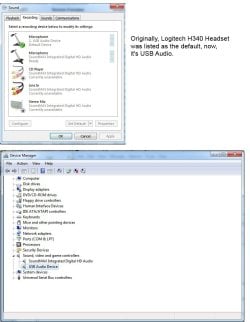
Specifically, the "Recording Devices" tab of your Sound window, like this:

Sound.JPG

And one of Device Manager with the "Sound and Game Controllers" section expanded.

Also, can you let us know what sound controller you're using? Like Realtek, etc. The model of motherboard may help in that regard as well. If you could post that information, that would be great.

Thanks. :)
 

My Computer

Computer type
PC/Desktop
Computer Manufacturer/Model Number
Mellon Labs (custom build)
OS
Win 7 Pro x64/Win 10 Pro x64 dual boot
CPU
AMD FX 8350 Vishera @ 4200
Motherboard
ASUS M5A97 R2.0
Memory
16 GB Mushkin Blackline DDR3-2400 @ 1866 (9-10-10-10-31)
Graphics Card(s)
XFX Radeon R9 280 Double D Black Edition
Sound Card
Realtek HD Audio on MB. Sounds great.
Monitor(s) Displays
Acer 24", Acer 22"
Screen Resolution
3840 x 1080
Hard Drives
1 x Mushkin Chronos 120 GB SSD (Win 10)
1 x Samsung 850 EVO 250 GB SSD (Win 7)
1 x WD 1TB SATA Blue
1 x WD 1TB SATA Green
PSU
Corsair TX-750
Case
CoolerMaster HAF 912+
Cooling
Coolermaster Seidon 240M Liquid AIO. 6 case fans
Keyboard
Logitech G710+
Mouse
Logitech G500s
Internet Speed
Much better since I got fiber, but still way overpriced.
Antivirus
MSE, Malware Bytes for scanning
Browser
Firefox
Other Info
Corsair VOID USB headphones.

A Mellon Labs X-1 - LCD Smartie driven system status display.

Brought to you by the letter E
Hi,

I have attached both images as you requested. Thank you. Jane
 

Attachments

  • recording img.jpg
    recording img.jpg
    72.5 KB · Views: 3

My Computer

OS
Windows 7
Jane,

I checked the Microsoft forums about the mic issue, and they offered these steps which apparently work to resolve the issue.

Try this, please, and let me know how it works out:

1. Run Device Manager
2. Go to the area that lists your headset (probably "Sound, video and game controllers")
3. Right click your headset and select "Properties"
4. Go to the "Drivers" tab
5. Click "Roll back driver"

If "Roll back driver" is greyed out, do the following:

1. Right click your headset and select "Update Driver Software..."
2. Select "Browse my computer for driver software"
3. Select "USB Audio Device" from the list


Hopefully that will work as Logitech doesn't seem interested in supporting the headset. Their forums hardly show anything, and their support pages have only a vague mention of the product. It doesn't have a driver package to make it work, it uses the standard Windows audio driver package. So hopefully, the guy at MS was right and the steps that I outlined might make it work.
 

My Computer

Computer type
PC/Desktop
Computer Manufacturer/Model Number
Mellon Labs (custom build)
OS
Win 7 Pro x64/Win 10 Pro x64 dual boot
CPU
AMD FX 8350 Vishera @ 4200
Motherboard
ASUS M5A97 R2.0
Memory
16 GB Mushkin Blackline DDR3-2400 @ 1866 (9-10-10-10-31)
Graphics Card(s)
XFX Radeon R9 280 Double D Black Edition
Sound Card
Realtek HD Audio on MB. Sounds great.
Monitor(s) Displays
Acer 24", Acer 22"
Screen Resolution
3840 x 1080
Hard Drives
1 x Mushkin Chronos 120 GB SSD (Win 10)
1 x Samsung 850 EVO 250 GB SSD (Win 7)
1 x WD 1TB SATA Blue
1 x WD 1TB SATA Green
PSU
Corsair TX-750
Case
CoolerMaster HAF 912+
Cooling
Coolermaster Seidon 240M Liquid AIO. 6 case fans
Keyboard
Logitech G710+
Mouse
Logitech G500s
Internet Speed
Much better since I got fiber, but still way overpriced.
Antivirus
MSE, Malware Bytes for scanning
Browser
Firefox
Other Info
Corsair VOID USB headphones.

A Mellon Labs X-1 - LCD Smartie driven system status display.

Brought to you by the letter E
Thanks again for your help. I followed the steps above and unfortunately, the result is the same, the mic still does not work. I also searched the Logitech forum, but I appreciate the time you took to do so as well, in case I missed any info.

At this point, I'm giving up on this headset, and will not purchase another one as I now have two with non-working mics. It's good for listening to audio, at least.

Again, many thanks. Jane
 

My Computer

OS
Windows 7
I'm sorry we couldn't get it working, Jane.

If you do need another headset with MIC abilities, Corsair has some nice offerings. Their build quality is good and the support is there too. I have a pair that I really like. Food for thought.
 

My Computer

Computer type
PC/Desktop
Computer Manufacturer/Model Number
Mellon Labs (custom build)
OS
Win 7 Pro x64/Win 10 Pro x64 dual boot
CPU
AMD FX 8350 Vishera @ 4200
Motherboard
ASUS M5A97 R2.0
Memory
16 GB Mushkin Blackline DDR3-2400 @ 1866 (9-10-10-10-31)
Graphics Card(s)
XFX Radeon R9 280 Double D Black Edition
Sound Card
Realtek HD Audio on MB. Sounds great.
Monitor(s) Displays
Acer 24", Acer 22"
Screen Resolution
3840 x 1080
Hard Drives
1 x Mushkin Chronos 120 GB SSD (Win 10)
1 x Samsung 850 EVO 250 GB SSD (Win 7)
1 x WD 1TB SATA Blue
1 x WD 1TB SATA Green
PSU
Corsair TX-750
Case
CoolerMaster HAF 912+
Cooling
Coolermaster Seidon 240M Liquid AIO. 6 case fans
Keyboard
Logitech G710+
Mouse
Logitech G500s
Internet Speed
Much better since I got fiber, but still way overpriced.
Antivirus
MSE, Malware Bytes for scanning
Browser
Firefox
Other Info
Corsair VOID USB headphones.

A Mellon Labs X-1 - LCD Smartie driven system status display.

Brought to you by the letter E
Thanks for the suggestion. I was actually going to ask if you could recommend another headset and I will definitely check the Corsair offerings.

Have a great day and again, many thanks. Jane
 

My Computer

OS
Windows 7
If "Roll back driver" is greyed out, do the following:

1. Right click your headset and select "Update Driver Software..."
2. Select "Browse my computer for driver software"
3. Select "USB Audio Device" from the list
I had the same problem as described in the original post, suddenly no microphone circa mid-December but with Windows 10, and the above did the trick for me. Thanks!
 

My Computer

Computer Manufacturer/Model Number
Acer Aspire 5536
OS
Windows 7 Home Premium x64
CPU
AMD Athlon(tm) X2 Dual-Core QL-64
Motherboard
Acer (JV50PU )
Memory
3GB
Graphics Card(s)
ATI Radeon HD 3200 Graphics
Sound Card
AMD High Definition Audio Device
Monitor(s) Displays
Generic PnP Monitor
Screen Resolution
1366x768
Hard Drives
232gb (WDC WD2500BPVT-00JJ5T0 ATA Device)
Solution found!

Hi Mellon Head,

I re-read and followed your instructions again, and still no working mic. I then decided to unplug my Logitech 340 Headset from the USB port, then I uninstalled the "USB Audio" driver completely, then restarted my pc.

I then plugged the Logitech H340 headset back into the same USB port, waited for it to install, and, now, the mic is working. I made two calls, one long and one short, to verify that.

I don't know if this is a permanent solution, but I now know how to get the mic working if it stops again, (now shows as Logitech H340 in preferences).

Thanks again for all of your help, which helped me find a solution. Have a great weekend!

Jane
 

My Computer

OS
Windows 7
Glad you got it working, you two. And Nght, thanks for the rep. Much appreciated. :)
 

My Computer

Computer type
PC/Desktop
Computer Manufacturer/Model Number
Mellon Labs (custom build)
OS
Win 7 Pro x64/Win 10 Pro x64 dual boot
CPU
AMD FX 8350 Vishera @ 4200
Motherboard
ASUS M5A97 R2.0
Memory
16 GB Mushkin Blackline DDR3-2400 @ 1866 (9-10-10-10-31)
Graphics Card(s)
XFX Radeon R9 280 Double D Black Edition
Sound Card
Realtek HD Audio on MB. Sounds great.
Monitor(s) Displays
Acer 24", Acer 22"
Screen Resolution
3840 x 1080
Hard Drives
1 x Mushkin Chronos 120 GB SSD (Win 10)
1 x Samsung 850 EVO 250 GB SSD (Win 7)
1 x WD 1TB SATA Blue
1 x WD 1TB SATA Green
PSU
Corsair TX-750
Case
CoolerMaster HAF 912+
Cooling
Coolermaster Seidon 240M Liquid AIO. 6 case fans
Keyboard
Logitech G710+
Mouse
Logitech G500s
Internet Speed
Much better since I got fiber, but still way overpriced.
Antivirus
MSE, Malware Bytes for scanning
Browser
Firefox
Other Info
Corsair VOID USB headphones.

A Mellon Labs X-1 - LCD Smartie driven system status display.

Brought to you by the letter E
What most likely happened because you removed all 3 party drivers is Windows 7 pickup up on the head phones being plugged in and you are now using the Windows 7 generic head phone drivers. If your head phone are working to your liking their is no problem.

Jack
 

My Computer

Computer type
PC/Desktop
Computer Manufacturer/Model Number
Home made Desktop
OS
Windows 10 Pro. 64/ version 1709 Windows 7 Pro/64
CPU
Intel i7-6800K @ 4.3
Motherboard
ASUS X-99 Deluxe II
Memory
Corsair Platinum 16 gig @2400
Graphics Card(s)
EVGA GTX 1070 OC
Monitor(s) Displays
Asus 27" LED LCD/VE278Q
Screen Resolution
1920-1080 or 1280-720 HDMI
Hard Drives
INTEL SSD 730-240 Gb Sata 3.0/
PSU
EVGA Platium 1200W
Case
Phanteks Luxe Tempered Glass 8 fans/ one radiator
Cooling
XSPC/ Water Cooled CPU
Keyboard
Das 4 Professional
Mouse
Logitech M705/MX Anywhere 2-S
Internet Speed
100 mbits
Antivirus
Microsoft Security Essentials/ Malwarebytes Premium 3.0/ SAS
Browser
I.E. 11 default/Firefox/ ISP Time Warner Cable/Spectrum
Other Info
LG BluRay Burner/
Sound system-KLipsch-THX/
Icy Dock ssd Hot Swap bays.
Back
Top