Help for Windows Media Player, "Class Not Registered"

Jadiction

New member
Local time
11:40 AM
Messages
9
[[RESOLVED]] Help for Windows Media Player, "Class Not Registered"

-----RESOLVED----- Thanks To SledgeDG-----

I've never seen a problem like this before, when i try to play a file for Windows Media Player, it says "Class not registered" >> Screenshot from Lightshot <<, Any resolves? Thank you.

Sreenshots:

Screenshot from Lightshot
 
Last edited:

My Computer My Computer

OS
Windows 7 Ultimate X64
I've never seen a problem like this before, when i try to play a file for Windows Media Player, it says "Class not registered" >> Screenshot from Lightshot <<, Any resolves? Thank you.

Sreenshots:

Screenshot from Lightshot


Could be no default program is associated with mp3. does this happen with other audio players?

could also be the OS doesn't recognize the mp3 extension


Ken
 

My Computer My Computer

Computer Manufacturer/Model Number
HP Pavillion dv-7 1005 Tx
OS
Win 8 Release candidate 8400
CPU
[email protected]
Memory
4 gigs
Graphics Card(s)
Nvidia 9600M
Sound Card
HD built-in
Monitor(s) Displays
17" Wxga
Screen Resolution
1440x900
Cooling
none
Internet Speed
45Mb down 5Mb up
Hello Jadiction and welcome to SF
Such errors usually point towards a damaged or unregistered quartz.dll
Let's re-register the dll first, that's the easy part ;)

Open a command line (CMD) right click, run as administrator and put in

regsvr32 quartz.dll
after a few seconds you should get a message that the action was completed successfully.

Do that first, check if it works again and report back

-DG
 

My Computer My Computer

Computer Manufacturer/Model Number
HP m8000n
OS
Windows 7 Ultimate x86
CPU
DualCore AMD Athlon 64 X2, 2600 MHz 5200+
Motherboard
Asus M2N68-LA (Narra)
Memory
Samsung 2GB DDR2
Graphics Card(s)
Onboard NVIDIA GeForce 6150SE nForce 430
Sound Card
Onboard nVIDIA nForce 6100-430 (MCP61P)
Monitor(s) Displays
Westinghouse 19" LED
Screen Resolution
1280x1024
Hard Drives
SATA II Seagate Barracuda 500GB
USB II WD Elements 500GB
USB II WD My Book 1TB
USB II WD My Book 2TB
PSU
Stock (HP)
Case
Stock (HP)
Cooling
Stock
Keyboard
Logitech Classic KB 200
Mouse
Standard HP opticle USB mouse
My default program was Windows Media player, then it did this, now it won't let me select it as a default, even if i browse and find it.
I tried the "regsvr32 quartz.dll" and that didn't resolve it.
 

My Computer My Computer

OS
Windows 7 Ultimate X64

My Computer My Computer

Computer Manufacturer/Model Number
HP m8000n
OS
Windows 7 Ultimate x86
CPU
DualCore AMD Athlon 64 X2, 2600 MHz 5200+
Motherboard
Asus M2N68-LA (Narra)
Memory
Samsung 2GB DDR2
Graphics Card(s)
Onboard NVIDIA GeForce 6150SE nForce 430
Sound Card
Onboard nVIDIA nForce 6100-430 (MCP61P)
Monitor(s) Displays
Westinghouse 19" LED
Screen Resolution
1280x1024
Hard Drives
SATA II Seagate Barracuda 500GB
USB II WD Elements 500GB
USB II WD My Book 1TB
USB II WD My Book 2TB
PSU
Stock (HP)
Case
Stock (HP)
Cooling
Stock
Keyboard
Logitech Classic KB 200
Mouse
Standard HP opticle USB mouse
I tried to uninstall and reinstall. Found no file to re-install, and found no way to uninstall.
 

My Computer My Computer

OS
Windows 7 Ultimate X64
not un install...just install on top of the old one from the link in my former post

For now run the full scan first
 

My Computer My Computer

Computer Manufacturer/Model Number
HP m8000n
OS
Windows 7 Ultimate x86
CPU
DualCore AMD Athlon 64 X2, 2600 MHz 5200+
Motherboard
Asus M2N68-LA (Narra)
Memory
Samsung 2GB DDR2
Graphics Card(s)
Onboard NVIDIA GeForce 6150SE nForce 430
Sound Card
Onboard nVIDIA nForce 6100-430 (MCP61P)
Monitor(s) Displays
Westinghouse 19" LED
Screen Resolution
1280x1024
Hard Drives
SATA II Seagate Barracuda 500GB
USB II WD Elements 500GB
USB II WD My Book 1TB
USB II WD My Book 2TB
PSU
Stock (HP)
Case
Stock (HP)
Cooling
Stock
Keyboard
Logitech Classic KB 200
Mouse
Standard HP opticle USB mouse
The scan is running. I didn't see the install link before. Haha, sorry.
 

My Computer My Computer

OS
Windows 7 Ultimate X64

My Computer My Computer

Computer Manufacturer/Model Number
HP m8000n
OS
Windows 7 Ultimate x86
CPU
DualCore AMD Athlon 64 X2, 2600 MHz 5200+
Motherboard
Asus M2N68-LA (Narra)
Memory
Samsung 2GB DDR2
Graphics Card(s)
Onboard NVIDIA GeForce 6150SE nForce 430
Sound Card
Onboard nVIDIA nForce 6100-430 (MCP61P)
Monitor(s) Displays
Westinghouse 19" LED
Screen Resolution
1280x1024
Hard Drives
SATA II Seagate Barracuda 500GB
USB II WD Elements 500GB
USB II WD My Book 1TB
USB II WD My Book 2TB
PSU
Stock (HP)
Case
Stock (HP)
Cooling
Stock
Keyboard
Logitech Classic KB 200
Mouse
Standard HP opticle USB mouse
  • Like
Reactions: Arc
Hi Jadiction ! :D

I hope your problem is already solved with DG's assistance . It is due to a missing \ corrupted registry file . If that one is a system registry , SFC will fix it , certainly .

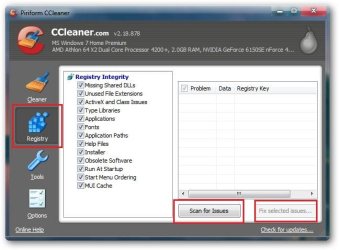
One more thing you should do . Download and install CCleaner , run a registry scan with it , and opt for fixing the issues .

sshot-1.jpg

Best of luck mate :D
 

My Computer My Computer

Computer type
PC/Desktop
Computer Manufacturer/Model Number
Self Assembled
OS
Microsoft Windows 10 Pro Insider Preview 64-bit
CPU
Intel(R) Core(TM) i3-4130 CPU @ 3.40GHz
Motherboard
Gigabyte Technology Co., Ltd. B85M-D3H
Memory
Corsair Vengence 4GB x2 (8.00GB Dual-Channel DDR3 @ 798MHz)
Graphics Card(s)
2047MB GeForce GTS 450 (ZOTAC International)
Sound Card
Onboard (Realtek High Definition Audio)
Monitor(s) Displays
LG Flatron E2040T
Screen Resolution
1600x900
Hard Drives
Western Digital 1 TB
Seagate 500 GB
PSU
Corsair VS550
Case
Cooler Master K380
Cooling
Cooler Master Seidon 120V Plus
Keyboard
Logitech MK260r
Mouse
Logitech MK260r
Internet Speed
PMPL Broadband
Antivirus
Windows Defender + MBAM
Browser
Firefox
Other Info
Dell Studio 15" Laptop
System file checker worked. Thanks alot DG. ;D
 

My Computer My Computer

OS
Windows 7 Ultimate X64
you're very welcome, Jadiction !
I'm glad it worked for you.
Thanks for the feedback

-DG
 

My Computer My Computer

Computer Manufacturer/Model Number
HP m8000n
OS
Windows 7 Ultimate x86
CPU
DualCore AMD Athlon 64 X2, 2600 MHz 5200+
Motherboard
Asus M2N68-LA (Narra)
Memory
Samsung 2GB DDR2
Graphics Card(s)
Onboard NVIDIA GeForce 6150SE nForce 430
Sound Card
Onboard nVIDIA nForce 6100-430 (MCP61P)
Monitor(s) Displays
Westinghouse 19" LED
Screen Resolution
1280x1024
Hard Drives
SATA II Seagate Barracuda 500GB
USB II WD Elements 500GB
USB II WD My Book 1TB
USB II WD My Book 2TB
PSU
Stock (HP)
Case
Stock (HP)
Cooling
Stock
Keyboard
Logitech Classic KB 200
Mouse
Standard HP opticle USB mouse
wow i ran into this same issue. Lucky i came upon this thread. I used SFC and it found 2 errors that it fixed. I also ran CClean and my issue was resolved.

i been finding alot of useful info on this forum recently and wanted to register to say thanks!
 

My Computer My Computer

OS
Windows 7 64 bit
Back
Top