
Help formatting my old XP drive

Serantos

New member
Local time
6:10 AM
Messages
10
Location
Las Vegas
Hello,
I am having a problem formatting a drive. When I first built this computer, I had two 500GB HDD's installed. Originally I installed XP on the machine. Some time ago, I installed Windows 7 on my other drive. I have been using Windows 7 for months now, and I no longer wish to use Windows XP.

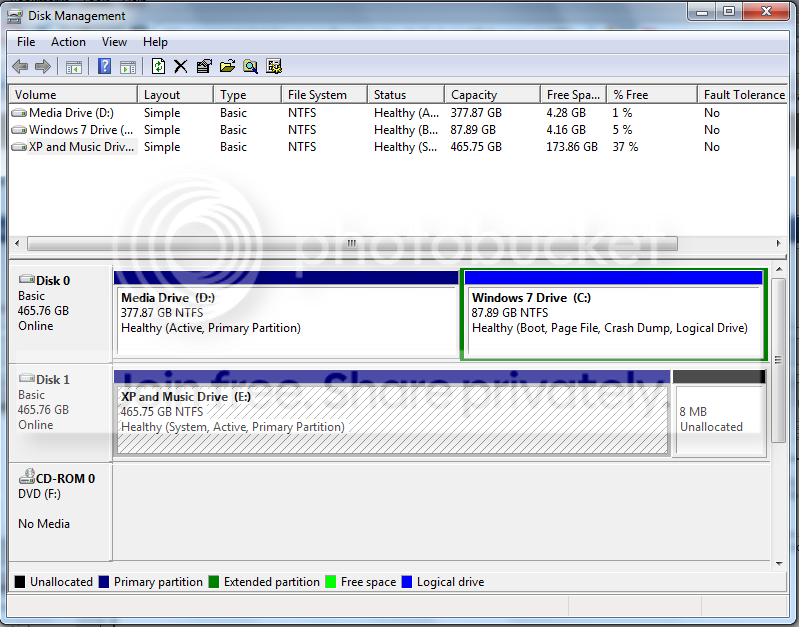
I am running out of space on my Windows 7 Drive, I originally only allocated 90GB to it. I want to format my XP drive so I can move things around and get more space, but I cannot reformat, disk management gives me the error, "Windows cannot format the System Partition on this disk."

I REALLY REALLY do not want to have to reinstall windows 7.

This is what my drives look like.
Drives.png


I basically want to format the XP drive and make that my new media drive, and extending the current Windows 7 drive to include the space that I will gain from moving my media drive.

Any help would be greatly appreciated.

-Shane
 

My Computer

Computer Manufacturer/Model Number
Custom
OS
Windows 7 Ultimate x64
CPU
Intel Q6600 2.4GHz Quad Core
Memory
4GB
Graphics Card(s)
NVidia 8600GT
Sound Card
Audigy 2ZS
Hello,
I am having a problem formatting a drive. When I first built this computer, I had two 500GB HDD's installed. Originally I installed XP on the machine. Some time ago, I installed Windows 7 on my other drive. I have been using Windows 7 for months now, and I no longer wish to use Windows XP.

I am running out of space on my Windows 7 Drive, I originally only allocated 90GB to it. I want to format my XP drive so I can move things around and get more space, but I cannot reformat, disk management gives me the error, "Windows cannot format the System Partition on this disk."

I REALLY REALLY do not want to have to reinstall windows 7.

This is what my drives look like.

Drives.png


I basically want to format the XP drive and make that my new media drive, and extending the current Windows 7 drive to include the space that I will gain from moving my media drive.

Any help would be greatly appreciated.

-Shane

Here is a url with a video toward the end explaining how to format. I wish you luck


How to Format a Hard Drive
 

My Computer

Computer type
PC/Desktop
Computer Manufacturer/Model Number
Dell XPS 420
OS
Windows 10, Home Clean Install
CPU
Intel Core2 processsor Q8200(2.33Ghz 1333FSB) Quad Core Tech
Motherboard
Dell
Memory
6 gb
Graphics Card(s)
ATI Radeon 256MB HD3650
Sound Card
Intergrated 7.1 Channel Audio
Monitor(s) Displays
Dell SP2009W 20"
Hard Drives
640 GB Serial ATA Hard drive
Cooling
Fan
Keyboard
Dell USB Keyboard
Mouse
Dell Premium Optical USB
Internet Speed
DSL 2.85
I don't want to sound rude or anything like that because I'm new here. Maybe I didn't specify in my first post but I am far from computer illiterate. I am trying to ask how to format this drive that windows isn't letting me format.

I do not want to have to reinstall windows 7, I just want the XP data gone. Unfortunately, that is where my boot information is being kept, and I do not know how to circumvent that.

any help would be greatly appreciated.
 

My Computer

Computer Manufacturer/Model Number
Custom
OS
Windows 7 Ultimate x64
CPU
Intel Q6600 2.4GHz Quad Core
Memory
4GB
Graphics Card(s)
NVidia 8600GT
Sound Card
Audigy 2ZS
To accomplish what you want you must set Win7 drive as first HD to boot in BIOS boot order, mark XP and the Media drives inactive, mark the Win7 drive active, then recover the MBR to Win7 by running Startup Repair 3 separate times.

Back up your files and a Win7 system image externally or to the other drive.

Now reboot, Enter BIOS Setup by tapping key given on first bootup screen, set Win7 partition as first HDD to boot, after DVD drive. Save settings and exit BIOS.

Boot into Win7 DVD Repair console, click through to Recovery tools list and open a Command Prompt, type:

DISKPART
LIST DISK
SELECT DISK # (for XP drive)
LIST PARTITION
SELECT PARTITION # (for XP partition)
INACTIVE
SELECT DISK # (for Win7 drive)
SELECT PARTITION # (for Media partition)
INACTIVE
SELECT PARTITION # (for Win7 Partition)
ACTIVE
EXIT

Return to DVD Recovery Tools list and run Startup Repair 3 separate times to attempt repair and then rewrite MBR to Windows 7.

Check Disk Management that WIn7 is now System Active so you can now format your XP HD.
 
Greg, thank you very much for the detailed post. After reading all of this, it seems much more difficult than I thought it would be, and time consuming. If I just do a complete clean install of Windows 7, will I be able to format BOTH of my hard drives with no problems?

If that's the case, I'll just back up the files I need. I was trying to avoid this because I don't have an external HDD, but I can borrow one I'm sure. It looks like I was going to need to backup either way it goes, my Win7 install is fairly fresh, so it wont be too hard to get back to where I am now.
 

My Computer

Computer Manufacturer/Model Number
Custom
OS
Windows 7 Ultimate x64
CPU
Intel Q6600 2.4GHz Quad Core
Memory
4GB
Graphics Card(s)
NVidia 8600GT
Sound Card
Audigy 2ZS
Didn't mean to scare you off!

But I'll never argue with anyone wanting to clean reinstall, because nothing beats it including getting a new computer - since most all of today's machines are loaded with bloatware with no DVD to clean reinstall!

You can back up your data to the other internal HD and just unplug it during Win7 reinstall if you want, then plug it back in to move data back. But you'll still need to deactivate the two partitions so it won't interfere with Win7 boot after being plugged back in.

But if you want to wipe both slates clean during install, then set DISK0 as first HD in BIOS boot order after DVD, boot Win7 DVD, select "connect to internet during install" to get latest drivers/Updates during install, then Custom install, then use Drive Options to delete all partitions on both HD's, create a new one for Win7, then format before install.

Later use Disk Management to create your data drives so you can format them NTFS Logical so that they can never be marked active (unless converted) as the Media drive somehow was.
 
Ok, I just couldn't remember if during the installation of Windows I could format both drives with no error messages. I'll leave my boot order alone, and format both drives and install on my old XP drive which is Disk 0.

Sound about right?

Again, thanks for the help.
 

My Computer

Computer Manufacturer/Model Number
Custom
OS
Windows 7 Ultimate x64
CPU
Intel Q6600 2.4GHz Quad Core
Memory
4GB
Graphics Card(s)
NVidia 8600GT
Sound Card
Audigy 2ZS
Sounds like a plan.

When you wipe the drives ilke that, the installer will want to make the 100mb System Reserved partition which holds the boot and repair console made available at F8 during bootup which is useful. But there is a way to avoid it if you dont' want it.

Let us know if you need any help.
 
That's fine. I'll try and do this today, if I can find an external for backing up. I'll post back here when I'm done. Thank you so much for all the help Greg!
 

My Computer

Computer Manufacturer/Model Number
Custom
OS
Windows 7 Ultimate x64
CPU
Intel Q6600 2.4GHz Quad Core
Memory
4GB
Graphics Card(s)
NVidia 8600GT
Sound Card
Audigy 2ZS
Serantos,

I have been exactly where you are.

I certainly won't disagree with Greg that nothing beats a clean slate, but his post#4 is still excellent advice. It may seem complicated, but really he has laid out every step you'll need to follow. That may take a lot more lines than; format + reinstall, but it isn't more work -especially if you have numerous programs installed.

And of course, if it doesn't work out, you have only lost a half hour and can proceed to Plan B.
 

My Computer

Computer type
PC/Desktop
Computer Manufacturer/Model Number
Custom
OS
7 x64 Ultimate
CPU
AMD Ryzen 5
Motherboard
Gigabyte GA-AB350-Gaming
Memory
16GB DDR4
Graphics Card(s)
Radeon R7 360
Monitor(s) Displays
2 x Dell U2518D
Screen Resolution
2560x1440 2560x1440
Hard Drives
WD 500GB x2
Samsung SSD 128MB (OS)
XPG SX8200 Pro M.2 2280 1TB
PSU
Antec 500
Cooling
Hyper 212 EVO
Keyboard
Logitech cordless K800
Mouse
Logitech M510
Antivirus
Avira
I never posted back to update on this issue. I just ended up reformatting and reinstalling. The only reason I didn't want to do it was because of the time it would have taken to back up my files. Everything went smoothly except for the fact that I had made one of my drives a dynamic drive and windows setup wanted nothing to do with it. I formatted it, but could not make it into one partition.

Once I booted Windows 7, I could go in and change the drive back into a simple drive then turned it all into one partition.

Greg, I can't thank you enough for the help, I'm sorry I didn't go with your route because I'm sure you had to look up all of that stuff somewhere. I really do appreciate it though.

-Shane
 

My Computer

Computer Manufacturer/Model Number
Custom
OS
Windows 7 Ultimate x64
CPU
Intel Q6600 2.4GHz Quad Core
Memory
4GB
Graphics Card(s)
NVidia 8600GT
Sound Card
Audigy 2ZS
I'm sure you had to look up all of that stuff somewhere.
-Shane

Nope, we help do these here every day - over 100+ successful dual boot extractions since Win7 was released.

Lots of users want rid of their XP/Vista almost as soon as they experience Win7.

Glad it worked out for ya. Enjoy Win7.
 
Please correct me here if I'm wrong, but it could also be due to the fact that the pagefile.sys is located on the XP drive and as such, you need to disable the pagefile.sys and then attempt a format.
 

My Computer

Computer Manufacturer/Model Number
Home Built
OS
Windows 7 x64 Ultimate
CPU
Intel Quad Core Q6600
Motherboard
Asus P5Q
Memory
OCZ Platinum 2x4GB 1066
Graphics Card(s)
Asus EAH 3450
Sound Card
On board
Monitor(s) Displays
Dell 17'
Hard Drives
1xsata 320GB OS
1xsata 500GB VM
1xsata 640GB Dynamic mirrored with 1.0TB
1xsata 1.0TB Dynamic mirrored with 640GB
1xsata 1.5TB External via E-sata Docking Station
PSU
OCZ 700MXSP
Case
Thermaltake full-tower
Cooling
Air
Back
Top