Solved Help! I can't open .mlc files

papin97

New member
Member
VIP
Local time
9:23 PM
Messages
118
Location
Tangerang, Banten, Indonesia
Help! I can't open .mlc files. The description is "Language Pack File_", and show "Open With" if I double click.
Anyone know how to enable it?
 

My Computer My Computer

At a glance

Windows 7 Home Premium 64bit OEMIntel core i5-2430M @2,4GHz (Quad Core)RAM 8GB DDR3 (Dual Channel)nVidia GeForce GT 540M 2,7GB , Intel Graphics...
Computer type
Laptop
Computer Manufacturer/Model Number
Acer Aspire 4755G
OS
Windows 7 Home Premium 64bit OEM
CPU
Intel core i5-2430M @2,4GHz (Quad Core)
Motherboard
Acer Aspire 4755G
Memory
RAM 8GB DDR3 (Dual Channel)
Graphics Card(s)
nVidia GeForce GT 540M 2,7GB , Intel Graphics 4096MB
Sound Card
Realtek High Definition Audio
Monitor(s) Displays
Internal Monitor
Screen Resolution
1366*768
Hard Drives
WDC WD6400BPVT-22HXZT1 (640GB)
Keyboard
Default Keyboard
Mouse
Optical Mouse
Internet Speed
~10 Mbps
Antivirus
Microsoft Security Essentials
Browser
Google Chrome
Other Info
This is my second laptop after my old notebook that broke because file system is corrupted and I can't recover it.
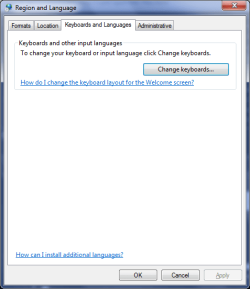
If you are talking about the MS Windows Language interface packs, you don't normally open them directly. They are used to change the display language of Windows. If you go to control panel and look in the Region And Language section there is an option to install or uninstall display languages. I believe if you then choose to install display language, then choose Browse computer or network, you can point it to the .mlc file to install your language pack.

If you needed the program that actually installs it (for some other reason) it is listed as lpksetup.exe on your system drive.
 

My Computer My Computer

At a glance

Windows 7 Ultimate x64Intel i5 750GSkill 8GB DDR3-1600EVGA Nvidia GTX 460
OS
Windows 7 Ultimate x64
CPU
Intel i5 750
Motherboard
ASUS P7P55D Pro
Memory
GSkill 8GB DDR3-1600
Graphics Card(s)
EVGA Nvidia GTX 460
Sound Card
Onboard and external Presonus Firestudio Project
Monitor(s) Displays
2 x NEC LCD 1850E
Screen Resolution
1280x1024 x2
Hard Drives
lots of 'em
PSU
Thermaltake ToughPower 750W
Case
NZXT Lexa
Cooling
Air cooled
Keyboard
Logitech G15
Mouse
Logitech MX Revolution
Internet Speed
25 Mb/s down 1.5 Mb/s up
Other Info
This is my recording studio PC. I also have a gaming rig, a HTPC, an old dual-core system I set up as a server, and a few old dinosaurs (the oldest is an Intel P-90) that I use for DOS and Win95 gaming when I feel nostalgic.
No, There is not option to install language. See the Image.
And I only find lpksetup.ex_ in /windows/system32
 

Attachments

  • no option to install language.PNG
    no option to install language.PNG
    12.3 KB · Views: 19
Last edited:

My Computer My Computer

At a glance

Windows 7 Home Premium 64bit OEMIntel core i5-2430M @2,4GHz (Quad Core)RAM 8GB DDR3 (Dual Channel)nVidia GeForce GT 540M 2,7GB , Intel Graphics...
Computer type
Laptop
Computer Manufacturer/Model Number
Acer Aspire 4755G
OS
Windows 7 Home Premium 64bit OEM
CPU
Intel core i5-2430M @2,4GHz (Quad Core)
Motherboard
Acer Aspire 4755G
Memory
RAM 8GB DDR3 (Dual Channel)
Graphics Card(s)
nVidia GeForce GT 540M 2,7GB , Intel Graphics 4096MB
Sound Card
Realtek High Definition Audio
Monitor(s) Displays
Internal Monitor
Screen Resolution
1366*768
Hard Drives
WDC WD6400BPVT-22HXZT1 (640GB)
Keyboard
Default Keyboard
Mouse
Optical Mouse
Internet Speed
~10 Mbps
Antivirus
Microsoft Security Essentials
Browser
Google Chrome
Other Info
This is my second laptop after my old notebook that broke because file system is corrupted and I can't recover it.
Papin, check my answer to your question on another thread: ** REMOVED **

You can not use language packs and change the display language for you have Home Premium. Language packs work only on Ultimate and Enterprise.

Kari
 
Last edited by a moderator:

My Computer My Computer

At a glance

Windows 10 Pro x64 EN-GB1.6 GHz Intel Core i7-720QM Processor6 GBATI Mobility Radeon HD 5850 Graphics
Computer type
Laptop
Computer Manufacturer/Model Number
HP ENVY 17-1150eg
OS
Windows 10 Pro x64 EN-GB
CPU
1.6 GHz Intel Core i7-720QM Processor
Memory
6 GB
Graphics Card(s)
ATI Mobility Radeon HD 5850 Graphics
Sound Card
Beats sound system with integrated subwoofer
Monitor(s) Displays
17" laptop display, 22" LED and 32" Full HD TV through HDMI
Screen Resolution
1600*900 (1), 1920*1080 (2&3)
Hard Drives
Internal: 2 x 500 GB SATA Hard Disk Drive 7200 rpm
External: 2TB for backups, 3TB USB3 network drive for media
Cooling
As Envy runs a bit warm, I have it on a Cooler Master pad
Keyboard
Logitech diNovo Media Desktop Laser (bluetooth)
Mouse
Logitech Performance Mouse MX
Internet Speed
50/10 Mbps VDSL
Antivirus
Windows Defender 4.3.9431.0
Browser
Maxthon 3.5.2., IE11

Attachments

  • download indonesia LIP.PNG
    download indonesia LIP.PNG
    2.3 KB · Views: 15
Last edited:

My Computer My Computer

At a glance

Windows 7 Home Premium 64bit OEMIntel core i5-2430M @2,4GHz (Quad Core)RAM 8GB DDR3 (Dual Channel)nVidia GeForce GT 540M 2,7GB , Intel Graphics...
Computer type
Laptop
Computer Manufacturer/Model Number
Acer Aspire 4755G
OS
Windows 7 Home Premium 64bit OEM
CPU
Intel core i5-2430M @2,4GHz (Quad Core)
Motherboard
Acer Aspire 4755G
Memory
RAM 8GB DDR3 (Dual Channel)
Graphics Card(s)
nVidia GeForce GT 540M 2,7GB , Intel Graphics 4096MB
Sound Card
Realtek High Definition Audio
Monitor(s) Displays
Internal Monitor
Screen Resolution
1366*768
Hard Drives
WDC WD6400BPVT-22HXZT1 (640GB)
Keyboard
Default Keyboard
Mouse
Optical Mouse
Internet Speed
~10 Mbps
Antivirus
Microsoft Security Essentials
Browser
Google Chrome
Other Info
This is my second laptop after my old notebook that broke because file system is corrupted and I can't recover it.

Yes, I am sure.

In some countries, as for instance in my native Finland, computers sold with pre-installed Windows let you select the language at first boot, so called OoBE boot (Out of Box Experience). This determines which language the user wants to set up his / her computer and in which language he wants Windows. In Finland for instance when you boot a PC first time, before it even asks your initial username, user is asked if he / she wants to use PC in one of the official languages of Finland (Finnish and Swedish), giving also an option to select English which in Scandinavian countries has an almost official "third domestic language" status.

This selection can not be changed later, i.e. if you later want to do a factory reset the language selection is no longer available, so it is extremely important to select the correct language at first boot. Most of my rigs are bought here in Germany but I have for instance an HP HDX16 laptop which when first booted asked if I want Finnish, Swedish or English. I selected English and can no longer go back to that selection so even if I decided to do a complete factory reset, this computer would be set up using English, without possibility to select the language again.

Kari
 

My Computer My Computer

At a glance

Windows 10 Pro x64 EN-GB1.6 GHz Intel Core i7-720QM Processor6 GBATI Mobility Radeon HD 5850 Graphics
Computer type
Laptop
Computer Manufacturer/Model Number
HP ENVY 17-1150eg
OS
Windows 10 Pro x64 EN-GB
CPU
1.6 GHz Intel Core i7-720QM Processor
Memory
6 GB
Graphics Card(s)
ATI Mobility Radeon HD 5850 Graphics
Sound Card
Beats sound system with integrated subwoofer
Monitor(s) Displays
17" laptop display, 22" LED and 32" Full HD TV through HDMI
Screen Resolution
1600*900 (1), 1920*1080 (2&3)
Hard Drives
Internal: 2 x 500 GB SATA Hard Disk Drive 7200 rpm
External: 2TB for backups, 3TB USB3 network drive for media
Cooling
As Envy runs a bit warm, I have it on a Cooler Master pad
Keyboard
Logitech diNovo Media Desktop Laser (bluetooth)
Mouse
Logitech Performance Mouse MX
Internet Speed
50/10 Mbps VDSL
Antivirus
Windows Defender 4.3.9431.0
Browser
Maxthon 3.5.2., IE11
Reply

I know that. Before I re-installing, Display Language is appear in my Windows 7 Home Premium. I got Indonesian language from download, not pre-installed. Now, I want to download again. Why I can't open .mlc file? In Default Programs, .mlc file's description is "Language Pack File". If I open it, show "Open With" dialog. Why?
And in my laptop, at first boot, language selection isn't appear, in first bought and after re-installing.
 
Last edited:

My Computer My Computer

At a glance

Windows 7 Home Premium 64bit OEMIntel core i5-2430M @2,4GHz (Quad Core)RAM 8GB DDR3 (Dual Channel)nVidia GeForce GT 540M 2,7GB , Intel Graphics...
Computer type
Laptop
Computer Manufacturer/Model Number
Acer Aspire 4755G
OS
Windows 7 Home Premium 64bit OEM
CPU
Intel core i5-2430M @2,4GHz (Quad Core)
Motherboard
Acer Aspire 4755G
Memory
RAM 8GB DDR3 (Dual Channel)
Graphics Card(s)
nVidia GeForce GT 540M 2,7GB , Intel Graphics 4096MB
Sound Card
Realtek High Definition Audio
Monitor(s) Displays
Internal Monitor
Screen Resolution
1366*768
Hard Drives
WDC WD6400BPVT-22HXZT1 (640GB)
Keyboard
Default Keyboard
Mouse
Optical Mouse
Internet Speed
~10 Mbps
Antivirus
Microsoft Security Essentials
Browser
Google Chrome
Other Info
This is my second laptop after my old notebook that broke because file system is corrupted and I can't recover it.

I'm using size 4 bold font for it looks to me you did not understood me when I gave you a valid and correct answer earlier:

You can not install Windows Language Packs on Home Premium. You need to have Ultimate or Enterprise. Hai capito?

There are some non-authorized methods to use third party tools to get Language Packs installed on Home Premium but I honestly ask you to forget these; all known hacks to use Language Packs cause Windows to lose its validation and genuine status.

An Indonesian Windows 7 can partially use English dialogs using Language Interface Packs (LIP). These are very limited tools, transferring some of the most used features and dialogs in English, but LIP does not change display language. See the difference:

Language Packs. If you're running the Ultimate or Enterprise edition of Windows Vista or Windows 7, you can download any of the 33 available language packs by using Windows Update. Language packs provide a translated version of Windows dialog boxes, menu items, and help content.

Language Interface Packs (LIPs). LIPs can be installed over any edition of Windows Vista and Windows 7, providing a translated version of only the most widely used dialog boxes, menu items, and help content. To install a LIP, you will need to have the required parent language installed on your PC. If your language is listed as "coming soon," it's on the way—check back here for updates.

You can download and install English LIP to Indonesian Home Premium here: Download languages for Windows - Microsoft Windows

You have no legal, valid and working way to change your display language to English.

Kari
 

My Computer My Computer

At a glance

Windows 10 Pro x64 EN-GB1.6 GHz Intel Core i7-720QM Processor6 GBATI Mobility Radeon HD 5850 Graphics
Computer type
Laptop
Computer Manufacturer/Model Number
HP ENVY 17-1150eg
OS
Windows 10 Pro x64 EN-GB
CPU
1.6 GHz Intel Core i7-720QM Processor
Memory
6 GB
Graphics Card(s)
ATI Mobility Radeon HD 5850 Graphics
Sound Card
Beats sound system with integrated subwoofer
Monitor(s) Displays
17" laptop display, 22" LED and 32" Full HD TV through HDMI
Screen Resolution
1600*900 (1), 1920*1080 (2&3)
Hard Drives
Internal: 2 x 500 GB SATA Hard Disk Drive 7200 rpm
External: 2TB for backups, 3TB USB3 network drive for media
Cooling
As Envy runs a bit warm, I have it on a Cooler Master pad
Keyboard
Logitech diNovo Media Desktop Laser (bluetooth)
Mouse
Logitech Performance Mouse MX
Internet Speed
50/10 Mbps VDSL
Antivirus
Windows Defender 4.3.9431.0
Browser
Maxthon 3.5.2., IE11
You can download and install English LIP to Indonesian Home Premium here: Download languages for Windows - Microsoft Windows
You have no legal, valid and working way to change your display language to English.
My Laptop now using English and I want to use Indonesia LIP. I have downloaded Indonesia LIP and show "Open With" dialog
AND I DON'T WANT TO LANGUAGE PACKS, JUST WANT TO LIP, AS WORKED ON WIN7 HOME PREMIUM BEFORE RE-INSTALLING (FROM DOWNLOAD FROM THAT WEBSITE)
 

Attachments

  • can't open .mlc file.PNG
    can't open .mlc file.PNG
    11.3 KB · Views: 25

My Computer My Computer

At a glance

Windows 7 Home Premium 64bit OEMIntel core i5-2430M @2,4GHz (Quad Core)RAM 8GB DDR3 (Dual Channel)nVidia GeForce GT 540M 2,7GB , Intel Graphics...
Computer type
Laptop
Computer Manufacturer/Model Number
Acer Aspire 4755G
OS
Windows 7 Home Premium 64bit OEM
CPU
Intel core i5-2430M @2,4GHz (Quad Core)
Motherboard
Acer Aspire 4755G
Memory
RAM 8GB DDR3 (Dual Channel)
Graphics Card(s)
nVidia GeForce GT 540M 2,7GB , Intel Graphics 4096MB
Sound Card
Realtek High Definition Audio
Monitor(s) Displays
Internal Monitor
Screen Resolution
1366*768
Hard Drives
WDC WD6400BPVT-22HXZT1 (640GB)
Keyboard
Default Keyboard
Mouse
Optical Mouse
Internet Speed
~10 Mbps
Antivirus
Microsoft Security Essentials
Browser
Google Chrome
Other Info
This is my second laptop after my old notebook that broke because file system is corrupted and I can't recover it.
[solved by me]

Okay, Problem Solved. I'm do these myself (not from anyone or internet):D
Please + my rep. I don't have any rep.

  1. I found the file lpksetup.ex_ (See image 1)
  2. I copied and renamed to lpksetup.exe (See image 1 beside lpksetup.ex_)
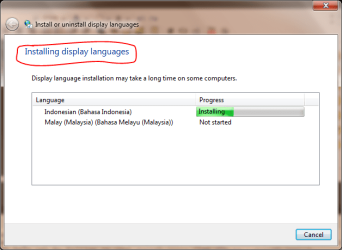
  3. I opened it and showed Install language (Although I can't open two days ago because CLSID missing) and I install new language from .mlc files (See Image 2)
  4. I restarted computer and showed new language. I'm using Bahasa Melayu. (See image 3)
Thanks anyway for giving solutions. Now I can use my new language from my Windows 7 Home Premium and I'm not use any ilegal tools (Look at Image 3 on Taskbar. I'm installed MSE, antivirus for Windows genuine only).
 

Attachments

  • lpksetup.ex_.PNG
    lpksetup.ex_.PNG
    78.1 KB · Views: 85
  • can install language.PNG
    can install language.PNG
    19.9 KB · Views: 45
  • System in bahasa Melayu.PNG
    System in bahasa Melayu.PNG
    78.6 KB · Views: 59
Last edited:

My Computer My Computer

At a glance

Windows 7 Home Premium 64bit OEMIntel core i5-2430M @2,4GHz (Quad Core)RAM 8GB DDR3 (Dual Channel)nVidia GeForce GT 540M 2,7GB , Intel Graphics...
Computer type
Laptop
Computer Manufacturer/Model Number
Acer Aspire 4755G
OS
Windows 7 Home Premium 64bit OEM
CPU
Intel core i5-2430M @2,4GHz (Quad Core)
Motherboard
Acer Aspire 4755G
Memory
RAM 8GB DDR3 (Dual Channel)
Graphics Card(s)
nVidia GeForce GT 540M 2,7GB , Intel Graphics 4096MB
Sound Card
Realtek High Definition Audio
Monitor(s) Displays
Internal Monitor
Screen Resolution
1366*768
Hard Drives
WDC WD6400BPVT-22HXZT1 (640GB)
Keyboard
Default Keyboard
Mouse
Optical Mouse
Internet Speed
~10 Mbps
Antivirus
Microsoft Security Essentials
Browser
Google Chrome
Other Info
This is my second laptop after my old notebook that broke because file system is corrupted and I can't recover it.
Back
Top