HELP in disk partition

mugen

New member
Local time
12:14 PM
Messages
7
help how to get a color blue the simple volume...........


i try to shrink the c:
but it can be a simple volume..
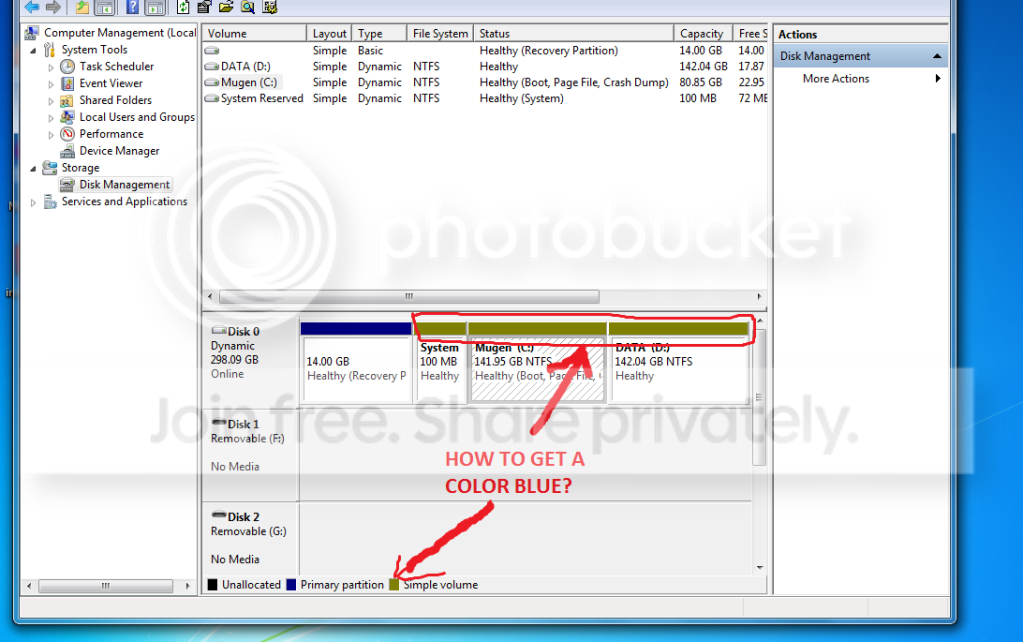
disk.png


help pls...:cry:
 

My Computer

Computer Manufacturer/Model Number
ACER
OS
Windows 7 Ultimate
CPU
E5200 2.5ghz
Memory
2GB Ram
Graphics Card(s)
Nvidia
Sound Card
5.1 built in
Monitor(s) Displays
Acer P205H
Screen Resolution
1600x900
Hard Drives
WD 320GB
Case
Mini case
Keyboard
Acer
Mouse
Acer
Internet Speed
1mbps
help how to get a color blue the simple volume...........


i try to shrink the c:
but it can be a simple volume..


help pls...:cry:
You seem to have all three as dynamic disk's,they should be basic.

You can use partition wizard to convert the dynamic disk's to Basic
Free Download Partition Wizard

However,im pretty sure you will lose your data if you do convert to a basic disc.
 

My Computer

Computer Manufacturer/Model Number
Blue Shards 1.0
OS
Windows 7 Ultimate 64bit
CPU
AMD Phenom II 555 Black Edition Quad Core OC'd to 4.0GHz
Motherboard
ASUS M4A88T-M
Memory
G Skill RipJaw 1333MHz 4GB
Graphics Card(s)
ATI raideon 4250 HD/XFX ATI Radeon 1GB HD4650
Sound Card
Realteck HD Audio
Monitor(s) Displays
2x 22" Widescreen HD Monitors
Hard Drives
500GB Sata 7500RPM
80GB IDE
PSU
850W OCUK Modular
Case
Antec Dark Fleet DF-30
Cooling
Titan Fenrir Pro (CPU)
Keyboard
Logitech Wireless
Mouse
Logitech Wireless
Internet Speed
24Meg
Other Info
Getting soon-
2TB 7200RPM HDD
+8GB RAM
30GB SSD
HD6950/70
Exactly right on losing the data. The drives are going to have to be backed up in order to change to Basic.
 

My Computer

Computer type
PC/Desktop
Computer Manufacturer/Model Number
Self build
OS
Windows 10 Home
CPU
Intel Core i5 3550
Motherboard
ASUS P8Z77-V LX (LGA1155)
Memory
Corsair Vengeance DDR3 16GB
Graphics Card(s)
Nvidia GEForce GTX 970 SSC
Monitor(s) Displays
Hanns-G 23.6", Acer 17"
Screen Resolution
1920x1080, 1440x900
Hard Drives
Sandisk SSD 256 GB
WD500GB
WD640GB
Seagage Ultra + 1TB ext.
BWD 800GB
WD 1TB ext
PSU
Antec 650w
Case
Cooler Master Centurion 534
Cooling
COOLER MASTER GeminII S524, 3 120 mm case fans.
Keyboard
Logitech MK300
Mouse
Logitech MK300
Internet Speed
Cable
Antivirus
MSSE, Malwarebytes
Browser
IE 10, Chrome
help how to get a color blue the simple volume...........


i try to shrink the c:
but it can be a simple volume..


help pls...:cry:
You seem to have all three as dynamic disk's,they should be basic.

You can use partition wizard to convert the dynamic disk's to Basic
Free Download Partition Wizard

However,im pretty sure you will lose your data if you do convert to a basic disc.


HOW to?????
 

My Computer

Computer Manufacturer/Model Number
ACER
OS
Windows 7 Ultimate
CPU
E5200 2.5ghz
Memory
2GB Ram
Graphics Card(s)
Nvidia
Sound Card
5.1 built in
Monitor(s) Displays
Acer P205H
Screen Resolution
1600x900
Hard Drives
WD 320GB
Case
Mini case
Keyboard
Acer
Mouse
Acer
Internet Speed
1mbps
help how to get a color blue the simple volume...........


i try to shrink the c:
but it can be a simple volume..


help pls...:cry:
You seem to have all three as dynamic disk's,they should be basic.

You can use partition wizard to convert the dynamic disk's to Basic
Free Download Partition Wizard

However,im pretty sure you will lose your data if you do convert to a basic disc.


HOW to?????
You need a place to store a backup of this hard drive, another internal hard drive or an external USB hard drive ... Then make an image of the three partitions (or sometimes called Volumes) that are now "Dynamic" and save it to your backup space. Then delete the three partitions and recreate them as "Simple Volumes" and restore the image backup you saved.

Question: you said you wanted to shrink one of the partitions (volumes)? You can only have 4 "Primary" partitions on one hard drive and you have 4 already. Do you want to make another Partition?

Cheers!
Robert
 

My Computer

OS
...
You seem to have all three as dynamic disk's,they should be basic.

You can use partition wizard to convert the dynamic disk's to Basic
Free Download Partition Wizard

However,im pretty sure you will lose your data if you do convert to a basic disc.


HOW to?????
You need a place to store a backup of this hard drive, another internal hard drive or an external USB hard drive ... Then make an image of the three partitions (or sometimes called Volumes) that are now "Dynamic" and save it to your backup space. Then delete the three partitions and recreate them as "Simple Volumes" and restore the image backup you saved.

Question: you said you wanted to shrink one of the partitions (volumes)? You can only have 4 "Primary" partitions on one hard drive and you have 4 already. Do you want to make another Partition?

Cheers!
Robert

yes because i want to install a dual boot... 7 & vista
 

My Computer

Computer Manufacturer/Model Number
ACER
OS
Windows 7 Ultimate
CPU
E5200 2.5ghz
Memory
2GB Ram
Graphics Card(s)
Nvidia
Sound Card
5.1 built in
Monitor(s) Displays
Acer P205H
Screen Resolution
1600x900
Hard Drives
WD 320GB
Case
Mini case
Keyboard
Acer
Mouse
Acer
Internet Speed
1mbps
HOW to?????
You need a place to store a backup of this hard drive, another internal hard drive or an external USB hard drive ... Then make an image of the three partitions (or sometimes called Volumes) that are now "Dynamic" and save it to your backup space. Then delete the three partitions and recreate them as "Simple Volumes" and restore the image backup you saved.

Question: you said you wanted to shrink one of the partitions (volumes)? You can only have 4 "Primary" partitions on one hard drive and you have 4 already. Do you want to make another Partition?

Cheers!
Robert

yes because i want to install a dual boot... 7 & vista
OK yes you can have more partitions. The 4th partition needs to be an "Extended" partition or volume. Inside the "Extended" partition you can make other "Logical" partitions and you can install Vista in one of those.

Here is a good place to start learning about partitions: Understanding Disk Partitions

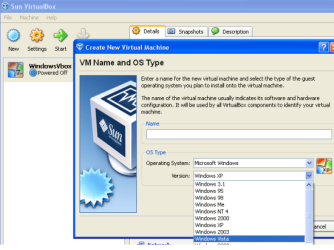
Also, you can get this free software: VirtualBox
install it and install Vista inside your Windows 7. Vista will run like one of your programs.

v_box_01.PNG

Cheers!
Robert
 

My Computer

OS
...
Back
Top