
Help me in setting up a LAN please.

mq15

New member
Local time
1:18 PM
Messages
12
Hello there,

I have following equipments:
1. One HP laptop with Windows 7 Ultimate 32bit
2. One PC with Windows Xp
3. One Hub
4. One ADSL modem with an Internet connection
5. All the required cables and adapters etc

I want to setup a LAN comprising PC and laptop systems via hub and then provide this LAN with the Internet connection via the ADSL modem. Can you people help me please.

Thanks
 

My Computer

Computer Manufacturer/Model Number
HP Pavillion DV67000
OS
Windows 7 Ultimate 32bit
CPU
Interl(R) Pentium(R) Dual CPU T2390 @ 1.86GHz 1.87Ghz
Motherboard
Quanta 30D2
Memory
1024MBytes (DDR2)
Graphics Card(s)
NVIDIA GeForce 8400M GS
Sound Card
Realtek High Definition Audio
Monitor(s) Displays
Generic PnP Monitor (Mobile PC Display)
Screen Resolution
1200 x 800
Hard Drives
WDC WD120BEVS-60USTO ATA Device
Keyboard
HID Keyboard Device (Standard PS/2 Keyboard)
Mouse
Synaptics PS/2 Port TouchPad
Internet Speed
Down=0.93 Mb/s Up=0.21 Mb/s Ping=85 m/s (from speedtest.net)
Other Info
Batteries:
Microsoft AC Adapter
Microsoft ACPI-Compliant Control Method Battery
Microsoft Composite Battery
It would be great if you filled out your system spec's since it will become invaluable to others wishing to help you in the future.

I would simply give you network a name and apply encryption using your XP PC as the manager of your network then share the network resources. Once that part is operational go into Network setup in control panel on the laptop and give the network name that you established on the XP PC and the encryption key generated and it will find your network (I expect you will be using the laptop wireless so this needs to be done once and further connections will be automatic if you choose this).
You will have to share drives on the laptop if you want the PC to see them and then you would need to add a network connection for the shared drives on both the PC and laptop.
 

My Computer

Computer Manufacturer/Model Number
DELL XPS Studio 435T
OS
Vista 64 Ultimate, Windows 7 64 Ultimate, Ubuntu 9.10
CPU
i7 975 3.3 GHz Extreme (Factory OC'd to 3.6 GHz)
Motherboard
DELL provided
Memory
18 Gb Tri-Channel 1066
Graphics Card(s)
ATI 5970 2048 Mb
Sound Card
X-Fi Extreme Gamer
Monitor(s) Displays
Vizio 37" HD-TV
Screen Resolution
1920 x 1080
Hard Drives
1.5 Tb HDD
1.5 Tb HDD
2.0 Tb Network Drive
512 Gb Crucial SSD
PSU
DELL Provided 475 watts
Case
DELL
Cooling
3 fans
Keyboard
Logitech Performance K350 Wireless
Mouse
Logitech Performance MX Wireless
Internet Speed
3 Mb up 750 Kb down
Other Info
Bamboo Fun Tablet, Belkin N+ Wireless router, Pioneer Dolby System Wireless Headphones, Bose 5.1 Dolby Surround Sound System, LifeCam VX 3000 Webcam, Blu-Ray/Hi Def DVD +RW combo and Blu-ray +RW,l 15 in 1 media card reader, Logitech Rumblepad 2, Hauppauge 2250 DTV Tuner with MS Media Center Remote

Laptop:Alienware M17x, Q9100 CPU, 8Gb RAM, 1920x1200 WUXGA LCD driven by 4870's in CrossFireX, Bl
Thanks for your responce fishnbanjo. I will update my system specifications as soon as possible.
But I need help at more basic level please. Still waiting...

Thanks again.
 

My Computer

Computer Manufacturer/Model Number
HP Pavillion DV67000
OS
Windows 7 Ultimate 32bit
CPU
Interl(R) Pentium(R) Dual CPU T2390 @ 1.86GHz 1.87Ghz
Motherboard
Quanta 30D2
Memory
1024MBytes (DDR2)
Graphics Card(s)
NVIDIA GeForce 8400M GS
Sound Card
Realtek High Definition Audio
Monitor(s) Displays
Generic PnP Monitor (Mobile PC Display)
Screen Resolution
1200 x 800
Hard Drives
WDC WD120BEVS-60USTO ATA Device
Keyboard
HID Keyboard Device (Standard PS/2 Keyboard)
Mouse
Synaptics PS/2 Port TouchPad
Internet Speed
Down=0.93 Mb/s Up=0.21 Mb/s Ping=85 m/s (from speedtest.net)
Other Info
Batteries:
Microsoft AC Adapter
Microsoft ACPI-Compliant Control Method Battery
Microsoft Composite Battery
Okay. Let me tell you guys what I know and what I want to know:
What I Have Done:
I connect both the PC and the laptop to the hub with appropriate cables. Then I connect the ADSL modem with the hub (with the appropriate cable, off course) and set every thing ON. Both the PC and the laptop have Internet connection.
What I Want:
Now I want the PC and the laptop to behave as If two hosts in a LAN. What settings I have to make on PC and laptop for this? Please help me.

Thanks.
 

My Computer

Computer Manufacturer/Model Number
HP Pavillion DV67000
OS
Windows 7 Ultimate 32bit
CPU
Interl(R) Pentium(R) Dual CPU T2390 @ 1.86GHz 1.87Ghz
Motherboard
Quanta 30D2
Memory
1024MBytes (DDR2)
Graphics Card(s)
NVIDIA GeForce 8400M GS
Sound Card
Realtek High Definition Audio
Monitor(s) Displays
Generic PnP Monitor (Mobile PC Display)
Screen Resolution
1200 x 800
Hard Drives
WDC WD120BEVS-60USTO ATA Device
Keyboard
HID Keyboard Device (Standard PS/2 Keyboard)
Mouse
Synaptics PS/2 Port TouchPad
Internet Speed
Down=0.93 Mb/s Up=0.21 Mb/s Ping=85 m/s (from speedtest.net)
Other Info
Batteries:
Microsoft AC Adapter
Microsoft ACPI-Compliant Control Method Battery
Microsoft Composite Battery
Okay. Let me tell you guys what I know and what I want to know:
What I Have Done:
I connect both the PC and the laptop to the hub with appropriate cables. Then I connect the ADSL modem with the hub (with the appropriate cable, off course) and set every thing ON. Both the PC and the laptop have Internet connection.
What I Want:
Now I want the PC and the laptop to behave as If two hosts in a LAN. What settings I have to make on PC and laptop for this? Please help me.

Thanks.
Again, we need your system specs, in addition what do you mean by the term hub?
 

My Computer

Computer Manufacturer/Model Number
Custom Build
OS
Windows 7 7600 1 X64
CPU
AMD PHENOM II X 550 PROCESSOR 3.1 ghz
Motherboard
ASUS M4A78-TE
Memory
Corsair 4 gig ddr 3
Graphics Card(s)
ati radeon 3300
Sound Card
ati hd
Monitor(s) Displays
syncmaster 2033sw
Screen Resolution
1600X900 60 hz refresh
Hard Drives
twin_seagates SATA's 1 TB & 500 Gig, hitachi_slimline 160 gig
PSU
antec_550 watt
Case
cooler master GLite
Cooling
stock_heat sink
Internet Speed
20mbs up/ 1.5mbs down
Other Info
favorite child "stewie"
favorite dog "brian"
I thought I was the only one confused LOL, guess not. For the sake of simplicity lets toss in a router after the modem then connect the hub "or switch" to the router and then plug both machines into either the hub or the router. I call that the easy way, no need to reinvent the wheel for a simple LAN set up is there?
 

My Computer

Computer type
PC/Desktop
Computer Manufacturer/Model Number
Home built
OS
Windows 7 Ult, Windows 8.1 Pro,
CPU
Q9650-4.275GHz, E8600 4.5GHz, E6750-3.8GHz
Motherboard
Evga 780i FTW
Memory
G.Skill PC2 9600 1200Mhz 5 5 5 15 2T
Graphics Card(s)
GTX480
Sound Card
Asus Xonar D2
Monitor(s) Displays
HannsG
Screen Resolution
1680X1050
Hard Drives
GSkill Phoenix Pro 120GB SSD
PSU
ThermalTake Toughpower 1000Watt modular
Case
ThermalTake XaserV
Cooling
Xigmatek S1283
Keyboard
Logitech G15
Mouse
Logitech G9
Internet Speed
T1
I thought I was the only one confused LOL, guess not. For the sake of simplicity lets toss in a router after the modem then connect the hub "or switch" to the router and then plug both machines into either the hub or the router. I call that the easy way, no need to reinvent the wheel for a simple LAN set up is there?
Yes, so was I!
 

My Computer

Computer Manufacturer/Model Number
Custom Build
OS
Windows 7 7600 1 X64
CPU
AMD PHENOM II X 550 PROCESSOR 3.1 ghz
Motherboard
ASUS M4A78-TE
Memory
Corsair 4 gig ddr 3
Graphics Card(s)
ati radeon 3300
Sound Card
ati hd
Monitor(s) Displays
syncmaster 2033sw
Screen Resolution
1600X900 60 hz refresh
Hard Drives
twin_seagates SATA's 1 TB & 500 Gig, hitachi_slimline 160 gig
PSU
antec_550 watt
Case
cooler master GLite
Cooling
stock_heat sink
Internet Speed
20mbs up/ 1.5mbs down
Other Info
favorite child "stewie"
favorite dog "brian"
A picture is worth a thousand words
The blue device on the left is "ZXDSL 831 Series Modem Router". I was calling it modem.
The white device on the left, labelled "BayLan" is what I am calling hub and it is "5-P Ethernet hub" (model# EH5T)
The blue cable in the hub is going to the PC, the white one to the laptop and the gray is going to the modem router

Now, I guess, everything is clear. Thanks
 

Attachments

  • sending.jpg
    sending.jpg
    389.8 KB · Views: 10

My Computer

Computer Manufacturer/Model Number
HP Pavillion DV67000
OS
Windows 7 Ultimate 32bit
CPU
Interl(R) Pentium(R) Dual CPU T2390 @ 1.86GHz 1.87Ghz
Motherboard
Quanta 30D2
Memory
1024MBytes (DDR2)
Graphics Card(s)
NVIDIA GeForce 8400M GS
Sound Card
Realtek High Definition Audio
Monitor(s) Displays
Generic PnP Monitor (Mobile PC Display)
Screen Resolution
1200 x 800
Hard Drives
WDC WD120BEVS-60USTO ATA Device
Keyboard
HID Keyboard Device (Standard PS/2 Keyboard)
Mouse
Synaptics PS/2 Port TouchPad
Internet Speed
Down=0.93 Mb/s Up=0.21 Mb/s Ping=85 m/s (from speedtest.net)
Other Info
Batteries:
Microsoft AC Adapter
Microsoft ACPI-Compliant Control Method Battery
Microsoft Composite Battery
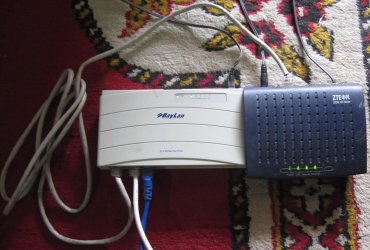
A picture is worth a thousand words
The blue device on the left is "ZXDSL 831 Series Modem Router". I was calling it modem.
The white device on the left, labelled "BayLan" is what I am calling hub and it is "5-P Ethernet hub" (model# EH5T)
The blue cable in the hub is going to the PC, the white one to the laptop and the gray is going to the modem router

Now, I guess, everything is clear. Thanks
There are distinct differences in your terminology from hub to router.
Since you have a router you have in effect a lan, the only restriction is the number of ports on your router. Each port has its own ip address behind the actual hardware firewall.
 

My Computer

Computer Manufacturer/Model Number
Custom Build
OS
Windows 7 7600 1 X64
CPU
AMD PHENOM II X 550 PROCESSOR 3.1 ghz
Motherboard
ASUS M4A78-TE
Memory
Corsair 4 gig ddr 3
Graphics Card(s)
ati radeon 3300
Sound Card
ati hd
Monitor(s) Displays
syncmaster 2033sw
Screen Resolution
1600X900 60 hz refresh
Hard Drives
twin_seagates SATA's 1 TB & 500 Gig, hitachi_slimline 160 gig
PSU
antec_550 watt
Case
cooler master GLite
Cooling
stock_heat sink
Internet Speed
20mbs up/ 1.5mbs down
Other Info
favorite child "stewie"
favorite dog "brian"
Thanks Adrian. Then what should I do ?
 

My Computer

Computer Manufacturer/Model Number
HP Pavillion DV67000
OS
Windows 7 Ultimate 32bit
CPU
Interl(R) Pentium(R) Dual CPU T2390 @ 1.86GHz 1.87Ghz
Motherboard
Quanta 30D2
Memory
1024MBytes (DDR2)
Graphics Card(s)
NVIDIA GeForce 8400M GS
Sound Card
Realtek High Definition Audio
Monitor(s) Displays
Generic PnP Monitor (Mobile PC Display)
Screen Resolution
1200 x 800
Hard Drives
WDC WD120BEVS-60USTO ATA Device
Keyboard
HID Keyboard Device (Standard PS/2 Keyboard)
Mouse
Synaptics PS/2 Port TouchPad
Internet Speed
Down=0.93 Mb/s Up=0.21 Mb/s Ping=85 m/s (from speedtest.net)
Other Info
Batteries:
Microsoft AC Adapter
Microsoft ACPI-Compliant Control Method Battery
Microsoft Composite Battery
Hello there,


I want to setup a LAN comprising PC and laptop systems via hub and then provide this LAN with the Internet connection via the ADSL modem. Can you people help me please.

Thanks
Since you have all the necessary hardware and have an internet connection I suggest you review your network connections and establish a home or public profile and establish what kind of sharing privelages you want.
You already have a LAN established, you now just need to set up if you want to share your pc's.

Adrian
 

My Computer

Computer Manufacturer/Model Number
Custom Build
OS
Windows 7 7600 1 X64
CPU
AMD PHENOM II X 550 PROCESSOR 3.1 ghz
Motherboard
ASUS M4A78-TE
Memory
Corsair 4 gig ddr 3
Graphics Card(s)
ati radeon 3300
Sound Card
ati hd
Monitor(s) Displays
syncmaster 2033sw
Screen Resolution
1600X900 60 hz refresh
Hard Drives
twin_seagates SATA's 1 TB & 500 Gig, hitachi_slimline 160 gig
PSU
antec_550 watt
Case
cooler master GLite
Cooling
stock_heat sink
Internet Speed
20mbs up/ 1.5mbs down
Other Info
favorite child "stewie"
favorite dog "brian"
Ok thanks Adrian.
Please tell me how can I review my network connections and establish a home or public profile and establish sharing privelages etc ?

Please understand that what I want is simple start sharing between Windows 7 and Window Xp PCs in whatever the way it is possible like, LAN, workgroup, domain or any other.

Thanks again
 
Last edited:

My Computer

Computer Manufacturer/Model Number
HP Pavillion DV67000
OS
Windows 7 Ultimate 32bit
CPU
Interl(R) Pentium(R) Dual CPU T2390 @ 1.86GHz 1.87Ghz
Motherboard
Quanta 30D2
Memory
1024MBytes (DDR2)
Graphics Card(s)
NVIDIA GeForce 8400M GS
Sound Card
Realtek High Definition Audio
Monitor(s) Displays
Generic PnP Monitor (Mobile PC Display)
Screen Resolution
1200 x 800
Hard Drives
WDC WD120BEVS-60USTO ATA Device
Keyboard
HID Keyboard Device (Standard PS/2 Keyboard)
Mouse
Synaptics PS/2 Port TouchPad
Internet Speed
Down=0.93 Mb/s Up=0.21 Mb/s Ping=85 m/s (from speedtest.net)
Other Info
Batteries:
Microsoft AC Adapter
Microsoft ACPI-Compliant Control Method Battery
Microsoft Composite Battery
Back
Top