Help me please.....

Status
Not open for further replies.
I want to do a clean install someone can tell me where I can find it......
 

My Computer

Computer Manufacturer/Model Number
Enclosure Type: Desktop
OS
Microsoft Windows 7 version 7100 32x
CPU
AMD Sempron(tm)
Memory
1.25 GB
Graphics Card(s)
Standard VGA Graphics Adapter
Sound Card
NVIDIA(R) nForce(TM) Audio Codec Interface
Screen Resolution
1024x768 LCD screen
Keyboard
standart PS/2 Keyboard
Mouse
HID-compliant mouse
Other Info
BIOS Version: Phoenix - AwardBIOS v6.00PG

System Type: X86-based PC

My Computer

Computer Manufacturer/Model Number
Gateway GT5692
OS
Windows 7 Ulti. x64
CPU
AMD Phenom 8450 triple-core 2.10 ghz
Memory
4GB
Graphics Card(s)
ATI Radion HD 3200
Monitor(s) Displays
Gateway FPD1775W
Screen Resolution
1280x720
Hard Drives
465.6613 Gibibytes
I did what you said and I installed the WIN7 from the Microsoft site (the 7100 version)
and its still shows me the Standard VGA..... what do I do???:cry:
 

My Computer

Computer Manufacturer/Model Number
Enclosure Type: Desktop
OS
Microsoft Windows 7 version 7100 32x
CPU
AMD Sempron(tm)
Memory
1.25 GB
Graphics Card(s)
Standard VGA Graphics Adapter
Sound Card
NVIDIA(R) nForce(TM) Audio Codec Interface
Screen Resolution
1024x768 LCD screen
Keyboard
standart PS/2 Keyboard
Mouse
HID-compliant mouse
Other Info
BIOS Version: Phoenix - AwardBIOS v6.00PG

System Type: X86-based PC
I did what you said and I installed the WIN7 from the Microsoft site (the 7100 version)
and its still shows me the Standard VGA..... what do I do???:cry:

We need to know the make of your video card in order to tell you what drivers to install to fix this issue.
 

My Computer

Computer Manufacturer/Model Number
Custom Build
OS
Windows 7 Ultimate x64 SP1
CPU
AMD Phenom II 1090 3.2 six core
Motherboard
MSI 890FXA-GD65
Memory
16 gig DDR3
Graphics Card(s)
MSI R6950 2gig
Sound Card
on board
Monitor(s) Displays
Acer 23inch led
Screen Resolution
1900x1080 widescreen
Hard Drives
Seagate 1tb SATA6
2x 1tb HITACHI Deskstar
PSU
CORSAIR Enthusiast Series TX750 V2 750W
Case
CoolMaster HAF 922
Cooling
Box AMD Heatsink/Fan
Internet Speed
Cable 12Mbps/3Mbps
We need to know the make of your video card in order to tell you what drivers to install to fix this issue.

But every program said I have VGA..... but its not truth!!!!!

P.S. After I installed it all my problems where gone (except this one.....)
so it was a good decision anyway....
 

My Computer

Computer Manufacturer/Model Number
Enclosure Type: Desktop
OS
Microsoft Windows 7 version 7100 32x
CPU
AMD Sempron(tm)
Memory
1.25 GB
Graphics Card(s)
Standard VGA Graphics Adapter
Sound Card
NVIDIA(R) nForce(TM) Audio Codec Interface
Screen Resolution
1024x768 LCD screen
Keyboard
standart PS/2 Keyboard
Mouse
HID-compliant mouse
Other Info
BIOS Version: Phoenix - AwardBIOS v6.00PG

System Type: X86-based PC
The only other option is to open up your Desktop computer & physically look at the card. Just a manufacture name would be sufficient for us (ATI, nVidia, Intel etc.)
   Note
It will more than likely be in the AGP (brown) slot between the CPU & the ISA (white) slots.
 

My Computer

Computer Manufacturer/Model Number
Compaq Desktop
OS
Windows 7 Ultimate x64
CPU
AMD Sempron Dual Core
Memory
3GB
Graphics Card(s)
NVIDIA GeForce 6150SE nForce 430
Screen Resolution
1024x768
Hard Drives
150GB Sata
The best I can then suggest is
1.go to the manufacture web site for your system, check and get all the Latest recommended Drivers for your system.
2.Get the latest BIOS and flash for your system, many times a BIOS upgrade will enable your card. ,
and then go the the WEB Site for ea of the known Major Video Card Manufactures.
3. go to NVidia Site and run there "check for drivers" if it is a NVidia they will find if NO.
4. Go to INTEL and repeat same as #1, If NO
5. Go to ATI and repeat step #1, If NO.

Last by not least "DO RUN THE WIN7 COMPABILITY TEST" you might also check to see if your VIDEO Card is even recommended for VISTA.
HCL site is
Code:
http://www.microsoft.com/whdc/hcl/default.mspx
 
I opened my computer and what it says is:

I have "NVIDIA nForce2".

What do I do now??
 

My Computer

Computer Manufacturer/Model Number
Enclosure Type: Desktop
OS
Microsoft Windows 7 version 7100 32x
CPU
AMD Sempron(tm)
Memory
1.25 GB
Graphics Card(s)
Standard VGA Graphics Adapter
Sound Card
NVIDIA(R) nForce(TM) Audio Codec Interface
Screen Resolution
1024x768 LCD screen
Keyboard
standart PS/2 Keyboard
Mouse
HID-compliant mouse
Other Info
BIOS Version: Phoenix - AwardBIOS v6.00PG

System Type: X86-based PC
Excellent, if you go Here and use the AutoDetect option it should pick up your drivers.

If not then, manually download the nForce Professional 2000 series Vista driver. You can run it once downloaded in Vista compatability mode.
 

My Computer

Computer Manufacturer/Model Number
Compaq Desktop
OS
Windows 7 Ultimate x64
CPU
AMD Sempron Dual Core
Memory
3GB
Graphics Card(s)
NVIDIA GeForce 6150SE nForce 430
Screen Resolution
1024x768
Hard Drives
150GB Sata
It didn't work I downloaded it ( nForce 2000 for vista 32x) and it still shows like I have the VGA!!!!!!!:cry:
 

My Computer

Computer Manufacturer/Model Number
Enclosure Type: Desktop
OS
Microsoft Windows 7 version 7100 32x
CPU
AMD Sempron(tm)
Memory
1.25 GB
Graphics Card(s)
Standard VGA Graphics Adapter
Sound Card
NVIDIA(R) nForce(TM) Audio Codec Interface
Screen Resolution
1024x768 LCD screen
Keyboard
standart PS/2 Keyboard
Mouse
HID-compliant mouse
Other Info
BIOS Version: Phoenix - AwardBIOS v6.00PG

System Type: X86-based PC
That's so strange :confused:

Is there anything in the BIOS regarding Onboard vs AGP in anything GFX related?
 

My Computer

Computer Manufacturer/Model Number
Compaq Desktop
OS
Windows 7 Ultimate x64
CPU
AMD Sempron Dual Core
Memory
3GB
Graphics Card(s)
NVIDIA GeForce 6150SE nForce 430
Screen Resolution
1024x768
Hard Drives
150GB Sata
Im sorry can you repeat this again but in simpler language?? (im sorry about that but as I said before im not so good in computer..... or computer language......)
 

My Computer

Computer Manufacturer/Model Number
Enclosure Type: Desktop
OS
Microsoft Windows 7 version 7100 32x
CPU
AMD Sempron(tm)
Memory
1.25 GB
Graphics Card(s)
Standard VGA Graphics Adapter
Sound Card
NVIDIA(R) nForce(TM) Audio Codec Interface
Screen Resolution
1024x768 LCD screen
Keyboard
standart PS/2 Keyboard
Mouse
HID-compliant mouse
Other Info
BIOS Version: Phoenix - AwardBIOS v6.00PG

System Type: X86-based PC
When you first switch on your computer your get the POST screen (load of text & maybe an image). If you press F2 or 'Del' then you can access the BIOS settings. If you navigate all the menu options you may see something regarding graphics & other peripherals. Any you see, write down (with their current setting) & we can tell you if it's the 1 you need to change.
 

My Computer

Computer Manufacturer/Model Number
Compaq Desktop
OS
Windows 7 Ultimate x64
CPU
AMD Sempron Dual Core
Memory
3GB
Graphics Card(s)
NVIDIA GeForce 6150SE nForce 430
Screen Resolution
1024x768
Hard Drives
150GB Sata

My Computer

Computer Manufacturer/Model Number
Gateway GT5692
OS
Windows 7 Ulti. x64
CPU
AMD Phenom 8450 triple-core 2.10 ghz
Memory
4GB
Graphics Card(s)
ATI Radion HD 3200
Monitor(s) Displays
Gateway FPD1775W
Screen Resolution
1280x720
Hard Drives
465.6613 Gibibytes
BIOS:

I'm sorry but I can't see anything..... (But if I didn't saw something it doesn't say anything because I'm not so good in BIOS stuff......).

do you have another solution that even 5 years old can do??
 

My Computer

Computer Manufacturer/Model Number
Enclosure Type: Desktop
OS
Microsoft Windows 7 version 7100 32x
CPU
AMD Sempron(tm)
Memory
1.25 GB
Graphics Card(s)
Standard VGA Graphics Adapter
Sound Card
NVIDIA(R) nForce(TM) Audio Codec Interface
Screen Resolution
1024x768 LCD screen
Keyboard
standart PS/2 Keyboard
Mouse
HID-compliant mouse
Other Info
BIOS Version: Phoenix - AwardBIOS v6.00PG

System Type: X86-based PC

My Computer

Computer Manufacturer/Model Number
Enclosure Type: Desktop
OS
Microsoft Windows 7 version 7100 32x
CPU
AMD Sempron(tm)
Memory
1.25 GB
Graphics Card(s)
Standard VGA Graphics Adapter
Sound Card
NVIDIA(R) nForce(TM) Audio Codec Interface
Screen Resolution
1024x768 LCD screen
Keyboard
standart PS/2 Keyboard
Mouse
HID-compliant mouse
Other Info
BIOS Version: Phoenix - AwardBIOS v6.00PG

System Type: X86-based PC
Somebody please think of another way to help me I really need it!!!!:cry:
 

My Computer

Computer Manufacturer/Model Number
Enclosure Type: Desktop
OS
Microsoft Windows 7 version 7100 32x
CPU
AMD Sempron(tm)
Memory
1.25 GB
Graphics Card(s)
Standard VGA Graphics Adapter
Sound Card
NVIDIA(R) nForce(TM) Audio Codec Interface
Screen Resolution
1024x768 LCD screen
Keyboard
standart PS/2 Keyboard
Mouse
HID-compliant mouse
Other Info
BIOS Version: Phoenix - AwardBIOS v6.00PG

System Type: X86-based PC
We're trying mate, just need to do more digging.
 

My Computer

Computer Manufacturer/Model Number
Compaq Desktop
OS
Windows 7 Ultimate x64
CPU
AMD Sempron Dual Core
Memory
3GB
Graphics Card(s)
NVIDIA GeForce 6150SE nForce 430
Screen Resolution
1024x768
Hard Drives
150GB Sata
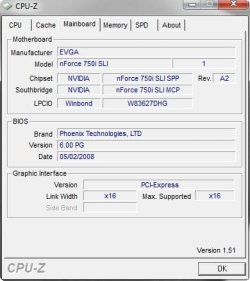
Have you tried to install CPUZ and check what it says on the the third TAB about your Motherboard model, can you post a screen shot of this window so we can get the full specs and then we should be able to get the onboard graphics spec.

2009-06-03_033458.jpg
 

My Computer

Computer Manufacturer/Model Number
Home Brew
OS
Windows 7 Ultimate Vista Ultimate x64
CPU
Core 2 Duo E8500 3.16Ghz @ 3.8Ghz
Motherboard
eVGA 750i FTW
Memory
2x2Gigs Patriot PC2-6400 LL
Graphics Card(s)
Inno3D GeForce GTX260 216 SP
Monitor(s) Displays
ASUS VW222U 22" 2ms Response time
Screen Resolution
1680x1050
Hard Drives
SATA 150GB
SATA II 250GB
USB IDE 750GB Ext.
PSU
HYTEC 600W & Thermaltake 650W Toughpower Power Exp
Case
Thermaltake Armor LCS (Liquid Cooling System)
Cooling
Liquid Cooling System
Keyboard
Logitech G15 Gaming Keyboard
Mouse
Logitech G9 Gaming Mouse
Status
Not open for further replies.
Back
Top