
[Help me with bugs!!] I'm porting Ambient theme to Win 7

Sonic0509

New member
Local time
9:40 AM
Messages
7
Welcome everybody!
I started porting my favourite XP theme to 7 on 12.06.2012 (and finally today working on it more seriously :cool:). I'm porting a Vista port of the Ambient theme to be exact. In direct port there were some bugs that were pretty annoying but I'm gonna fix them later, for now there is bigger one.
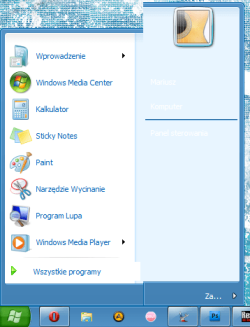
I like the original XP Places pane/Start menu more than Vista-styled so I decided to port it instead of leaving Vista one. While replacing bitmaps, changing content/scaling margins and testing theme after every single replace/change this appeared
-> attachment (places pane is too tall).
I tried changing scaling/default size values but I couldn't figure out what is wrong. So I'm writing here with hope that somebody will help me.

I want this thread to be general "help me" thread for my porting work so I'm not gonna start new one for each bug - I will be writing everything in this one ;)

Thank you in advance for any help! :D

btw. Here is what a direct Vista port looks like: link.
 

Attachments
  • start.png
    start.png
    25.3 KB · Views: 13

My Computer My Computer

At a glance

Windows 7 Home Premium 32-bitAtom N280 @ 1,66GHzSamsung 1GB 667 MHzIntel GMA 950
Computer Manufacturer/Model Number
Toshiba
OS
Windows 7 Home Premium 32-bit
CPU
Atom N280 @ 1,66GHz
Memory
Samsung 1GB 667 MHz
Graphics Card(s)
Intel GMA 950
Sound Card
Realtek HD Audio
Monitor(s) Displays
built-in / iPod
Screen Resolution
1204x600 / 960x640
Hard Drives
FUJITSU MJA2250BH G2 ATA (250GB)
Case
Toshiba NB200
Keyboard
Logitech MK250
Mouse
Logitech MK250
Internet Speed
25 Mb/s / 1 Mb/s
Welcome to the Seven Forums
How are you porting these themes, what are you using?
Jerry
 

My Computer My Computer

At a glance

Win 7 Pro x64 / Win 10 ProIntel(R) Core(TM) i7-3630QM CPU @ 2.40GHz12 GB(1) Intel(R) HD Graphics 4000 (2) NVIDIA GeFo...
Computer type
Laptop
Computer Manufacturer/Model Number
Sager NP9170
OS
Win 7 Pro x64 / Win 10 Pro
CPU
Intel(R) Core(TM) i7-3630QM CPU @ 2.40GHz
Motherboard
CLEVO P170EM
Memory
12 GB
Graphics Card(s)
(1) Intel(R) HD Graphics 4000 (2) NVIDIA GeForce GTX 675M
Sound Card
(1) Realtek High Definition Audio (2) Intel(R) Display Aud
Monitor(s) Displays
17.3
Screen Resolution
1920x1080
Hard Drives
(1) Samsung 860 EVO 500GB(OS) (1) Samsung 860 EVO 500GB(Data)
Keyboard
Backlite
Antivirus
MSE, Malwarebytes Pro
Browser
Firefox
Other Info
DESKTOP: Custom-built.
OS: Win 10 Pro x64.
CASE: Rosewill R5.
CPU: Intel I5 4670K CPU @ 3.40GHz.
CPU COOLER: Cool Master Hyper 212 EVO.
MOTHERBOARD: Asus Z87-A.
MEMORY: Kingston HyperX 2x4 GB.
GPU: Nvidia Geforce 650 TI.
PSU: Corsair TX750.
DRIVES: (1) Samsung 840 120 GB SSD (2) Western Digital blue 500 GB 7200 RPM.
Oh! I totally forgot to mention that. I'm using Ave's Vista Style Builder (with 7 support :) ), and I have Restorator installed (mainly for extracting XP bitmaps but If using it to edit 7 theme will be necessary I know how to do it too). By the way: you could see it on the screenshoot ;)
 

My Computer My Computer

At a glance

Windows 7 Home Premium 32-bitAtom N280 @ 1,66GHzSamsung 1GB 667 MHzIntel GMA 950
Computer Manufacturer/Model Number
Toshiba
OS
Windows 7 Home Premium 32-bit
CPU
Atom N280 @ 1,66GHz
Memory
Samsung 1GB 667 MHz
Graphics Card(s)
Intel GMA 950
Sound Card
Realtek HD Audio
Monitor(s) Displays
built-in / iPod
Screen Resolution
1204x600 / 960x640
Hard Drives
FUJITSU MJA2250BH G2 ATA (250GB)
Case
Toshiba NB200
Keyboard
Logitech MK250
Mouse
Logitech MK250
Internet Speed
25 Mb/s / 1 Mb/s
I have Windows Style Builder too. Post a link to the theme you got the start menu from and I will look at it and see if I can help.
Jerry
 

My Computer My Computer

At a glance

Win 7 Pro x64 / Win 10 ProIntel(R) Core(TM) i7-3630QM CPU @ 2.40GHz12 GB(1) Intel(R) HD Graphics 4000 (2) NVIDIA GeFo...
Computer type
Laptop
Computer Manufacturer/Model Number
Sager NP9170
OS
Win 7 Pro x64 / Win 10 Pro
CPU
Intel(R) Core(TM) i7-3630QM CPU @ 2.40GHz
Motherboard
CLEVO P170EM
Memory
12 GB
Graphics Card(s)
(1) Intel(R) HD Graphics 4000 (2) NVIDIA GeForce GTX 675M
Sound Card
(1) Realtek High Definition Audio (2) Intel(R) Display Aud
Monitor(s) Displays
17.3
Screen Resolution
1920x1080
Hard Drives
(1) Samsung 860 EVO 500GB(OS) (1) Samsung 860 EVO 500GB(Data)
Keyboard
Backlite
Antivirus
MSE, Malwarebytes Pro
Browser
Firefox
Other Info
DESKTOP: Custom-built.
OS: Win 10 Pro x64.
CASE: Rosewill R5.
CPU: Intel I5 4670K CPU @ 3.40GHz.
CPU COOLER: Cool Master Hyper 212 EVO.
MOTHERBOARD: Asus Z87-A.
MEMORY: Kingston HyperX 2x4 GB.
GPU: Nvidia Geforce 650 TI.
PSU: Corsair TX750.
DRIVES: (1) Samsung 840 120 GB SSD (2) Western Digital blue 500 GB 7200 RPM.
Last edited:

My Computer My Computer

At a glance

Windows 7 Home Premium 32-bitAtom N280 @ 1,66GHzSamsung 1GB 667 MHzIntel GMA 950
Computer Manufacturer/Model Number
Toshiba
OS
Windows 7 Home Premium 32-bit
CPU
Atom N280 @ 1,66GHz
Memory
Samsung 1GB 667 MHz
Graphics Card(s)
Intel GMA 950
Sound Card
Realtek HD Audio
Monitor(s) Displays
built-in / iPod
Screen Resolution
1204x600 / 960x640
Hard Drives
FUJITSU MJA2250BH G2 ATA (250GB)
Case
Toshiba NB200
Keyboard
Logitech MK250
Mouse
Logitech MK250
Internet Speed
25 Mb/s / 1 Mb/s
I will do some testing and get back to you.
Jerry
 

My Computer My Computer

At a glance

Win 7 Pro x64 / Win 10 ProIntel(R) Core(TM) i7-3630QM CPU @ 2.40GHz12 GB(1) Intel(R) HD Graphics 4000 (2) NVIDIA GeFo...
Computer type
Laptop
Computer Manufacturer/Model Number
Sager NP9170
OS
Win 7 Pro x64 / Win 10 Pro
CPU
Intel(R) Core(TM) i7-3630QM CPU @ 2.40GHz
Motherboard
CLEVO P170EM
Memory
12 GB
Graphics Card(s)
(1) Intel(R) HD Graphics 4000 (2) NVIDIA GeForce GTX 675M
Sound Card
(1) Realtek High Definition Audio (2) Intel(R) Display Aud
Monitor(s) Displays
17.3
Screen Resolution
1920x1080
Hard Drives
(1) Samsung 860 EVO 500GB(OS) (1) Samsung 860 EVO 500GB(Data)
Keyboard
Backlite
Antivirus
MSE, Malwarebytes Pro
Browser
Firefox
Other Info
DESKTOP: Custom-built.
OS: Win 10 Pro x64.
CASE: Rosewill R5.
CPU: Intel I5 4670K CPU @ 3.40GHz.
CPU COOLER: Cool Master Hyper 212 EVO.
MOTHERBOARD: Asus Z87-A.
MEMORY: Kingston HyperX 2x4 GB.
GPU: Nvidia Geforce 650 TI.
PSU: Corsair TX750.
DRIVES: (1) Samsung 840 120 GB SSD (2) Western Digital blue 500 GB 7200 RPM.
I did some testing over the weekend and I could not get any good results at all, I even exported the images from your style.msstyles and imported them into a new copy of aero.msstyles and it came out even worse then what's in your screenshot.
The only solution I think I can offer would be you are going to have to create new images that will fit better.
Jerry
 

My Computer My Computer

At a glance

Win 7 Pro x64 / Win 10 ProIntel(R) Core(TM) i7-3630QM CPU @ 2.40GHz12 GB(1) Intel(R) HD Graphics 4000 (2) NVIDIA GeFo...
Computer type
Laptop
Computer Manufacturer/Model Number
Sager NP9170
OS
Win 7 Pro x64 / Win 10 Pro
CPU
Intel(R) Core(TM) i7-3630QM CPU @ 2.40GHz
Motherboard
CLEVO P170EM
Memory
12 GB
Graphics Card(s)
(1) Intel(R) HD Graphics 4000 (2) NVIDIA GeForce GTX 675M
Sound Card
(1) Realtek High Definition Audio (2) Intel(R) Display Aud
Monitor(s) Displays
17.3
Screen Resolution
1920x1080
Hard Drives
(1) Samsung 860 EVO 500GB(OS) (1) Samsung 860 EVO 500GB(Data)
Keyboard
Backlite
Antivirus
MSE, Malwarebytes Pro
Browser
Firefox
Other Info
DESKTOP: Custom-built.
OS: Win 10 Pro x64.
CASE: Rosewill R5.
CPU: Intel I5 4670K CPU @ 3.40GHz.
CPU COOLER: Cool Master Hyper 212 EVO.
MOTHERBOARD: Asus Z87-A.
MEMORY: Kingston HyperX 2x4 GB.
GPU: Nvidia Geforce 650 TI.
PSU: Corsair TX750.
DRIVES: (1) Samsung 840 120 GB SSD (2) Western Digital blue 500 GB 7200 RPM.
Thats shame it didn't work either way :/
Anyway, thank you for trying! :)
 

My Computer My Computer

At a glance

Windows 7 Home Premium 32-bitAtom N280 @ 1,66GHzSamsung 1GB 667 MHzIntel GMA 950
Computer Manufacturer/Model Number
Toshiba
OS
Windows 7 Home Premium 32-bit
CPU
Atom N280 @ 1,66GHz
Memory
Samsung 1GB 667 MHz
Graphics Card(s)
Intel GMA 950
Sound Card
Realtek HD Audio
Monitor(s) Displays
built-in / iPod
Screen Resolution
1204x600 / 960x640
Hard Drives
FUJITSU MJA2250BH G2 ATA (250GB)
Case
Toshiba NB200
Keyboard
Logitech MK250
Mouse
Logitech MK250
Internet Speed
25 Mb/s / 1 Mb/s
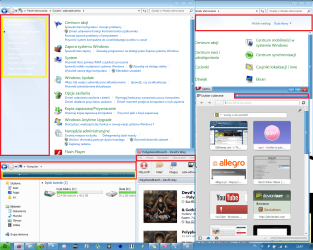
I've got start menu fully working but I still can't find out how to fix many things. I'm asking for help again. Could someone tell me where can I find highlighted items? Red - background (for Opera both focused and not); yellow - text color/highlighted and pressed backgrounds.
 

My Computer My Computer

At a glance

Windows 7 Home Premium 32-bitAtom N280 @ 1,66GHzSamsung 1GB 667 MHzIntel GMA 950
Computer Manufacturer/Model Number
Toshiba
OS
Windows 7 Home Premium 32-bit
CPU
Atom N280 @ 1,66GHz
Memory
Samsung 1GB 667 MHz
Graphics Card(s)
Intel GMA 950
Sound Card
Realtek HD Audio
Monitor(s) Displays
built-in / iPod
Screen Resolution
1204x600 / 960x640
Hard Drives
FUJITSU MJA2250BH G2 ATA (250GB)
Case
Toshiba NB200
Keyboard
Logitech MK250
Mouse
Logitech MK250
Internet Speed
25 Mb/s / 1 Mb/s

My Computer My Computer

At a glance

Win 7 Pro x64 / Win 10 ProIntel(R) Core(TM) i7-3630QM CPU @ 2.40GHz12 GB(1) Intel(R) HD Graphics 4000 (2) NVIDIA GeFo...
Computer type
Laptop
Computer Manufacturer/Model Number
Sager NP9170
OS
Win 7 Pro x64 / Win 10 Pro
CPU
Intel(R) Core(TM) i7-3630QM CPU @ 2.40GHz
Motherboard
CLEVO P170EM
Memory
12 GB
Graphics Card(s)
(1) Intel(R) HD Graphics 4000 (2) NVIDIA GeForce GTX 675M
Sound Card
(1) Realtek High Definition Audio (2) Intel(R) Display Aud
Monitor(s) Displays
17.3
Screen Resolution
1920x1080
Hard Drives
(1) Samsung 860 EVO 500GB(OS) (1) Samsung 860 EVO 500GB(Data)
Keyboard
Backlite
Antivirus
MSE, Malwarebytes Pro
Browser
Firefox
Other Info
DESKTOP: Custom-built.
OS: Win 10 Pro x64.
CASE: Rosewill R5.
CPU: Intel I5 4670K CPU @ 3.40GHz.
CPU COOLER: Cool Master Hyper 212 EVO.
MOTHERBOARD: Asus Z87-A.
MEMORY: Kingston HyperX 2x4 GB.
GPU: Nvidia Geforce 650 TI.
PSU: Corsair TX750.
DRIVES: (1) Samsung 840 120 GB SSD (2) Western Digital blue 500 GB 7200 RPM.
Whoops! I forgot to attach screenshoot to my earlier post.

How I fixed start menu: I've made bitmaps of same height as in original and put them in clean theme again.

Now I really want to fix the highlighted areas. After this, the theme will be almost complete :)
 

Attachments

  • ambient-q.png
    ambient-q.png
    165.2 KB · Views: 12

My Computer My Computer

At a glance

Windows 7 Home Premium 32-bitAtom N280 @ 1,66GHzSamsung 1GB 667 MHzIntel GMA 950
Computer Manufacturer/Model Number
Toshiba
OS
Windows 7 Home Premium 32-bit
CPU
Atom N280 @ 1,66GHz
Memory
Samsung 1GB 667 MHz
Graphics Card(s)
Intel GMA 950
Sound Card
Realtek HD Audio
Monitor(s) Displays
built-in / iPod
Screen Resolution
1204x600 / 960x640
Hard Drives
FUJITSU MJA2250BH G2 ATA (250GB)
Case
Toshiba NB200
Keyboard
Logitech MK250
Mouse
Logitech MK250
Internet Speed
25 Mb/s / 1 Mb/s
#1
Those are in the shell32.dll in C:\Windows\System32 and if you have 64 bit also in C:\Windows\SysWOW64 you would need to change both, they are bitmap(.bmp)numbers 632, 633(left side), 634, 635(top)

#2
Text Styles > ControlPanelStyle > TaskLink > TEXTCOLOR:COLOR and Styles > ControlPanelStyle > NavigationPanelLabel > TEXTCOLOR:COLOR

#3
Explorer & Shell > Explorer > CommandModule > <1> (it may be the same as #5)

#4
Explorer & Shell > Explorer > CommandModule > <3> > <1> > TEXTCOLOR:COLOR
Explorer & Shell > Explorer > CommandModule > <4> > <1> > TEXTCOLOR:COLOR
Explorer & Shell > Explorer > CommandModule > <5> > <1> > TEXTCOLOR:COLOR

#5
That is the top frame of Windows Exoplorer
Windows and Caption Buttons > Aero > Dwm Window > Frames > Normal > Top

#6
What program or window is that?

Jerry
ambient-q.png
 

My Computer My Computer

At a glance

Win 7 Pro x64 / Win 10 ProIntel(R) Core(TM) i7-3630QM CPU @ 2.40GHz12 GB(1) Intel(R) HD Graphics 4000 (2) NVIDIA GeFo...
Computer type
Laptop
Computer Manufacturer/Model Number
Sager NP9170
OS
Win 7 Pro x64 / Win 10 Pro
CPU
Intel(R) Core(TM) i7-3630QM CPU @ 2.40GHz
Motherboard
CLEVO P170EM
Memory
12 GB
Graphics Card(s)
(1) Intel(R) HD Graphics 4000 (2) NVIDIA GeForce GTX 675M
Sound Card
(1) Realtek High Definition Audio (2) Intel(R) Display Aud
Monitor(s) Displays
17.3
Screen Resolution
1920x1080
Hard Drives
(1) Samsung 860 EVO 500GB(OS) (1) Samsung 860 EVO 500GB(Data)
Keyboard
Backlite
Antivirus
MSE, Malwarebytes Pro
Browser
Firefox
Other Info
DESKTOP: Custom-built.
OS: Win 10 Pro x64.
CASE: Rosewill R5.
CPU: Intel I5 4670K CPU @ 3.40GHz.
CPU COOLER: Cool Master Hyper 212 EVO.
MOTHERBOARD: Asus Z87-A.
MEMORY: Kingston HyperX 2x4 GB.
GPU: Nvidia Geforce 650 TI.
PSU: Corsair TX750.
DRIVES: (1) Samsung 840 120 GB SSD (2) Western Digital blue 500 GB 7200 RPM.
#1 That's definitely not good news. I don't want to mess with system files but I guess I now have to. :/

#2 That's kinda good news

#3 Thanks for command bar. Could you also tell me where can I find navigation bar background?

#4 That will be useful for sure.

#5 Do you maybe know why it often gets glitched in Opera when using custom visual styles? I looks perfectly normal when using Aero VS (first attachment for comparison).

#6 It's last.fm app (that's actually not important). I mean menu bar (last.fm was the first example I could find). What is wront: it looks different in explorer than in 3rd party apps (second attachment (left: explorer; right: a 3rd party app)).


Also there I have two more problems with explorer frame.

1. When using aero snap to snap window to the right or left side of screen There is single, empty (can click through it) row of pixels left above the window. Caption frame and its size mask are perfeclty aligned. An messing around with them ended with restoring original ones.

2. As you can see in first attached picture there is column of single pixels between explorer frame and actual window. I suppose it hapens only in opera and not everytime. I captures image behind the Opera's window and releases it when I minimize then maximize window or maximize and restore.


Thanks for what you helped me with and thank you in advance again!
 

Attachments

  • op.glitch.png
    op.glitch.png
    6.1 KB · Views: 6
  • menubar.png
    menubar.png
    1.5 KB · Views: 4

My Computer My Computer

At a glance

Windows 7 Home Premium 32-bitAtom N280 @ 1,66GHzSamsung 1GB 667 MHzIntel GMA 950
Computer Manufacturer/Model Number
Toshiba
OS
Windows 7 Home Premium 32-bit
CPU
Atom N280 @ 1,66GHz
Memory
Samsung 1GB 667 MHz
Graphics Card(s)
Intel GMA 950
Sound Card
Realtek HD Audio
Monitor(s) Displays
built-in / iPod
Screen Resolution
1204x600 / 960x640
Hard Drives
FUJITSU MJA2250BH G2 ATA (250GB)
Case
Toshiba NB200
Keyboard
Logitech MK250
Mouse
Logitech MK250
Internet Speed
25 Mb/s / 1 Mb/s
#3 Thanks for command bar. Could you also tell me where can I find navigation bar background?
Post a better(bigger) screenshot with arrows.

#5 Do you maybe know why it often gets glitched in Opera when using custom visual styles? I looks perfectly normal when using Aero VS (first attachment for comparison).
Not sure. Here is what I get 1st is default aero 2nd I colored the top frame at Windows and Caption Buttons > Aero > Dwm Window > Frames > Normal > Top
2.JPG1.JPG


#6 It's last.fm app (that's actually not important). I mean menu bar (last.fm was the first example I could find). What is wront: it looks different in explorer than in 3rd party apps (second attachment (left: explorer; right: a 3rd party app))
Post a better(bigger) screenshot with arrows.

1. When using aero snap to snap window to the right or left side of screen There is single, empty (can click through it) row of pixels left above the window. Caption frame and its size mask are perfeclty aligned. An messing around with them ended with restoring original ones.
Post screenshots

2. As you can see in first attached picture there is column of single pixels between explorer frame and actual window. I suppose it hapens only in opera and not everytime. I captures image behind the Opera's window and releases it when I minimize then maximize window or maximize and restore.
I don't understand what you mean.

Jerry
 

My Computer My Computer

At a glance

Win 7 Pro x64 / Win 10 ProIntel(R) Core(TM) i7-3630QM CPU @ 2.40GHz12 GB(1) Intel(R) HD Graphics 4000 (2) NVIDIA GeFo...
Computer type
Laptop
Computer Manufacturer/Model Number
Sager NP9170
OS
Win 7 Pro x64 / Win 10 Pro
CPU
Intel(R) Core(TM) i7-3630QM CPU @ 2.40GHz
Motherboard
CLEVO P170EM
Memory
12 GB
Graphics Card(s)
(1) Intel(R) HD Graphics 4000 (2) NVIDIA GeForce GTX 675M
Sound Card
(1) Realtek High Definition Audio (2) Intel(R) Display Aud
Monitor(s) Displays
17.3
Screen Resolution
1920x1080
Hard Drives
(1) Samsung 860 EVO 500GB(OS) (1) Samsung 860 EVO 500GB(Data)
Keyboard
Backlite
Antivirus
MSE, Malwarebytes Pro
Browser
Firefox
Other Info
DESKTOP: Custom-built.
OS: Win 10 Pro x64.
CASE: Rosewill R5.
CPU: Intel I5 4670K CPU @ 3.40GHz.
CPU COOLER: Cool Master Hyper 212 EVO.
MOTHERBOARD: Asus Z87-A.
MEMORY: Kingston HyperX 2x4 GB.
GPU: Nvidia Geforce 650 TI.
PSU: Corsair TX750.
DRIVES: (1) Samsung 840 120 GB SSD (2) Western Digital blue 500 GB 7200 RPM.
The Last FM toolbar is at Lists, Menus & Tabs > Menu > BarBackground

Jerry
 

My Computer My Computer

At a glance

Win 7 Pro x64 / Win 10 ProIntel(R) Core(TM) i7-3630QM CPU @ 2.40GHz12 GB(1) Intel(R) HD Graphics 4000 (2) NVIDIA GeFo...
Computer type
Laptop
Computer Manufacturer/Model Number
Sager NP9170
OS
Win 7 Pro x64 / Win 10 Pro
CPU
Intel(R) Core(TM) i7-3630QM CPU @ 2.40GHz
Motherboard
CLEVO P170EM
Memory
12 GB
Graphics Card(s)
(1) Intel(R) HD Graphics 4000 (2) NVIDIA GeForce GTX 675M
Sound Card
(1) Realtek High Definition Audio (2) Intel(R) Display Aud
Monitor(s) Displays
17.3
Screen Resolution
1920x1080
Hard Drives
(1) Samsung 860 EVO 500GB(OS) (1) Samsung 860 EVO 500GB(Data)
Keyboard
Backlite
Antivirus
MSE, Malwarebytes Pro
Browser
Firefox
Other Info
DESKTOP: Custom-built.
OS: Win 10 Pro x64.
CASE: Rosewill R5.
CPU: Intel I5 4670K CPU @ 3.40GHz.
CPU COOLER: Cool Master Hyper 212 EVO.
MOTHERBOARD: Asus Z87-A.
MEMORY: Kingston HyperX 2x4 GB.
GPU: Nvidia Geforce 650 TI.
PSU: Corsair TX750.
DRIVES: (1) Samsung 840 120 GB SSD (2) Western Digital blue 500 GB 7200 RPM.
Back
Top



