Help-Merging recovery (C:) with hard drive (D:)

tsoccerstar

New member
Local time
1:53 AM
Messages
7
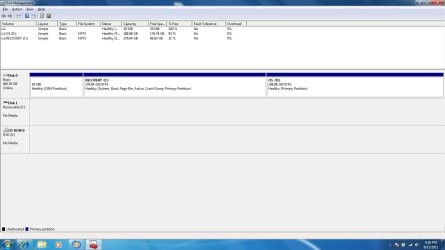
My laptop recently crashed and Windows 7 was not able to be repaired so I had to reinstall from scratch. Now that I did though it runs under a recovery drive (15GB) and my original drive shows up as OS (D). All of my files were on the Original drive and I am trying to figure out how to get it working again.
 
Last edited:

My Computer My Computer

At a glance

Windows 7 Home Premium x644GBIntegrated
Computer Manufacturer/Model Number
Dell Inspiron 1750
OS
Windows 7 Home Premium x64
Motherboard
Intel Core 2 Duo T6600
Memory
4GB
Graphics Card(s)
Integrated
Sound Card
Bypass-Nu Force Icon Mobile
Screen Resolution
1600 x 900
Hard Drives
500GB Samsung
So I have read other threads of Similar problems and it appears I installed Windows 7 to the wrong Partition. I Can reinstall it to the original one I think but am wondering how I can save all of my previous stuff on my harddrive?
 

My Computer My Computer

At a glance

Windows 7 Home Premium x644GBIntegrated
Computer Manufacturer/Model Number
Dell Inspiron 1750
OS
Windows 7 Home Premium x64
Motherboard
Intel Core 2 Duo T6600
Memory
4GB
Graphics Card(s)
Integrated
Sound Card
Bypass-Nu Force Icon Mobile
Screen Resolution
1600 x 900
Hard Drives
500GB Samsung
I'm having difficulty understanding your problem. A more detailed description and a screenshot of your disk partitioning (using Disk Management) would help.
 

My Computer My Computer

At a glance

Windows 7x64 Home Premium SP1Intel i7 2600kG.Skill Ripjaws (DDR3-1600) 2x4GBNvidia GeForce GTS 450; Intel HD Graphics 300...
Computer type
PC/Desktop
Computer Manufacturer/Model Number
Own build
OS
Windows 7x64 Home Premium SP1
CPU
Intel i7 2600k
Motherboard
ASUS P8Z68 Deluxe
Memory
G.Skill Ripjaws (DDR3-1600) 2x4GB
Graphics Card(s)
Nvidia GeForce GTS 450; Intel HD Graphics 3000(GT2+)
Monitor(s) Displays
Dell Ultrasharp IPS panel U2311H, Samsung SyncMaster P2350
Screen Resolution
1920x1080
Hard Drives
Samsung 850 Pro SSD 256GB, Samsung SSD 840 120GB, Seagates 1TB Barracuda ST31000528AS x2
PSU
Seasonic M12II 520W
Case
Lian Li Lancool PC-K60
Cooling
Case: 1x120mm, 3x140mm CPU: Hyper 212+
Keyboard
Logitech MK520 (wireless)
Mouse
Logitech MK520
Internet Speed
6-7 Mbps
Antivirus
Norton Security Premium, Malwarebytes on 2 (MSE on 3rd PC)
Browser
FireFox
Other Info
Audio: Logitech Z523 2.1
How to use Dell Recovery Partition,make Recovery Disks & how to order Recovery Disks.
Dell - Support
 

My Computer My Computer

At a glance

ME/XP/Vista/Win7
OS
ME/XP/Vista/Win7
Here is the screenshot. I have all of my files copied over to the recovery partition because I am not able to delete the crashed Windows 7 off of the OS partition. I am not able to open any of my files though :(
 

Attachments

  • Partition Screenshot.jpg
    Partition Screenshot.jpg
    72.6 KB · Views: 40

My Computer My Computer

At a glance

Windows 7 Home Premium x644GBIntegrated
Computer Manufacturer/Model Number
Dell Inspiron 1750
OS
Windows 7 Home Premium x64
Motherboard
Intel Core 2 Duo T6600
Memory
4GB
Graphics Card(s)
Integrated
Sound Card
Bypass-Nu Force Icon Mobile
Screen Resolution
1600 x 900
Hard Drives
500GB Samsung
Back
Top