Help Needed Cleaning Disk

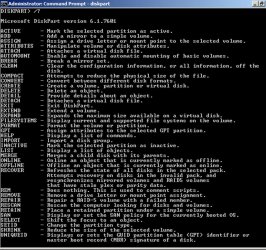
Here's a list of the the various diskpart commands:
 

Attachments

  • untitled.jpg
    untitled.jpg
    173 KB · Views: 4

My Computer

Computer type
PC/Desktop
Computer Manufacturer/Model Number
Ignatz Special; 4 speed manual gearbox; factory air conditioning; one of one
OS
Windows 7 Home Premium SP1, 64-bit
CPU
Intel Skylake i5-6600K, not overclocked
Motherboard
AsRock Z170M Extreme 4, micro ATX
Memory
8 GB HyperX DDR4-2666 (2 x 4 GB)
Graphics Card(s)
none; graphics are integrated on CPU
Sound Card
onboard: Realtek ALC1150; external: USB Behringer UF0-202
Monitor(s) Displays
Dell S2340M 23 inch IPS
Screen Resolution
1600 x 900
Hard Drives
System: Crucial MX100 series SSD, 128 GB;
Data: Samsung Spinpoint 103SJ, 1 TB;
Backup: WD Caviar Green WD30EZRX-00D8PB0, 3 TB
PSU
Rosewill SilentNight 500 watt fanless, semi-modular
Case
Antec Solo II
Cooling
Noctua NH-U12S; Noctua F12 intake, Noctua S12A exhaust
Keyboard
Microsoft 200 6JH-00001 USB
Mouse
Dell or Microsoft optical wired; USB
Antivirus
Microsoft Security Essentials and Malwarebytes Premium
Browser
Pale Moon
Other Info
All fans PWM; speeds at idle: CPU circa 500 rpm; intake circa 600 rpm; exhaust circa 600 rpm; CPU temps 27 idle and 47 C load in a warm room (27 C/81 F) when running Intel Extreme Tuning Utility stress test.
Calzon:

Have you specifically done this:

Enabled viewing of system and hidden files-----and then gone into your users directory under C users and searched for a folder that is unexpectedly large?

You may have some yet unidentified type of temp files that are not readily ID'ed by WinDirStat or Explorer.

Offhand, I'd expect that type of thing is more likely the explanation than some other thing that Diskpart might cure.

I have not paid extreme attention to these issues, but I can't recall one that was not ultimately resolved---typically by finding a pile of unneeded files in some folder which were NOT removed by cleaning apps.
 

My Computer

Computer type
PC/Desktop
Computer Manufacturer/Model Number
Ignatz Special; 4 speed manual gearbox; factory air conditioning; one of one
OS
Windows 7 Home Premium SP1, 64-bit
CPU
Intel Skylake i5-6600K, not overclocked
Motherboard
AsRock Z170M Extreme 4, micro ATX
Memory
8 GB HyperX DDR4-2666 (2 x 4 GB)
Graphics Card(s)
none; graphics are integrated on CPU
Sound Card
onboard: Realtek ALC1150; external: USB Behringer UF0-202
Monitor(s) Displays
Dell S2340M 23 inch IPS
Screen Resolution
1600 x 900
Hard Drives
System: Crucial MX100 series SSD, 128 GB;
Data: Samsung Spinpoint 103SJ, 1 TB;
Backup: WD Caviar Green WD30EZRX-00D8PB0, 3 TB
PSU
Rosewill SilentNight 500 watt fanless, semi-modular
Case
Antec Solo II
Cooling
Noctua NH-U12S; Noctua F12 intake, Noctua S12A exhaust
Keyboard
Microsoft 200 6JH-00001 USB
Mouse
Dell or Microsoft optical wired; USB
Antivirus
Microsoft Security Essentials and Malwarebytes Premium
Browser
Pale Moon
Other Info
All fans PWM; speeds at idle: CPU circa 500 rpm; intake circa 600 rpm; exhaust circa 600 rpm; CPU temps 27 idle and 47 C load in a warm room (27 C/81 F) when running Intel Extreme Tuning Utility stress test.
A Description of the Diskpart Command-Line Utility is the official diskpart guide, after i run advanced windows cleaner, then run ccleaner, i run wise disk cleaner and it finds hundreds of files that were missed. it's a good program, just don't allow the installer to give you unwanted software. i like thier registry cleaner too, all freeware
 

My Computer

Computer Manufacturer/Model Number
Dell 8400
OS
MS Windows 7 Home Premium 64-bit SP1
CPU
Intel Pentium 4 630 Prescott 90nm Technology
Motherboard
Dell Inc. OU7077
Memory
3.00 GB Dual-Channel DDR2 @ 199Mhz (3-3-3-9)
Graphics Card(s)
128MB Radeon X300/X550/X1050 Series (CrossFire Disabled)
Sound Card
SoundMAX Integrated Digital Audio
Monitor(s) Displays
eView 17f2 (1042x786@85Hz right now)
Hard Drives
932GB Western Digital WDC WD1001FALS-00E8B0 ATA Device (SATA) @44 degrees Centigrade, for backup i have a WDC WD16 00JB-00GVA0 USB Device eide adapted on a usb 2.0 port
PSU
standard original one, battery backed ups with a new battery
Case
dell 8400 crab
Cooling
8400 has a military fan, plus i have a small fan behind it
Keyboard
microsoft reclusa gaming keyboard, backlit buttons, it rocks
Mouse
logitech trackball
Internet Speed
unlimited
Other Info
best surge protector i could find, weighs a ton lol
I had previously enabled viewing of system/hidden files for all my folders, and I spent several hours last night looking for large files/folders within Windows Explorer. Searching for files created/modified in the past few days, files over a certain size, etc., unfortunately I didn't find any "smoking gun"

I am a little nervous using diskpart, since a mistake could cause big problems for me, so I am now contemplating what I wanted to avoid, a reformat and reinstallation of Windows. First I will do a complete backup then use diskpart. If unsuccessful with diskpart, I will reformat and reinstall (not a restore) Windows.

I usually prefer to avoid a total reformat/reinstall because even though it may eliminate the issues, it usually masks the underlying cause so I may never know for sure what happened.

I will report my findings back to this thread so it is added to the “knowledge base”. Thank you for all the suggestions.

 

My Computer

OS
Windows 7 64 bit Premium
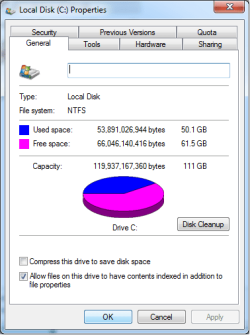
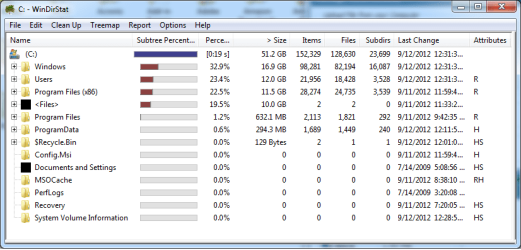
Well I gave up and simply reformatted my SSD and reinstalled Windows. From the screenshots below (Drive Properties and WinDirStat), the numbers all appear to be correct and I no longer have a problem with missing/hidden 34GB of drive space.

I became most alarmed when I read a post on this board from a person who reported a similar problem. Someone suggested their problem could be related to a virus that copied all/some files to a hidden spot/status. Personally I think one of my Blue Screens during the past week might have corrupted my SSD, but I will probably never know.

Thank you to everyone for taking the time to try to solve my problem. At least I picked up some good tips to adjust performance and eliminate wasted disk space, so the entire process was not wasted time.

Drive Properties3.png

WinDirStat.png
 

My Computer

OS
Windows 7 64 bit Premium
AppData, Windows Update staging files and other Temporary files can pile up and take gigs of space without always being visible. I find that CCleaner gets these best.

IE9 can be set in Internet Options>Advanced to empty temp files when browser is closed. Firefox must be cleared manually from Tools tab.
 
Back
Top