Solved Help Please! All System Restore Points Are Gone.

BILL 143

New member
Local time
4:07 PM
Messages
29
Location
Out in the Country, there are Stars!
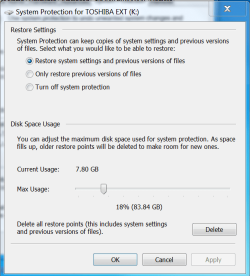
Is there a way to recover missing restore points. I have been rebuilding my PC and Installing all updates since Feb 18th 2026. There is a record of shadow copies in the Reliability View page showing restore points after each critical windows update. Yesterday something happened to the .Net 4.8 updates and they stopped installing. So I stopped for the night and figured I would do a restore in the morning but All the restore points are gone. I do not want to start over again if I can locate the missing restore points. I did find that a USB drive had been added in the system protection somehow (not me) and there is a file on the USB drive that was not there when I started called System Volume Information. I think somehow the Restore System put everything on the K: drive by mistake when I first started the rebuild there was only the C: drive there no K: at all. There is 7 GB of restore points there I just don't know how to access them. Help is Badly needed please!
 

Attachments
  • SYSTEM PROTECTION FOR K DRIVE.PNG
    SYSTEM PROTECTION FOR K DRIVE.PNG
    26.5 KB · Views: 3
  • SYSTEM VOLUME INFO.PNG
    SYSTEM VOLUME INFO.PNG
    18 KB · Views: 0
Last edited:

My Computers My Computers

  • At a glance

    Windows 7 Ultimate x64 7601.win7sp1_ldr_escro...Intel(R) Xeon(R) CPU E3-1270 V2 @ 3.50GHz (8 ...32768MB RAMNVIDIA GeForce GTX 1050 Ti
    Computer type
    PC/Desktop
    Computer Manufacturer/Model Number
    Dell Precision T1650 Custom
    OS
    Windows 7 Ultimate x64 7601.win7sp1_ldr_escrow.200102-1707)
    CPU
    Intel(R) Xeon(R) CPU E3-1270 V2 @ 3.50GHz (8 CPUs), ~3.5GHz
    Memory
    32768MB RAM
    Graphics Card(s)
    NVIDIA GeForce GTX 1050 Ti
    Hard Drives
    WDC WD10EZEX-60WN4A2 ATA Device
    WDC WD5000AACS-61M6B2 ATA Device
    Antivirus
    MSE
    Browser
    Firefox esu
  • At a glance

    Microsoft Windows 7 Home Premium V-6.1.7601 S...Intel(R) Core(TM) i3 CPU - M 350 @ 2.27GHz, 2...Installed Physical Memory (RAM) 8.00 GBIntel(R) HD Graphics PNP Device ID PCI\VEN_80...
    Computer type
    Laptop
    System Manufacturer/Model Number
    TOSHIBA SATELLITE P505-S8020
    OS
    Microsoft Windows 7 Home Premium V-6.1.7601 Service Pack 1 Build 7601 x64-based PC
    CPU
    Intel(R) Core(TM) i3 CPU - M 350 @ 2.27GHz, 2266 Mhz, 2 Core(s), 4 Logical Processor(s)
    Motherboard
    Factory - Unknown
    Memory
    Installed Physical Memory (RAM) 8.00 GB
    Graphics Card(s)
    Intel(R) HD Graphics PNP Device ID PCI\VEN_8086&DEV_0046&SUBSYS_FF501179&REV_02\3&11583659&1&10
    Sound Card
    Conexant SmartAudio HD
    Monitor(s) Displays
    C34G55TWWN
    Screen Resolution
    1920X1200 60Hz
    Hard Drives
    WDC WD10JPVT-00A1YT0
    PSU
    Factory - Unknown
    Case
    Factory - Unknown
    Cooling
    Factory - Unknown
    Keyboard
    NPET (Through) 3 X 4 port USB switch
    Mouse
    Logitech (Through) 3 X 4 port USB switch
    Internet Speed
    250 - 275 Mbps
    Browser
    Firefox esr
    Antivirus
    Avira
    Other Info
    This is an older laptop mostly a backup
First thing to check is the Shadow Copy Service running, if not the restore points may still there but not picked up by the System Restore Utility.
If that is the case, starting the service might do the trick. If that doesn't work, there may be an issue with your recovery environment - try loading an installation disk or bootable repair USB which will use it's own recovery environment and again you might see your restore points available. Pete
 
Last edited:

My Computers My Computers

  • At a glance

    Windows 7 Home Premium 64 bit
    OS
    Windows 7 Home Premium 64 bit
  • Computer type
    PC/Desktop
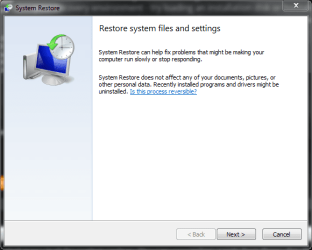
Under the start menu look for system restore.It's also found in the middle of the screen before the one that you where on. You can use restore points from there. Any that are missing are gone.

image.png
 

My Computers My Computers

  • At a glance

    Windows 7 pro/Windows 10 ProIntel i7 860 Quad core 2.8 ghz8 gbATI Radeon HD 5770 1 gb ram
    Computer type
    PC/Desktop
    Computer Manufacturer/Model Number
    HP Pavillion Elite HPE-250f
    OS
    Windows 7 pro/Windows 10 Pro
    CPU
    Intel i7 860 Quad core 2.8 ghz
    Memory
    8 gb
    Graphics Card(s)
    ATI Radeon HD 5770 1 gb ram
    Monitor(s) Displays
    Alienware 25 AW2521HF & Viewsonic
    Screen Resolution
    1920 x1080 & 1680x1050
    Hard Drives
    WD blue 1 tb & 500 gb.
    Browser
    FF of course.
    Other Info
    https://www.bestbuy.com/site/hp-pavilion-elite-desktop-intel-core-i7-processor-8gb-memory-1tb-hard-drive/9921493.p?skuId=9921493
  • At a glance

    Windows 2012 R2 Data center/Linux Minti3 9100 3.6GHz, 8M cache, 4C/4T8GB 2666MT/s DDR4 ECC UDIMM
    Computer type
    PC/Desktop
    System Manufacturer/Model Number
    Dell Poweredge T140
    OS
    Windows 2012 R2 Data center/Linux Mint
    CPU
    i3 9100 3.6GHz, 8M cache, 4C/4T
    Memory
    8GB 2666MT/s DDR4 ECC UDIMM
    Monitor(s) Displays
    Viewsonic
    Screen Resolution
    1680x1050
    Hard Drives
    1 TB & 750 GB
    Other Info
    https://www.dell.com/en-us/work/shop/productdetailstxn/poweredge-t140?~ck=bt

My Computers My Computers

  • At a glance

    7 X64i5 84002x8gb 3200mhz
    Computer type
    PC/Desktop
    OS
    7 X64
    CPU
    i5 8400
    Motherboard
    gigabyte b365m ds3h
    Memory
    2x8gb 3200mhz
    Hard Drives
    various
    PSU
    pure power 11 400w cm
    Case
    Coolermaster
    Cooling
    cryorig m9i
  • At a glance

    7x64g54008gb ddr4 2400
    Computer type
    PC/Desktop
    OS
    7x64
    CPU
    g5400
    Motherboard
    ga b365m ds3h
    Memory
    8gb ddr4 2400
    PSU
    xfx pro 450w
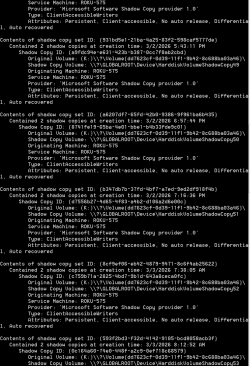
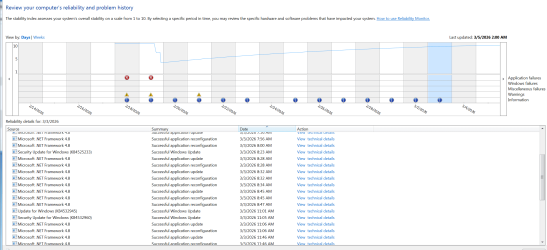
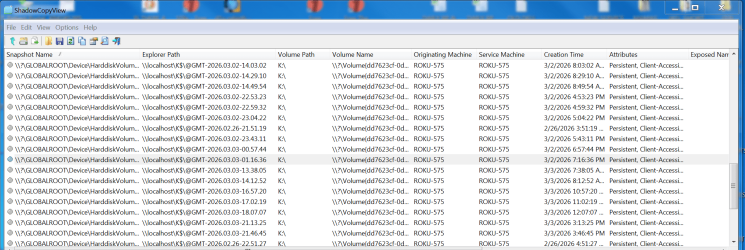
The first thing I did was check Volume Shadow Copy in Services, it was not started and set to Manual, Started the service and changed to Auto. The second thing I did was run Dism from elevated CMD prompt, I followed that with sfc /scannow. The third thing was Check disk. Then I tried a Safe Mode start to check if the restore points were visible, they were not. I started lots of research, all day I ran the cmd command in an elevated prompt "vssadmin list shadows" and in the attachment is what it displayed. Everything was working fine attachment 03-02-26 lots of restore points being created and then on 03-03-26 nothing. All updates for .Net 4.8 stopped updating. Downloaded EaseUS Free software, could not figure it out so contacted support, we attempted to connect but connection from Team viewer was to slow. Downloaded "Shadow Explorer" That was useless. So here I am now. I downloaded Shadow Copy View but may need some help with what it found.

Thank you all for any help with this issue.

Bill

- - - Updated - - -

Ok, it looks like all Volume Shadow Copies are on the USB K: drive, could someone walk me through how to get them back to where they belong please.

- - - Updated - - -

Thank you all for the help but after spending the day trying to recover my restore points I have decided to start over, again-again-again so going for my 4th attempt at this rebuild and will start the F-Disk as soon as I have all my files off of the hard drive, learning as I go I will start saving System images sooner rather than when it is done... Thanks again.
 

Attachments

  • RESTORE POINTS CMD WINDOW.PNG
    RESTORE POINTS CMD WINDOW.PNG
    25 KB · Views: 0
  • 03-02-26 RELIABILITY MONITOR.PNG
    03-02-26 RELIABILITY MONITOR.PNG
    80.7 KB · Views: 1
  • 03-03-26 RELIABILITY LOG.PNG
    03-03-26 RELIABILITY LOG.PNG
    81 KB · Views: 0
  • SHADOW COPY VIEW ALL ON K - DRIVE.PNG
    SHADOW COPY VIEW ALL ON K - DRIVE.PNG
    117.1 KB · Views: 1

My Computers My Computers

  • At a glance

    Windows 7 Ultimate x64 7601.win7sp1_ldr_escro...Intel(R) Xeon(R) CPU E3-1270 V2 @ 3.50GHz (8 ...32768MB RAMNVIDIA GeForce GTX 1050 Ti
    Computer type
    PC/Desktop
    Computer Manufacturer/Model Number
    Dell Precision T1650 Custom
    OS
    Windows 7 Ultimate x64 7601.win7sp1_ldr_escrow.200102-1707)
    CPU
    Intel(R) Xeon(R) CPU E3-1270 V2 @ 3.50GHz (8 CPUs), ~3.5GHz
    Memory
    32768MB RAM
    Graphics Card(s)
    NVIDIA GeForce GTX 1050 Ti
    Hard Drives
    WDC WD10EZEX-60WN4A2 ATA Device
    WDC WD5000AACS-61M6B2 ATA Device
    Antivirus
    MSE
    Browser
    Firefox esu
  • At a glance

    Microsoft Windows 7 Home Premium V-6.1.7601 S...Intel(R) Core(TM) i3 CPU - M 350 @ 2.27GHz, 2...Installed Physical Memory (RAM) 8.00 GBIntel(R) HD Graphics PNP Device ID PCI\VEN_80...
    Computer type
    Laptop
    System Manufacturer/Model Number
    TOSHIBA SATELLITE P505-S8020
    OS
    Microsoft Windows 7 Home Premium V-6.1.7601 Service Pack 1 Build 7601 x64-based PC
    CPU
    Intel(R) Core(TM) i3 CPU - M 350 @ 2.27GHz, 2266 Mhz, 2 Core(s), 4 Logical Processor(s)
    Motherboard
    Factory - Unknown
    Memory
    Installed Physical Memory (RAM) 8.00 GB
    Graphics Card(s)
    Intel(R) HD Graphics PNP Device ID PCI\VEN_8086&DEV_0046&SUBSYS_FF501179&REV_02\3&11583659&1&10
    Sound Card
    Conexant SmartAudio HD
    Monitor(s) Displays
    C34G55TWWN
    Screen Resolution
    1920X1200 60Hz
    Hard Drives
    WDC WD10JPVT-00A1YT0
    PSU
    Factory - Unknown
    Case
    Factory - Unknown
    Cooling
    Factory - Unknown
    Keyboard
    NPET (Through) 3 X 4 port USB switch
    Mouse
    Logitech (Through) 3 X 4 port USB switch
    Internet Speed
    250 - 275 Mbps
    Browser
    Firefox esr
    Antivirus
    Avira
    Other Info
    This is an older laptop mostly a backup
Back
Top