
Abhishek1108
From India
Hey guys,
In my current pc, I have 4 partitions (all primary)- System Reserved, Windows 7, Windows 8 and Abhishek (Personal Data).
Now I want to install ubuntu on another partition, so how do I create it because I already have four primary partitions. If I convert Abhishek to logical then I will have 3 primary and 1 logical partition. Still I cannot create a partition(neither primary nor logical).
Space is not a problem.
So now what to do.
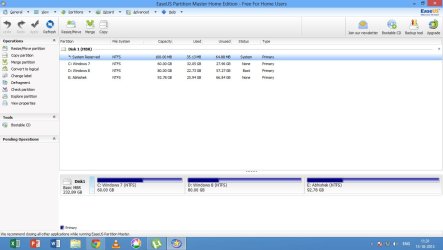
In my current pc, I have 4 partitions (all primary)- System Reserved, Windows 7, Windows 8 and Abhishek (Personal Data).
Now I want to install ubuntu on another partition, so how do I create it because I already have four primary partitions. If I convert Abhishek to logical then I will have 3 primary and 1 logical partition. Still I cannot create a partition(neither primary nor logical).
Space is not a problem.
So now what to do.
My Computer
- Computer type
- PC/Desktop
- Computer Manufacturer/Model Number
- Custom Build
- OS
- Windows 7 Professional x64 Windows 8 Professional x64
- CPU
- Intel Core2Duo E7400
- Motherboard
- Intel DG31PR
- Memory
- 4 GB RAM
- Graphics Card(s)
- Intel G33/G31 Express Chipset Family
- Screen Resolution
- 1360X768
- PSU
- 400 W
- Antivirus
- Kaspersky Internet Security
- Browser
- Chrome


