HELP! Secondary Hard Drive Issue

viyu

New member
Local time
2:55 AM
Messages
1
I am currently running Windows 7 Ultimate 64 Bit. I installed a secondary drive (Western Digital WD Black WD1002FAEX) today. The secondary drive shows up on the device manager and bios, but does not appear in my windows explorer. I've also included a picture of the disk management below.


My Computer My Computer

OS
Windows 7 Ultimate 64 Bit
Hello there viyu!

Sorry to hear you are having some troubles setting up your new hard drive, but it seems you haven't said if you had done any of the steps on initializing and formatting your hard drive. So I will provide a few short steps on how to do so.

1. Hit the start menu and in the search at the bottom type in disk management, I do believe you have it open in the picture already so that is the first thing.

2.Right click on your unallocated hard drive and click initialize this should open up a new menu keep MBR checked off and make sure you have the proper hard drive checked off.

3.After that is done right click on the hard drive again and click format and it should take you through a step by step process which is fairly simple and make sure you keep it on NTSF and then select your hard drive letter.


That should be everything to get your new hard drive up and running, If I have missed anything I am sure some one will correct me or add their advice into what I have missed!

Good luck!
Swifty.

 

My Computer My Computer

Computer type
PC/Desktop
Computer Manufacturer/Model Number
Custom
OS
Windows 7 x64 Professional
CPU
Intel i5-4690k
Motherboard
MSI Z97 Gaming 5
Memory
Corsair Vengeance Pro Series 16GB DDR3 1866mhz
Graphics Card(s)
R9 390 8GB
Monitor(s) Displays
24" Acer 3D monitor
Hard Drives
2TB Seagate HDD
120GB Adata SSD
PSU
750 watt
Case
Zalmann Z9
Cooling
Fan
Keyboard
Razer Deathstalker
Mouse
Anker Gaming Mouse
Internet Speed
20MB/S
Antivirus
AVG
Browser
Google Chrome
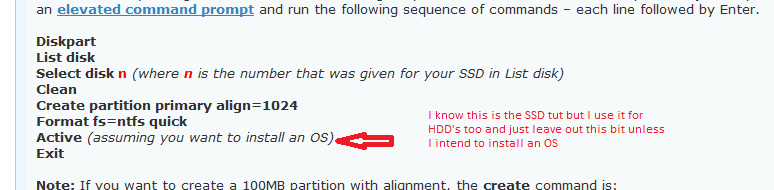
Hum Swifty I am wondering if the drive is actually set up right or not and am thinking perhaps running the DISKPART on it again might do the trick.

I know this is for an SSD but I do it on HDD's as well - the alignment bi that is.
 

Attachments

  • SSDD.PNG
    SSDD.PNG
    7.8 KB · Views: 9

My Computer My Computer

Computer type
PC/Desktop
Computer Manufacturer/Model Number
Own build (new) Desk1 / Asus ROG Win 7 / Desk2 1st build
OS
Desk1 7 Home Prem / Desk2 10 Pro / Main lap Asus ROG 10 Pro 2 laptop Toshiba 7 Pro Asus P2520 7 & 10
CPU
Desk1 i5 3750K / Laptop i7 GTX 860M / Desk2 i5 2500
Motherboard
Desk1 Asus P877-V / Desk2 Gigabyte H67 UD3H / Laptop ?
Memory
Desk1 8GB (1866) / Desk2 16GB (1333) / Laptop 8Gb DDR3
Graphics Card(s)
Desk 1& 2NVidia GTX 650 & Laptops on board Intel
Sound Card
Desk 1 & 2 -XONAR DG Realtek High Def audio Laptop
Monitor(s) Displays
Desk 1 Benq HD 2450 / Desk2 Philips 24" / Laptop 17.5"
Screen Resolution
1920x1080 D1 & D2 & Laptop 1
Hard Drives
Desk1 Samsung 120GB 830 SSD
Asus ROG 256GB 850 Pro SSD
Desk2 Samsung 840 256 SSD
Toshiba 120GB EVO
PSU
Desk 1 Corsair HX 1050/ Laptop ? / Desk 2 Corsair HX 650
Case
Desk 1 Cooler HAF XM ? Toshiba laptop / Desk2 Coolermaster
Cooling
Fans on all Desk1 -2 Desk2 - all Coolermasters 5 Laptop ?
Keyboard
Desk 1 MS Sidewinder X6 Desk 2 MS Sidewinder X 4
Mouse
Desk 1&2 - Gigabyte MS 900 gamer - laptop - Logitec wireless
Internet Speed
ADSL2+
Other Info
One other Desktop (tester) and spare Toshba laptop both with SSD's
Running Kaspersky 2016 ISS on all machines config'd identically
Logitec audio stereo systems on each machine (x3)
Canon MG5250MFC
Router/modem TP-Link running WPA2SK
Swifty's advice is correct. A drive ships unformatted, so you need to tell the computer how to format it and which letter to assign to the drive.
 

My Computer My Computer

OS
Windows 7 Ultimate x64 SP1
CPU
Intel Core i7-2600
Motherboard
Gigabyte GA-P67A-UD3P-B3
Memory
12 GB Patriot Extreme DDR3-1333
Graphics Card(s)
Nvidia GTX 470
Monitor(s) Displays
Dell UltraSharp 2209WA
Hard Drives
OCZ Agility3 240 GB, WD5001AALS, WD7501AALS
PSU
OCZ ModStream 700W
Case
CoolerMaster HAF 912 Advanced
Cooling
CoolerMaster Hyper 212 Plus
Hum Swifty I am wondering if the drive is actually set up right or not and am thinking perhaps running the DISKPART on it again might do the trick.

I know this is for an SSD but I do it on HDD's as well - the alignment bi that is.

Everything looks good there the only thing I would look out for is if you are using an operating system older than Windows 7 for the SDD to look at the partition primary alignment that may change when using another OS.
 

My Computer My Computer

Computer type
PC/Desktop
Computer Manufacturer/Model Number
Custom
OS
Windows 7 x64 Professional
CPU
Intel i5-4690k
Motherboard
MSI Z97 Gaming 5
Memory
Corsair Vengeance Pro Series 16GB DDR3 1866mhz
Graphics Card(s)
R9 390 8GB
Monitor(s) Displays
24" Acer 3D monitor
Hard Drives
2TB Seagate HDD
120GB Adata SSD
PSU
750 watt
Case
Zalmann Z9
Cooling
Fan
Keyboard
Razer Deathstalker
Mouse
Anker Gaming Mouse
Internet Speed
20MB/S
Antivirus
AVG
Browser
Google Chrome
Hum Swifty I am wondering if the drive is actually set up right or not and am thinking perhaps running the DISKPART on it again might do the trick.

I know this is for an SSD but I do it on HDD's as well - the alignment bi that is.

Everything looks good there the only thing I would look out for is if you are using an operating system older than Windows 7 for the SDD to look at the partition primary alignment that may change when using another OS.
Ok Swifty got you I just assumed the OP was using 7 :o
 

My Computer My Computer

Computer type
PC/Desktop
Computer Manufacturer/Model Number
Own build (new) Desk1 / Asus ROG Win 7 / Desk2 1st build
OS
Desk1 7 Home Prem / Desk2 10 Pro / Main lap Asus ROG 10 Pro 2 laptop Toshiba 7 Pro Asus P2520 7 & 10
CPU
Desk1 i5 3750K / Laptop i7 GTX 860M / Desk2 i5 2500
Motherboard
Desk1 Asus P877-V / Desk2 Gigabyte H67 UD3H / Laptop ?
Memory
Desk1 8GB (1866) / Desk2 16GB (1333) / Laptop 8Gb DDR3
Graphics Card(s)
Desk 1& 2NVidia GTX 650 & Laptops on board Intel
Sound Card
Desk 1 & 2 -XONAR DG Realtek High Def audio Laptop
Monitor(s) Displays
Desk 1 Benq HD 2450 / Desk2 Philips 24" / Laptop 17.5"
Screen Resolution
1920x1080 D1 & D2 & Laptop 1
Hard Drives
Desk1 Samsung 120GB 830 SSD
Asus ROG 256GB 850 Pro SSD
Desk2 Samsung 840 256 SSD
Toshiba 120GB EVO
PSU
Desk 1 Corsair HX 1050/ Laptop ? / Desk 2 Corsair HX 650
Case
Desk 1 Cooler HAF XM ? Toshiba laptop / Desk2 Coolermaster
Cooling
Fans on all Desk1 -2 Desk2 - all Coolermasters 5 Laptop ?
Keyboard
Desk 1 MS Sidewinder X6 Desk 2 MS Sidewinder X 4
Mouse
Desk 1&2 - Gigabyte MS 900 gamer - laptop - Logitec wireless
Internet Speed
ADSL2+
Other Info
One other Desktop (tester) and spare Toshba laptop both with SSD's
Running Kaspersky 2016 ISS on all machines config'd identically
Logitec audio stereo systems on each machine (x3)
Canon MG5250MFC
Router/modem TP-Link running WPA2SK
Back
Top