Solved HELP! Stuck on Standard VGA Graphics Adapter

Maty

New member
Local time
5:28 PM
Messages
26
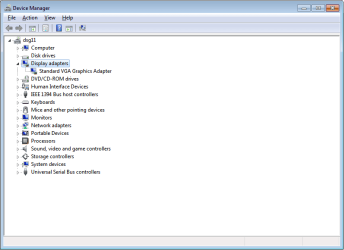
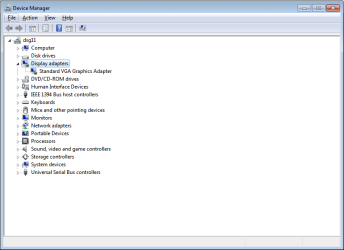
Hello. I recently restored the computer to factory settings and the graphics card won't work now. Before the restore it was working just fine but now I am stuck on the Standard VGA Graphics Adapter. The graphic card that I have I think it's a "ATI Raedon HD 5450 Series Graphic". I have already tried updating it and can't get it to work either. Here is a link for information about the computer, HP Support document - HP Support Center

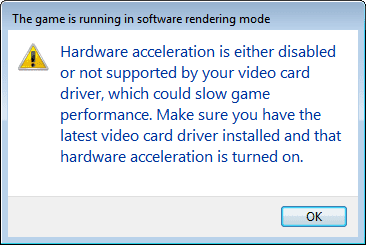
And here are some pictures of what's going on.
(by the way, I haven't installed, removed, or touched anything inside the computer)
(the hardware acceleration slider is all the way to the right, the full position)
(this is windows 7 home premium 64bit)
 

Attachments
  • Untitled.png
    Untitled.png
    13.1 KB · Views: 3
  • Untitled1.png
    Untitled1.png
    28.2 KB · Views: 5
  • Untitled2.png
    Untitled2.png
    12.8 KB · Views: 3
  • Untitled3.png
    Untitled3.png
    5.2 KB · Views: 36

My Computer My Computer

Computer type
PC/Desktop
Computer Manufacturer/Model Number
HP
OS
Windows 7 Home Premium 64bit
Hi Welcome to Seven Forums ... Have you tried to Install the Driver for your Graphics Card from the Manufactures website ..
 

My Computer My Computer

Computer Manufacturer/Model Number
W530-3630QM1
OS
windows 7 home 64bit
CPU
INTEL-CORE I7
Memory
16GB
Hard Drives
750GB
Browser
Chrome
Thank you! And yes, I went into the AMD website and updated the driver. Tried updating everything, the INTEL processor, and anything for this desktop from the HP website.
 

My Computer My Computer

Computer type
PC/Desktop
Computer Manufacturer/Model Number
HP
OS
Windows 7 Home Premium 64bit
I did mean the HP website .. If you tried to Install that Driver what happened ? Did you get any errors ? Also have you tried the Original Driver from the HP website .. There is more than one Driver there though can be difficult to find ..
 

My Computer My Computer

Computer Manufacturer/Model Number
W530-3630QM1
OS
windows 7 home 64bit
CPU
INTEL-CORE I7
Memory
16GB
Hard Drives
750GB
Browser
Chrome

My Computer My Computer

Computer type
PC/Desktop
Computer Manufacturer/Model Number
self build
OS
win 7 ultimate32bit, Win8.1pro wmc 32bit
CPU
amd phenom x4 9600
Motherboard
asus m2n32-sli deluxe
Memory
corsair twinxs 2x2gb
Graphics Card(s)
2x nvidia 1gb 8500gt
Sound Card
onboard
Monitor(s) Displays
23" PB Viseo 233d
Screen Resolution
1920x1080
Hard Drives
maxtor sata 500gb
maxtor sata 320gb
fujitsu sata200gb
PSU
oryxx tornado 750w
Case
thermaltake xaser lll
Cooling
artic freezer64 pro + 7 case fans
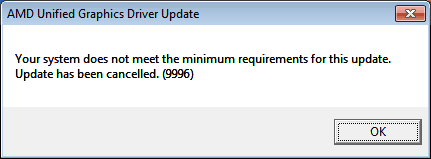
I just saw a new part of the HP website that I missed before with driver updates, I clicked the Graphic Driver and got this error
 

Attachments

  • Untitled.png
    Untitled.png
    2.8 KB · Views: 34

My Computer My Computer

Computer type
PC/Desktop
Computer Manufacturer/Model Number
HP
OS
Windows 7 Home Premium 64bit
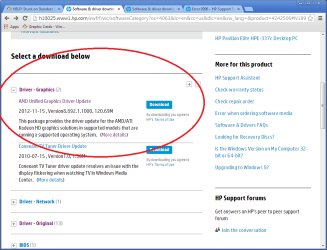
Thanks Pebbly, and yes. On the bottom of that link where it says Driver-Graphics, that's the part of the website that I missed and got that error box from.
 

My Computer My Computer

Computer type
PC/Desktop
Computer Manufacturer/Model Number
HP
OS
Windows 7 Home Premium 64bit
This is the one you guys are talking about, right?
 

Attachments

  • Untitled.png
    Untitled.png
    36.6 KB · Views: 2

My Computer My Computer

Computer type
PC/Desktop
Computer Manufacturer/Model Number
HP
OS
Windows 7 Home Premium 64bit
No its under Original Drivers dated 2010
 

My Computer My Computer

Computer Manufacturer/Model Number
W530-3630QM1
OS
windows 7 home 64bit
CPU
INTEL-CORE I7
Memory
16GB
Hard Drives
750GB
Browser
Chrome
No the original driver V8.7400 in the drivers -original :)
 

My Computer My Computer

Computer type
PC/Desktop
Computer Manufacturer/Model Number
self build
OS
win 7 ultimate32bit, Win8.1pro wmc 32bit
CPU
amd phenom x4 9600
Motherboard
asus m2n32-sli deluxe
Memory
corsair twinxs 2x2gb
Graphics Card(s)
2x nvidia 1gb 8500gt
Sound Card
onboard
Monitor(s) Displays
23" PB Viseo 233d
Screen Resolution
1920x1080
Hard Drives
maxtor sata 500gb
maxtor sata 320gb
fujitsu sata200gb
PSU
oryxx tornado 750w
Case
thermaltake xaser lll
Cooling
artic freezer64 pro + 7 case fans
I got the exact same error message, the one with the 9996 error.
 

My Computer My Computer

Computer type
PC/Desktop
Computer Manufacturer/Model Number
HP
OS
Windows 7 Home Premium 64bit
Are you using the On-board Graphics .. I would try taking your Graphics Card out and reseating it .. It is not being detected ..
 

My Computer My Computer

Computer Manufacturer/Model Number
W530-3630QM1
OS
windows 7 home 64bit
CPU
INTEL-CORE I7
Memory
16GB
Hard Drives
750GB
Browser
Chrome
I'm not sure, but why would I have to do that? It was fine before resetting the settings and I haven't touched anything inside the tower since then.
 

My Computer My Computer

Computer type
PC/Desktop
Computer Manufacturer/Model Number
HP
OS
Windows 7 Home Premium 64bit
If you look on the back of your Computer .. You should have two VGA adapters .. One would be for your Radeon Card and the other for your On-board Graphics .. If you where always using the Radeon Card i admit it should be working now .. I would check and see which one is plugged into your Monitor ..
 

My Computer My Computer

Computer Manufacturer/Model Number
W530-3630QM1
OS
windows 7 home 64bit
CPU
INTEL-CORE I7
Memory
16GB
Hard Drives
750GB
Browser
Chrome
I see what you're saying, but I haven't disconnected the monitor at all. And I think it's using the Radeon Card because the monitor is plugged in an input that looks like it can be removed, you know, those slots that you can add stuff to your computer. The other VGA adapter that is hardwired into the tower itself is covered up with a piece of plastic (came with the computer and have never taken out).
 

My Computer My Computer

Computer type
PC/Desktop
Computer Manufacturer/Model Number
HP
OS
Windows 7 Home Premium 64bit
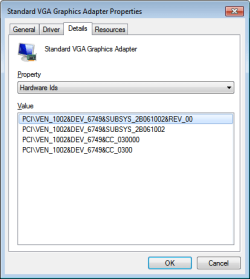
Lets try this open the Device Manager, right click onto the graphics adapter > "Properties" > "Details" > "Property" > "HardwareIDs". There you will find the DeviceID please Post the id
 

My Computer My Computer

Computer Manufacturer/Model Number
W530-3630QM1
OS
windows 7 home 64bit
CPU
INTEL-CORE I7
Memory
16GB
Hard Drives
750GB
Browser
Chrome
Here it is.
 

Attachments

  • Untitled.png
    Untitled.png
    7.6 KB · Views: 16

My Computer My Computer

Computer type
PC/Desktop
Computer Manufacturer/Model Number
HP
OS
Windows 7 Home Premium 64bit
Sorry for the delay was checking it out .. Yes it is the Radeon Card .. Shall have to do some research but shall get back to you ASAP .. I need to cook and eat at the moment ...
 

My Computer My Computer

Computer Manufacturer/Model Number
W530-3630QM1
OS
windows 7 home 64bit
CPU
INTEL-CORE I7
Memory
16GB
Hard Drives
750GB
Browser
Chrome
OK, thank you so much for your help.
 

My Computer My Computer

Computer type
PC/Desktop
Computer Manufacturer/Model Number
HP
OS
Windows 7 Home Premium 64bit
Back
Top