
You are using an out of date browser. It may not display this or other websites correctly.
You should upgrade or use an alternative browser.
You should upgrade or use an alternative browser.
Solved HELP! Stuck on Standard VGA Graphics Adapter
- Thread starter Maty
- Start date

The Link is below Try this one if Windows fails to find the Driver .. Make sure you have NET4 Framework. Installed the Link for that is on the bottom of the Page ...
http://support.amd.com/en-us/download/desktop?os=Windows%207%20-%2064
http://support.amd.com/en-us/download/desktop?os=Windows%207%20-%2064
My Computer
At a glance
windows 7 home 64bitINTEL-CORE I716GB
- Computer Manufacturer/Model Number
- W530-3630QM1
- OS
- windows 7 home 64bit
- CPU
- INTEL-CORE I7
- Memory
- 16GB
- Hard Drives
- 750GB
- Browser
- Chrome
Still no luck... All 133 updates installed without any error, well actually there was 1, but I restarted the computer and tried again and it worked that time.
It seemed like the link installed correctly, even when I went and reinstalled it there was a message at the bottom saying the driver was up to date. However when the installation finishes, nothing happens. There is no .exe anywhere, if it wasn't for the program being in control panel, I would have no idea it was installed.
It seemed like the link installed correctly, even when I went and reinstalled it there was a message at the bottom saying the driver was up to date. However when the installation finishes, nothing happens. There is no .exe anywhere, if it wasn't for the program being in control panel, I would have no idea it was installed.
My Computer
At a glance
Windows 7 Home Premium 64bit
- Computer type
- PC/Desktop
- Computer Manufacturer/Model Number
- HP
- OS
- Windows 7 Home Premium 64bit
What would happen if I disable the VGA Standard? Or if I install the driver manually? Like browse to the location of the file (I read about it, but don't know how to do).
My Computer
At a glance
Windows 7 Home Premium 64bit
- Computer type
- PC/Desktop
- Computer Manufacturer/Model Number
- HP
- OS
- Windows 7 Home Premium 64bit
Hi there ... I cannot figure out what is going on there .. So i am going to ask a friend to have a look at this Post as see if he can shed any light on it ... I really did think the Clean Install would have sorted the issue .. Sorry you have had all that bother for nothing ...
My Computer
At a glance
windows 7 home 64bitINTEL-CORE I716GB
- Computer Manufacturer/Model Number
- W530-3630QM1
- OS
- windows 7 home 64bit
- CPU
- INTEL-CORE I7
- Memory
- 16GB
- Hard Drives
- 750GB
- Browser
- Chrome
I would so too... It's not your fault, at least I got a fresh start now to work with. I just checked for updates, and found 14 new ones, so I'm going to keep trying keeping everything up to date and re-updating the graphics card or trying to recognize it.
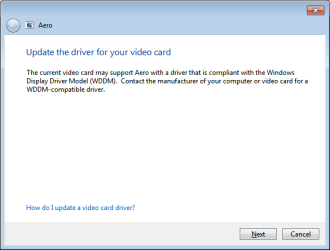
I just found in the Personilization (when you right click on the desktop) that there is an error with the Aero theme and transparency. This error box,
I just found in the Personilization (when you right click on the desktop) that there is an error with the Aero theme and transparency. This error box,
Attachments
My Computer
At a glance
Windows 7 Home Premium 64bit
- Computer type
- PC/Desktop
- Computer Manufacturer/Model Number
- HP
- OS
- Windows 7 Home Premium 64bit
It might be worth trying the other VGA port just to see what Windows would Display
My Computer
At a glance
windows 7 home 64bitINTEL-CORE I716GB
- Computer Manufacturer/Model Number
- W530-3630QM1
- OS
- windows 7 home 64bit
- CPU
- INTEL-CORE I7
- Memory
- 16GB
- Hard Drives
- 750GB
- Browser
- Chrome
OK, I'll see if I can find a star screwdriver anywhere. I don't think I have any, but I'll look and ask around. Maybe I should mention that the monitor has a VGA output and Raedon card has a DVI input, there is a converter in between them. But on the HP website it does mention that the Raedon card supports VGA,
2 - DVI (single-link)*
* VGA is available using DVI-to-VGA adapter
My Computer
At a glance
Windows 7 Home Premium 64bit
- Computer type
- PC/Desktop
- Computer Manufacturer/Model Number
- HP
- OS
- Windows 7 Home Premium 64bit
Thinking about that, it seems like that's how it should be... But I haven't changed the monitor either, from when it was working to now. I am going to try a different monitor with a DVI output though.
My Computer
At a glance
Windows 7 Home Premium 64bit
- Computer type
- PC/Desktop
- Computer Manufacturer/Model Number
- HP
- OS
- Windows 7 Home Premium 64bit
Its worth trying any thing
My Computer
At a glance
windows 7 home 64bitINTEL-CORE I716GB
- Computer Manufacturer/Model Number
- W530-3630QM1
- OS
- windows 7 home 64bit
- CPU
- INTEL-CORE I7
- Memory
- 16GB
- Hard Drives
- 750GB
- Browser
- Chrome
So after all of the updates were finished I checked for new updates, found a couple of ones. Restarted the computer and checked for updates again (when I accessed the update screen it said "your computer is up-to-date" and even had a green shield with a checkmark on it), so after checking for updates, it found 80 new important updates.... What's going on? I checked the history and only like 2 or 3 failed, the rest were successful.
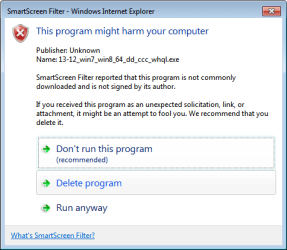
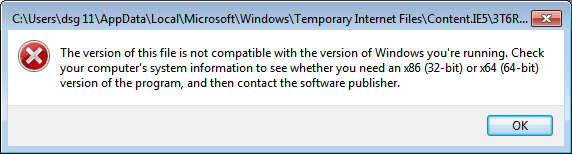
Also on the update session before this 80 one, I saw the NET4 framework, the one you mentioned. So after it finished I tried the link you sent again and got the same error as before. I click "run anyways" and that's when I get the second error box. I even go through the AMD website and put all of the video card information again.
Quick question though, just to make sure (at this point I don't trust anything on this computer), when running Belarc, where should the video card information appear?
Also on the update session before this 80 one, I saw the NET4 framework, the one you mentioned. So after it finished I tried the link you sent again and got the same error as before. I click "run anyways" and that's when I get the second error box. I even go through the AMD website and put all of the video card information again.
Quick question though, just to make sure (at this point I don't trust anything on this computer), when running Belarc, where should the video card information appear?
Attachments
My Computer
At a glance
Windows 7 Home Premium 64bit
- Computer type
- PC/Desktop
- Computer Manufacturer/Model Number
- HP
- OS
- Windows 7 Home Premium 64bit
Hi there .. Under Display Adapter in the Device Manager .. But in your case it does not only shows as Standard VGA
My Computer
At a glance
windows 7 home 64bitINTEL-CORE I716GB
- Computer Manufacturer/Model Number
- W530-3630QM1
- OS
- windows 7 home 64bit
- CPU
- INTEL-CORE I7
- Memory
- 16GB
- Hard Drives
- 750GB
- Browser
- Chrome

My Computer
At a glance
x64 (6.3.9600) Win8.1 Pro & soon dual boot x6...AMD A6-3420M APU with Radeon(tm) HD Graphics6.00 GBAMD Radeon(TM) HD 6520G
- Computer type
- Laptop
- Computer Manufacturer/Model Number
- HP Pavilion dv6-6c10us
- OS
- x64 (6.3.9600) Win8.1 Pro & soon dual boot x64 (6.1.7601) Win7_SP1 HomePrem
- CPU
- AMD A6-3420M APU with Radeon(tm) HD Graphics
- Motherboard
- Hewlett-Packard 1805
- Memory
- 6.00 GB
- Graphics Card(s)
- AMD Radeon(TM) HD 6520G
- Sound Card
- (1) AMD High Definition Audio Device (2) IDT High Definiti
- Monitor(s) Displays
- HP W2072a 20" LCD (1600 x 900) @ 60 Hz
- Screen Resolution
- 1366 x 768 x 32 bits (4294967296 colors) @ 60 Hz
- Hard Drives
- ST640LM0 00 HM641JI SATA Disk Device
- Keyboard
- Logitech k520 wireless KB
- Mouse
- Logitech m320 wireless mouse (bundled with KB)
- Internet Speed
- 15/5 | 54 MB Wireless 'n'
- Antivirus
- Realtime: Defender or Avast | On-demand: Malwarebytes, ESET
- Browser
- IE 11 on Win8, IE 10 on win 7
- Other Info
- Media: [Gimp, Audacity, VLC] || Comm: [WEmail 2012, Skype] || Productivity: [OpenOffice,| Textpad] || Utils: [Sysinternals, cCleaner, Speccy, Defraggler]

Maty, please tell us all, the make and model of your video card.
I`m not gonna read 6 pages of posts.
And please fill out your specs.
I`m not gonna read 6 pages of posts.
And please fill out your specs.
My Computer
At a glance
Windows 10 Pro x64Intel Core i7 6700KGSkill TridentZ RGB 16GB 3600 16-16-16-36EVGA GTX 980 Ti SC x2
- Computer type
- PC/Desktop
- Computer Manufacturer/Model Number
- Skylake Special #666
- OS
- Windows 10 Pro x64
- CPU
- Intel Core i7 6700K
- Motherboard
- Asus Sabertooth Z170 Mark 1
- Memory
- GSkill TridentZ RGB 16GB 3600 16-16-16-36
- Graphics Card(s)
- EVGA GTX 980 Ti SC x2
- Sound Card
- Realtek High Definition
- Monitor(s) Displays
- AOC G2460PG
- Screen Resolution
- 1920 x 1080 144Hz
- Hard Drives
- Samsung 860 Pro 256GB, Seagate Barracuda 4TB x2
- PSU
- EVGA 1000 P2, EVGA White Custom Braided Cables
- Case
- Corsair Vengeance C70 Gunmetal Black
- Cooling
- Corsair H100i v2, Corsair ML120 x2, Thermal Grizzly Kryonaut
- Keyboard
- Logitech G910 Orion Spectrum
- Mouse
- Logitech G700s
- Internet Speed
- Verizon Fios Quantum Gateway 75/75
- Antivirus
- Windows Defender, Malwarebytes Free 3.8.3
- Browser
- Chrome
- Other Info
- Corsair SP120 x4, LG Blu-ray Drive, Durabrand HT-395 100 Watt Dolby Digital Amp, Corsair H2100 Wireless 7.1 Headset
Here is the Speecy, is this what you need AddRam?
http://speccy.piriform.com/results/S6kge4ZF5CLLVUZwKxTdqL2
http://speccy.piriform.com/results/S6kge4ZF5CLLVUZwKxTdqL2
My Computer
At a glance
Windows 7 Home Premium 64bit
- Computer type
- PC/Desktop
- Computer Manufacturer/Model Number
- HP
- OS
- Windows 7 Home Premium 64bit
Thanks for the Speccy report.
How is your monitor connected to your machine? Speccy tells me it is analog.
Monitor manual (PDF)
Adram was asking for you to update your system specs here on the forum, please follow the Easy System Specs link in my signature. Pleaase enter the makes and model of your machine manually in your forum profile - Thanks
How is your monitor connected to your machine? Speccy tells me it is analog.
Monitor manual (PDF)
Adram was asking for you to update your system specs here on the forum, please follow the Easy System Specs link in my signature. Pleaase enter the makes and model of your machine manually in your forum profile - Thanks
My Computer
At a glance
x64 (6.3.9600) Win8.1 Pro & soon dual boot x6...AMD A6-3420M APU with Radeon(tm) HD Graphics6.00 GBAMD Radeon(TM) HD 6520G
- Computer type
- Laptop
- Computer Manufacturer/Model Number
- HP Pavilion dv6-6c10us
- OS
- x64 (6.3.9600) Win8.1 Pro & soon dual boot x64 (6.1.7601) Win7_SP1 HomePrem
- CPU
- AMD A6-3420M APU with Radeon(tm) HD Graphics
- Motherboard
- Hewlett-Packard 1805
- Memory
- 6.00 GB
- Graphics Card(s)
- AMD Radeon(TM) HD 6520G
- Sound Card
- (1) AMD High Definition Audio Device (2) IDT High Definiti
- Monitor(s) Displays
- HP W2072a 20" LCD (1600 x 900) @ 60 Hz
- Screen Resolution
- 1366 x 768 x 32 bits (4294967296 colors) @ 60 Hz
- Hard Drives
- ST640LM0 00 HM641JI SATA Disk Device
- Keyboard
- Logitech k520 wireless KB
- Mouse
- Logitech m320 wireless mouse (bundled with KB)
- Internet Speed
- 15/5 | 54 MB Wireless 'n'
- Antivirus
- Realtime: Defender or Avast | On-demand: Malwarebytes, ESET
- Browser
- IE 11 on Win8, IE 10 on win 7
- Other Info
- Media: [Gimp, Audacity, VLC] || Comm: [WEmail 2012, Skype] || Productivity: [OpenOffice,| Textpad] || Utils: [Sysinternals, cCleaner, Speccy, Defraggler]
OMG, I`ve never seen a Speccy result like that in my lifetime 
Maty, that does not help us at all.
Once again, what is the make and model of your computer.
Maty, that does not help us at all.
Once again, what is the make and model of your computer.
My Computer
At a glance
Windows 10 Pro x64Intel Core i7 6700KGSkill TridentZ RGB 16GB 3600 16-16-16-36EVGA GTX 980 Ti SC x2
- Computer type
- PC/Desktop
- Computer Manufacturer/Model Number
- Skylake Special #666
- OS
- Windows 10 Pro x64
- CPU
- Intel Core i7 6700K
- Motherboard
- Asus Sabertooth Z170 Mark 1
- Memory
- GSkill TridentZ RGB 16GB 3600 16-16-16-36
- Graphics Card(s)
- EVGA GTX 980 Ti SC x2
- Sound Card
- Realtek High Definition
- Monitor(s) Displays
- AOC G2460PG
- Screen Resolution
- 1920 x 1080 144Hz
- Hard Drives
- Samsung 860 Pro 256GB, Seagate Barracuda 4TB x2
- PSU
- EVGA 1000 P2, EVGA White Custom Braided Cables
- Case
- Corsair Vengeance C70 Gunmetal Black
- Cooling
- Corsair H100i v2, Corsair ML120 x2, Thermal Grizzly Kryonaut
- Keyboard
- Logitech G910 Orion Spectrum
- Mouse
- Logitech G700s
- Internet Speed
- Verizon Fios Quantum Gateway 75/75
- Antivirus
- Windows Defender, Malwarebytes Free 3.8.3
- Browser
- Chrome
- Other Info
- Corsair SP120 x4, LG Blu-ray Drive, Durabrand HT-395 100 Watt Dolby Digital Amp, Corsair H2100 Wireless 7.1 Headset
Maty,
Try uninstalling the Display adapter in Device manager until you get to the Microsoft VGA driver - answer yes to uninstall software if prompted.
You might have to "uninstall" it a few times depending on how many attempts you've made to install "new" drivers. The idea is to get to the base driver delivered by MS and then move up to the specific driver.
Speccy shows ATI Standard VGA driver, not MS Standard VGA driver. Worth a shot
Try uninstalling the Display adapter in Device manager until you get to the Microsoft VGA driver - answer yes to uninstall software if prompted.
You might have to "uninstall" it a few times depending on how many attempts you've made to install "new" drivers. The idea is to get to the base driver delivered by MS and then move up to the specific driver.
Speccy shows ATI Standard VGA driver, not MS Standard VGA driver. Worth a shot
My Computer
At a glance
x64 (6.3.9600) Win8.1 Pro & soon dual boot x6...AMD A6-3420M APU with Radeon(tm) HD Graphics6.00 GBAMD Radeon(TM) HD 6520G
- Computer type
- Laptop
- Computer Manufacturer/Model Number
- HP Pavilion dv6-6c10us
- OS
- x64 (6.3.9600) Win8.1 Pro & soon dual boot x64 (6.1.7601) Win7_SP1 HomePrem
- CPU
- AMD A6-3420M APU with Radeon(tm) HD Graphics
- Motherboard
- Hewlett-Packard 1805
- Memory
- 6.00 GB
- Graphics Card(s)
- AMD Radeon(TM) HD 6520G
- Sound Card
- (1) AMD High Definition Audio Device (2) IDT High Definiti
- Monitor(s) Displays
- HP W2072a 20" LCD (1600 x 900) @ 60 Hz
- Screen Resolution
- 1366 x 768 x 32 bits (4294967296 colors) @ 60 Hz
- Hard Drives
- ST640LM0 00 HM641JI SATA Disk Device
- Keyboard
- Logitech k520 wireless KB
- Mouse
- Logitech m320 wireless mouse (bundled with KB)
- Internet Speed
- 15/5 | 54 MB Wireless 'n'
- Antivirus
- Realtime: Defender or Avast | On-demand: Malwarebytes, ESET
- Browser
- IE 11 on Win8, IE 10 on win 7
- Other Info
- Media: [Gimp, Audacity, VLC] || Comm: [WEmail 2012, Skype] || Productivity: [OpenOffice,| Textpad] || Utils: [Sysinternals, cCleaner, Speccy, Defraggler]
I still want to see what the forum SIW tool tells us
- Easy System specs in my sig makes it REALLY easy
HP Pavilion Elite HPE-300z CTO Desktop
There are a number of options for graphics cards listed on Specs and Options
Graphics Must select one of the following options:
- Easy System specs in my sig makes it REALLY easy
HP Pavilion Elite HPE-300z CTO Desktop
There are a number of options for graphics cards listed on Specs and Options
Graphics Must select one of the following options:
- GeForce 315
- Radeon HD5450 (512 MB)
- Radeon HD5450 (1 GB)
- Radeon HD5570 (1 GB)
- Radeon HD5570 (2 GB)
- Radeon HD5770
- GeForce GT220
- GeForce GT320
- GeForce GT230
Warning
DO NOT enter the serial number here
My Computer
At a glance
x64 (6.3.9600) Win8.1 Pro & soon dual boot x6...AMD A6-3420M APU with Radeon(tm) HD Graphics6.00 GBAMD Radeon(TM) HD 6520G
- Computer type
- Laptop
- Computer Manufacturer/Model Number
- HP Pavilion dv6-6c10us
- OS
- x64 (6.3.9600) Win8.1 Pro & soon dual boot x64 (6.1.7601) Win7_SP1 HomePrem
- CPU
- AMD A6-3420M APU with Radeon(tm) HD Graphics
- Motherboard
- Hewlett-Packard 1805
- Memory
- 6.00 GB
- Graphics Card(s)
- AMD Radeon(TM) HD 6520G
- Sound Card
- (1) AMD High Definition Audio Device (2) IDT High Definiti
- Monitor(s) Displays
- HP W2072a 20" LCD (1600 x 900) @ 60 Hz
- Screen Resolution
- 1366 x 768 x 32 bits (4294967296 colors) @ 60 Hz
- Hard Drives
- ST640LM0 00 HM641JI SATA Disk Device
- Keyboard
- Logitech k520 wireless KB
- Mouse
- Logitech m320 wireless mouse (bundled with KB)
- Internet Speed
- 15/5 | 54 MB Wireless 'n'
- Antivirus
- Realtime: Defender or Avast | On-demand: Malwarebytes, ESET
- Browser
- IE 11 on Win8, IE 10 on win 7
- Other Info
- Media: [Gimp, Audacity, VLC] || Comm: [WEmail 2012, Skype] || Productivity: [OpenOffice,| Textpad] || Utils: [Sysinternals, cCleaner, Speccy, Defraggler]
Similar threads
- Replies
- 6
- Views
- 6K
- Replies
- 3
- Views
- 12K

- Replies
- 5
- Views
- 43K
- Replies
- 1
- Views
- 55K
- Replies
- 39
- Views
- 10K