[Help] Theme

jamichaels

New member
Local time
9:36 AM
Messages
29
hello people, i'm new to this forum :)
please have the time to read and help me
thanks for all the help:D

i booted my laptop but i pressed the power button twice
so it shut down again
when i boot it up
thinking that i had crashed or had a problem
it showed the warning "Windows was unable to start at the last time blah blah blah"
then there's two option (you all know this)
one to scan for problems (recommended)
the other to start windows normally
well i picked the Recommended one, cause i don't know, i haven't done it
so i canceled it to restore to its factory state, so then it scans once more for problems
i, knowing there isn't any problem, wanted to cancel it but it said i can't
it was taking too long. i held the power button to force shut down
then i restarted it, now it didn't show up
so after i log in, my theme is like the old window classic theme
i tried personalizing and picking different style, but it goes to the same classic theme
also my start orb is back to default even if i change my explorer.exe file
i have downloaded new themes, but it only goes to default

wth is wrong with my computer?
only the default aero and the other pre-sets theme works
:mad::mad:
 

My Computer My Computer

At a glance

windows 7 x64 (7600)Intel Celeron 9003.0 GBIntel 4 Series Express Chipset
Computer Manufacturer/Model Number
HP G60
OS
windows 7 x64 (7600)
CPU
Intel Celeron 900
Memory
3.0 GB
Graphics Card(s)
Intel 4 Series Express Chipset
Hello jamichaels.


Maybe a system restore to a point before the bad startup will help; have a look at the tutorial at the link below.

http://www.sevenforums.com/tutorials/700-system-restore.html?ltr=S

When you get that sorted have a look at the second tutorial, it's very helpful for creating restore points in Windows 7 so you'll have them whenever you need them.

http://www.sevenforums.com/tutorials/67114-system-restore-point-create-system-startup.html?ltr=S


Be sure to post back so we know how it sorts out.
 

My Computer My Computer

At a glance

W 7 64-bit UltimateIntel Q9550 Yorkfield8GB Dominator 8500C5DATI : XFX 5870
Computer Manufacturer/Model Number
* BFK Customs *
OS
W 7 64-bit Ultimate
CPU
Intel Q9550 Yorkfield
Motherboard
ASUS P5Q Pro
Memory
8GB Dominator 8500C5D
Graphics Card(s)
ATI : XFX 5870
Sound Card
Realtek HD Audio 7-1
Monitor(s) Displays
1x 47" LCD HDMI & 3x 26" LCD HDMI
Screen Resolution
1920x1080P & 1920x1200
Hard Drives
1x 80GB Intel X25-M G2 SSD : 1x 500GB & 1x 640GB WD Caviar Black(s)
PSU
Corsair 620HX
Case
Cooler Master RC-690
Cooling
Tuniq Tower 120, 2x 140mm and 3x 120mm case fans
Keyboard
Microsoft 500
Mouse
Razer Diamondback 3G
Internet Speed
14 Mb/s
Other Info
1x Koutech 3Gb/s SATA HDD Hot Swap Rack
so i did the restore
but the theme still goes to classic
 

My Computer My Computer

At a glance

windows 7 x64 (7600)Intel Celeron 9003.0 GBIntel 4 Series Express Chipset
Computer Manufacturer/Model Number
HP G60
OS
windows 7 x64 (7600)
CPU
Intel Celeron 900
Memory
3.0 GB
Graphics Card(s)
Intel 4 Series Express Chipset
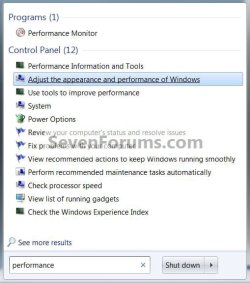
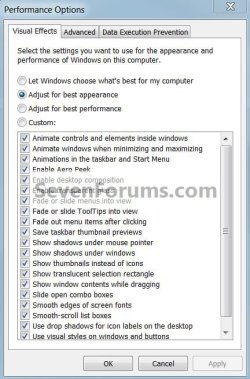
Have alook at this to see how it is adjusted.


Apearance.jpgApearance2.jpg
 

My Computer My Computer

At a glance

W 7 64-bit UltimateIntel Q9550 Yorkfield8GB Dominator 8500C5DATI : XFX 5870
Computer Manufacturer/Model Number
* BFK Customs *
OS
W 7 64-bit Ultimate
CPU
Intel Q9550 Yorkfield
Motherboard
ASUS P5Q Pro
Memory
8GB Dominator 8500C5D
Graphics Card(s)
ATI : XFX 5870
Sound Card
Realtek HD Audio 7-1
Monitor(s) Displays
1x 47" LCD HDMI & 3x 26" LCD HDMI
Screen Resolution
1920x1080P & 1920x1200
Hard Drives
1x 80GB Intel X25-M G2 SSD : 1x 500GB & 1x 640GB WD Caviar Black(s)
PSU
Corsair 620HX
Case
Cooler Master RC-690
Cooling
Tuniq Tower 120, 2x 140mm and 3x 120mm case fans
Keyboard
Microsoft 500
Mouse
Razer Diamondback 3G
Internet Speed
14 Mb/s
Other Info
1x Koutech 3Gb/s SATA HDD Hot Swap Rack
i did that already and haven't change anything

but i just re-run the system restore but at a later time.
and it's back to normal. i just need to re-install the delete programs due to the restore
thanks for the help :D
 

My Computer My Computer

At a glance

windows 7 x64 (7600)Intel Celeron 9003.0 GBIntel 4 Series Express Chipset
Computer Manufacturer/Model Number
HP G60
OS
windows 7 x64 (7600)
CPU
Intel Celeron 900
Memory
3.0 GB
Graphics Card(s)
Intel 4 Series Express Chipset
I'm glad you found a solution that worked for you, be sure to have a look at the second tutorial that I linked above, it's very useful, it creates restore points in Windows 7 whenever the PC is started or re-started.
 

My Computer My Computer

At a glance

W 7 64-bit UltimateIntel Q9550 Yorkfield8GB Dominator 8500C5DATI : XFX 5870
Computer Manufacturer/Model Number
* BFK Customs *
OS
W 7 64-bit Ultimate
CPU
Intel Q9550 Yorkfield
Motherboard
ASUS P5Q Pro
Memory
8GB Dominator 8500C5D
Graphics Card(s)
ATI : XFX 5870
Sound Card
Realtek HD Audio 7-1
Monitor(s) Displays
1x 47" LCD HDMI & 3x 26" LCD HDMI
Screen Resolution
1920x1080P & 1920x1200
Hard Drives
1x 80GB Intel X25-M G2 SSD : 1x 500GB & 1x 640GB WD Caviar Black(s)
PSU
Corsair 620HX
Case
Cooler Master RC-690
Cooling
Tuniq Tower 120, 2x 140mm and 3x 120mm case fans
Keyboard
Microsoft 500
Mouse
Razer Diamondback 3G
Internet Speed
14 Mb/s
Other Info
1x Koutech 3Gb/s SATA HDD Hot Swap Rack
ok, i'll asure this time
thanks :D
 

My Computer My Computer

At a glance

windows 7 x64 (7600)Intel Celeron 9003.0 GBIntel 4 Series Express Chipset
Computer Manufacturer/Model Number
HP G60
OS
windows 7 x64 (7600)
CPU
Intel Celeron 900
Memory
3.0 GB
Graphics Card(s)
Intel 4 Series Express Chipset
Back
Top