Solved Help to create a regular LAN to share drives/folders - not Home

Ozstar, post the ShareDetail.txt now.
 

My Computer My Computer

At a glance

Windows 10, Windows 8.1 Pro, Windows 7 Profes...
Computer type
PC/Desktop
OS
Windows 10, Windows 8.1 Pro, Windows 7 Professional, OS X El Capitan

On Lenovo try changing in Advanced Sharing Settings (Network and Sharing Center) - for Home/Work - select "Use User Accounts and Passwords to connect to other computers". Will ask for a relog, restart if you don't want to bother. Perhaps HomeGroup is problematic. that's why not accepting the credentials.
 

My Computer My Computer

At a glance

Windows 7 Ultimate x64 SP1AMD Phenom 2 1090T2x8GB Kingston HyperX Fury Black 1600Mhz Unga...MSI GTX 970 Gaming 4G
Computer type
PC/Desktop
Computer Manufacturer/Model Number
Custom Build
OS
Windows 7 Ultimate x64 SP1
CPU
AMD Phenom 2 1090T
Motherboard
Gigabyte GA-890FXA-UD5
Memory
2x8GB Kingston HyperX Fury Black 1600Mhz Unganged
Graphics Card(s)
MSI GTX 970 Gaming 4G
Sound Card
Realtek On-Board HD 7.1 Audio / Logitech G35
Monitor(s) Displays
3xAcer GD245HQ
Screen Resolution
1920x1080
Hard Drives
Samsung 850 Pro 512GB SSD - OS /
WD Caviar Black SATA 3 - 1 TBx2 - Dynamic RAID 0 /
WD Caviar Green SATA 2 - 640GBx2 - Dynamic RAID 0 /
WD Caviar Green SATA 2 - 640GB - Internal Backup /
Seagate Barracude SATA 3 - 3TB - External Backup/ Sync
PSU
HighPower 1000W
Case
Cooler Master HAF 932
Cooling
Noctua NH-D14
Keyboard
Logitech G19
Mouse
Logitech G500
Internet Speed
100/4 Mbit Cable (100GB quota)
Antivirus
ZoneAlarm Extreme Security / MBAM Pro / MBAE Free / SAS Free
Browser
IE 11 - Firefox - Chrome
Other Info
Logitech F710/ G27/ G940/ Z5500 // TrackIR 5 // Nvidia 3D Surround Vision
Share Details too long to post.. Have attached it.
 

Attachments

My Computer My Computer

At a glance

Win 7 Pro 32 and 64 versions2.5 up4 to 8Nividia and AMD
Computer type
PC/Desktop
Computer Manufacturer/Model Number
Custom Builds but also Surface Pro 3, Dells Desk and HP laptop
OS
Win 7 Pro 32 and 64 versions
CPU
2.5 up
Motherboard
Different types
Memory
4 to 8
Graphics Card(s)
Nividia and AMD
Hard Drives
From 60GB to 2 TB
Antivirus
Avast Free
Browser
Firefox latest
Permissions seem okay. What is the exact error message you receive when accessing a share such as 'K' using a remote machine?
 

My Computer My Computer

At a glance

Windows 10, Windows 8.1 Pro, Windows 7 Profes...
Computer type
PC/Desktop
OS
Windows 10, Windows 8.1 Pro, Windows 7 Professional, OS X El Capitan
Yes changed from Windows choose to Use Accounts and Pwds, Rebooted.. Still the same unfortunately.
 

My Computer My Computer

At a glance

Win 7 Pro 32 and 64 versions2.5 up4 to 8Nividia and AMD
Computer type
PC/Desktop
Computer Manufacturer/Model Number
Custom Builds but also Surface Pro 3, Dells Desk and HP laptop
OS
Win 7 Pro 32 and 64 versions
CPU
2.5 up
Motherboard
Different types
Memory
4 to 8
Graphics Card(s)
Nividia and AMD
Hard Drives
From 60GB to 2 TB
Antivirus
Avast Free
Browser
Firefox latest
Cannot get to or see any drives at all on Webmain from Lenovo2 or Video in the Explorer tree.

I get the Panel ..

Windows Security.
Enter Network Passwor to connect to WEBMAIN
Domain Lenovo2

logon failure: Unknown user name or bad password
 

My Computer My Computer

At a glance

Win 7 Pro 32 and 64 versions2.5 up4 to 8Nividia and AMD
Computer type
PC/Desktop
Computer Manufacturer/Model Number
Custom Builds but also Surface Pro 3, Dells Desk and HP laptop
OS
Win 7 Pro 32 and 64 versions
CPU
2.5 up
Motherboard
Different types
Memory
4 to 8
Graphics Card(s)
Nividia and AMD
Hard Drives
From 60GB to 2 TB
Antivirus
Avast Free
Browser
Firefox latest
Can you also try with the other PCs please? Lets see if it is Webmain or Lenovo's fault.

Did you disable firewalls?
 

My Computer My Computer

At a glance

Windows 7 Ultimate x64 SP1AMD Phenom 2 1090T2x8GB Kingston HyperX Fury Black 1600Mhz Unga...MSI GTX 970 Gaming 4G
Computer type
PC/Desktop
Computer Manufacturer/Model Number
Custom Build
OS
Windows 7 Ultimate x64 SP1
CPU
AMD Phenom 2 1090T
Motherboard
Gigabyte GA-890FXA-UD5
Memory
2x8GB Kingston HyperX Fury Black 1600Mhz Unganged
Graphics Card(s)
MSI GTX 970 Gaming 4G
Sound Card
Realtek On-Board HD 7.1 Audio / Logitech G35
Monitor(s) Displays
3xAcer GD245HQ
Screen Resolution
1920x1080
Hard Drives
Samsung 850 Pro 512GB SSD - OS /
WD Caviar Black SATA 3 - 1 TBx2 - Dynamic RAID 0 /
WD Caviar Green SATA 2 - 640GBx2 - Dynamic RAID 0 /
WD Caviar Green SATA 2 - 640GB - Internal Backup /
Seagate Barracude SATA 3 - 3TB - External Backup/ Sync
PSU
HighPower 1000W
Case
Cooler Master HAF 932
Cooling
Noctua NH-D14
Keyboard
Logitech G19
Mouse
Logitech G500
Internet Speed
100/4 Mbit Cable (100GB quota)
Antivirus
ZoneAlarm Extreme Security / MBAM Pro / MBAE Free / SAS Free
Browser
IE 11 - Firefox - Chrome
Other Info
Logitech F710/ G27/ G940/ Z5500 // TrackIR 5 // Nvidia 3D Surround Vision
Yes disabled Firewalls..no difference.. enabled again now.

I am not sure about the message on bubsuelee.

BTW I have always had the same user David and passwords on all boxes on my lan without any problems having them all on and used at the same time.
 

My Computer My Computer

At a glance

Win 7 Pro 32 and 64 versions2.5 up4 to 8Nividia and AMD
Computer type
PC/Desktop
Computer Manufacturer/Model Number
Custom Builds but also Surface Pro 3, Dells Desk and HP laptop
OS
Win 7 Pro 32 and 64 versions
CPU
2.5 up
Motherboard
Different types
Memory
4 to 8
Graphics Card(s)
Nividia and AMD
Hard Drives
From 60GB to 2 TB
Antivirus
Avast Free
Browser
Firefox latest
Please remove your last screenshot :) Mail address visible

Alright tried disabling firewall on Webmain yet?

You can check the stored credentials (Manage users) on BubSueLee, and then restart if nothing stored.
 

My Computer My Computer

At a glance

Windows 7 Ultimate x64 SP1AMD Phenom 2 1090T2x8GB Kingston HyperX Fury Black 1600Mhz Unga...MSI GTX 970 Gaming 4G
Computer type
PC/Desktop
Computer Manufacturer/Model Number
Custom Build
OS
Windows 7 Ultimate x64 SP1
CPU
AMD Phenom 2 1090T
Motherboard
Gigabyte GA-890FXA-UD5
Memory
2x8GB Kingston HyperX Fury Black 1600Mhz Unganged
Graphics Card(s)
MSI GTX 970 Gaming 4G
Sound Card
Realtek On-Board HD 7.1 Audio / Logitech G35
Monitor(s) Displays
3xAcer GD245HQ
Screen Resolution
1920x1080
Hard Drives
Samsung 850 Pro 512GB SSD - OS /
WD Caviar Black SATA 3 - 1 TBx2 - Dynamic RAID 0 /
WD Caviar Green SATA 2 - 640GBx2 - Dynamic RAID 0 /
WD Caviar Green SATA 2 - 640GB - Internal Backup /
Seagate Barracude SATA 3 - 3TB - External Backup/ Sync
PSU
HighPower 1000W
Case
Cooler Master HAF 932
Cooling
Noctua NH-D14
Keyboard
Logitech G19
Mouse
Logitech G500
Internet Speed
100/4 Mbit Cable (100GB quota)
Antivirus
ZoneAlarm Extreme Security / MBAM Pro / MBAE Free / SAS Free
Browser
IE 11 - Firefox - Chrome
Other Info
Logitech F710/ G27/ G940/ Z5500 // TrackIR 5 // Nvidia 3D Surround Vision
Things may have messed up while changing to HomeGroup. If things don't improve, I say leave HomeGroup on Webmain and a test PC and lets see if Workgroup works alright.

The other 3 can access each other, right? Check workgroup name on one of them, then see if Webmain is on same one. (Right click Computer - either on desktop or Start Menu - and Properties)
 

My Computer My Computer

At a glance

Windows 7 Ultimate x64 SP1AMD Phenom 2 1090T2x8GB Kingston HyperX Fury Black 1600Mhz Unga...MSI GTX 970 Gaming 4G
Computer type
PC/Desktop
Computer Manufacturer/Model Number
Custom Build
OS
Windows 7 Ultimate x64 SP1
CPU
AMD Phenom 2 1090T
Motherboard
Gigabyte GA-890FXA-UD5
Memory
2x8GB Kingston HyperX Fury Black 1600Mhz Unganged
Graphics Card(s)
MSI GTX 970 Gaming 4G
Sound Card
Realtek On-Board HD 7.1 Audio / Logitech G35
Monitor(s) Displays
3xAcer GD245HQ
Screen Resolution
1920x1080
Hard Drives
Samsung 850 Pro 512GB SSD - OS /
WD Caviar Black SATA 3 - 1 TBx2 - Dynamic RAID 0 /
WD Caviar Green SATA 2 - 640GBx2 - Dynamic RAID 0 /
WD Caviar Green SATA 2 - 640GB - Internal Backup /
Seagate Barracude SATA 3 - 3TB - External Backup/ Sync
PSU
HighPower 1000W
Case
Cooler Master HAF 932
Cooling
Noctua NH-D14
Keyboard
Logitech G19
Mouse
Logitech G500
Internet Speed
100/4 Mbit Cable (100GB quota)
Antivirus
ZoneAlarm Extreme Security / MBAM Pro / MBAE Free / SAS Free
Browser
IE 11 - Firefox - Chrome
Other Info
Logitech F710/ G27/ G940/ Z5500 // TrackIR 5 // Nvidia 3D Surround Vision
I've just noticed that the group 'HomeUsers' is not listed on the NTFS permissions of C:\, which is the share of 'WebMain C'. Ozstar, are you able to access the 'WebMain-Audio', WebMain-Graphics, or 'WebMain-Internet' shares (which connect to drives J, L, and F respectively)?
 

My Computer My Computer

At a glance

Windows 10, Windows 8.1 Pro, Windows 7 Profes...
Computer type
PC/Desktop
OS
Windows 10, Windows 8.1 Pro, Windows 7 Professional, OS X El Capitan
Yes all 4 say WORKGROUP including Webmain.
 

My Computer My Computer

At a glance

Win 7 Pro 32 and 64 versions2.5 up4 to 8Nividia and AMD
Computer type
PC/Desktop
Computer Manufacturer/Model Number
Custom Builds but also Surface Pro 3, Dells Desk and HP laptop
OS
Win 7 Pro 32 and 64 versions
CPU
2.5 up
Motherboard
Different types
Memory
4 to 8
Graphics Card(s)
Nividia and AMD
Hard Drives
From 60GB to 2 TB
Antivirus
Avast Free
Browser
Firefox latest
Ok, I know you have told us the passwords are the same, so please bear with me :)

Are you being asked a password while logging in to Webmain? And regardless reset the password on Webmain to the your regular password. CTRL ALT DEL - reset - enter your usual password.
 

My Computer My Computer

At a glance

Windows 7 Ultimate x64 SP1AMD Phenom 2 1090T2x8GB Kingston HyperX Fury Black 1600Mhz Unga...MSI GTX 970 Gaming 4G
Computer type
PC/Desktop
Computer Manufacturer/Model Number
Custom Build
OS
Windows 7 Ultimate x64 SP1
CPU
AMD Phenom 2 1090T
Motherboard
Gigabyte GA-890FXA-UD5
Memory
2x8GB Kingston HyperX Fury Black 1600Mhz Unganged
Graphics Card(s)
MSI GTX 970 Gaming 4G
Sound Card
Realtek On-Board HD 7.1 Audio / Logitech G35
Monitor(s) Displays
3xAcer GD245HQ
Screen Resolution
1920x1080
Hard Drives
Samsung 850 Pro 512GB SSD - OS /
WD Caviar Black SATA 3 - 1 TBx2 - Dynamic RAID 0 /
WD Caviar Green SATA 2 - 640GBx2 - Dynamic RAID 0 /
WD Caviar Green SATA 2 - 640GB - Internal Backup /
Seagate Barracude SATA 3 - 3TB - External Backup/ Sync
PSU
HighPower 1000W
Case
Cooler Master HAF 932
Cooling
Noctua NH-D14
Keyboard
Logitech G19
Mouse
Logitech G500
Internet Speed
100/4 Mbit Cable (100GB quota)
Antivirus
ZoneAlarm Extreme Security / MBAM Pro / MBAE Free / SAS Free
Browser
IE 11 - Firefox - Chrome
Other Info
Logitech F710/ G27/ G940/ Z5500 // TrackIR 5 // Nvidia 3D Surround Vision
On each box as soon as I touch nthe WEBMAIN name in the Explorer tree, I get the panel so cannot see any of those or other drives.
All other boxes cannect to each other without any trouble and Webmain connect out to all others with no trouble.

Not sure whether this is relevent or notn but I can ping without problem from Lenovo2 192.168.0.13 which is Webmain.
 

My Computer My Computer

At a glance

Win 7 Pro 32 and 64 versions2.5 up4 to 8Nividia and AMD
Computer type
PC/Desktop
Computer Manufacturer/Model Number
Custom Builds but also Surface Pro 3, Dells Desk and HP laptop
OS
Win 7 Pro 32 and 64 versions
CPU
2.5 up
Motherboard
Different types
Memory
4 to 8
Graphics Card(s)
Nividia and AMD
Hard Drives
From 60GB to 2 TB
Antivirus
Avast Free
Browser
Firefox latest
Yes I have reset the pasword on Webmain and also Lenovo2 and still get the same panel as soon as I touch the name WEBMAIN in the Network Explorer tree.
 

My Computer My Computer

At a glance

Win 7 Pro 32 and 64 versions2.5 up4 to 8Nividia and AMD
Computer type
PC/Desktop
Computer Manufacturer/Model Number
Custom Builds but also Surface Pro 3, Dells Desk and HP laptop
OS
Win 7 Pro 32 and 64 versions
CPU
2.5 up
Motherboard
Different types
Memory
4 to 8
Graphics Card(s)
Nividia and AMD
Hard Drives
From 60GB to 2 TB
Antivirus
Avast Free
Browser
Firefox latest
Yes all 4 say WORKGROUP including Webmain.
Looking at the System pane isn't going to tell you whether you're connected to a HomeGroup or not. Follow the steps under the "Find out if your PC belongs to a homegroup" section here, and make sure WebMain is part of the HomeGroup.

On each box as soon as I touch nthe WEBMAIN name in the Explorer tree, I get the panel so cannot see any of those or other drives.
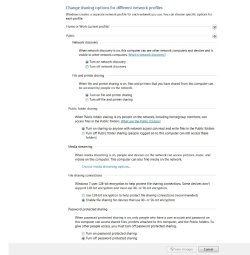
Unless it's an admin share, I never get prompted for credentials when clicking on a remote computer in Explorer. I'm starting to wonder if there's an option under the Advanced sharing settings pane that is amiss. Would you be able to take a screenshot of all settings in that pane?
 

My Computer My Computer

At a glance

Windows 10, Windows 8.1 Pro, Windows 7 Profes...
Computer type
PC/Desktop
OS
Windows 10, Windows 8.1 Pro, Windows 7 Professional, OS X El Capitan
To see if anything happened, turned OFF password needed in Advanced Sharing.

I could now access Webmain drives from the other boxes, and whilst I could see all drives, got the 'No Access' when touching.

I can get to Users in Webmain.


Later.. Will take the screenshot now..
 

My Computer My Computer

At a glance

Win 7 Pro 32 and 64 versions2.5 up4 to 8Nividia and AMD
Computer type
PC/Desktop
Computer Manufacturer/Model Number
Custom Builds but also Surface Pro 3, Dells Desk and HP laptop
OS
Win 7 Pro 32 and 64 versions
CPU
2.5 up
Motherboard
Different types
Memory
4 to 8
Graphics Card(s)
Nividia and AMD
Hard Drives
From 60GB to 2 TB
Antivirus
Avast Free
Browser
Firefox latest
When you disable Password Protected sharing, you get access as a Guest, then need Everyone permission. Verify this by opening the Sessions (Computer - properties - Shared Folders) when you are browsing Webmain root share.

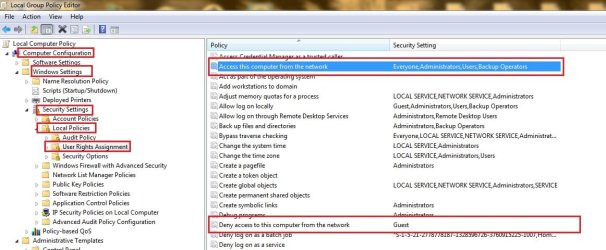
Maybe check these settings? (run gpedit.msc - only Pro/Ultimate and Enterprise Editions of Windows 7)
04 - gpedit.jpg
 

My Computer My Computer

At a glance

Windows 7 Ultimate x64 SP1AMD Phenom 2 1090T2x8GB Kingston HyperX Fury Black 1600Mhz Unga...MSI GTX 970 Gaming 4G
Computer type
PC/Desktop
Computer Manufacturer/Model Number
Custom Build
OS
Windows 7 Ultimate x64 SP1
CPU
AMD Phenom 2 1090T
Motherboard
Gigabyte GA-890FXA-UD5
Memory
2x8GB Kingston HyperX Fury Black 1600Mhz Unganged
Graphics Card(s)
MSI GTX 970 Gaming 4G
Sound Card
Realtek On-Board HD 7.1 Audio / Logitech G35
Monitor(s) Displays
3xAcer GD245HQ
Screen Resolution
1920x1080
Hard Drives
Samsung 850 Pro 512GB SSD - OS /
WD Caviar Black SATA 3 - 1 TBx2 - Dynamic RAID 0 /
WD Caviar Green SATA 2 - 640GBx2 - Dynamic RAID 0 /
WD Caviar Green SATA 2 - 640GB - Internal Backup /
Seagate Barracude SATA 3 - 3TB - External Backup/ Sync
PSU
HighPower 1000W
Case
Cooler Master HAF 932
Cooling
Noctua NH-D14
Keyboard
Logitech G19
Mouse
Logitech G500
Internet Speed
100/4 Mbit Cable (100GB quota)
Antivirus
ZoneAlarm Extreme Security / MBAM Pro / MBAE Free / SAS Free
Browser
IE 11 - Firefox - Chrome
Other Info
Logitech F710/ G27/ G940/ Z5500 // TrackIR 5 // Nvidia 3D Surround Vision
This is Advanced Sharing Page.. Bottom does not show..

'Allow Windows to manager is Enabled'.

I will look at Policies now...
 

Attachments

  • Advance Share Webmain.jpg
    Advance Share Webmain.jpg
    58.1 KB · Views: 0

My Computer My Computer

At a glance

Win 7 Pro 32 and 64 versions2.5 up4 to 8Nividia and AMD
Computer type
PC/Desktop
Computer Manufacturer/Model Number
Custom Builds but also Surface Pro 3, Dells Desk and HP laptop
OS
Win 7 Pro 32 and 64 versions
CPU
2.5 up
Motherboard
Different types
Memory
4 to 8
Graphics Card(s)
Nividia and AMD
Hard Drives
From 60GB to 2 TB
Antivirus
Avast Free
Browser
Firefox latest
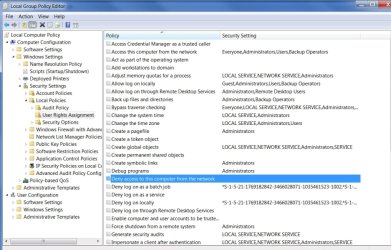
Here is the result.. Local Group Policy
 

Attachments

  • local group policy.jpg
    local group policy.jpg
    100.6 KB · Views: 0

My Computer My Computer

At a glance

Win 7 Pro 32 and 64 versions2.5 up4 to 8Nividia and AMD
Computer type
PC/Desktop
Computer Manufacturer/Model Number
Custom Builds but also Surface Pro 3, Dells Desk and HP laptop
OS
Win 7 Pro 32 and 64 versions
CPU
2.5 up
Motherboard
Different types
Memory
4 to 8
Graphics Card(s)
Nividia and AMD
Hard Drives
From 60GB to 2 TB
Antivirus
Avast Free
Browser
Firefox latest
Back
Top