Solved Help to remove drivers from the DriverStore without damage

ProfPepper

New member
Local time
1:20 AM
Messages
23
Hi,

I was looking to ways to clear up space on my SSD and I noticed my DriverStore folder has grown to 7 GB!

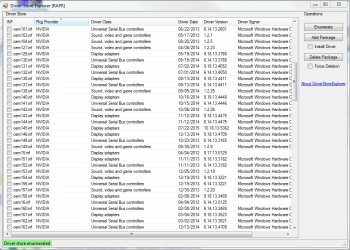
I downloaded a DriverStore explorer and found that there were a lot of old Nvidia and Razer drivers that had been moved to the driver store.

I can remove them, but am hesitant as I have not messed with system32 before and I'm afraid of repercussions.

My question is: If I remove all Nvidia and Razer drivers found in the DriverStore, will there be any repercussions?

Thanks :)
 

Attachments

  • driverstore.PNG
    driverstore.PNG
    38.6 KB · Views: 0

My Computer

Computer type
PC/Desktop
OS
Windows 7 Home Premium 64-bit
CPU
Intel i5-3570K
Motherboard
ASUS P8Z77-V-LX
Memory
8GB
Graphics Card(s)
GTX 670
Hard Drives
3TB WD Green
1TB WD Blue
60GB Intel 330 SSD
Antivirus
Avast
Browser
Firefox
Have you tried just going to the control panel and uninstalling? What kind of drivers are they? If they're graphics you can go ahead and remove them all. You'd only notice a difference in resolution and performance until you redownload the drivers. I recommend getting your NVIDEA drivers from the official NVIDEA site as well as it detects your GPU and configures settings to that particular GPU to get the best drivers and performance. I don't know about the USB Bus drivers however. My guess is just remove all but the latest one.
 

My Computer

Computer type
PC/Desktop
Computer Manufacturer/Model Number
Myself
OS
Windows 10 Pro x64
CPU
Intel Core i7 5820K
Motherboard
MSI X99S SLI Plus ATX 2011-3
Memory
16GB(4x4GB) Kingston Hyper X Red @ 1866Hz
Graphics Card(s)
EVGA GTX 980 X2 SLI
Monitor(s) Displays
LG something 21:9 2 of those
Screen Resolution
2560x1080 or 5120x1080 in Surround mode (don't use often)
Hard Drives
Intel 750 PCIE 400GB
1TB Seagate Baracuda
500GB Samsung SSD
PSU
EVGA 1200W 80+ Platinum
Case
Custom Water-Lopped PC desk
Cooling
Water-Lopped
Keyboard
Corsair K70 RGB Brown
Mouse
Logitech G502 Gaming
Internet Speed
Fast enough
Antivirus
Windows Defender and/or Kaspersky Anti-Virus 2015
Browser
Google Chrome/Mozilla Firefox
Other Info
A few $K later....
So I only started uninstalling old drivers before installing the new ones recently, so all these old Nvidia drivers from years ago got pushed to the DriverStore I suppose.

I always get the latest driver, I just wanted to make sure that removing drivers from the driver store was safe.
 

My Computer

Computer type
PC/Desktop
OS
Windows 7 Home Premium 64-bit
CPU
Intel i5-3570K
Motherboard
ASUS P8Z77-V-LX
Memory
8GB
Graphics Card(s)
GTX 670
Hard Drives
3TB WD Green
1TB WD Blue
60GB Intel 330 SSD
Antivirus
Avast
Browser
Firefox
Yeah. Removing old versions of drivers are okay. As new updated drivers still have support for older devices as well. I'd uninstall all drivers exept the latest
 

My Computer

Computer type
PC/Desktop
Computer Manufacturer/Model Number
Myself
OS
Windows 10 Pro x64
CPU
Intel Core i7 5820K
Motherboard
MSI X99S SLI Plus ATX 2011-3
Memory
16GB(4x4GB) Kingston Hyper X Red @ 1866Hz
Graphics Card(s)
EVGA GTX 980 X2 SLI
Monitor(s) Displays
LG something 21:9 2 of those
Screen Resolution
2560x1080 or 5120x1080 in Surround mode (don't use often)
Hard Drives
Intel 750 PCIE 400GB
1TB Seagate Baracuda
500GB Samsung SSD
PSU
EVGA 1200W 80+ Platinum
Case
Custom Water-Lopped PC desk
Cooling
Water-Lopped
Keyboard
Corsair K70 RGB Brown
Mouse
Logitech G502 Gaming
Internet Speed
Fast enough
Antivirus
Windows Defender and/or Kaspersky Anti-Virus 2015
Browser
Google Chrome/Mozilla Firefox
Other Info
A few $K later....
I'm just worried about repercussions. Have you removed drivers from the DriverStore before?
 

My Computer

Computer type
PC/Desktop
OS
Windows 7 Home Premium 64-bit
CPU
Intel i5-3570K
Motherboard
ASUS P8Z77-V-LX
Memory
8GB
Graphics Card(s)
GTX 670
Hard Drives
3TB WD Green
1TB WD Blue
60GB Intel 330 SSD
Antivirus
Avast
Browser
Firefox
Indeed I have. But I dont think I've ever had as many as you do. Before I update my drivers I usually check the drivers (all of them in my case) that apply to what im updating and delete them, restart, then proceed to install the updated driver software. I prefer clean installs if you catch my drift.
 

My Computer

Computer type
PC/Desktop
Computer Manufacturer/Model Number
Myself
OS
Windows 10 Pro x64
CPU
Intel Core i7 5820K
Motherboard
MSI X99S SLI Plus ATX 2011-3
Memory
16GB(4x4GB) Kingston Hyper X Red @ 1866Hz
Graphics Card(s)
EVGA GTX 980 X2 SLI
Monitor(s) Displays
LG something 21:9 2 of those
Screen Resolution
2560x1080 or 5120x1080 in Surround mode (don't use often)
Hard Drives
Intel 750 PCIE 400GB
1TB Seagate Baracuda
500GB Samsung SSD
PSU
EVGA 1200W 80+ Platinum
Case
Custom Water-Lopped PC desk
Cooling
Water-Lopped
Keyboard
Corsair K70 RGB Brown
Mouse
Logitech G502 Gaming
Internet Speed
Fast enough
Antivirus
Windows Defender and/or Kaspersky Anti-Virus 2015
Browser
Google Chrome/Mozilla Firefox
Other Info
A few $K later....
Alright, I'll create a restore point and give it a shot. I'll let you know the results.
 

My Computer

Computer type
PC/Desktop
OS
Windows 7 Home Premium 64-bit
CPU
Intel i5-3570K
Motherboard
ASUS P8Z77-V-LX
Memory
8GB
Graphics Card(s)
GTX 670
Hard Drives
3TB WD Green
1TB WD Blue
60GB Intel 330 SSD
Antivirus
Avast
Browser
Firefox
Done, everything worked fine and freed up 5 GB of space! Thanks for the advice.
 

My Computer

Computer type
PC/Desktop
OS
Windows 7 Home Premium 64-bit
CPU
Intel i5-3570K
Motherboard
ASUS P8Z77-V-LX
Memory
8GB
Graphics Card(s)
GTX 670
Hard Drives
3TB WD Green
1TB WD Blue
60GB Intel 330 SSD
Antivirus
Avast
Browser
Firefox
Yep. Don't forget to mark thread as solved :)
 

My Computer

Computer type
PC/Desktop
Computer Manufacturer/Model Number
Myself
OS
Windows 10 Pro x64
CPU
Intel Core i7 5820K
Motherboard
MSI X99S SLI Plus ATX 2011-3
Memory
16GB(4x4GB) Kingston Hyper X Red @ 1866Hz
Graphics Card(s)
EVGA GTX 980 X2 SLI
Monitor(s) Displays
LG something 21:9 2 of those
Screen Resolution
2560x1080 or 5120x1080 in Surround mode (don't use often)
Hard Drives
Intel 750 PCIE 400GB
1TB Seagate Baracuda
500GB Samsung SSD
PSU
EVGA 1200W 80+ Platinum
Case
Custom Water-Lopped PC desk
Cooling
Water-Lopped
Keyboard
Corsair K70 RGB Brown
Mouse
Logitech G502 Gaming
Internet Speed
Fast enough
Antivirus
Windows Defender and/or Kaspersky Anti-Virus 2015
Browser
Google Chrome/Mozilla Firefox
Other Info
A few $K later....
Back
Top