Help! Unable to Create Restore Point

Abe R Donian

New member
Local time
6:14 AM
Messages
3
I am getting this error on trying to create a restore point: 0x80042308 "The specified object was not found"

No old RPs are available either.

I've tried: Turning off and on System Protection, restarting VSS, all to no avail.

Event log error: "The shadow copies of volume C: were aborted because of an IO failure on volume C:'
AND a warning
"The system failed to flush data to the transaction log. Corruption may occur."

I would appreciate any/all suggestions.

Thanks.
Abe

Windows 7 professional, 32 bit
Dell Latitude E4310
 

My Computer

Computer Manufacturer/Model Number
Dell Latitude E4310
OS
Windows 7 professional 32bit

My Computer

Computer Manufacturer/Model Number
Alienware
OS
Windows 7 Ultimate x64
CPU
I7
Motherboard
GA-X58-USB3
Memory
6 x 1.5V DDR3 DIMM sockets supporting up to 24 GB of system
Graphics Card(s)
GeForce GTX 580
Sound Card
Realtek ALC892 codec 2/4/5.1/7.1-channel
Monitor(s) Displays
NEC Display Solutions E321 Black 32"
Screen Resolution
1366 x 768
Hard Drives
OCZ Colossus LT Series OCZSSD2-1CLSLT1T 3.5" 1TB SATA II MLC Internal Solid State Drive
PSU
XFX Black Edition XPS-850W-BES 850W ATX12V
Case
Antec
Cooling
Zalman
Keyboard
Microsoft
Mouse
Microsoft
No success, but maybe a problem isolated?

Many thanks.

I've done CHKDSK w/o success.

Re-installing VSS dlls were problematic:
1) couldn't stop Vol Shad Copy service: "The service was not started"
In msconfig, under services, Vol Shad Copy says "stopped"; in Services.msc, Vol Shad Copy says start "automatic."
2) Registering several dlls gave a message like:
"The module "swprv.dll" [or another] was loaded but the call to DllRegisterserver failed with error code 0x80070715"

I am grateful for any thoughts.
Abe


My Computer

Computer Manufacturer/Model Number
Dell Latitude E4310
OS
Windows 7 professional 32bit
Dear Abe R Donian,
A warm welcome to Windows Seven forums!:)

Let us start with the basics!

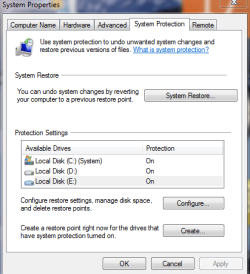
1) Under "System Protection" are all the drives in the "ON" mode?

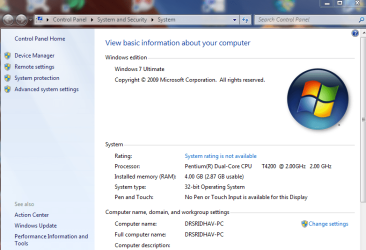
Computer--->Rt.click--->Properties----> System Protection---> SNAP SYSTEM-1

2) Have you allocated reserve space for "System Restore" on ALL the drives? SNAPSHOT-1

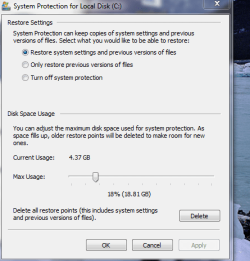
3) if you have "enabled" the S-R what percentage of space have you given? SNAPSHOT-2

4) Were your earlier successful in"creating" system restore point" ? If you carefully see, the S-R s have already taken up 4GB space on the C:drive!

I want you to post snaps like mine for all of us to examine, diagnose and treat your PC's ailment!
regards,
Sreedhav
 

Attachments

  • System-1.png
    System-1.png
    46.2 KB · Views: 59
  • SNAPSHOT-1.png
    SNAPSHOT-1.png
    16.2 KB · Views: 53
  • SNAPSHOT-2.png
    SNAPSHOT-2.png
    22.3 KB · Views: 50

My Computer

Computer Manufacturer/Model Number
Sony Vaio C series VPCCB35FN laptop
OS
MS Windows 7 Home Premium 64-bit SP1
CPU
IntelCore [email protected]; Sandy Bridge 32nm Tech.
Motherboard
Sony Vaio Version:C609NJYJ
Memory
4096Mb RAM; Single ChannelDDR3@665MHz; DRAM Freq:662MHz
Graphics Card(s)
AMD Radeon HD 6630M; GPU:Whistler;BIOS Core&mem Clock:123.36
Sound Card
REALTEK High Definition Audio Device; INTEL Display Card
Monitor(s) Displays
Generic PnP Intel HD;Resolution:1920*1040 Pixels; BPP:32bits
Screen Resolution
Current Resolution:1920*1080 Pixels; Monitor Frequency:60Hz
Hard Drives
Internal HD:TOSHIBA MK5061GSY; Real Size:488 GB;NTFS; 3 Partitions; SATA; HEADS:16

External HDD: WD Elements 1023 PORTABLE; Estimated Size: 1TB; NTFS; 3 Partitions
Cooling
Lateral Exhaust with a Cooling Pad Placed Beneath.
Keyboard
Logitech Bluetooth+ Generic Integrated K-B
Mouse
Logitech Bluetooth
Internet Speed
2MBPS
Other Info
1)Trend Micro Titanium Maximum Security Suite Version:3
2)SAS-PRO

3)MBAM--PRO


4)WATERFOX+IE9 +WOT+LINKEXTEND+ DRWEBCUREIT LINK CHECKER

5)SPYWAREBLASTER

6) WINPATROL PLUS

7) SANDBOXIE and
8) A BIT OF COMMON SENSE.
Thanks for the reply.
Yes, System Protection has always been ON.
Yes, I had already increased space allocation to 46GB (20%).
I deleted all previous RPs.
Still no luck.
 

My Computer

Computer Manufacturer/Model Number
Dell Latitude E4310
OS
Windows 7 professional 32bit
I have exactly same problem and have been searching for an answer few days now... i'm actually trying to make system image, but it is similar...

And i know exactly what is the problem - I/O errors, one of my disks in Intel Raid 0 is having trouble, but windows is still working, chkdsk /r repaired few errors that showed up, but every time i try to create system image, i get the same error as thread's author

The problem is that Windows Backup cannot handle occasional I/O errors, is there any solution to that? I Want to backup my system as it is, even with small I/O glitches, since it's better to have such backup than no backup

any idea how to force windows backup to ignore occasional I/O errors?

chkdsk seems to not find them anymore. (it fixed few, but if i run it now it cannot find anything new)

i have also tried sfc /scannow

But disk has problems for sure, if i mark the disk in the raid as Normal from Error, it goes back to error after few minutes and i see I/O errors in the event log. but windows is fine, programs are fine, games are fine, documents are fine, i'm sure that it is just small part of the disk that is affected.... how to force windows to ignore it just for the backup purposes?
 

My Computer

OS
Windows 7 64bit
Back
Top