[help] Windows 7 Freezes/Crashes after Logging In

ubcboy

New member
Local time
7:13 AM
Messages
3
Hi Seven Forums community,

I am a complete amateur with computers, so I apologize in advance for my poor terminology and descriptions.

I was recently handed a Windows 7 computer by my dad. From what we both know, the computer worked completely fine and there were no problems. I am currently typing this post on my laptop, here are the specs of the system:

Windows edition: Windows 7 Professional
Model: HP Compaq 8000 Elite SFF PC
System type: 64-bit Operating System

The problem:
After typing my login information at the Welcome screen, the computer loads my desktop fine. However, at this point, anything I click results into the computer trying to process/load or whatever, but nothing happens. If I click a shortcut, the start menu, or load an internet browser, nothing loads. I just see the circular loading symbol around my cursor, but I can't do anything. I feel like my computer is rendered useless.

I don't have much downloaded on it, just Google Chrome, iTunes, Microsoft Office, Malwarebytes and like AVG, and I think some HP Security Manager that would automatically prompt whenever I logged in. I also moved around 20gbs of songs and files (ie. school assignments, projects, etc.) from my previous computer. I used this computer fine for all of yesterday, when I had first started using the computer, but today it seems bugged. I can run it in safe mode and everything works fine there. I don't know what to do though...

What would be your advice? I've tried to do a "clean boot" from what I've read online but I can't even get to the command prompt after logging in since it can't load anything. I don't want to restore it to factory settings or anything since all of my files will be lost, I was foolish enough not to save it on the external hard drive, I didn't think this would happen.

This has been really frustrating and I appreciate all of your responses! Thanks!
 

My Computer My Computer

At a glance

Windows 7 Professional 64bit
Computer type
PC/Desktop
OS
Windows 7 Professional 64bit
sounds like you have too many programs trying to load at the same time. And restoring it to factory settings wont necessairly make you lose all your files. try the following link and see if you can post a image of the errors that appear in the event viewer. To get to the event viewer click start and in the search box at the very bottom type event viewer. Once in the event viewer follow the instructions in the following link:

https://www.google.com/url?q=http:/...ds-cse&usg=AFQjCNGjccNXB4v5jknmpDk1yz5q63YPwA
 

My Computer My Computer

At a glance

Windows 7 ultimate 64-bitIntel I7 2600K 3.4ghzCorsair 16gb ddr3 1600mhzNvidia Geforce gt 430
Computer type
PC/Desktop
Computer Manufacturer/Model Number
custom built
OS
Windows 7 ultimate 64-bit
CPU
Intel I7 2600K 3.4ghz
Motherboard
Asus Evo P8P67
Memory
Corsair 16gb ddr3 1600mhz
Graphics Card(s)
Nvidia Geforce gt 430
Sound Card
Sound Blaster Titanium x-fi pci express
Monitor(s) Displays
Dell E198WFP
Hard Drives
1 western digital 2TB drive.
PSU
Antec 1200 watt
Case
Inwin Dragon Rider
Cooling
6 case supplied cooling fans
Keyboard
logitech mk700
Mouse
logitech m705
Internet Speed
25-50mbps download; 10mbps upload(i think)
Antivirus
avg free 2014
Browser
mozilla firefox
Other Info
Also have a pretty bad speaker setup which is a klipsch promedia 5.1 surround speaker setup with huge subwoofer and lg blu ray player/writer. Also a hp officejet pro 8600 plus wireless all in one and a logitech s7500 webcam.
Boot into Safe Mode, and then try the following steps please. Once it completes, see if you can login normally. It will a few hours to run, so be patient.

1. Click Start
orb.png

2. In the search box, type cmd
3. In the list that appears, right-click on cmd.exe and choose Run as administrator
4. In the command window that opens, type chkdsk /R and hit enter.

You will be prompted whether you wish to schedule a chkdsk scan at next startup, type 'Y' and hit enter. Now restart your computer and chkdsk will automatically run.
 

My Computer My Computer

At a glance

Windows 10 Pro x64 ; Xubuntu x64Intel i7 860 @ 2.80 GHz O/C'ed to 4.0GHz16GB Corsair Vengance DDR3 @ 661 MHz Dual Cha...EVGA NVidia GTX 560 1024MB
Computer type
PC/Desktop
Computer Manufacturer/Model Number
Golden Mk. I.4
OS
Windows 10 Pro x64 ; Xubuntu x64
CPU
Intel i7 860 @ 2.80 GHz O/C'ed to 4.0GHz
Motherboard
Gigabyte P55A-UD3R Rev.1. Award BIOS F13
Memory
16GB Corsair Vengance DDR3 @ 661 MHz Dual Channel (9-9-9-24)
Graphics Card(s)
EVGA NVidia GTX 560 1024MB
Sound Card
Realtek Integrated
Monitor(s) Displays
Dual Samsung SyncMaster 2494HS
Screen Resolution
1920*1080 and 1920*1080
Hard Drives
1*Samsung 840 EVO 120GB SSD;
1*OCZ Vertex 2 60GB SSD;
2*Samsung F3 SpinPoint 1TB in RAID0;
1*Samsung F1 SpinPoint 1TB;
2*Western Digital 1TB External USB 3.0
1*Western Digital 500GB External USB 3.0
1*Seagate 500GB External USB 2.0
PSU
Thermaltake ToughPower QFan 750W
Case
Thermaltake Element S VK60001W2Z
Cooling
Corsair H60 Water Cooling, 2*230mm and 2*80mm case fans
Keyboard
Logitech G110
Mouse
Logitech MX518
Thanks for the responses guys! I wish I had seen these sooner, but I ended up running a System Restore on my computer to last night, apparently there were service pack updates and my computer crashed or something...everything seems to be working fine now, thanks again! I'll keep these in mind.
 

My Computer My Computer

At a glance

Windows 7 Professional 64bit
Computer type
PC/Desktop
OS
Windows 7 Professional 64bit
Welcome ubcboy to forum.

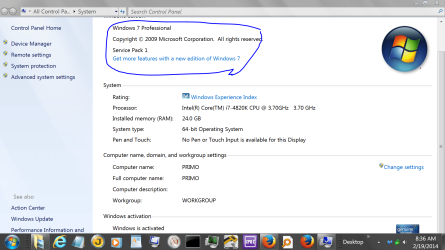
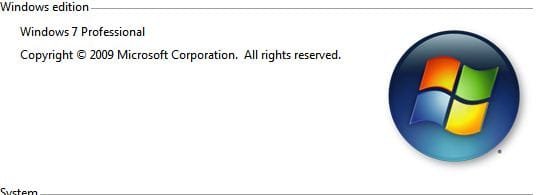
Lets check and see if you have SP-1 installed. It's important you have it installed.

Could you look at this.
Press the Windows key and the Pause key and you should see one of these.

SHOW SYSTEM INSTALLED.PNG
 

My Computer My Computer

At a glance

Windows 10 Pro. 64/ version 1709 Windows 7 Pr...Intel i7-6800K @ 4.3Corsair Platinum 16 gig @2400EVGA GTX 1070 OC
Computer type
PC/Desktop
Computer Manufacturer/Model Number
Home made Desktop
OS
Windows 10 Pro. 64/ version 1709 Windows 7 Pro/64
CPU
Intel i7-6800K @ 4.3
Motherboard
ASUS X-99 Deluxe II
Memory
Corsair Platinum 16 gig @2400
Graphics Card(s)
EVGA GTX 1070 OC
Monitor(s) Displays
Asus 27" LED LCD/VE278Q
Screen Resolution
1920-1080 or 1280-720 HDMI
Hard Drives
INTEL SSD 730-240 Gb Sata 3.0/
PSU
EVGA Platium 1200W
Case
Phanteks Luxe Tempered Glass 8 fans/ one radiator
Cooling
XSPC/ Water Cooled CPU
Keyboard
Das 4 Professional
Mouse
Logitech M705/MX Anywhere 2-S
Internet Speed
100 mbits
Antivirus
Microsoft Security Essentials/ Malwarebytes Premium 3.0/ SAS
Browser
I.E. 11 default/Firefox/ ISP Time Warner Cable/Spectrum
Other Info
LG BluRay Burner/
Sound system-KLipsch-THX/
Icy Dock ssd Hot Swap bays.
Welcome ubcboy to forum.

Lets check and see if you have SP-1 installed. It's important you have it installed.

Could you look at this.
Press the Windows key and the Pause key and you should see one of these.

View attachment 307137

So I thought everything was okay but the same problem is persisting now and Windows 7 is acting very slow and unresponsive again. I am currently on Safe Mode right now typing this response. In regards to your comment, I don't have anything that says "Service Pack"...

This is really bothering me since I have a whole bunch of midterms coming up in the next week or so and I don't know what to do...I appreciate all of your help it's giving me hope!!

I also attached my "event viewer" log (named "Errors" in a zip file) as I read online I should do that and post it on the thread, lol. I don't understand anything. Thanks again everyone!

Edit: Also if I can add, Windows 7 seems to boot up a lot slower than it usually does and the time it takes to transition from booting up to the log in screen and to the desktop seems very irregular and delayed...
 

Attachments

  • Nothing.JPG
    Nothing.JPG
    16.9 KB · Views: 5
  • Errors.zip
    Errors.zip
    51.3 KB · Views: 0
Last edited:

My Computer My Computer

At a glance

Windows 7 Professional 64bit
Computer type
PC/Desktop
OS
Windows 7 Professional 64bit
Back
Top