Help - Windows won't boot, white dash blinking endlessly.

LiTos456

New member
Local time
4:27 PM
Messages
51
Hey guys, here I am again with another failure.
Today morning I woke up to my windows refusing to boot. It just does the white dash blinking in the top left corner (it jumps down a bit at first, then just keeps blinking endlessly). I'm aware that this can be a result of a poor shutdown or a crash or modified system files or program installation, or whatever. The thing is last night I was using the computer fine and I didn't install anything, modify anything, and it shut down correctly (as far as I know - after I clicked shut down I shut off the monitors and went somewhere else, and just when I came back it turned off so I assume it was fine).

I've tried a number of things already. First, I'm booting from an Ubuntu CD right now and my files are all fine and intact on the C:\ drive. Second, I tried running my Windows 7 CD to go into the recovery system and tried a bunch of things.

The recovery thing doesn't detect my operating system, first of all, but I've had this issue before. I remember that I got it to work somehow, but I don't remember how. I think it might have been a disc that I burned with a modification that allowed it to detect the system (I used some tutorials over at sevenforums.com, can't remember which ones now though). I'll look for the CD, I might have it somewhere.
EDIT: I found what I presume is the CD but it doesn't even want to boot. I'll try looking for whatever I found before and make another one, I guess. But if I could get it to detect my OS I'd at least be able to run startup repair and system restore.

Since that renders startup repair useless (I tried it, didn't work of course) I tried messing with the command promt. Obviously there I could find the C drive and I tried performing a chkdsk on it. It did a LOT of stuff, it ran for about an hour, messed with the indexes, then "restored orphan files" for literally every single file on the bloody disk. Told me it made corrections to the system (failed to save the log though, apparently), and it didn't work.

I tried sfc /scannow and it told me that the Windows Resource Protection could not perform the operation after about a minute of trying to do so, no idea why.

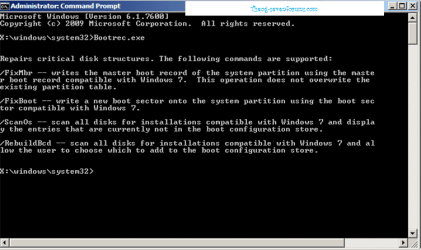
/FixMbr and /FixBoot didn't work either, UNLESS I didn't properly identify which partition I wanted it to fix. I'm not a wiz at cmd commands, so I may have done it wrong. A friend of mine had a similar issue some time ago (here is his thread) and apparently that fixed it for him. But doesn't seem to work for me.

I also did a quick test with my WD Diag tools CD and it was fine. The disk definitely works so it's not the issue, it's the Windows installation. I have no clue what to do at this point and I seriously don't want to reformat. I'll try to dig up that CD that I have a faint memory of making, because maybe it'll detect my OS and allow me to run repair and/or system restore.

Cheers and thanks in advance.
 
Last edited:

My Computer

OS
Windows 7 RC
From what you have written, this should be impossible but I suggest you to press F8 right before booting into windows, and select 'Use last known good config'.
This issue sound really hopeless, but if you could manage to boot into any windows which is on another partition (if you have any), you could rebuild the MBR manually (master boot record) which stores the OS information.
Do you have another disk/partition?
If yes, the best would be to install W7 on it (takes 20mins) do the above things (I will explain it further if you have another partition) and then boot back into your original OS and would be able to delete the 'blank' windows 7 installation files from the orher partition.
 

My Computer

Computer type
PC/Desktop
Computer Manufacturer/Model Number
Custom Built PC
OS
Windows 7 Ultimate 64 bit SP1
CPU
Intel(R) Core(TM) i5-2500K
Motherboard
Gigabyte Technology Co., Ltd. Z68X-UD3-B3
Memory
12GB Kingston Hyperx 1600MHz
Graphics Card(s)
Asus GTS 450
PSU
500W Coolink
Other Info
Genius G-Pen F610 (PenPad)
How many times have you tried the repair option? If a system is hosed it may take three tries.

Found this link:
http://www.sevenforums.com/tutorials/105541-startup-repair-run-3-separate-times.html?ltr=S

From here:
http://www.sevenforums.com/installa...-repair-menu-doesnt-see-operating-system.html

We also need more information about your system, Please fill out your system specs.

Is this the OS the machine came with or is it an upgrade from Vista, XP?

Why are you still at Windows 7 RC, have you not been updating?


It took me a while to reply, but speedgamer01 has valid points in his/her evaluation of your situation.
 

My Computer

Computer type
PC/Desktop
Computer Manufacturer/Model Number
Gateway DX4831-01e (Mid-Tower Desktop)
OS
Originally Win 7 Hm Prem x64 Ver 6.1.7600 Build 7601-SP1 | Upgraded to Windows 10 December 14, 2019
CPU
Intel i3 530 2.93GHz, 2933MHz 2 Cores 4 Logical Processors
Motherboard
Gateway H57M01 133 megahertz
Memory
6GB of 1,333MHz DDR3 SDRAM
Graphics Card(s)
32MB Intel Graphics Media Accelerator HD IGChip
Sound Card
Realtek High Definition Audio
Monitor(s) Displays
Gateway HX2000 20inch TFT active matrix TN
Screen Resolution
1600 x 900 x 59 hertz
Hard Drives
WDC WD10EADS-00M2B0 [HDD] (1000.20 GB) -- drive 0,
HL-DT-ST DVDRAM GH41N [CD-ROM dr]
Four card readers, and Four USB 2.0
PSU
300watts.
Case
Mid-Tower Desktop
Cooling
Stock from Gateway
Keyboard
Natural Ergonomic Keyboard 4000, see Other Info
Mouse
Orig. Gateway wore out now using Insignia USB wired optical
Internet Speed
Vz FIOS 10ms png 57.64Mbps down 65.53Mbps up Speedtest.org
Antivirus
Zamana Anti-logger with Anti-malware, MSE, Windows Firewall,
Browser
IE11.0.9600.19399-Upd ver11.0.135, Firefox 68.0.1 x64
Other Info
System Specs by Belarc.

BIOS: American Megatrends Inc. P01-A0 11/17/2009

Replaced the MS 'Natural' Standard PS/2 Enhanced 101-102 Keyboard with a new Natural Ergonomic Keyboard 4000 on August 1st 2014.

Canon Pixma MG3222 Printer.

Updated to IE11 on 12102015 | Fios Quantum Router g1100

Additional AV: SpywareBlaster, manual Mbam, SAS
Yes,
I haven't noticed that you have RC, it has expired 2 months ago!
Didn't you get popups in windows? It seems that Microsoft has decided to shut off RC versions, they can't run forever for free..
@Anak I'm a he :D
 

My Computer

Computer type
PC/Desktop
Computer Manufacturer/Model Number
Custom Built PC
OS
Windows 7 Ultimate 64 bit SP1
CPU
Intel(R) Core(TM) i5-2500K
Motherboard
Gigabyte Technology Co., Ltd. Z68X-UD3-B3
Memory
12GB Kingston Hyperx 1600MHz
Graphics Card(s)
Asus GTS 450
PSU
500W Coolink
Other Info
Genius G-Pen F610 (PenPad)
Yes,
I haven't noticed that you have RC, it has expired 2 months ago!
Didn't you get popups in windows? It seems that Microsoft has decided to shut off RC versions, they can't run forever for free.. @Anak I'm a he :D
@Anak I'm a he
Good to know! :)

I get distracted at times in order to take care of the Homestead, and I had thought of other reasons for this thread especially the MBR, but when I came back I saw you, sg01, had already articulated them.
 

My Computer

Computer type
PC/Desktop
Computer Manufacturer/Model Number
Gateway DX4831-01e (Mid-Tower Desktop)
OS
Originally Win 7 Hm Prem x64 Ver 6.1.7600 Build 7601-SP1 | Upgraded to Windows 10 December 14, 2019
CPU
Intel i3 530 2.93GHz, 2933MHz 2 Cores 4 Logical Processors
Motherboard
Gateway H57M01 133 megahertz
Memory
6GB of 1,333MHz DDR3 SDRAM
Graphics Card(s)
32MB Intel Graphics Media Accelerator HD IGChip
Sound Card
Realtek High Definition Audio
Monitor(s) Displays
Gateway HX2000 20inch TFT active matrix TN
Screen Resolution
1600 x 900 x 59 hertz
Hard Drives
WDC WD10EADS-00M2B0 [HDD] (1000.20 GB) -- drive 0,
HL-DT-ST DVDRAM GH41N [CD-ROM dr]
Four card readers, and Four USB 2.0
PSU
300watts.
Case
Mid-Tower Desktop
Cooling
Stock from Gateway
Keyboard
Natural Ergonomic Keyboard 4000, see Other Info
Mouse
Orig. Gateway wore out now using Insignia USB wired optical
Internet Speed
Vz FIOS 10ms png 57.64Mbps down 65.53Mbps up Speedtest.org
Antivirus
Zamana Anti-logger with Anti-malware, MSE, Windows Firewall,
Browser
IE11.0.9600.19399-Upd ver11.0.135, Firefox 68.0.1 x64
Other Info
System Specs by Belarc.

BIOS: American Megatrends Inc. P01-A0 11/17/2009

Replaced the MS 'Natural' Standard PS/2 Enhanced 101-102 Keyboard with a new Natural Ergonomic Keyboard 4000 on August 1st 2014.

Canon Pixma MG3222 Printer.

Updated to IE11 on 12102015 | Fios Quantum Router g1100

Additional AV: SpywareBlaster, manual Mbam, SAS
Oh, no I have Windows 7 Professional. I haven't updated my profile here since ages ago, I guess.
I don't have another partition, I have other hard drives where I can install it though, if that works... I don't really get how I can rebuild the MBR manually, I thought it's possible to do it from the CMD.
Either way I wouldn't mind doing this if I can install windows on another HDD and then erase it completely if I fix my issue.

Also I looked at the 3 times repair thing but I didn't really understand it. All it talks about is how to mark a partition active in the repair CMD. And then what? Do I just re-run the startup repair 3 times?

My system specs are:
Windows 7 Pro (64bit)
MSI P7N Platinum motherboard
4GB DDR2 Ram
Radeon HD 6870
550 watt rosewill psu

And yeah that's about it. Though I don't see how hardware specs apply here.
Also any idea what could have caused this? Windows didn't show any signs of problems before I shut it down. Except one of my rainmeter skins died for some reason, which didn't make sense, but I don't think that's related. That's the only odd thing that happened yesterday.

EDIT: Actually, I missed this part:
Now return to Recov Tools list to run Startup REpair up to 3 separate times with reboots to write MBR to Windows 7.
I'm going to try this later today. Question though: Would I have to retype the command prompt stuff (to activate the partition) every time I restart?
 
Last edited:

My Computer

OS
Windows 7 RC

My Computer

Computer type
PC/Desktop
Computer Manufacturer/Model Number
Gateway DX4831-01e (Mid-Tower Desktop)
OS
Originally Win 7 Hm Prem x64 Ver 6.1.7600 Build 7601-SP1 | Upgraded to Windows 10 December 14, 2019
CPU
Intel i3 530 2.93GHz, 2933MHz 2 Cores 4 Logical Processors
Motherboard
Gateway H57M01 133 megahertz
Memory
6GB of 1,333MHz DDR3 SDRAM
Graphics Card(s)
32MB Intel Graphics Media Accelerator HD IGChip
Sound Card
Realtek High Definition Audio
Monitor(s) Displays
Gateway HX2000 20inch TFT active matrix TN
Screen Resolution
1600 x 900 x 59 hertz
Hard Drives
WDC WD10EADS-00M2B0 [HDD] (1000.20 GB) -- drive 0,
HL-DT-ST DVDRAM GH41N [CD-ROM dr]
Four card readers, and Four USB 2.0
PSU
300watts.
Case
Mid-Tower Desktop
Cooling
Stock from Gateway
Keyboard
Natural Ergonomic Keyboard 4000, see Other Info
Mouse
Orig. Gateway wore out now using Insignia USB wired optical
Internet Speed
Vz FIOS 10ms png 57.64Mbps down 65.53Mbps up Speedtest.org
Antivirus
Zamana Anti-logger with Anti-malware, MSE, Windows Firewall,
Browser
IE11.0.9600.19399-Upd ver11.0.135, Firefox 68.0.1 x64
Other Info
System Specs by Belarc.

BIOS: American Megatrends Inc. P01-A0 11/17/2009

Replaced the MS 'Natural' Standard PS/2 Enhanced 101-102 Keyboard with a new Natural Ergonomic Keyboard 4000 on August 1st 2014.

Canon Pixma MG3222 Printer.

Updated to IE11 on 12102015 | Fios Quantum Router g1100

Additional AV: SpywareBlaster, manual Mbam, SAS
I really don't think that's the simplest solution. I mean it happened seemingly for no reason... First of all, I want to try to use the 3-times repair method because I haven't yet. Second I remember that I somehow got the windows CD to detect my OS before so it could perform repairs. I think this may have involved making another Win7 CD (I have the files on my computer) and injecting something into it that would allow it to detect the system. I may have even found a tutorial for it on this forum but can't find it now, I don't remember. Maybe someone knows what I'm talking about?
 

My Computer

OS
Windows 7 RC

My Computer

Computer type
PC/Desktop
Computer Manufacturer/Model Number
Custom Built PC
OS
Windows 7 Ultimate 64 bit SP1
CPU
Intel(R) Core(TM) i5-2500K
Motherboard
Gigabyte Technology Co., Ltd. Z68X-UD3-B3
Memory
12GB Kingston Hyperx 1600MHz
Graphics Card(s)
Asus GTS 450
PSU
500W Coolink
Other Info
Genius G-Pen F610 (PenPad)

My Computer

OS
ME/XP/Vista/Win7
Ok, I've made some progress: Using diskpart, WinRE was able to find and detect my windows installation and perform a repair on it. I didn't have to do it 3 times, because the latter 2 it said no problems were found (I still tried 3 times but it only performed repairs once).
Upon starting up my computer it got past the flashing dash and as its about to "load windows", a screen with an error message comes up:

File: \Windows\system32\winload.exe
Status: 0xc0000428
Info: Windows cannot verify the digital signature for this file.

I'm looking into this issue by searching on google now. So far I've found different mixed causes and solution but a lot of them seem to have to do with people dual booting system. I only have one system installed on my computer, this.

Should I go on to try to rebuild the mbr or use the rebuildbcd method? I'm searching for options now but at this point I think I've opened up some paths and made progress, so I'm glad.
 

My Computer

OS
Windows 7 RC
Um, again you have to press F8 before windows starts to loads.
Now select 'Disable signature enforcement', please post back with the results! :)
enDeviceDriver.png

SG
 

My Computer

Computer type
PC/Desktop
Computer Manufacturer/Model Number
Custom Built PC
OS
Windows 7 Ultimate 64 bit SP1
CPU
Intel(R) Core(TM) i5-2500K
Motherboard
Gigabyte Technology Co., Ltd. Z68X-UD3-B3
Memory
12GB Kingston Hyperx 1600MHz
Graphics Card(s)
Asus GTS 450
PSU
500W Coolink
Other Info
Genius G-Pen F610 (PenPad)
Shit. I don't like this.
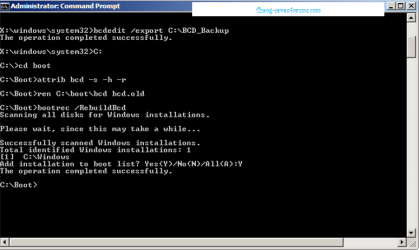
First let me just point out that I've tried to use the bootsect.exe utility to restore my mbr, which didn't work. I then tried to use the bootsect /fixmbr and /fixboot commands, since I could use them now because it detects my installation, but that didn't work. Finally, I tried following the /rebuildbcd method, that didn't work either.

Then I saw your post about the F8 thing just now. I did as you told me and... It began to load windows, the logo flew in, but before it finished loading the computer simply restarted and then took me to a windows error recovery options.

Which is kind of scary. Any ideas?
PS: Would I have to disable driver signature enforcement every time I start my computer, if I get it to work...?
Also when I go to repair your computer in the 7 DVD, it automatically starts startup repair, detects that my computer was unable to start and then "fails to repair the problem automatically". Although this was happening before I disabled the driver signature enforcement too. When I try to do startup repair there again, it doesn't find any problems.
 

My Computer

OS
Windows 7 RC
Nice, don't give up you are nearly there!!
So it crashes at half-way loading windows 7 if you disable driver s.e.?
Now try the other option called 'Use last known good config' though this might not work at all. Give it a shot... :)
:sleepy: Goodnite
 

My Computer

Computer type
PC/Desktop
Computer Manufacturer/Model Number
Custom Built PC
OS
Windows 7 Ultimate 64 bit SP1
CPU
Intel(R) Core(TM) i5-2500K
Motherboard
Gigabyte Technology Co., Ltd. Z68X-UD3-B3
Memory
12GB Kingston Hyperx 1600MHz
Graphics Card(s)
Asus GTS 450
PSU
500W Coolink
Other Info
Genius G-Pen F610 (PenPad)
Wait! Don't go yet! I'm trying this now.
No, when I try last known good config it goes back to the DSE error.
Help :(

Also look at this page: http://www.lifeworldblog.com/comput...-verify-the-digital-signature-for-winload-exe
The guy there says that it doesnt have to do with the signature but something with the bootloader. But if my bootloader already found the system and tried to boot it (but now it crashes for some reason) then... I don't know! Argh.
 

My Computer

OS
Windows 7 RC
Anyone have any ideas? Didn't get a response here for a while. I've ordered a new HDD and might go ahead and wipe windows soon (don't want to have it running on my 40GB anymore) but I'd still like to see if I can fix it.
 

My Computer

OS
Windows 7 RC
I've decided to reinstall Windows, so everything's fine now.
Thanks for the help everyone.
 

My Computer

OS
Windows 7 RC
Back
Top