Solved Help with qualcomm drivers

dtoxic

New member
Local time
5:50 PM
Messages
32
hello all

i'am trying to unpack install shield [.exe] file so far i only managed to extract these files

5/16/2014 06:17 PM <DIR> .
05/16/2014 06:17 PM <DIR> ..
05/30/2013 06:31 AM 21,504 .data
05/30/2013 06:31 AM 512 .orpc
05/30/2013 06:31 AM 195,072 .rdata
05/30/2013 06:31 AM 86,528 .reloc
05/30/2013 06:31 AM 152 .rsrc_1
05/30/2013 06:31 AM 634,880 .text
05/30/2013 06:31 AM 6,512 CERTIFICATE
05/30/2013 06:31 AM 333,588,704 [0] -------- [inside here are the drivers] 318MB
9 File(s) 334,533,864 bytes
2 Dir(s) 17,935,298,560 bytes free

now i think the file [0] is an archive and i tried all the usual program [winrar,7zip,winzip etc] nothing worked

can anyone make sense on how to get out the drivers out of there without installing them?

thx
 

My Computer

Computer type
PC/Desktop
Computer Manufacturer/Model Number
Custom
OS
Windows 7 SP1 X64
CPU
i7 4770k
Motherboard
MSI Z87 Xpower
Memory
Kingston KHX2133
Graphics Card(s)
MSI GTX 1070 8Gb
Hi

Please try the below steps.

1. Download innounp ( inno setup unpacker )from the below link.

Inno Setup Unpacker - Browse /innounp/innounp 0.40 at SourceForge.net ( innounp040.rar)

Readme : innounp, the Inno Setup Unpacker

2. Create a new folder in the root of a partition ( for example, D:\Test )

3. Extract the zip file and copy innounp.exe to the "Test" folder. Also copy the driver setup exe file to the folder and rename it to something small like "atheroz" ( any small name without spaces ).

4. Open a command prompt and navigate to the "D:\Test" folder. Alternatively hold the "Shift" key and right click on the folder. You will see an option "Open Command Window Here".

http://www.sevenforums.com/tutorial...window-here-add-remove-shift-right-click.html


Now enter the extraction command like this :

innounp -x atheroz.exe

Hopefully the setup will be extracted successfully.
 

My Computer

Computer type
PC/Desktop
OS
Windows 7 Ultimate x64
Hi

Please try the below steps.

1. Download innounp ( inno setup unpacker )from the below link.

Inno Setup Unpacker - Browse /innounp/innounp 0.40 at SourceForge.net ( innounp040.rar)

Readme : innounp, the Inno Setup Unpacker

2. Create a new folder in the root of a partition ( for example, D:\Test )

3. Extract the zip file and copy innounp.exe to the "Test" folder. Also copy the driver setup exe file to the folder and rename it to something small like "atheroz" ( any small name without spaces ).

4. Open a command prompt and navigate to the "D:\Test" folder. Alternatively hold the "Shift" key and right click on the folder. You will see an option "Open Command Window Here".

http://www.sevenforums.com/tutorial...window-here-add-remove-shift-right-click.html


Now enter the extraction command like this :

innounp -x atheroz.exe

Hopefully the setup will be extracted successfully.

it's a no go because it's not a inno setup file its Installshield totally different

here is the link to the drivers maybe someone has the time to look at them

http://www.qca.qualcomm.com/drivers/KillerSuite_1.1.38.1281_Win7_Win8_Win81.exe

anyway thanks for the reply
 

My Computer

Computer type
PC/Desktop
Computer Manufacturer/Model Number
Custom
OS
Windows 7 SP1 X64
CPU
i7 4770k
Motherboard
MSI Z87 Xpower
Memory
Kingston KHX2133
Graphics Card(s)
MSI GTX 1070 8Gb
I tried running that file but can't. Qualcomm checks if you have the Qualcomm hardware installed before it unpacks that file.

But let me ask: Just what are you trying to accomplish? What driver are you trying to get? There may be another approach.

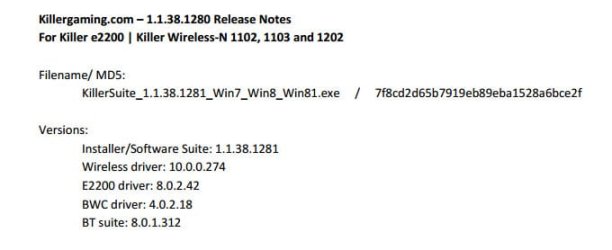
When i look at the release notes for the download I see it contains several drivers
> Which driver file do you want?
> Also, go to device manager, right click the device you want the drivers for, select Properties->Detail tab. Select Hardware IDs from the pull down menu. Copy/paste what you see
 

Attachments

  • Killer.jpg
    Killer.jpg
    16.5 KB · Views: 19

My Computer

Computer type
PC/Desktop
Computer Manufacturer/Model Number
Dell Optiplex 360 and Optiplex 755
OS
Desk 1: Win 7 Pro x32; Desk 2: Windows 10 x64
Hard Drives
500GB Crucial SSD in both Desktops
Other Info
Buffalo 6TB NAS, Raid 1
i'am just trying to get the drivers out (the newest version) because the software suit,manager is way to buggy if installed the network has frequent dropouts lags etc.

i;am on win 7 (msi xpower z87 board) thats the only reason
 

My Computer

Computer type
PC/Desktop
Computer Manufacturer/Model Number
Custom
OS
Windows 7 SP1 X64
CPU
i7 4770k
Motherboard
MSI Z87 Xpower
Memory
Kingston KHX2133
Graphics Card(s)
MSI GTX 1070 8Gb
You could do the following:
> Install the software suite (which includes the drivers)
> Run Double Driver (to backup installed drivers)
> Uninstall the software suite

You now have a copy of the extracted drivers you want in the Double Drivers backup
 

My Computer

Computer type
PC/Desktop
Computer Manufacturer/Model Number
Dell Optiplex 360 and Optiplex 755
OS
Desk 1: Win 7 Pro x32; Desk 2: Windows 10 x64
Hard Drives
500GB Crucial SSD in both Desktops
Other Info
Buffalo 6TB NAS, Raid 1
You could do the following:
> Install the software suite (which includes the drivers)
> Run Double Driver (to backup installed drivers)
> Uninstall the software suite

You now have a copy of the extracted drivers you want in the Double Drivers backup

hmmm ill give it a try thanks that didn't cross my mind :)
 

My Computer

Computer type
PC/Desktop
Computer Manufacturer/Model Number
Custom
OS
Windows 7 SP1 X64
CPU
i7 4770k
Motherboard
MSI Z87 Xpower
Memory
Kingston KHX2133
Graphics Card(s)
MSI GTX 1070 8Gb
Back
Top