
Solved Help with selecting a backup software

RalphG

New member
Member
VIP
Local time
11:41 AM
Messages
176
Hello all,
I need help in selecting a backup/image software. I tend to try out software
and learn new things on my Win. 7, 64x, system. I have tried windows own
image app. and a couple of others. However I can never get it to work. All I want
is to make a backup/image that I can use to get my computer back to a state
where everything was stable.
What I need is something that is idiot proof.

Thanks for any help you can provide:)
 

My Computer

Computer Manufacturer/Model Number
Acer Aspire X3910 & HP Pavilion a6334f
OS
Windows 7 Ultimate 64x and 32x
CPU
Acer: Intel Pentium E5700 HP: Core 2 Duo E4500
Memory
Acer: 4 GB HP: 3 GB
Graphics Card(s)
Acer: Integrated HP: Integrated
Sound Card
Acer: Integrated HP: Integrated
Monitor(s) Displays
Sceptre 21"
Screen Resolution
1440x900
Hard Drives
Acer: WD Caviar Blue 640 GB WD6400AAKS-22A7B2
HP: WD 500GB WDC WD5000AAKS-65YGA0
Cooling
Both: CPU Fan
Internet Speed
4.5 To 5.0
Other Info
Seagate Ext. Port. Drive 2.5" 500 GB
Hitachi Ext. Port. Drive 2.5" 320 GB

My Computer

Computer Manufacturer/Model Number
HP, Dell, Gateway, Toshiba - 4 laptops and 2 desktops
OS
Vista, Windows7, Mint Mate, Zorin, Windows 8
CPU
from 1.6GHz Duo to i7
Monitor(s) Displays
2x HP w2207
Hard Drives
5x HDD, 7x SSD, 12x Externals
Keyboard
with trackball - no mices
Mouse
Trackball mice
Internet Speed
DSL 6000
Thanks for the reply. I will look at your tutorial
 

My Computer

Computer Manufacturer/Model Number
Acer Aspire X3910 & HP Pavilion a6334f
OS
Windows 7 Ultimate 64x and 32x
CPU
Acer: Intel Pentium E5700 HP: Core 2 Duo E4500
Memory
Acer: 4 GB HP: 3 GB
Graphics Card(s)
Acer: Integrated HP: Integrated
Sound Card
Acer: Integrated HP: Integrated
Monitor(s) Displays
Sceptre 21"
Screen Resolution
1440x900
Hard Drives
Acer: WD Caviar Blue 640 GB WD6400AAKS-22A7B2
HP: WD 500GB WDC WD5000AAKS-65YGA0
Cooling
Both: CPU Fan
Internet Speed
4.5 To 5.0
Other Info
Seagate Ext. Port. Drive 2.5" 500 GB
Hitachi Ext. Port. Drive 2.5" 320 GB

My Computer

Computer Manufacturer/Model Number
Self
OS
Main - Windows 7 Pro SP1 64-Bit; 2nd - Windows Server 2008 R2
CPU
Main - Core i7 2600K; 2nd - Core i7 920
Motherboard
Main - Asus P8Z68-V Pro/Gen3; 2nd - Gigabyte GA-EX58-UDR3
Memory
Main - 16GB Corsair Vengeance; 2nd - 12GB Corsair Vengeance
Graphics Card(s)
Main - XFX Radeon 6870 1GB; 2nd - XFX Radeon 4870 1GB
Sound Card
Both: Onboard Realtek Azalia
Monitor(s) Displays
Main - Hann 25" + I-INC 25" + Acer 23"; 2nd - Upgrading Soon
Screen Resolution
Main - 1920x1080 (All Three Monitors); 2nd - Upgrading Soon
Hard Drives
Main - (1) Crucial M4 128GB (Boot)
Main - (1) Seagate 2TB 64MB Cache (Data)
Main - (1) Seagate 2TB 64MB Cache (Data Backup)
2nd - (1) Intel X25-M SSD 80GB (Boot)
2nd - (3) Seagate 1TB 32MB Cache (Data Backup)
2nd - (1) Seagate 320GB (Because)
PSU
Main - OCZ 600W Modular; 2nd - OCZ 600W
Case
Main - Thermaltake Element G; 2nd - NZXT something or other
Cooling
Main - Corsair H80; 2nd - Prolimatech Megahalems
Keyboard
Main - Razer Reclusa; 2nd - Old MS Keyboard
Mouse
Main - Logitech MX Revolution; 2nd - Old MS Mouse
Internet Speed
20Mbps Time-Warner Cable
Thanks for the input:)
 

My Computer

Computer Manufacturer/Model Number
Acer Aspire X3910 & HP Pavilion a6334f
OS
Windows 7 Ultimate 64x and 32x
CPU
Acer: Intel Pentium E5700 HP: Core 2 Duo E4500
Memory
Acer: 4 GB HP: 3 GB
Graphics Card(s)
Acer: Integrated HP: Integrated
Sound Card
Acer: Integrated HP: Integrated
Monitor(s) Displays
Sceptre 21"
Screen Resolution
1440x900
Hard Drives
Acer: WD Caviar Blue 640 GB WD6400AAKS-22A7B2
HP: WD 500GB WDC WD5000AAKS-65YGA0
Cooling
Both: CPU Fan
Internet Speed
4.5 To 5.0
Other Info
Seagate Ext. Port. Drive 2.5" 500 GB
Hitachi Ext. Port. Drive 2.5" 320 GB
My biggest problem isn't so much creating a backup/image but the restoring process.
 

My Computer

Computer Manufacturer/Model Number
Acer Aspire X3910 & HP Pavilion a6334f
OS
Windows 7 Ultimate 64x and 32x
CPU
Acer: Intel Pentium E5700 HP: Core 2 Duo E4500
Memory
Acer: 4 GB HP: 3 GB
Graphics Card(s)
Acer: Integrated HP: Integrated
Sound Card
Acer: Integrated HP: Integrated
Monitor(s) Displays
Sceptre 21"
Screen Resolution
1440x900
Hard Drives
Acer: WD Caviar Blue 640 GB WD6400AAKS-22A7B2
HP: WD 500GB WDC WD5000AAKS-65YGA0
Cooling
Both: CPU Fan
Internet Speed
4.5 To 5.0
Other Info
Seagate Ext. Port. Drive 2.5" 500 GB
Hitachi Ext. Port. Drive 2.5" 320 GB
It's covered in the tutorial, but basically you just make a bootable recovery CD (the program will remind you to do that) and then follow it step by step. Easy as pie. :)
 

My Computer

Computer Manufacturer/Model Number
Self
OS
Main - Windows 7 Pro SP1 64-Bit; 2nd - Windows Server 2008 R2
CPU
Main - Core i7 2600K; 2nd - Core i7 920
Motherboard
Main - Asus P8Z68-V Pro/Gen3; 2nd - Gigabyte GA-EX58-UDR3
Memory
Main - 16GB Corsair Vengeance; 2nd - 12GB Corsair Vengeance
Graphics Card(s)
Main - XFX Radeon 6870 1GB; 2nd - XFX Radeon 4870 1GB
Sound Card
Both: Onboard Realtek Azalia
Monitor(s) Displays
Main - Hann 25" + I-INC 25" + Acer 23"; 2nd - Upgrading Soon
Screen Resolution
Main - 1920x1080 (All Three Monitors); 2nd - Upgrading Soon
Hard Drives
Main - (1) Crucial M4 128GB (Boot)
Main - (1) Seagate 2TB 64MB Cache (Data)
Main - (1) Seagate 2TB 64MB Cache (Data Backup)
2nd - (1) Intel X25-M SSD 80GB (Boot)
2nd - (3) Seagate 1TB 32MB Cache (Data Backup)
2nd - (1) Seagate 320GB (Because)
PSU
Main - OCZ 600W Modular; 2nd - OCZ 600W
Case
Main - Thermaltake Element G; 2nd - NZXT something or other
Cooling
Main - Corsair H80; 2nd - Prolimatech Megahalems
Keyboard
Main - Razer Reclusa; 2nd - Old MS Keyboard
Mouse
Main - Logitech MX Revolution; 2nd - Old MS Mouse
Internet Speed
20Mbps Time-Warner Cable
Great Thanks alot:D
 

My Computer

Computer Manufacturer/Model Number
Acer Aspire X3910 & HP Pavilion a6334f
OS
Windows 7 Ultimate 64x and 32x
CPU
Acer: Intel Pentium E5700 HP: Core 2 Duo E4500
Memory
Acer: 4 GB HP: 3 GB
Graphics Card(s)
Acer: Integrated HP: Integrated
Sound Card
Acer: Integrated HP: Integrated
Monitor(s) Displays
Sceptre 21"
Screen Resolution
1440x900
Hard Drives
Acer: WD Caviar Blue 640 GB WD6400AAKS-22A7B2
HP: WD 500GB WDC WD5000AAKS-65YGA0
Cooling
Both: CPU Fan
Internet Speed
4.5 To 5.0
Other Info
Seagate Ext. Port. Drive 2.5" 500 GB
Hitachi Ext. Port. Drive 2.5" 320 GB
There is some chance (1 in 10??) that the recovery disk you make with Macrium will not actually boot your PC.

So--be sure to confirm that the disk is bootable. Boot from it and proceed several steps into the restoration process. Make sure you can locate the image file you want to restore, as well as the partition/drive to which you intend to restore.

If your recovery disk will not boot, the alternative is to use an another method of burning the disk, often called "compatibility" mode. Look for menu choices. Or you could make a "WinPE" recovery disk, but that is somewhat complicated. I'd use the standard Linux-based recovery disk if possible. If you cannot boot from the recovery disk, you cannot restore.
 

My Computer

Computer type
PC/Desktop
Computer Manufacturer/Model Number
Ignatz Special; 4 speed manual gearbox; factory air conditioning; one of one
OS
Windows 7 Home Premium SP1, 64-bit
CPU
Intel Skylake i5-6600K, not overclocked
Motherboard
AsRock Z170M Extreme 4, micro ATX
Memory
8 GB HyperX DDR4-2666 (2 x 4 GB)
Graphics Card(s)
none; graphics are integrated on CPU
Sound Card
onboard: Realtek ALC1150; external: USB Behringer UF0-202
Monitor(s) Displays
Dell S2340M 23 inch IPS
Screen Resolution
1600 x 900
Hard Drives
System: Crucial MX100 series SSD, 128 GB;
Data: Samsung Spinpoint 103SJ, 1 TB;
Backup: WD Caviar Green WD30EZRX-00D8PB0, 3 TB
PSU
Rosewill SilentNight 500 watt fanless, semi-modular
Case
Antec Solo II
Cooling
Noctua NH-U12S; Noctua F12 intake, Noctua S12A exhaust
Keyboard
Microsoft 200 6JH-00001 USB
Mouse
Dell or Microsoft optical wired; USB
Antivirus
Microsoft Security Essentials and Malwarebytes Premium
Browser
Pale Moon
Other Info
All fans PWM; speeds at idle: CPU circa 500 rpm; intake circa 600 rpm; exhaust circa 600 rpm; CPU temps 27 idle and 47 C load in a warm room (27 C/81 F) when running Intel Extreme Tuning Utility stress test.
Thanks for the heads up. This will help:D
 

My Computer

Computer Manufacturer/Model Number
Acer Aspire X3910 & HP Pavilion a6334f
OS
Windows 7 Ultimate 64x and 32x
CPU
Acer: Intel Pentium E5700 HP: Core 2 Duo E4500
Memory
Acer: 4 GB HP: 3 GB
Graphics Card(s)
Acer: Integrated HP: Integrated
Sound Card
Acer: Integrated HP: Integrated
Monitor(s) Displays
Sceptre 21"
Screen Resolution
1440x900
Hard Drives
Acer: WD Caviar Blue 640 GB WD6400AAKS-22A7B2
HP: WD 500GB WDC WD5000AAKS-65YGA0
Cooling
Both: CPU Fan
Internet Speed
4.5 To 5.0
Other Info
Seagate Ext. Port. Drive 2.5" 500 GB
Hitachi Ext. Port. Drive 2.5" 320 GB
There is some chance (1 in 10??) that the recovery disk you make with Macrium will not actually boot your PC.

So--be sure to confirm that the disk is bootable. Boot from it and proceed several steps into the restoration process. Make sure you can locate the image file you want to restore, as well as the partition/drive to which you intend to restore.

If your recovery disk will not boot, the alternative is to use an another method of burning the disk, often called "compatibility" mode. Look for menu choices. Or you could make a "WinPE" recovery disk, but that is somewhat complicated. I'd use the standard Linux-based recovery disk if possible. If you cannot boot from the recovery disk, you cannot restore.

It's not complicated to make the WinPE recovery disk. There is a wizard but it does involve a 1.7GB download of the WAIK.
 

My Computer

Computer type
Laptop
Computer Manufacturer/Model Number
Hewlett-Packard/G62-107SA Notebook
OS
Microsoft Windows 7 Home Premium 64-bit Service Pack 1
CPU
Intel(R) Core(TM) i3 CPU M 330 @ 2.13GHz
Motherboard
Hewlett-Packard 1425
Memory
8 GB DDR3
Graphics Card(s)
Intel(R) HD Graphics
Sound Card
Realtek High Definition Audio
Monitor(s) Displays
Builtin
Screen Resolution
1366 x 768 x 32 bits (4294967296 colors) @ 60 Hz
Hard Drives
250 GB SATA Hard Disk Drive 7200 rpm
2TB Seagate GoFlex USB 2 Drive
1TB Iomega Prestige USB 2 Drive
1.5TB Iomega Prestige USB 2 Drive (Samsung)
2TB WD MyBook Live NAS.
Mouse
Logitech Anywhere MX
Internet Speed
152 Mbs download 10 Mbs upload
Antivirus
Norton 360
Browser
Chrome
The Macrium Version 5.0 tutorial that I just created a couple of days ago does not show the recovery procedure because I have no capture tools when those CDs or DVDs are running. And also because the version 5.0 options (Linux version or WinPe version) are much easier to handel than the Version 4.2 Linux.

I recommend you burn the WinPe DVD because it is easier to use (same interface as Macrium) and allows you to recover individual partitions. With the Linux version you can only recover whole disks. Just be aware that the burning of the WinPe version takes about 90 minutes because it will download the WAIK, a 1.7GB MS program which does the application installation. But all of that is automatic and no big deal.
 

My Computer

Computer Manufacturer/Model Number
HP, Dell, Gateway, Toshiba - 4 laptops and 2 desktops
OS
Vista, Windows7, Mint Mate, Zorin, Windows 8
CPU
from 1.6GHz Duo to i7
Monitor(s) Displays
2x HP w2207
Hard Drives
5x HDD, 7x SSD, 12x Externals
Keyboard
with trackball - no mices
Mouse
Trackball mice
Internet Speed
DSL 6000
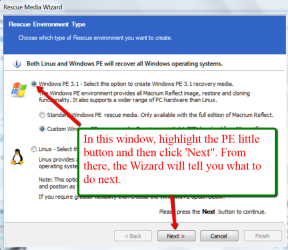
Thanks For the input, but I'm not sure how you do a WinPe version.
Could you please give me a little mor info.

Thanks:)
 

My Computer

Computer Manufacturer/Model Number
Acer Aspire X3910 & HP Pavilion a6334f
OS
Windows 7 Ultimate 64x and 32x
CPU
Acer: Intel Pentium E5700 HP: Core 2 Duo E4500
Memory
Acer: 4 GB HP: 3 GB
Graphics Card(s)
Acer: Integrated HP: Integrated
Sound Card
Acer: Integrated HP: Integrated
Monitor(s) Displays
Sceptre 21"
Screen Resolution
1440x900
Hard Drives
Acer: WD Caviar Blue 640 GB WD6400AAKS-22A7B2
HP: WD 500GB WDC WD5000AAKS-65YGA0
Cooling
Both: CPU Fan
Internet Speed
4.5 To 5.0
Other Info
Seagate Ext. Port. Drive 2.5" 500 GB
Hitachi Ext. Port. Drive 2.5" 320 GB
See the picture
 

Attachments

  • 2012-01-21_1439.png
    2012-01-21_1439.png
    217.7 KB · Views: 3

My Computer

Computer Manufacturer/Model Number
HP, Dell, Gateway, Toshiba - 4 laptops and 2 desktops
OS
Vista, Windows7, Mint Mate, Zorin, Windows 8
CPU
from 1.6GHz Duo to i7
Monitor(s) Displays
2x HP w2207
Hard Drives
5x HDD, 7x SSD, 12x Externals
Keyboard
with trackball - no mices
Mouse
Trackball mice
Internet Speed
DSL 6000
Thanks a bunch, it helps:)
 

My Computer

Computer Manufacturer/Model Number
Acer Aspire X3910 & HP Pavilion a6334f
OS
Windows 7 Ultimate 64x and 32x
CPU
Acer: Intel Pentium E5700 HP: Core 2 Duo E4500
Memory
Acer: 4 GB HP: 3 GB
Graphics Card(s)
Acer: Integrated HP: Integrated
Sound Card
Acer: Integrated HP: Integrated
Monitor(s) Displays
Sceptre 21"
Screen Resolution
1440x900
Hard Drives
Acer: WD Caviar Blue 640 GB WD6400AAKS-22A7B2
HP: WD 500GB WDC WD5000AAKS-65YGA0
Cooling
Both: CPU Fan
Internet Speed
4.5 To 5.0
Other Info
Seagate Ext. Port. Drive 2.5" 500 GB
Hitachi Ext. Port. Drive 2.5" 320 GB
Back
Top