Help with stutter in games

N00berG00ber

Weekend Warrior
Power User
VIP
Local time
6:53 PM
Messages
1,485
ok so ive been dealing with this forever and I can not figure it out for the life of me.

when im playing a game, for about .5 seconds to 1 sec, the game freezes then returns back to normal. all my specs are below.

heres what ive tried.

brand new gpu, brand new motherboard, brand new cpu, brand new everything!!!!!!!! the only thing I have not changed was the PSU and RAM. however, my components are getting enough power. I ran furmark and prime, and voltages did not bounce, move, or nothing. all was good, so I doubt it would be the PSU.

my cpu never goes above 46C and gpu never hits 76C. so temps are fine.

this is a fresh copy of windows too. I only have 30 processes running so windows is slimmed down a lot. I have no anti virus.

ive tried testing my ram with memtest and windows mem test and it came up good. so the only things I can think of it being is something with my RAM or some bios setting I was not sopose to change..... what do you people think it could be?


ive hitten a wall here. I have no idea what else it could be.
 

My Computer

Computer type
PC/Desktop
Computer Manufacturer/Model Number
Weekend Warrior Rig
OS
Windows 10 Pro
CPU
Intel i7-3770K 4.4GHz
Motherboard
ASUS P8Z77-V Pro
Memory
8GB G.SKILL Ripjaws 1866 MHz
Graphics Card(s)
EVGA GTX 980 Classified
Monitor(s) Displays
Asus VH238H 23" 2ms
Screen Resolution
1920x1080
Hard Drives
Intel 330 120GB SSD /
WD Blue 1TB /
WD Black 500GB
PSU
Corsair CX750M
Case
NZXT H440
Cooling
Corsair H80i- CPU / Corsair H90- GPU
Keyboard
Logitech K360 LE
Mouse
Logitech G500
Antivirus
Avast
Browser
Chrome
Other Info
1200W 2.1 Surround Sound Audio
Hmm...does this happen with all games or just a specific game?

Does the sound quit or stutter when the video freezes?

Does it happen ONLY while playing games?

If you let Unigine Heaven or Valley loop for a while, does it stutter?

Any unusual HDD activity when the stutter occurs?
 

My Computer

Computer type
PC/Desktop
Computer Manufacturer/Model Number
Custom Build
OS
Windows 7 Home Premium x64
CPU
Intel Core i7 5960X @3.0 GHz
Motherboard
Gigabyte GA-X99-SOC Force
Memory
4 x 4 GB G.Skill Ripjaws4 DDR4-2400
Graphics Card(s)
PNY GTX 780
Sound Card
Realtek on-board ALC1150
Monitor(s) Displays
HP Z30i + Asus PA246Q + Dell U2412M
Screen Resolution
2560x1600 + 1920x1200 + 1920x1200
Hard Drives
Samsung 830 256GB
PSU
Antec EarthWatts 650W
Case
Cooler Master HAF 932
Cooling
Corsair Hydro Series H105
Keyboard
Razer BlackWidow Tournament Edition Stealth
Mouse
Razer Naga
Hmm...does this happen with all games or just a specific game?

Does the sound quit or stutter when the video freezes?

Does it happen ONLY while playing games?

If you let Unigine Heaven or Valley loop for a while, does it stutter?

Any unusual HDD activity when the stutter occurs?


it happens in ALL games, lately I noiced you tube video being choppy. its not the hdd, because theres no activity going om when it happends, and I haven't tried the benchmarks because it get some low fps on thm and its hard to tell. as far as audio, im not completely sure. but ive tried multiple audio drivers, disabling stuff, nothing. im trying my ram rite now.

I set bios to all defaults and just testing changing ram. so far it looks like it IS the ram.....
 

My Computer

Computer type
PC/Desktop
Computer Manufacturer/Model Number
Weekend Warrior Rig
OS
Windows 10 Pro
CPU
Intel i7-3770K 4.4GHz
Motherboard
ASUS P8Z77-V Pro
Memory
8GB G.SKILL Ripjaws 1866 MHz
Graphics Card(s)
EVGA GTX 980 Classified
Monitor(s) Displays
Asus VH238H 23" 2ms
Screen Resolution
1920x1080
Hard Drives
Intel 330 120GB SSD /
WD Blue 1TB /
WD Black 500GB
PSU
Corsair CX750M
Case
NZXT H440
Cooling
Corsair H80i- CPU / Corsair H90- GPU
Keyboard
Logitech K360 LE
Mouse
Logitech G500
Antivirus
Avast
Browser
Chrome
Other Info
1200W 2.1 Surround Sound Audio
nvm. it happens on ram defaults and what I set it to. and bios is in defaults. so it could be the ram its self? bios is out of the question....

as far as audio, sometimes it freezes, most of the time it does not. its hard to tell , cause I don't notice the audio much. I got loud speakers.

im going to try just 1 stick at its intended speed.
 

My Computer

Computer type
PC/Desktop
Computer Manufacturer/Model Number
Weekend Warrior Rig
OS
Windows 10 Pro
CPU
Intel i7-3770K 4.4GHz
Motherboard
ASUS P8Z77-V Pro
Memory
8GB G.SKILL Ripjaws 1866 MHz
Graphics Card(s)
EVGA GTX 980 Classified
Monitor(s) Displays
Asus VH238H 23" 2ms
Screen Resolution
1920x1080
Hard Drives
Intel 330 120GB SSD /
WD Blue 1TB /
WD Black 500GB
PSU
Corsair CX750M
Case
NZXT H440
Cooling
Corsair H80i- CPU / Corsair H90- GPU
Keyboard
Logitech K360 LE
Mouse
Logitech G500
Antivirus
Avast
Browser
Chrome
Other Info
1200W 2.1 Surround Sound Audio
strange.... when I put each individual stick in, it shows as 4gb, however when both are in place it shows 8gb (7.90 usable)
 

My Computer

Computer type
PC/Desktop
Computer Manufacturer/Model Number
Weekend Warrior Rig
OS
Windows 10 Pro
CPU
Intel i7-3770K 4.4GHz
Motherboard
ASUS P8Z77-V Pro
Memory
8GB G.SKILL Ripjaws 1866 MHz
Graphics Card(s)
EVGA GTX 980 Classified
Monitor(s) Displays
Asus VH238H 23" 2ms
Screen Resolution
1920x1080
Hard Drives
Intel 330 120GB SSD /
WD Blue 1TB /
WD Black 500GB
PSU
Corsair CX750M
Case
NZXT H440
Cooling
Corsair H80i- CPU / Corsair H90- GPU
Keyboard
Logitech K360 LE
Mouse
Logitech G500
Antivirus
Avast
Browser
Chrome
Other Info
1200W 2.1 Surround Sound Audio
Set your BIOS to initialize the PCIe GPU first. It may be called PEG. Disable the on-chip GPU as well.
 

My Computer

Computer type
PC/Desktop
Computer Manufacturer/Model Number
Home Built Desktop By DataTech
OS
Windows 7 Ultimate X64 SP1
CPU
Intel i5-2550K, Differing ~4.4-4.8GHz No built in GPU
Motherboard
ASUS P8Z68-V PRO/GEN3
Memory
16GB G.Skill Sniper 1866MHz @ 2133MHz 2x8GB
Graphics Card(s)
ASUS GTX650TIB-DC2OC-2GD5, (650TI Boost)
Sound Card
Onboard Realtek 5-1
Monitor(s) Displays
Samsung P2570HD
Screen Resolution
1920x1080
Hard Drives
Samsung 840 Pro 256GB SSD for OS, 500GB Seagate Constellation (Enterprise drive) for Data
PSU
Corsair HX650W
Case
Inwin Dragon Rider
Cooling
Hyper 212 EVO w/two Noctua fans, push-pull, @1300 RPM
Keyboard
E-Z Eyes, bright yellow keys with large characters
Mouse
steelseries SENSEI Laser Pro Gaming
Internet Speed
48-51Mbs Mbs down, 11 Mbs up Xfinity Cable
Antivirus
Norton Internet Security 2013
Browser
IE 10, Opera, Pale Moon if needed
Other Info
4 case fans, LG BluRay-RE, ASUS DVD-RW, Mr. Fusion power supply, 1.21 gigawatts.
Set your BIOS to initialize the PCIe GPU first. It may be called PEG. Disable the on-chip GPU as well.

just did that lol

im going to ask a friend to borrow some of his ram tomorrow and try it. and see if that makes a difference. now windows is saying all 8gb is useable. weird.

but as far as bios options, from what I set to default, it makes no difference. with only 1 stick in at a time, same issue with both.

is there some northbridge settings I can try and change for the RAM?

my only other options is PSU hich I seriously doubt, and just windows in general. which I seriously doubt again.
 

My Computer

Computer type
PC/Desktop
Computer Manufacturer/Model Number
Weekend Warrior Rig
OS
Windows 10 Pro
CPU
Intel i7-3770K 4.4GHz
Motherboard
ASUS P8Z77-V Pro
Memory
8GB G.SKILL Ripjaws 1866 MHz
Graphics Card(s)
EVGA GTX 980 Classified
Monitor(s) Displays
Asus VH238H 23" 2ms
Screen Resolution
1920x1080
Hard Drives
Intel 330 120GB SSD /
WD Blue 1TB /
WD Black 500GB
PSU
Corsair CX750M
Case
NZXT H440
Cooling
Corsair H80i- CPU / Corsair H90- GPU
Keyboard
Logitech K360 LE
Mouse
Logitech G500
Antivirus
Avast
Browser
Chrome
Other Info
1200W 2.1 Surround Sound Audio
If you have a different PSU, you might give it a try.

I just remembered that I had a similar problem a while back on my htpc. I didn't game on it, but I was getting momentary video freezing and looping audio when watching videos. It acted like a good, old-fashioned hardware conflict (IRQ or DMA) which is nearly unheard of these days.

Turns out that it was bad capacitors on the motherboard. You said that you have a new motherboard so it probably won't have bad caps, but "dirty" power from a malfunctioning PSU may cause a similar problem.


Kent
 

My Computer

Computer type
PC/Desktop
Computer Manufacturer/Model Number
Custom Build
OS
Windows 7 Home Premium x64
CPU
Intel Core i7 5960X @3.0 GHz
Motherboard
Gigabyte GA-X99-SOC Force
Memory
4 x 4 GB G.Skill Ripjaws4 DDR4-2400
Graphics Card(s)
PNY GTX 780
Sound Card
Realtek on-board ALC1150
Monitor(s) Displays
HP Z30i + Asus PA246Q + Dell U2412M
Screen Resolution
2560x1600 + 1920x1200 + 1920x1200
Hard Drives
Samsung 830 256GB
PSU
Antec EarthWatts 650W
Case
Cooler Master HAF 932
Cooling
Corsair Hydro Series H105
Keyboard
Razer BlackWidow Tournament Edition Stealth
Mouse
Razer Naga
If you have a different PSU, you might give it a try.

I just remembered that I had a similar problem a while back on my htpc. I didn't game on it, but I was getting momentary video freezing and looping audio when watching videos. It acted like a good, old-fashioned hardware conflict (IRQ or DMA) which is nearly unheard of these days.

Turns out that it was bad capacitors on the motherboard. You said that you have a new motherboard so it probably won't have bad caps, but "dirty" power from a malfunctioning PSU may cause a similar problem.


Kent


I don't :(

I checked voltages by running furmark and prime at the same time and monitored cpu and gpu voltages. they were fine. no changes and no bouncing. the PSU is brand new too. just a few months old
 

My Computer

Computer type
PC/Desktop
Computer Manufacturer/Model Number
Weekend Warrior Rig
OS
Windows 10 Pro
CPU
Intel i7-3770K 4.4GHz
Motherboard
ASUS P8Z77-V Pro
Memory
8GB G.SKILL Ripjaws 1866 MHz
Graphics Card(s)
EVGA GTX 980 Classified
Monitor(s) Displays
Asus VH238H 23" 2ms
Screen Resolution
1920x1080
Hard Drives
Intel 330 120GB SSD /
WD Blue 1TB /
WD Black 500GB
PSU
Corsair CX750M
Case
NZXT H440
Cooling
Corsair H80i- CPU / Corsair H90- GPU
Keyboard
Logitech K360 LE
Mouse
Logitech G500
Antivirus
Avast
Browser
Chrome
Other Info
1200W 2.1 Surround Sound Audio

My Computer

Computer type
PC/Desktop
Computer Manufacturer/Model Number
Custom Build
OS
W7 Pro x64 SP1 | W10 Pro IP x64 | W8.1 Pro x64 VM | Linux Mint VM
CPU
i7-4790k @ 4GHz (4.4GHz Boost)
Motherboard
ASUS Sabertooth Z87 (BIOS Rev 2004)
Memory
16GB DDR3 Kingston HyperX Fury @ 1600MHz CL 9-9-9-27
Graphics Card(s)
EVGA GTX 980 Classified
Sound Card
Realtek Onboard
Monitor(s) Displays
Samsung S27D390
Screen Resolution
1920 x 1080
Hard Drives
240GB Intel 520 Series SSD |
Samsung 850 EVO 120GB SSD |
2TB WD Caviar Black |
2TB WD Caviar Green
PSU
Corsair HX850-80 Gold Modular
Case
Cooler Master Silencio 650
Cooling
Corsair H80i w/2 x Corsair SP120 | 2 x 120mm Noctua NF-S12B
Keyboard
Microsoft Sidewinder X4
Mouse
Gigabyte M6900 optical
Internet Speed
152mb
Antivirus
F-Secure
Browser
Firefox 38.0
Other Info
Backup Rig: Win 7 Pro 64-bit | AMD A10-5800k | ASUS F2A85-V Pro | 8GB Samsung DDR3 @1600MHz | 120GB Toshiba SDD | 2TB Seagate HDD | Cooler Master Silencio 550
As far as games, nothing helps. All games from very light on the system to very taxing on it. And I don't need anti virus on it. Its not a daily computer. I only go on here, Facebook, and YouTube lol
 

My Computer

Computer type
PC/Desktop
Computer Manufacturer/Model Number
Weekend Warrior Rig
OS
Windows 10 Pro
CPU
Intel i7-3770K 4.4GHz
Motherboard
ASUS P8Z77-V Pro
Memory
8GB G.SKILL Ripjaws 1866 MHz
Graphics Card(s)
EVGA GTX 980 Classified
Monitor(s) Displays
Asus VH238H 23" 2ms
Screen Resolution
1920x1080
Hard Drives
Intel 330 120GB SSD /
WD Blue 1TB /
WD Black 500GB
PSU
Corsair CX750M
Case
NZXT H440
Cooling
Corsair H80i- CPU / Corsair H90- GPU
Keyboard
Logitech K360 LE
Mouse
Logitech G500
Antivirus
Avast
Browser
Chrome
Other Info
1200W 2.1 Surround Sound Audio
Could it be my page file? I have initial and max at 2gb
 

My Computer

Computer type
PC/Desktop
Computer Manufacturer/Model Number
Weekend Warrior Rig
OS
Windows 10 Pro
CPU
Intel i7-3770K 4.4GHz
Motherboard
ASUS P8Z77-V Pro
Memory
8GB G.SKILL Ripjaws 1866 MHz
Graphics Card(s)
EVGA GTX 980 Classified
Monitor(s) Displays
Asus VH238H 23" 2ms
Screen Resolution
1920x1080
Hard Drives
Intel 330 120GB SSD /
WD Blue 1TB /
WD Black 500GB
PSU
Corsair CX750M
Case
NZXT H440
Cooling
Corsair H80i- CPU / Corsair H90- GPU
Keyboard
Logitech K360 LE
Mouse
Logitech G500
Antivirus
Avast
Browser
Chrome
Other Info
1200W 2.1 Surround Sound Audio
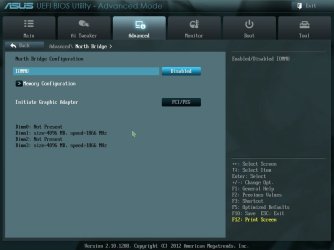
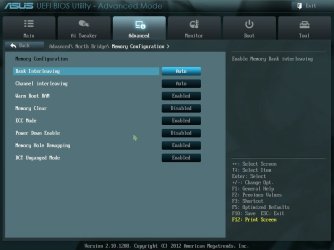
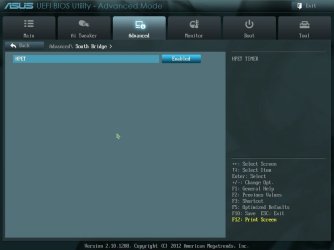
here is some of my ram options in bios....

should i change any of them?
 

Attachments

  • 130930235422.jpg
    130930235422.jpg
    115.1 KB · Views: 3
  • 130930235433.jpg
    130930235433.jpg
    122.6 KB · Views: 5
  • 130930235458.jpg
    130930235458.jpg
    94.8 KB · Views: 3

My Computer

Computer type
PC/Desktop
Computer Manufacturer/Model Number
Weekend Warrior Rig
OS
Windows 10 Pro
CPU
Intel i7-3770K 4.4GHz
Motherboard
ASUS P8Z77-V Pro
Memory
8GB G.SKILL Ripjaws 1866 MHz
Graphics Card(s)
EVGA GTX 980 Classified
Monitor(s) Displays
Asus VH238H 23" 2ms
Screen Resolution
1920x1080
Hard Drives
Intel 330 120GB SSD /
WD Blue 1TB /
WD Black 500GB
PSU
Corsair CX750M
Case
NZXT H440
Cooling
Corsair H80i- CPU / Corsair H90- GPU
Keyboard
Logitech K360 LE
Mouse
Logitech G500
Antivirus
Avast
Browser
Chrome
Other Info
1200W 2.1 Surround Sound Audio
Perhaps try disabling ECC, your RAM probably doesn't even support it but I haven't looked at your specs.
 

My Computer

OS
Windows 7 Professional 64bit
CPU
AMD Athlon II X3 440
Motherboard
ASUS M4A77TD
Memory
12.0 GB Dual-Channel DDR3 @ 669MHz
Graphics Card(s)
AMD Radeon HD 6850
Sound Card
AMD High Definition Audio Device
Monitor(s) Displays
Dell 317FP, Generic PnP Monitor
Screen Resolution
1920x1080
Hard Drives
112GB OCZ OCZ-AGIL ITY3 SATA Disk Device (SSD)
932GB Western Digital WDC WD10 01FALS-00E3A0 SATA Disk Device (SATA)
466GB Western Digital WDC WD50 01AALS-00L3B2 SATA Disk Device (SATA)
Case
ANTEC 300 ILLUSION
Cooling
CoolerMaster Hyper 212 plus
Other Info
I have two 4GB Corsair XMS3 modules and two 2GB Corsair XMS3 modules.
As far as games, nothing helps. All games from very light on the system to very taxing on it. And I don't need anti virus on it. Its not a daily computer. I only go on here, Facebook, and YouTube lol
Facebook is a real good reason to have a good real-time AV installed.
 

My Computer

Computer type
PC/Desktop
Computer Manufacturer/Model Number
Home Built Desktop By DataTech
OS
Windows 7 Ultimate X64 SP1
CPU
Intel i5-2550K, Differing ~4.4-4.8GHz No built in GPU
Motherboard
ASUS P8Z68-V PRO/GEN3
Memory
16GB G.Skill Sniper 1866MHz @ 2133MHz 2x8GB
Graphics Card(s)
ASUS GTX650TIB-DC2OC-2GD5, (650TI Boost)
Sound Card
Onboard Realtek 5-1
Monitor(s) Displays
Samsung P2570HD
Screen Resolution
1920x1080
Hard Drives
Samsung 840 Pro 256GB SSD for OS, 500GB Seagate Constellation (Enterprise drive) for Data
PSU
Corsair HX650W
Case
Inwin Dragon Rider
Cooling
Hyper 212 EVO w/two Noctua fans, push-pull, @1300 RPM
Keyboard
E-Z Eyes, bright yellow keys with large characters
Mouse
steelseries SENSEI Laser Pro Gaming
Internet Speed
48-51Mbs Mbs down, 11 Mbs up Xfinity Cable
Antivirus
Norton Internet Security 2013
Browser
IE 10, Opera, Pale Moon if needed
Other Info
4 case fans, LG BluRay-RE, ASUS DVD-RW, Mr. Fusion power supply, 1.21 gigawatts.
As far as games, nothing helps. All games from very light on the system to very taxing on it. And I don't need anti virus on it. Its not a daily computer. I only go on here, Facebook, and YouTube lol
Facebook is a real good reason to have a good real-time AV installed.


I don't do anything but chat on it lol
 

My Computer

Computer type
PC/Desktop
Computer Manufacturer/Model Number
Weekend Warrior Rig
OS
Windows 10 Pro
CPU
Intel i7-3770K 4.4GHz
Motherboard
ASUS P8Z77-V Pro
Memory
8GB G.SKILL Ripjaws 1866 MHz
Graphics Card(s)
EVGA GTX 980 Classified
Monitor(s) Displays
Asus VH238H 23" 2ms
Screen Resolution
1920x1080
Hard Drives
Intel 330 120GB SSD /
WD Blue 1TB /
WD Black 500GB
PSU
Corsair CX750M
Case
NZXT H440
Cooling
Corsair H80i- CPU / Corsair H90- GPU
Keyboard
Logitech K360 LE
Mouse
Logitech G500
Antivirus
Avast
Browser
Chrome
Other Info
1200W 2.1 Surround Sound Audio

My Computer

Computer type
PC/Desktop
Computer Manufacturer/Model Number
Weekend Warrior Rig
OS
Windows 10 Pro
CPU
Intel i7-3770K 4.4GHz
Motherboard
ASUS P8Z77-V Pro
Memory
8GB G.SKILL Ripjaws 1866 MHz
Graphics Card(s)
EVGA GTX 980 Classified
Monitor(s) Displays
Asus VH238H 23" 2ms
Screen Resolution
1920x1080
Hard Drives
Intel 330 120GB SSD /
WD Blue 1TB /
WD Black 500GB
PSU
Corsair CX750M
Case
NZXT H440
Cooling
Corsair H80i- CPU / Corsair H90- GPU
Keyboard
Logitech K360 LE
Mouse
Logitech G500
Antivirus
Avast
Browser
Chrome
Other Info
1200W 2.1 Surround Sound Audio
im stil lthinking its my ram, because I just checked my manual for this board, and I did not see my EXACT ram listed in the compatible ram. also disabling ECC seemed to make a little difference. the stutter does not happen as long or often. still happens tho
 

My Computer

Computer type
PC/Desktop
Computer Manufacturer/Model Number
Weekend Warrior Rig
OS
Windows 10 Pro
CPU
Intel i7-3770K 4.4GHz
Motherboard
ASUS P8Z77-V Pro
Memory
8GB G.SKILL Ripjaws 1866 MHz
Graphics Card(s)
EVGA GTX 980 Classified
Monitor(s) Displays
Asus VH238H 23" 2ms
Screen Resolution
1920x1080
Hard Drives
Intel 330 120GB SSD /
WD Blue 1TB /
WD Black 500GB
PSU
Corsair CX750M
Case
NZXT H440
Cooling
Corsair H80i- CPU / Corsair H90- GPU
Keyboard
Logitech K360 LE
Mouse
Logitech G500
Antivirus
Avast
Browser
Chrome
Other Info
1200W 2.1 Surround Sound Audio
No, your RAM is not the ECC type. ECC memory - Wikipedia, the free encyclopedia It is very expensive and used for mission critical use and for servers.

I am prone to think it is more a GPU issue since that's where most of game image processing takes place. Most have their own on-board GDDR memory.
 

My Computer

Computer type
PC/Desktop
Computer Manufacturer/Model Number
Home Built Desktop By DataTech
OS
Windows 7 Ultimate X64 SP1
CPU
Intel i5-2550K, Differing ~4.4-4.8GHz No built in GPU
Motherboard
ASUS P8Z68-V PRO/GEN3
Memory
16GB G.Skill Sniper 1866MHz @ 2133MHz 2x8GB
Graphics Card(s)
ASUS GTX650TIB-DC2OC-2GD5, (650TI Boost)
Sound Card
Onboard Realtek 5-1
Monitor(s) Displays
Samsung P2570HD
Screen Resolution
1920x1080
Hard Drives
Samsung 840 Pro 256GB SSD for OS, 500GB Seagate Constellation (Enterprise drive) for Data
PSU
Corsair HX650W
Case
Inwin Dragon Rider
Cooling
Hyper 212 EVO w/two Noctua fans, push-pull, @1300 RPM
Keyboard
E-Z Eyes, bright yellow keys with large characters
Mouse
steelseries SENSEI Laser Pro Gaming
Internet Speed
48-51Mbs Mbs down, 11 Mbs up Xfinity Cable
Antivirus
Norton Internet Security 2013
Browser
IE 10, Opera, Pale Moon if needed
Other Info
4 case fans, LG BluRay-RE, ASUS DVD-RW, Mr. Fusion power supply, 1.21 gigawatts.
No, your RAM is not the ECC type. ECC memory - Wikipedia, the free encyclopedia It is very expensive and used for mission critical use and for servers.

I am prone to think it is more a GPU issue since that's where most of game image processing takes place. Most have their own on-board GDDR memory.


I disabled it.

its a brand new GPU. this ones does it, and my last one did it. its not the gpu. it HAS TO BE MEMORY!!!!!

is there anything else I can disable in thiose windows to get better performance?

im borrowing my friends tomorrow
 

My Computer

Computer type
PC/Desktop
Computer Manufacturer/Model Number
Weekend Warrior Rig
OS
Windows 10 Pro
CPU
Intel i7-3770K 4.4GHz
Motherboard
ASUS P8Z77-V Pro
Memory
8GB G.SKILL Ripjaws 1866 MHz
Graphics Card(s)
EVGA GTX 980 Classified
Monitor(s) Displays
Asus VH238H 23" 2ms
Screen Resolution
1920x1080
Hard Drives
Intel 330 120GB SSD /
WD Blue 1TB /
WD Black 500GB
PSU
Corsair CX750M
Case
NZXT H440
Cooling
Corsair H80i- CPU / Corsair H90- GPU
Keyboard
Logitech K360 LE
Mouse
Logitech G500
Antivirus
Avast
Browser
Chrome
Other Info
1200W 2.1 Surround Sound Audio
Back
Top