
Help-Wont Let Me Create a Restore Point!

Birddude007

New member
Member
Local time
5:06 AM
Messages
70
Hello folks, I am having an issue trying to create a restore point in Windows 7 64bit/32/bit combo
When I click "create" about thirty seconds go by and then I get this pop up error-
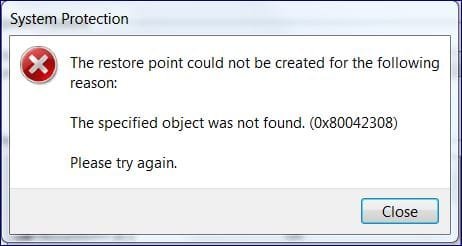
restore_point_error.JPG

Whats up with that?
Please...any and all info will be greatly appreciated
 

My Computer My Computer

OS
Windows 7 64 bit
CPU
AMD Dual Core 2,2 GHZ
Motherboard
dunno...its a laptop
Memory
4GB, upgrading to 8GB
Graphics Card(s)
integrated
Sound Card
does it need one?
Monitor(s) Displays
built in
Screen Resolution
lots
Hard Drives
2 x 250 GB
PSU
wall outlet
Case
plastic
Cooling
swamp cooler
Keyboard
finger operated
Mouse
cat got it
Internet Speed
1 meg

My Computer My Computer

Computer type
Laptop
Computer Manufacturer/Model Number
ACER ASPIRE 5742G
OS
Microsoft Windows 7 Home Premium 64-bits 7601 Multiprocessor Free Service Pack 1
CPU
Intel(R) Core(TM) i3 CPU M 370 @ 2.40GHz
Motherboard
Acer Aspire 5742G
Memory
4,00 GB
Graphics Card(s)
ATI Mobility Radeon HD 5400 Series
Sound Card
(1) AMD High Definition Audio Device (2) Realtek High Defi
Screen Resolution
1366 x 768 x 32 bits (4294967296 colors) @ 60 Hz
Hard Drives
WDC WD5000BEVT-22ZAT0
You may have a bug from somewhere so run SAS and or MBAM doing a full scan first.

Have you tried going into Safe Mode to see if you then can restore from there?
THW
 

My Computer My Computer

Computer Manufacturer/Model Number
HP M9077c
OS
Windows 7 Home Premium 64bit
CPU
Intel(R)Core(TM)2 quad [email protected] 2.39GHz
Motherboard
ASUSeK
Memory
6GB DDR2 6400
Graphics Card(s)
GeForce 8500/512MB
Sound Card
Realtek High Def Audio
Monitor(s) Displays
HP w2408 LCD 24" widescreen
Screen Resolution
1920x1200
Cooling
6 pack of Bud
Keyboard
MS wireless Inteli
Mouse
MS wireless Inteli
Do you see restore points? http://www.sevenforums.com/tutorials/700-system-restore.html
Don't actually perform the action

Turn system protection OFF for C http://www.sevenforums.com/tutorials/330-system-protection-turn-off.html afterwards turn it ON, just as it was.

Do the same for D,E,F etcetera. Now try to create a manual restore point. http://www.sevenforums.com/tutorials/697-system-restore-point-create.html

Check eventlog for related errors on time of restore point error. http://www.sevenforums.com/tutorials/226084-event-viewer-open-use-windows-7-a.html

Post results
 

My Computer My Computer

Computer type
Laptop
Computer Manufacturer/Model Number
ACER ASPIRE 5742G
OS
Microsoft Windows 7 Home Premium 64-bits 7601 Multiprocessor Free Service Pack 1
CPU
Intel(R) Core(TM) i3 CPU M 370 @ 2.40GHz
Motherboard
Acer Aspire 5742G
Memory
4,00 GB
Graphics Card(s)
ATI Mobility Radeon HD 5400 Series
Sound Card
(1) AMD High Definition Audio Device (2) Realtek High Defi
Screen Resolution
1366 x 768 x 32 bits (4294967296 colors) @ 60 Hz
Hard Drives
WDC WD5000BEVT-22ZAT0
This will help you fill in your system specs properly.

http://www.sevenforums.com/tutorials/180324-system-info-see-your-system-specs.html

Also could you tell us how much free space you have on your hard drives?
 

My Computer My Computer

Computer type
PC/Desktop
Computer Manufacturer/Model Number
Home made Desktop
OS
Windows 10 Pro. 64/ version 1709 Windows 7 Pro/64
CPU
Intel i7-6800K @ 4.3
Motherboard
ASUS X-99 Deluxe II
Memory
Corsair Platinum 16 gig @2400
Graphics Card(s)
EVGA GTX 1070 OC
Monitor(s) Displays
Asus 27" LED LCD/VE278Q
Screen Resolution
1920-1080 or 1280-720 HDMI
Hard Drives
INTEL SSD 730-240 Gb Sata 3.0/
PSU
EVGA Platium 1200W
Case
Phanteks Luxe Tempered Glass 8 fans/ one radiator
Cooling
XSPC/ Water Cooled CPU
Keyboard
Das 4 Professional
Mouse
Logitech M705/MX Anywhere 2-S
Internet Speed
100 mbits
Antivirus
Microsoft Security Essentials/ Malwarebytes Premium 3.0/ SAS
Browser
I.E. 11 default/Firefox/ ISP Time Warner Cable/Spectrum
Other Info
LG BluRay Burner/
Sound system-KLipsch-THX/
Icy Dock ssd Hot Swap bays.
Back
Top