helpn installing theme for windows 7 home basic

arash2009

New member
Local time
11:06 PM
Messages
15
windows 7 home basic does not allow to install theme , any other theme or any help on registry please !!!
 

My Computer

Computer Manufacturer/Model Number
hp, g61
OS
windows 7 Ultimate
CPU
core 2 duo
Memory
4 gig
you need to use universial patcher to patch your system the program is easy and it un patches your system if you want to. make sure you create a system restore point before doing this once it is complete you can get custom themes from devient art and use them on you system hope this helps.

-Andrew.
 

My Computer

Computer Manufacturer/Model Number
HP Pavilion p6795a
OS
windows 7 64 bit
CPU
intel core i5 3.30GHz Quad Core
Motherboard
HP
Memory
6gb
Graphics Card(s)
AMD RADEON HD 6450 1GB Dedicated
Sound Card
ATI HIGH DEFINITION SOUND
Monitor(s) Displays
LG
Screen Resolution
16:9 Hd
Hard Drives
1TB
Cooling
Fan
Keyboard
Wireless
Mouse
HP wireless keyboard and mouse
Internet Speed
fast enough
Other Info
Beast Of A Machine!
here is the theme patchers i used, also if the theme you want doesnt have an installer copy the theme files into C:\Windows\Resources\Themes\
 

My Computer

Computer Manufacturer/Model Number
Self Build
OS
Windows 7 X64
CPU
Intel E6750 @ 3.2GHz
Motherboard
Foxconn ELA 01
Memory
6GiB
Graphics Card(s)
EVGA 9800GTX/9800GTX+
Sound Card
Onboard
Monitor(s) Displays
22 Inch AOC
Hard Drives
500GiB 7200rpm
PSU
1050W
Cooling
Corsair H50 Hydro Cooler
Ok does it do anything to windows activation ? I use windows 7 home basic 64-bit which unpatcher should I use ?
 

My Computer

Computer Manufacturer/Model Number
hp, g61
OS
windows 7 Ultimate
CPU
core 2 duo
Memory
4 gig
The theme patchers do not affect the windows activation. And you want to get the one that says "x64" in the name... basically the bottom one. :p
 

My Computer

Computer type
PC/Desktop
Computer Manufacturer/Model Number
Custom built
OS
Windows 8 Pro 64-bit
CPU
Intel Core i7 950 @4.4GHz
Motherboard
EVGA 131-GT-E767
Memory
12GB DDR3 1333MHz @1400 (9-9-9-24)
Graphics Card(s)
2x AMD Radeon HD 6770
Sound Card
Sound Blaster Audigy
Monitor(s) Displays
Acer S231HL + Acer E19T5W
Screen Resolution
1920x1080 + 1440x900
Hard Drives
128GB Samsung 840 Pro
1TB Seagate Barracuda 7200RPM 64mb
500GB Seagate Barracuda 7200RPM 16mb
PSU
Corsair GS800
Case
Custom-made
Cooling
CM Hyper212+, lots of fans
Keyboard
NMB RT8255C+
Mouse
Func MS-3
Internet Speed
30/1.5
Antivirus
Microsoft Security Essentials/Spybot SD/Malwarebytes
Browser
Google Chrome
Other Info
Onkyo TX-27 receiver & two Realistic Optimus T100s.
my most problem is network icon in taskbar (bottom in right) which is showing a antana bar not two monitor icon ! but unpatcher is good if windows activation ,,,,,,
 

My Computer

Computer Manufacturer/Model Number
hp, g61
OS
windows 7 Ultimate
CPU
core 2 duo
Memory
4 gig
here is the theme patchers i used, also if the theme you want doesnt have an installer copy the theme files into C:\Windows\Resources\Themes\


I used x64 unpatcher but it didn't do anything ?????
then I used x86 but no help !!!!
 

My Computer

Computer Manufacturer/Model Number
hp, g61
OS
windows 7 Ultimate
CPU
core 2 duo
Memory
4 gig
help pleaseeeeeeeeeeeeeee!!!!!!!!!!!!!!!!!!!
 

My Computer

Computer Manufacturer/Model Number
hp, g61
OS
windows 7 Ultimate
CPU
core 2 duo
Memory
4 gig
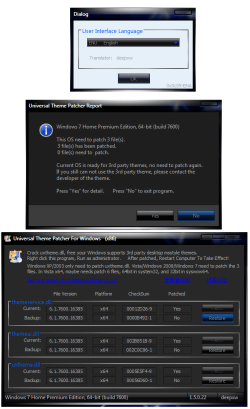
these are the three windows you should get from running the program. you can always try vistaglazz if the other ones arent working but try running them as an aadministrator

 

Attachments

  • UniThemePatcherWindows.png
    UniThemePatcherWindows.png
    140.4 KB · Views: 1,846

My Computer

Computer Manufacturer/Model Number
Self Build
OS
Windows 7 X64
CPU
Intel E6750 @ 3.2GHz
Motherboard
Foxconn ELA 01
Memory
6GiB
Graphics Card(s)
EVGA 9800GTX/9800GTX+
Sound Card
Onboard
Monitor(s) Displays
22 Inch AOC
Hard Drives
500GiB 7200rpm
PSU
1050W
Cooling
Corsair H50 Hydro Cooler
Back
Top