Hibernate Resume Problem

SnapCount

New member
Local time
10:07 AM
Messages
26
Location
In a House, Australia
Hi guys,

Wondering you you can help me with this issue from resuming from a hibernate or sleep state, and not being able to get a network connection at all.

I would then have to restart the laptop to get the connection back.

My laptop is a Compaq v3118au which has a nvidia nic and a broadcom 802.11b/g WLAN.
 

My Computer

OS
Windows XP Pro SP3 / Windows 7RC 7100
CPU
Intel Q6600 Quad Core @ 2.80
Motherboard
Gigabyte P35-DS3P
Memory
2 Gb Corsair
Graphics Card(s)
Leadtek 8800GT
Sound Card
Creative X-Fi XtreamGamer
Monitor(s) Displays
Chimei 22"
Case
LianLi A70
Hi snapcount,

You might check this:

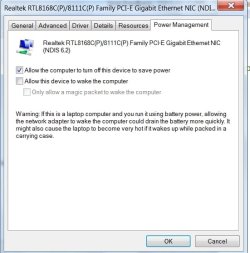
Go to Device Manager>right click your Network Adapter>Properties>Power Management Tab

POWERMANAGEMENT2009-02-19_053205.jpg

If "Allow the computer to turn off this device to save power" is ticked, untick it, OK.

Hope it helps

SIW2
 

My Computers

System One System Two

  • Computer type
    PC/Desktop
    OS
    7 X64
    CPU
    i5 8400
    Motherboard
    gigabyte b365m ds3h
    Memory
    2x8gb 3200mhz
    Hard Drives
    various
    PSU
    pure power 11 400w cm
    Case
    Coolermaster
    Cooling
    cryorig m9i
  • Computer type
    PC/Desktop
    OS
    7x64
    CPU
    g5400
    Motherboard
    ga b365m ds3h
    Memory
    8gb ddr4 2400
    PSU
    xfx pro 450w
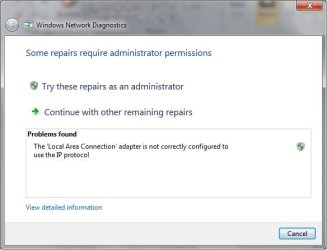
Thanks for the help, but unfortunately that didn't do the job.

It come up with this error for both ethernet and wireless.

Both after hibernate resume and sleep resume:(
 

Attachments

  • no network.jpg
    no network.jpg
    22.3 KB · Views: 167

My Computer

OS
Windows XP Pro SP3 / Windows 7RC 7100
CPU
Intel Q6600 Quad Core @ 2.80
Motherboard
Gigabyte P35-DS3P
Memory
2 Gb Corsair
Graphics Card(s)
Leadtek 8800GT
Sound Card
Creative X-Fi XtreamGamer
Monitor(s) Displays
Chimei 22"
Case
LianLi A70
Hi guys,

I have exactly the same problem. After resuming from Hibernate or from Sleep modes my wireless does not work.
I tried to uncheck that Power Management option, but didn't work.
I have a HP Pavilion dv2000 with Windows 7 build 7100.
With XP SP2 and SP3 I had no problems.

Help is appreciated.

Thanks.
 

My Computer

OS
windows 7
Hi

The diagnostics suggest that TCPIP is not correctly working with this device. Can you send a screenshot of the following window:

1. Open network connection folder (run ncpa.cpl)
2. Right click on your Wireless Network Connection and select properties

Send the output of the Networking/this connection uses the following items window. If there is a scroll bar, can you scroll & take multiple screenshots so that all the items in window are visible?

Thanks
Mitesh
 

My Computer

OS
Vista SP1, Windows 7 RC
Hi Mitesh

Thanks for your reply.
Attached is the screenshot.
 

Attachments

  • Wireless Properties.jpg
    Wireless Properties.jpg
    26.8 KB · Views: 71

My Computer

OS
windows 7
Can you try and check if disabling the BitDefender firewall fixes your problem. You can do that using the following steps, but note that this would disable the firewall (so you would want to reenable it once you identify if this fixes the problem or not):

1. Open network connection folder (run ncpa.cpl)
2. Right click on your Wireless Network Connection and select properties
3. Uncheck the box next to "BitDefender Firewall NDIS Filter Driver".
4. Click OK
5. Repeat steps 3 & 4 for the Local Area Connection by clicking it & selecting properties & changing settings

You can try a sleep/resume now & see if the problem goes away.

Cheers
Mitesh
 

My Computer

OS
Vista SP1, Windows 7 RC
I myself have experienced this many times. It has nothing to do with the firewall or power management. Upon coming out of hibernate Windows disables your ethernet/wireless adapters(all of them) and will not allow you to re-enable them. I have checked every possible solution on my laptop and have come to the conclusion that this is a windows bug that needs to be addressed. The one way I have found to alleviate that problem is before going into hibernate I will disconnect all connections to the laptop(wireless->disconnect, ethernet->unplug). This makes it to where I see this problem only 1 out of 50 times instead of 1 out of every 5 or 6 times.

Hope this helps
 

My Computer

OS
Windows 7
Unchecking the firewall (I had a diff one) seems to have worked for me!! Thank you!
 

My Computer

OS
Win 7 64 bit
Back
Top