hidden partition

ddm

New member
Local time
9:25 AM
Messages
2
I had installed for the first time Windows 7 Home Premium 32 bit.
As I know this software is creating a hidden partition of 100 MB.
I wish to know if such a partition is saved on the hard-disk.
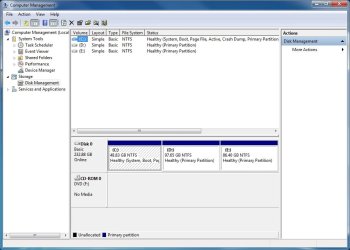
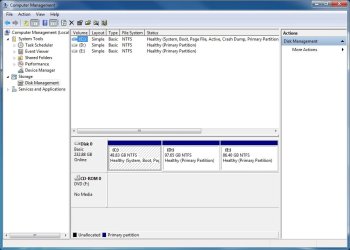
According to the Disk Management, as shown in the attached image, there is no partition shown.
In case the Disk Management does not show the reality, what kind of software are you recommending me to use in order to get access to this partition?

Thank you.
 

Attachments
  • disk management.jpg
    disk management.jpg
    66.8 KB · Views: 23

My Computer

Computer type
PC/Desktop
OS
Windows 7 Home Premium SP1 32 bit
CPU
Intel E8400
Hard Drives
Seagate 232 GB
Hello ddm and welcome to Seven Forums.

The 100MB partition contains boot files and recovery information. It isn't always created, particularly if the hard drive is pre-formatted and pre-partitioned. Under that scenario the boot files and recovery info are contained in the C: partition. These previous forum threads discuss the 100MB partition in more detail, including how to remove it and still be able to boot the computer:

http://www.sevenforums.com/installation-setup/10408-whats-100mb-partition-can-i-delete.html

http://www.sevenforums.com/installation-setup/93293-way-get-rid-100mb-partition.html
 

My Computer

Computer type
Laptop
Computer Manufacturer/Model Number
Sony Vaio VPCEB47GM Laptop
OS
Win 7 Pro 64-bit
CPU
Intel i5 2.4 Ghz
Memory
8GB DDR3
Graphics Card(s)
Intel HD 3000
Sound Card
IDT High Definition
Monitor(s) Displays
15.6 WGXA Anti-Glare LED
Screen Resolution
1280x800
Hard Drives
640Gb 7200rpm
Antivirus
MSE
Browser
Opera (primary) with IE9 backup
Thank you for your answer.
One more question,

Three primary Partitions on the same drive, of which i only use C: as my system, and the others for Programs, Games etc. can have any impact on performance or can damage the harddrive or the computer?
 

Attachments

  • disk management.jpg
    disk management.jpg
    66.8 KB · Views: 9

My Computer

Computer type
PC/Desktop
OS
Windows 7 Home Premium SP1 32 bit
CPU
Intel E8400
Hard Drives
Seagate 232 GB
As I understand things, there can be four primary partitions. One of them can be an extended partition, which can contain any number of logical partitions. To tell the difference between the different partitions, Disk Management color codes them. Primary partitions have a dark blue border. An extended partition has a green border. Logical drives within a primary partition have a light blue border. You shouldn't see any noticeable decrease in performance and there should be no damage or other issues to the hard drive. This older Forum thread discusses partition differences in a bit more detail.

http://www.sevenforums.com/general-...tween-primary-extended-logical-partition.html

One caution, though. If the hard drive ever fails, you could lose everything if you don't have suitable data backups and/or system images. ;)
 

My Computer

Computer type
Laptop
Computer Manufacturer/Model Number
Sony Vaio VPCEB47GM Laptop
OS
Win 7 Pro 64-bit
CPU
Intel i5 2.4 Ghz
Memory
8GB DDR3
Graphics Card(s)
Intel HD 3000
Sound Card
IDT High Definition
Monitor(s) Displays
15.6 WGXA Anti-Glare LED
Screen Resolution
1280x800
Hard Drives
640Gb 7200rpm
Antivirus
MSE
Browser
Opera (primary) with IE9 backup
In addition to this excellent information provided, I'd suggest you not install programs or games to another partition as they install themselves into the registry to become a part of the OS until uninstalled so should remain with the OS.

A more common use of another partition is for data, so that the OS partition remains smaller for imaging purposes and your data is safe and current in its own partition if Win7 becomes irreparable and must be reimaged.

Data can be linked by moving the active User folders to the data partition, however this forces its inclusion in the image so defeats that purpose. So another method is to copy the active User folders to the data partition to link to the related Library - Include a Folder - Windows 7 Forums, then delete the content of the User folder on C while keeping it in the Library to see if anything lands there.
 
Back
Top