First Hi,
Second, I'm not sure this is in the right section, my apologize if I made it wrong.
Third, my weird problem,
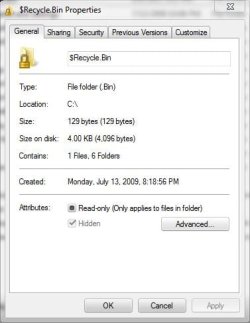
In Windows Explorer, I have set the option to see hidden files and system files and I do see them. The problem arise when I try to "unhide" a file. I right-click the file and choose "Properties", bottom I see Hide option box, it is checked but also greyed out so I can't "uncheck" it.
Anyone knows why and how can I fix this?
Thanks
Second, I'm not sure this is in the right section, my apologize if I made it wrong.
Third, my weird problem,
In Windows Explorer, I have set the option to see hidden files and system files and I do see them. The problem arise when I try to "unhide" a file. I right-click the file and choose "Properties", bottom I see Hide option box, it is checked but also greyed out so I can't "uncheck" it.
Anyone knows why and how can I fix this?
Thanks
My Computer
- Computer Manufacturer/Model Number
- My creation
- OS
- Windows 7, Ultimate 64bit Version 6.1.7600
- CPU
- Intel E6400 Core2Duo 2.13 GHz
- Motherboard
- Gigabyte GA-965P-DS3
- Memory
- 4 Go
- Graphics Card(s)
- Nvidia GTX260 OC
- Sound Card
- OnBoard
- Monitor(s) Displays
- Samsung SyncMaster 226BW
- Screen Resolution
- 1680x1050
- Hard Drives
- Western Digital WS250KS x2 (SATA)
Western Digital WD10EADS (SATA)
- PSU
- Antec 450
- Case
- Antec ?
- Cooling
- FAN ;o)
- Keyboard
- Logitech Wave
- Mouse
- Logitech G9
- Internet Speed
- Fast enough