High CPU usage and (sounds like pc overworking) when idle

danmoh009

New member
Local time
4:02 PM
Messages
2
Hi All,

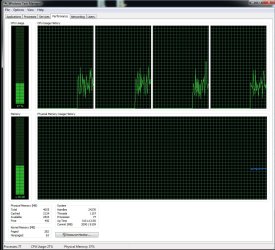
Im new to this forum but wondering if anyone can help, im having a bit of an issue with a fluctuating CPU usage. Seems quite loud as if the fan is over working, side panel is off and ventilation is good.

Im not really sure where to start i have done virus scans in safe mode also panda cloud to no avail,

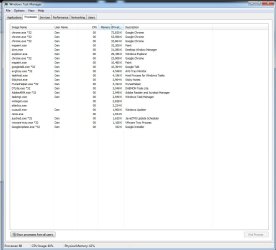
I have attached screen shots of cpu/process tab.

If someone can point me in the right direction to diagnosing this issue that would be great.

Note: the system does not blue screen or switch off it just becomes extremely noisy.

Thanks

Dan
 

Attachments
  • cpuusage.jpg
    cpuusage.jpg
    190.3 KB · Views: 3
  • processes.jpg
    processes.jpg
    79.5 KB · Views: 7

My Computer My Computer

Computer type
PC/Desktop
OS
Windows 7 64bit Ultimate
CPU
I5 760
Memory
8gb
Have you perhaps updated chrome? If you kill chrome does the system settle down?
If so instead of the standard google chrome you might try using a chromium snapshot.
Use the zip package, not the mini-installer. Unzip the exe into a separate folder. I used folders under C:\Utils for my stand-alone no-install-needed programs. Always make a copy of your profile folder and the currently used chromium folder so you can back off if you get a snapshot that doesn't play nicely with the system.

The snapshots are often as stable or more stable than chrome releases. Try a few and see if you get one that acts more reasonably. Also there's a command line switch to set the maximum number of simultaneous chrome.exe processes. I don't recall it at the moment. But searching "chromium command line switches" or similar terms should bring up a page of them.
 

My Computer My Computer

Computer Manufacturer/Model Number
HP Media Center
OS
Windows 7 32 bit
CPU
AMD 5200+ dual core
Memory
2 GB
Graphics Card(s)
NVidia GeForce 6150SE 128 MB
Monitor(s) Displays
CRT
Screen Resolution
1280x1024
Hard Drives
500 GB Sata internal :

SIIG USB 3.0 docking stations w/WD Caviar Black 6 Gb/s drives
Keyboard
PS/2
Mouse
PS/2 Wheel Mouse
Other Info
SIIG USB 3.0 PCIexpress card.
Thanks,

I will try this. Im not sure if its relevant but i didnt have any chrome windows/tabs open during point of the screenshot.

Might be totally useless info as maybe something is running in background, but thought id mention anyway.

Thanks
 

My Computer My Computer

Computer type
PC/Desktop
OS
Windows 7 64bit Ultimate
CPU
I5 760
Memory
8gb
Also it's probably a good idea to give more hardware details in
Edit System Specs


edit: another idea may be to use some hw monitor program like
HWMonitor or SpeedFan to see if your fans are what's making the noise.

also process of elimination.. open Task Manager and kill process(those you recognize.. don't kill off system services at random) one at a time and see if the noise decreases or disappears.
 

My Computer My Computer

Computer Manufacturer/Model Number
HP Media Center
OS
Windows 7 32 bit
CPU
AMD 5200+ dual core
Memory
2 GB
Graphics Card(s)
NVidia GeForce 6150SE 128 MB
Monitor(s) Displays
CRT
Screen Resolution
1280x1024
Hard Drives
500 GB Sata internal :

SIIG USB 3.0 docking stations w/WD Caviar Black 6 Gb/s drives
Keyboard
PS/2
Mouse
PS/2 Wheel Mouse
Other Info
SIIG USB 3.0 PCIexpress card.
Back
Top