High CPU usage

ubaldo2003

New member
Local time
9:50 PM
Messages
4
Good Evening,

I just bought an ACER Aspire X1430G and for some reason i get a high cpu usage once the computer finishes loading up. I was monitoring the cpu usage and it seems its fine at at 7% or lower but it can go as high as 80 to 90%.

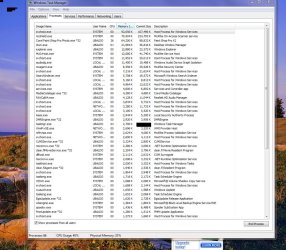
I opened task manager and it seems that mscshield.exe and svchost.exe are the ones on top of the list. (attached please find screen shot of processes)

Services using the svchost are
UxSms (Desktop Window Manager Session Manager)
TrkWks (Distributed Link Tracking Client)
Hidserv (Human Interface Device Access)
Netman (Network Connections)
WPDBusEnum (Portable Device Enumerator Service)
PcaSvc (Program Compatibility Assistant Service)
Sysmain (Superfetch)
AudioEndpointBuilder (Windows Audio Endpoint Builder)
wudfsvc (Windows Driver Foundation - User- mode Driver Framework)

Windows 7
RAM: 4gb
Processor: AMD E-450 APU WITH Radeon(tm) HD Graphics 1.65 GHz
 

Attachments
  • windows task manager.jpg
    windows task manager.jpg
    161.9 KB · Views: 132

My Computer

Computer Manufacturer/Model Number
ACER ASPIRE X1430G
OS
Windows 7 Home Premium 64bit
CPU
AMD E450 APU HD GRAPHICS 1.65 GHZ
Memory
4GB RAM
Hard Drives
1T
Dear ubaldo2003,
Hi! McAfee ! Has it come pre-loaded with the PC? It's hogging a fair bit of your resources and seems to increase the CPU usage.

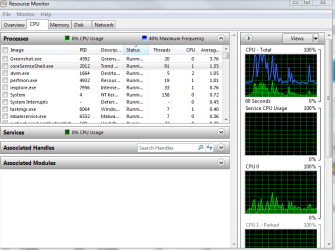
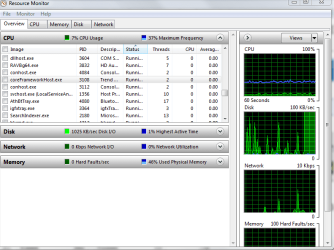
Since your's is a brand new piece, i can see no further than that as the culprit! View my Task Manager results to get an idea of what Trend Micro Max. Security Suite(which came bundled along) is using (for comparison). I do not rate McAfee high when compared to even free ones like, in order of importance(IMO)
1)Avast,and
2) Avira.
These are light weight apps. and the Avast Free AV does automatic updating and comes with an Anti-spyware bundled with it! The bundled AV goodies have a running life of (?) 2 months after which you'll have to like them(buy) or lump them and go in for a new AV.
regards and best wishes.
sreedhav:)
 

Attachments

  • Windows Task Manager_2012-02-23_10-14-02.png
    Windows Task Manager_2012-02-23_10-14-02.png
    20.1 KB · Views: 33
  • Resource Monitor_2012-02-23_10-35-18.png
    Resource Monitor_2012-02-23_10-35-18.png
    27.7 KB · Views: 35
  • Resource Monitor_2012-02-23_10-34-25.png
    Resource Monitor_2012-02-23_10-34-25.png
    27 KB · Views: 25

My Computer

Computer Manufacturer/Model Number
Sony Vaio C series VPCCB35FN laptop
OS
MS Windows 7 Home Premium 64-bit SP1
CPU
IntelCore [email protected]; Sandy Bridge 32nm Tech.
Motherboard
Sony Vaio Version:C609NJYJ
Memory
4096Mb RAM; Single ChannelDDR3@665MHz; DRAM Freq:662MHz
Graphics Card(s)
AMD Radeon HD 6630M; GPU:Whistler;BIOS Core&mem Clock:123.36
Sound Card
REALTEK High Definition Audio Device; INTEL Display Card
Monitor(s) Displays
Generic PnP Intel HD;Resolution:1920*1040 Pixels; BPP:32bits
Screen Resolution
Current Resolution:1920*1080 Pixels; Monitor Frequency:60Hz
Hard Drives
Internal HD:TOSHIBA MK5061GSY; Real Size:488 GB;NTFS; 3 Partitions; SATA; HEADS:16

External HDD: WD Elements 1023 PORTABLE; Estimated Size: 1TB; NTFS; 3 Partitions
Cooling
Lateral Exhaust with a Cooling Pad Placed Beneath.
Keyboard
Logitech Bluetooth+ Generic Integrated K-B
Mouse
Logitech Bluetooth
Internet Speed
2MBPS
Other Info
1)Trend Micro Titanium Maximum Security Suite Version:3
2)SAS-PRO

3)MBAM--PRO


4)WATERFOX+IE9 +WOT+LINKEXTEND+ DRWEBCUREIT LINK CHECKER

5)SPYWAREBLASTER

6) WINPATROL PLUS

7) SANDBOXIE and
8) A BIT OF COMMON SENSE.
Good Evening,


Thank you for your response!

Yes McAfee was preloaded and for the moment ive been using it since they gave me a free 2 month trial.

After I installed corel Paintshop Pro and CS5 i did notice a bit of difference on how my computer has been running.

Is McAfee the only program hogging my cpu or there is something else?

I will go ahead and get a new antivirus program do you know if Anti Malware bytes is any good?

*I attached a screen shot of my Resource Monitor.

Thank you!

resourcemonitor.jpg
 

My Computer

Computer Manufacturer/Model Number
ACER ASPIRE X1430G
OS
Windows 7 Home Premium 64bit
CPU
AMD E450 APU HD GRAPHICS 1.65 GHZ
Memory
4GB RAM
Hard Drives
1T
Dear ubaldo2003,
the snapshot you posted gave more info'. Yes, Corel paint shop pro is using 28% of the CPU resources.The only reason to hold back from removing it is, you paid for it!
If the decision to uninstall McAfee is made.read this about uninstalling: McAfee Removal Tool - Uninstall McAfee

MBAM( MalwareBytes AntiMalware) is excellent ! Go for the Pro version as the Real-time monitoring is great and has saved my skin many a times!Yet,make no mistake, it is not a substitute for an AV.:geek:

I have,over the years used major Anti Virus and Security Suites and will be buying either Kaspersky Pure OR Kaspersky internet security suite(the latest version.of course).

In my Country,one gets it for a much lower price and that too with the installation CD, and that's not the only reason. KIS is very efficient!

If the CPU performance does not improve after removing McAfee, then think about Corel and CS5.

Best wishes,
sreedhav
 

My Computer

Computer Manufacturer/Model Number
Sony Vaio C series VPCCB35FN laptop
OS
MS Windows 7 Home Premium 64-bit SP1
CPU
IntelCore [email protected]; Sandy Bridge 32nm Tech.
Motherboard
Sony Vaio Version:C609NJYJ
Memory
4096Mb RAM; Single ChannelDDR3@665MHz; DRAM Freq:662MHz
Graphics Card(s)
AMD Radeon HD 6630M; GPU:Whistler;BIOS Core&mem Clock:123.36
Sound Card
REALTEK High Definition Audio Device; INTEL Display Card
Monitor(s) Displays
Generic PnP Intel HD;Resolution:1920*1040 Pixels; BPP:32bits
Screen Resolution
Current Resolution:1920*1080 Pixels; Monitor Frequency:60Hz
Hard Drives
Internal HD:TOSHIBA MK5061GSY; Real Size:488 GB;NTFS; 3 Partitions; SATA; HEADS:16

External HDD: WD Elements 1023 PORTABLE; Estimated Size: 1TB; NTFS; 3 Partitions
Cooling
Lateral Exhaust with a Cooling Pad Placed Beneath.
Keyboard
Logitech Bluetooth+ Generic Integrated K-B
Mouse
Logitech Bluetooth
Internet Speed
2MBPS
Other Info
1)Trend Micro Titanium Maximum Security Suite Version:3
2)SAS-PRO

3)MBAM--PRO


4)WATERFOX+IE9 +WOT+LINKEXTEND+ DRWEBCUREIT LINK CHECKER

5)SPYWAREBLASTER

6) WINPATROL PLUS

7) SANDBOXIE and
8) A BIT OF COMMON SENSE.
Good Morning Sreedhav,

I removed McAfee and my computer has been running a little better.

I just have one question, does the cpu Usage memory has to be contantly going up to a certain percentage and than lowering back down? or it has to stay stedy?? per say 15%

ive been monitoring the cpu usage and its at 4% - 15% with out me doing anything on the computer and not having any programs open. at times it goes to 20% or even 50%.

I hope you understood my question.
 

My Computer

Computer Manufacturer/Model Number
ACER ASPIRE X1430G
OS
Windows 7 Home Premium 64bit
CPU
AMD E450 APU HD GRAPHICS 1.65 GHZ
Memory
4GB RAM
Hard Drives
1T
I understand because I'm having the same problem. This is something new in the last few days. From the completion of my start up process, my CPU usage runs at 40%. Once I start opening programs - it hoovers around 80% CPU Usage. At times hitting 100% and everything just stops. It's like driving a car with square wheels. I also use Corel and I don't believe that is the problem. I have used it for years and this has never happened. In addition, I haven't had it open since this problem occured. I do see multiple instances of iexplore.exe open and other stuff, but it doesn't make sense. Please let me know what progress you have made.
 

My Computer

Computer Manufacturer/Model Number
Dell Precision Laptop M6500
OS
Windows 7
Good Morning Sreedhav,

I removed McAfee and my computer has been running a little better.

I just have one question, does the cpu Usage memory has to be contantly going up to a certain percentage and than lowering back down? or it has to stay stedy?? per say 15%

ive been monitoring the cpu usage and its at 4% - 15% with out me doing anything on the computer and not having any programs open. at times it goes to 20% or even 50%.

How did you remove McAfee? It can be difficult to remove and you may have to use a specialized program to do that. Did you just go to Control Panel/programs and features and then select McAfee?

If your PC is new, the CPU activity may just be the indexing process that Windows uses by default. It can be turned off if you don't want to use indexing, but it should eventually quiet down--perhaps in a few days.
 

My Computer

Computer type
PC/Desktop
Computer Manufacturer/Model Number
Ignatz Special; 4 speed manual gearbox; factory air conditioning; one of one
OS
Windows 7 Home Premium SP1, 64-bit
CPU
Intel Skylake i5-6600K, not overclocked
Motherboard
AsRock Z170M Extreme 4, micro ATX
Memory
8 GB HyperX DDR4-2666 (2 x 4 GB)
Graphics Card(s)
none; graphics are integrated on CPU
Sound Card
onboard: Realtek ALC1150; external: USB Behringer UF0-202
Monitor(s) Displays
Dell S2340M 23 inch IPS
Screen Resolution
1600 x 900
Hard Drives
System: Crucial MX100 series SSD, 128 GB;
Data: Samsung Spinpoint 103SJ, 1 TB;
Backup: WD Caviar Green WD30EZRX-00D8PB0, 3 TB
PSU
Rosewill SilentNight 500 watt fanless, semi-modular
Case
Antec Solo II
Cooling
Noctua NH-U12S; Noctua F12 intake, Noctua S12A exhaust
Keyboard
Microsoft 200 6JH-00001 USB
Mouse
Dell or Microsoft optical wired; USB
Antivirus
Microsoft Security Essentials and Malwarebytes Premium
Browser
Pale Moon
Other Info
All fans PWM; speeds at idle: CPU circa 500 rpm; intake circa 600 rpm; exhaust circa 600 rpm; CPU temps 27 idle and 47 C load in a warm room (27 C/81 F) when running Intel Extreme Tuning Utility stress test.
Good Morning Sreedhav,

I removed McAfee and my computer has been running a little better.

I just have one question, does the cpu Usage memory has to be contantly going up to a certain percentage and than lowering back down? or it has to stay stedy?? per say 15%

ive been monitoring the cpu usage and its at 4% - 15% with out me doing anything on the computer and not having any programs open. at times it goes to 20% or even 50%.

I hope you understood my question.

Dear ubaldo2003,
Have yo uninstalled McAfee by correctly following the steps outlined in the link i provided? It can become mighty difficult for you to install a new AV if the uninstallation is not thorough!
The very fact that the CPU usage is now between-> 4and 15% indicates that it was McAfee that was hogging the resources. The spikes in CPU performance is perfectly normal. You can consider the problem as solved.

Regards,
sreedhav:cool:
 

My Computer

Computer Manufacturer/Model Number
Sony Vaio C series VPCCB35FN laptop
OS
MS Windows 7 Home Premium 64-bit SP1
CPU
IntelCore [email protected]; Sandy Bridge 32nm Tech.
Motherboard
Sony Vaio Version:C609NJYJ
Memory
4096Mb RAM; Single ChannelDDR3@665MHz; DRAM Freq:662MHz
Graphics Card(s)
AMD Radeon HD 6630M; GPU:Whistler;BIOS Core&mem Clock:123.36
Sound Card
REALTEK High Definition Audio Device; INTEL Display Card
Monitor(s) Displays
Generic PnP Intel HD;Resolution:1920*1040 Pixels; BPP:32bits
Screen Resolution
Current Resolution:1920*1080 Pixels; Monitor Frequency:60Hz
Hard Drives
Internal HD:TOSHIBA MK5061GSY; Real Size:488 GB;NTFS; 3 Partitions; SATA; HEADS:16

External HDD: WD Elements 1023 PORTABLE; Estimated Size: 1TB; NTFS; 3 Partitions
Cooling
Lateral Exhaust with a Cooling Pad Placed Beneath.
Keyboard
Logitech Bluetooth+ Generic Integrated K-B
Mouse
Logitech Bluetooth
Internet Speed
2MBPS
Other Info
1)Trend Micro Titanium Maximum Security Suite Version:3
2)SAS-PRO

3)MBAM--PRO


4)WATERFOX+IE9 +WOT+LINKEXTEND+ DRWEBCUREIT LINK CHECKER

5)SPYWAREBLASTER

6) WINPATROL PLUS

7) SANDBOXIE and
8) A BIT OF COMMON SENSE.
Good evening,

Thank you for your responses!

yes i unistalled McAfee from the remove program from the control panel I also downloaded the mcafee removal tool.

ok so the svchost using 105k of memory is normal right?
 

My Computer

Computer Manufacturer/Model Number
ACER ASPIRE X1430G
OS
Windows 7 Home Premium 64bit
CPU
AMD E450 APU HD GRAPHICS 1.65 GHZ
Memory
4GB RAM
Hard Drives
1T
Back
Top