High CPU usage

edassange

New member
Power User
Local time
2:41 PM
Messages
112
Recently I've been experiencing consistently much higher CPU usage, often around 30-40% and frequently spiking much higher, including 100%.

I've read here that Windows Update is often the culprit. KB3020369 was already installed but KB3172605 wasn't. It now is but CPU usage is still high. There's no single process that appears responsible - quite a few take their turn, but AnVir Task Manager shows that Windows Update service in one of the svchost processes is certainly one of those regularly spiking.

Any help really appreciated.
 

My Computer

Computer type
Laptop
Computer Manufacturer/Model Number
Acer Aspire 6930G
OS
W7 Home Premium x86 SP1 Build 7601
CPU
Intel Mobile Core 2 Duo P7450 @ 2.13GHz
Motherboard
Acer Makalu U2E1
Memory
4.00GB Dual-Channel DDR2 @ 332MH
Graphics Card(s)
1024MB NVIDIA GeForce 9600M GT
Monitor(s) Displays
Generic PnP
Screen Resolution
1024x768@60Hz
Hard Drives
298GB Western Digital WDC WD3200BEVT-22ZCT0 (SATA)
Antivirus
Kaspersky Security Cloud Free / VoodooShield
Browser
Brave / Firefox
Other Info
uBlockOrigin / Bidefender Trafficlight / HitmanPro

My Computer

Computer type
PC/Desktop
Computer Manufacturer/Model Number
Custom assembled by me :}
OS
Win-7-Pro64bit 7-H-Prem-64bit
CPU
i7-5930K 2nd i9-9940x both water blocked VRM's too
Motherboard
ASUS SABERTOOTH X99 2nd ASUS x299 Apex
Memory
Trident-z 3200C14 2nd Trident-z 3600C16
Graphics Card(s)
EVGA 1080ti ftw3 2nd Titan Xp both water blocked
Sound Card
Built-in Realtek
Monitor(s) Displays
1-AOC G2460PG 24"G-Sync 144Hz/ 2nd 1-ASUS VG248QE 24" 144Hz
Screen Resolution
1920 x 1080 144Hz
Hard Drives
2-Samsung M.2 Evo & Evo Plus
2-Samsung 850 EVO 500GB SSD's/ 3-2.5 W.D. Black 1tb-&3-1tb/3-3.5 WD Black 1tb hdd's
PSU
EVGA SuperNOVA 1000-P2 2nd 1200-P2
Case
2-Corsair Obsidian Series 450D Black ATX Mid Tower
Cooling
Custom water loops
Keyboard
Logitech G710+/ 2nd Logitech G910
Mouse
2-RedDragon M901 Perdition 16400 dpi Gaming mouse = wired
Internet Speed
Comcast Ping 19ms 89.31mbps download speed 6.12mbps upload
Antivirus
Malwarebytes Pro/ Superantispyware Pro
Browser
FireFox & Pale moon
Other Info
2nd ASUS X299 Apex/Intel i9-9940x with Custom water loop/7H-Prem-x64/Corsair 450D case/Ram Trident-z 3600C16 4x8gb / Samsung970Evo plus 500gb SSD/Dual ssd EZ swap evo/PSU EVGA SuperNova 1200w-P2 80+Platinum/GPU Titan Xp /8-ML-140 on push-pull on 2-280GTX rads
I can only see 3 options.
 

My Computer

Computer type
Laptop
Computer Manufacturer/Model Number
Acer Aspire 6930G
OS
W7 Home Premium x86 SP1 Build 7601
CPU
Intel Mobile Core 2 Duo P7450 @ 2.13GHz
Motherboard
Acer Makalu U2E1
Memory
4.00GB Dual-Channel DDR2 @ 332MH
Graphics Card(s)
1024MB NVIDIA GeForce 9600M GT
Monitor(s) Displays
Generic PnP
Screen Resolution
1024x768@60Hz
Hard Drives
298GB Western Digital WDC WD3200BEVT-22ZCT0 (SATA)
Antivirus
Kaspersky Security Cloud Free / VoodooShield
Browser
Brave / Firefox
Other Info
uBlockOrigin / Bidefender Trafficlight / HitmanPro
Hi,
Oops option 3 :)
 

My Computer

Computer type
PC/Desktop
Computer Manufacturer/Model Number
Custom assembled by me :}
OS
Win-7-Pro64bit 7-H-Prem-64bit
CPU
i7-5930K 2nd i9-9940x both water blocked VRM's too
Motherboard
ASUS SABERTOOTH X99 2nd ASUS x299 Apex
Memory
Trident-z 3200C14 2nd Trident-z 3600C16
Graphics Card(s)
EVGA 1080ti ftw3 2nd Titan Xp both water blocked
Sound Card
Built-in Realtek
Monitor(s) Displays
1-AOC G2460PG 24"G-Sync 144Hz/ 2nd 1-ASUS VG248QE 24" 144Hz
Screen Resolution
1920 x 1080 144Hz
Hard Drives
2-Samsung M.2 Evo & Evo Plus
2-Samsung 850 EVO 500GB SSD's/ 3-2.5 W.D. Black 1tb-&3-1tb/3-3.5 WD Black 1tb hdd's
PSU
EVGA SuperNOVA 1000-P2 2nd 1200-P2
Case
2-Corsair Obsidian Series 450D Black ATX Mid Tower
Cooling
Custom water loops
Keyboard
Logitech G710+/ 2nd Logitech G910
Mouse
2-RedDragon M901 Perdition 16400 dpi Gaming mouse = wired
Internet Speed
Comcast Ping 19ms 89.31mbps download speed 6.12mbps upload
Antivirus
Malwarebytes Pro/ Superantispyware Pro
Browser
FireFox & Pale moon
Other Info
2nd ASUS X299 Apex/Intel i9-9940x with Custom water loop/7H-Prem-x64/Corsair 450D case/Ram Trident-z 3600C16 4x8gb / Samsung970Evo plus 500gb SSD/Dual ssd EZ swap evo/PSU EVGA SuperNova 1200w-P2 80+Platinum/GPU Titan Xp /8-ML-140 on push-pull on 2-280GTX rads
Thanks a lot. I'll report back if there are any problems.
 

My Computer

Computer type
Laptop
Computer Manufacturer/Model Number
Acer Aspire 6930G
OS
W7 Home Premium x86 SP1 Build 7601
CPU
Intel Mobile Core 2 Duo P7450 @ 2.13GHz
Motherboard
Acer Makalu U2E1
Memory
4.00GB Dual-Channel DDR2 @ 332MH
Graphics Card(s)
1024MB NVIDIA GeForce 9600M GT
Monitor(s) Displays
Generic PnP
Screen Resolution
1024x768@60Hz
Hard Drives
298GB Western Digital WDC WD3200BEVT-22ZCT0 (SATA)
Antivirus
Kaspersky Security Cloud Free / VoodooShield
Browser
Brave / Firefox
Other Info
uBlockOrigin / Bidefender Trafficlight / HitmanPro
Right, done that but still problems. On startup after things had settled down and I hid various optional updates I didn't want, Windows Update process spikes around 15% CPU every 15 secs or so. After a while WU disappeared but was replaced by Windows Management Instrumentation process which behaves in an identical manner as WU, 15% CPU spikes every 15 secs. Again, any help really appreciated.

PS - I was reading in another thread, if I understood you correctly, you said installing KB3172605 would stop Trusted Installer process running because it replaces it with a more up to date process, but on startup Trusted Installer was still running here.
 

My Computer

Computer type
Laptop
Computer Manufacturer/Model Number
Acer Aspire 6930G
OS
W7 Home Premium x86 SP1 Build 7601
CPU
Intel Mobile Core 2 Duo P7450 @ 2.13GHz
Motherboard
Acer Makalu U2E1
Memory
4.00GB Dual-Channel DDR2 @ 332MH
Graphics Card(s)
1024MB NVIDIA GeForce 9600M GT
Monitor(s) Displays
Generic PnP
Screen Resolution
1024x768@60Hz
Hard Drives
298GB Western Digital WDC WD3200BEVT-22ZCT0 (SATA)
Antivirus
Kaspersky Security Cloud Free / VoodooShield
Browser
Brave / Firefox
Other Info
uBlockOrigin / Bidefender Trafficlight / HitmanPro
Hi,
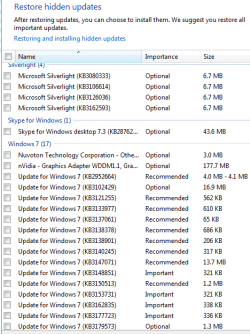
Post a screen shot of the updates you've hidden
FYI there's no real reason to hide an update
If you don't want to install it just leave it in the Optional section.

Click Start and type in the search box
resource monitor
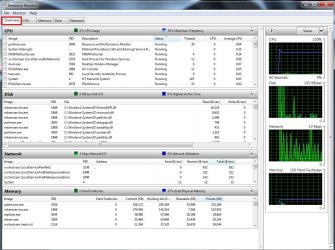
Go to the overview section to see what is going on
Post a screen shot like this one.
resource monitor overview.jpg
 

My Computer

Computer type
PC/Desktop
Computer Manufacturer/Model Number
Custom assembled by me :}
OS
Win-7-Pro64bit 7-H-Prem-64bit
CPU
i7-5930K 2nd i9-9940x both water blocked VRM's too
Motherboard
ASUS SABERTOOTH X99 2nd ASUS x299 Apex
Memory
Trident-z 3200C14 2nd Trident-z 3600C16
Graphics Card(s)
EVGA 1080ti ftw3 2nd Titan Xp both water blocked
Sound Card
Built-in Realtek
Monitor(s) Displays
1-AOC G2460PG 24"G-Sync 144Hz/ 2nd 1-ASUS VG248QE 24" 144Hz
Screen Resolution
1920 x 1080 144Hz
Hard Drives
2-Samsung M.2 Evo & Evo Plus
2-Samsung 850 EVO 500GB SSD's/ 3-2.5 W.D. Black 1tb-&3-1tb/3-3.5 WD Black 1tb hdd's
PSU
EVGA SuperNOVA 1000-P2 2nd 1200-P2
Case
2-Corsair Obsidian Series 450D Black ATX Mid Tower
Cooling
Custom water loops
Keyboard
Logitech G710+/ 2nd Logitech G910
Mouse
2-RedDragon M901 Perdition 16400 dpi Gaming mouse = wired
Internet Speed
Comcast Ping 19ms 89.31mbps download speed 6.12mbps upload
Antivirus
Malwarebytes Pro/ Superantispyware Pro
Browser
FireFox & Pale moon
Other Info
2nd ASUS X299 Apex/Intel i9-9940x with Custom water loop/7H-Prem-x64/Corsair 450D case/Ram Trident-z 3600C16 4x8gb / Samsung970Evo plus 500gb SSD/Dual ssd EZ swap evo/PSU EVGA SuperNova 1200w-P2 80+Platinum/GPU Titan Xp /8-ML-140 on push-pull on 2-280GTX rads
Hidden updates.PNG

PS - I uninstalled Silverlight a while ago

Resource monitor.PNG
 

My Computer

Computer type
Laptop
Computer Manufacturer/Model Number
Acer Aspire 6930G
OS
W7 Home Premium x86 SP1 Build 7601
CPU
Intel Mobile Core 2 Duo P7450 @ 2.13GHz
Motherboard
Acer Makalu U2E1
Memory
4.00GB Dual-Channel DDR2 @ 332MH
Graphics Card(s)
1024MB NVIDIA GeForce 9600M GT
Monitor(s) Displays
Generic PnP
Screen Resolution
1024x768@60Hz
Hard Drives
298GB Western Digital WDC WD3200BEVT-22ZCT0 (SATA)
Antivirus
Kaspersky Security Cloud Free / VoodooShield
Browser
Brave / Firefox
Other Info
uBlockOrigin / Bidefender Trafficlight / HitmanPro
Hi,
Take a screen shot when cpu usage is high not when it's low :)

Hiding Important updates is never a good thing to do and you have hid several = why ?
What problems did you have with them exactly ?
 

My Computer

Computer type
PC/Desktop
Computer Manufacturer/Model Number
Custom assembled by me :}
OS
Win-7-Pro64bit 7-H-Prem-64bit
CPU
i7-5930K 2nd i9-9940x both water blocked VRM's too
Motherboard
ASUS SABERTOOTH X99 2nd ASUS x299 Apex
Memory
Trident-z 3200C14 2nd Trident-z 3600C16
Graphics Card(s)
EVGA 1080ti ftw3 2nd Titan Xp both water blocked
Sound Card
Built-in Realtek
Monitor(s) Displays
1-AOC G2460PG 24"G-Sync 144Hz/ 2nd 1-ASUS VG248QE 24" 144Hz
Screen Resolution
1920 x 1080 144Hz
Hard Drives
2-Samsung M.2 Evo & Evo Plus
2-Samsung 850 EVO 500GB SSD's/ 3-2.5 W.D. Black 1tb-&3-1tb/3-3.5 WD Black 1tb hdd's
PSU
EVGA SuperNOVA 1000-P2 2nd 1200-P2
Case
2-Corsair Obsidian Series 450D Black ATX Mid Tower
Cooling
Custom water loops
Keyboard
Logitech G710+/ 2nd Logitech G910
Mouse
2-RedDragon M901 Perdition 16400 dpi Gaming mouse = wired
Internet Speed
Comcast Ping 19ms 89.31mbps download speed 6.12mbps upload
Antivirus
Malwarebytes Pro/ Superantispyware Pro
Browser
FireFox & Pale moon
Other Info
2nd ASUS X299 Apex/Intel i9-9940x with Custom water loop/7H-Prem-x64/Corsair 450D case/Ram Trident-z 3600C16 4x8gb / Samsung970Evo plus 500gb SSD/Dual ssd EZ swap evo/PSU EVGA SuperNova 1200w-P2 80+Platinum/GPU Titan Xp /8-ML-140 on push-pull on 2-280GTX rads
Is there anyone else who can provide some assistance?
 

My Computer

Computer type
Laptop
Computer Manufacturer/Model Number
Acer Aspire 6930G
OS
W7 Home Premium x86 SP1 Build 7601
CPU
Intel Mobile Core 2 Duo P7450 @ 2.13GHz
Motherboard
Acer Makalu U2E1
Memory
4.00GB Dual-Channel DDR2 @ 332MH
Graphics Card(s)
1024MB NVIDIA GeForce 9600M GT
Monitor(s) Displays
Generic PnP
Screen Resolution
1024x768@60Hz
Hard Drives
298GB Western Digital WDC WD3200BEVT-22ZCT0 (SATA)
Antivirus
Kaspersky Security Cloud Free / VoodooShield
Browser
Brave / Firefox
Other Info
uBlockOrigin / Bidefender Trafficlight / HitmanPro
Hi,
Not sure why but anyone is always welcome to pitch in but I doubt instructions will get any easier :)
Good luck
Cheers.
 

My Computer

Computer type
PC/Desktop
Computer Manufacturer/Model Number
Custom assembled by me :}
OS
Win-7-Pro64bit 7-H-Prem-64bit
CPU
i7-5930K 2nd i9-9940x both water blocked VRM's too
Motherboard
ASUS SABERTOOTH X99 2nd ASUS x299 Apex
Memory
Trident-z 3200C14 2nd Trident-z 3600C16
Graphics Card(s)
EVGA 1080ti ftw3 2nd Titan Xp both water blocked
Sound Card
Built-in Realtek
Monitor(s) Displays
1-AOC G2460PG 24"G-Sync 144Hz/ 2nd 1-ASUS VG248QE 24" 144Hz
Screen Resolution
1920 x 1080 144Hz
Hard Drives
2-Samsung M.2 Evo & Evo Plus
2-Samsung 850 EVO 500GB SSD's/ 3-2.5 W.D. Black 1tb-&3-1tb/3-3.5 WD Black 1tb hdd's
PSU
EVGA SuperNOVA 1000-P2 2nd 1200-P2
Case
2-Corsair Obsidian Series 450D Black ATX Mid Tower
Cooling
Custom water loops
Keyboard
Logitech G710+/ 2nd Logitech G910
Mouse
2-RedDragon M901 Perdition 16400 dpi Gaming mouse = wired
Internet Speed
Comcast Ping 19ms 89.31mbps download speed 6.12mbps upload
Antivirus
Malwarebytes Pro/ Superantispyware Pro
Browser
FireFox & Pale moon
Other Info
2nd ASUS X299 Apex/Intel i9-9940x with Custom water loop/7H-Prem-x64/Corsair 450D case/Ram Trident-z 3600C16 4x8gb / Samsung970Evo plus 500gb SSD/Dual ssd EZ swap evo/PSU EVGA SuperNova 1200w-P2 80+Platinum/GPU Titan Xp /8-ML-140 on push-pull on 2-280GTX rads
Hi

You could be facing the Windows Update bug, where it scans for updates endlessly, and uses a lot of CPU. The only (temporary) fix for this is to manually download updates from here Search for Windows Updates takes forever? - A possible solution from bottom up, and install them. If any of these updates say they are not applicable, skip them. If any of them require a restart, do so. Keep doing that until it is finished, and then do one final restart, and your CPU usage will come down, and you should be able to check for updates as well

-CKing
 

My Computer

Computer type
Laptop
Computer Manufacturer/Model Number
HP Pavilion TS 14 Notebook PC
OS
Windows 10 x64
CPU
AMD A4-5000 APU
Motherboard
N/A
Memory
6GB DDR3 RAM
Graphics Card(s)
Integrated Radeon HD 8330 (in the APU)
Hard Drives
600GB Hard Disk
Antivirus
Windows Defender
Browser
Google Chrome
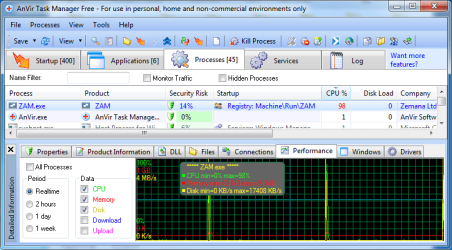
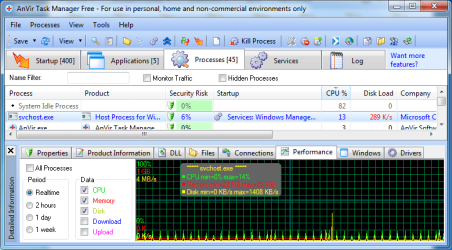
Well since you seem to be using Anvir Task Manager post a screenshot with cpu usage by svchost.exe windows update service like this:

AnVir Task Manager Free.jpg

Note to other members. Anvir Task Manager installed version may be bundled with Adware/ PUPS.

EDIT: Also post a screenshot showing RAM / CPU usage when the problem is occurring lile ThrashZone suggested.

One easy way to check if it's a Windows Update issue is to stop Windows Update service and then set startup type to disabled. Reboot then see if the problem still happens.
 

My Computer

Computer type
Laptop
Computer Manufacturer/Model Number
ASUS
OS
Microsoft Windows 7 Home Premium 64-bit 7601 Multiprocessor Free Service Pack 1
CPU
AMD C-60 APU with Radeon(tm) HD Graphics
Motherboard
ASUSTeK COMPUTER INC. X501U
Memory
4.00 GB
Graphics Card(s)
AMD Radeon HD 6290 Graphics
Sound Card
(1) AMD High Definition Audio Device (2) Realtek High Defi
Screen Resolution
1366 x 768 x 32 bits (4294967296 colors) @ 60 Hz
Hard Drives
Hitachi HTS545050A7E380 SATA Disk Device
Antivirus
Comodo CIS & FW, SecureAplus App Whitelisting, Threatfire
Browser
Cyberfox 64bit, Opera 64bit, Airfox
Other Info
Spy-The-Spy, HitmanPro.Alert, Norton Connect Safe, MJRegWatcher, BitDefender TrafficLight, Voodoo Shield, Zemana AntiMalware
Hi,
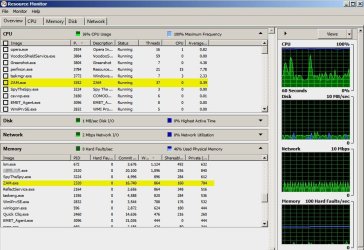
When you said cpu is high usage isn;t exactly true on your screen shot
Memory was at 50% cpu was at 2%

So look into this as to what was causing the 50% memory loss which was ESet & Chrome mainly being a resource hog :)
https://forum.eset.com/topic/1526-ekrnexe-keeps-using-98-to-100-cpu/

Oops forgot Zam.exe your antimalware utility too.
 
Last edited:

My Computer

Computer type
PC/Desktop
Computer Manufacturer/Model Number
Custom assembled by me :}
OS
Win-7-Pro64bit 7-H-Prem-64bit
CPU
i7-5930K 2nd i9-9940x both water blocked VRM's too
Motherboard
ASUS SABERTOOTH X99 2nd ASUS x299 Apex
Memory
Trident-z 3200C14 2nd Trident-z 3600C16
Graphics Card(s)
EVGA 1080ti ftw3 2nd Titan Xp both water blocked
Sound Card
Built-in Realtek
Monitor(s) Displays
1-AOC G2460PG 24"G-Sync 144Hz/ 2nd 1-ASUS VG248QE 24" 144Hz
Screen Resolution
1920 x 1080 144Hz
Hard Drives
2-Samsung M.2 Evo & Evo Plus
2-Samsung 850 EVO 500GB SSD's/ 3-2.5 W.D. Black 1tb-&3-1tb/3-3.5 WD Black 1tb hdd's
PSU
EVGA SuperNOVA 1000-P2 2nd 1200-P2
Case
2-Corsair Obsidian Series 450D Black ATX Mid Tower
Cooling
Custom water loops
Keyboard
Logitech G710+/ 2nd Logitech G910
Mouse
2-RedDragon M901 Perdition 16400 dpi Gaming mouse = wired
Internet Speed
Comcast Ping 19ms 89.31mbps download speed 6.12mbps upload
Antivirus
Malwarebytes Pro/ Superantispyware Pro
Browser
FireFox & Pale moon
Other Info
2nd ASUS X299 Apex/Intel i9-9940x with Custom water loop/7H-Prem-x64/Corsair 450D case/Ram Trident-z 3600C16 4x8gb / Samsung970Evo plus 500gb SSD/Dual ssd EZ swap evo/PSU EVGA SuperNova 1200w-P2 80+Platinum/GPU Titan Xp /8-ML-140 on push-pull on 2-280GTX rads
Agree with ThrashZone on ZAM.exe - mine shows a lot lower.

ResMon.jpg

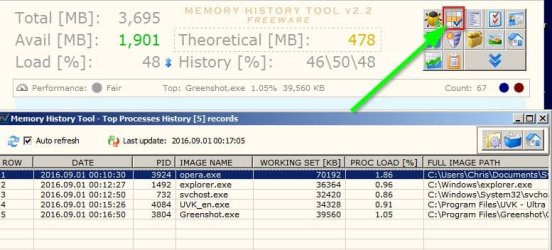
I'm not sure if this will help but it might be worth a try. Grab a copy of free portable MemHistory Tool.

Extract the files and right click the executable MemHistoryFree.exe then choose run as administrator.

There's a mouse hover activated menu in the top right corner. Change settings so that it does not start with windows.

Then leave it running for as long as you care. An hour might be a reasonable time.

Then take a look at the top processes history list.

Memory History Tool - Top Processes History.jpg

In the program's folder there's a subfolder named csv that contains a log in .csv format. Open it with your spreasheet viewer and see if it provides any clues. It gives more information than task manager or resource monitor as it shows memory use and load on the system over a period of time. You could even try letting it run all day.

Memory History Tool - CSV.jpg

Also which power plan is being used and have you made any changes to core parking or freq scaling?

EDIT: RE: Trusted Installer. Well you would see it running after a WU reset and reboot,It will run until it rescanned for installed and available windows updates and should stop when finished.
 
Last edited:

My Computer

Computer type
Laptop
Computer Manufacturer/Model Number
ASUS
OS
Microsoft Windows 7 Home Premium 64-bit 7601 Multiprocessor Free Service Pack 1
CPU
AMD C-60 APU with Radeon(tm) HD Graphics
Motherboard
ASUSTeK COMPUTER INC. X501U
Memory
4.00 GB
Graphics Card(s)
AMD Radeon HD 6290 Graphics
Sound Card
(1) AMD High Definition Audio Device (2) Realtek High Defi
Screen Resolution
1366 x 768 x 32 bits (4294967296 colors) @ 60 Hz
Hard Drives
Hitachi HTS545050A7E380 SATA Disk Device
Antivirus
Comodo CIS & FW, SecureAplus App Whitelisting, Threatfire
Browser
Cyberfox 64bit, Opera 64bit, Airfox
Other Info
Spy-The-Spy, HitmanPro.Alert, Norton Connect Safe, MJRegWatcher, BitDefender TrafficLight, Voodoo Shield, Zemana AntiMalware
Thanks a lot for all the replies. I'm really confused because Windows Task Manager says Chrome is causing high CPU but Anvir says it's Windows Update and Windows Management Instrumentation, also with ZAM spiking at 100% every few minutes and Eset spiking at 100% whenever it updates.

I already disabled WU but the problem still occurs. It's weird but Windows Management Instrumentation, inactive with WU enabled, then becomes active when it's disabled with pretty much identical characteristics, 15% CPU spikes every 15 seconds or so. CPU isn't high all the time, occasionally it will be around 1-2% but normally a fair bit higher.

I'm a bit busy today now but I'll provide those screenshots and other info as soon as I can.
 

My Computer

Computer type
Laptop
Computer Manufacturer/Model Number
Acer Aspire 6930G
OS
W7 Home Premium x86 SP1 Build 7601
CPU
Intel Mobile Core 2 Duo P7450 @ 2.13GHz
Motherboard
Acer Makalu U2E1
Memory
4.00GB Dual-Channel DDR2 @ 332MH
Graphics Card(s)
1024MB NVIDIA GeForce 9600M GT
Monitor(s) Displays
Generic PnP
Screen Resolution
1024x768@60Hz
Hard Drives
298GB Western Digital WDC WD3200BEVT-22ZCT0 (SATA)
Antivirus
Kaspersky Security Cloud Free / VoodooShield
Browser
Brave / Firefox
Other Info
uBlockOrigin / Bidefender Trafficlight / HitmanPro
Hi,
Yea Chrome all by it's self on a 32 bit machine will wear it down to a slow crawl pretty much the cost for speed :)

Having multiple Chrome tabs open is just insult to injury it already has several processes running with one tab.
 

My Computer

Computer type
PC/Desktop
Computer Manufacturer/Model Number
Custom assembled by me :}
OS
Win-7-Pro64bit 7-H-Prem-64bit
CPU
i7-5930K 2nd i9-9940x both water blocked VRM's too
Motherboard
ASUS SABERTOOTH X99 2nd ASUS x299 Apex
Memory
Trident-z 3200C14 2nd Trident-z 3600C16
Graphics Card(s)
EVGA 1080ti ftw3 2nd Titan Xp both water blocked
Sound Card
Built-in Realtek
Monitor(s) Displays
1-AOC G2460PG 24"G-Sync 144Hz/ 2nd 1-ASUS VG248QE 24" 144Hz
Screen Resolution
1920 x 1080 144Hz
Hard Drives
2-Samsung M.2 Evo & Evo Plus
2-Samsung 850 EVO 500GB SSD's/ 3-2.5 W.D. Black 1tb-&3-1tb/3-3.5 WD Black 1tb hdd's
PSU
EVGA SuperNOVA 1000-P2 2nd 1200-P2
Case
2-Corsair Obsidian Series 450D Black ATX Mid Tower
Cooling
Custom water loops
Keyboard
Logitech G710+/ 2nd Logitech G910
Mouse
2-RedDragon M901 Perdition 16400 dpi Gaming mouse = wired
Internet Speed
Comcast Ping 19ms 89.31mbps download speed 6.12mbps upload
Antivirus
Malwarebytes Pro/ Superantispyware Pro
Browser
FireFox & Pale moon
Other Info
2nd ASUS X299 Apex/Intel i9-9940x with Custom water loop/7H-Prem-x64/Corsair 450D case/Ram Trident-z 3600C16 4x8gb / Samsung970Evo plus 500gb SSD/Dual ssd EZ swap evo/PSU EVGA SuperNova 1200w-P2 80+Platinum/GPU Titan Xp /8-ML-140 on push-pull on 2-280GTX rads
ZAM spiking at 100% every few minutes and Eset spiking at 100% whenever it updates.

RE: Disabled WU. Rules out WU as the cause so re-enable it.

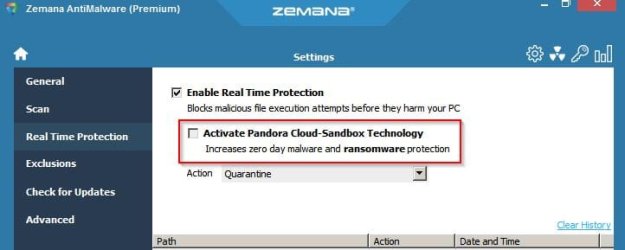
RE: ZAM. What are you settings? Try switching off Pandora.

Zemana AntiMalware (Premium).jpg

Also ZAM updates signatures very often. Typically every 5 minutes.

Note: On my machine ZAM program update hasn't always gone smoothly and a fresh install of ZAM was needed. It's happened a few times. You'd need your licence key handy and also need to exit the program then stop and delete the ZAM service before uninstalling using a decent uninstaller (not Control Panel / Add Remove Programs)

RE: ESET. Well I'd expect a spike when updating just the same as any program that launched and made a grab for some RAM.
 

My Computer

Computer type
Laptop
Computer Manufacturer/Model Number
ASUS
OS
Microsoft Windows 7 Home Premium 64-bit 7601 Multiprocessor Free Service Pack 1
CPU
AMD C-60 APU with Radeon(tm) HD Graphics
Motherboard
ASUSTeK COMPUTER INC. X501U
Memory
4.00 GB
Graphics Card(s)
AMD Radeon HD 6290 Graphics
Sound Card
(1) AMD High Definition Audio Device (2) Realtek High Defi
Screen Resolution
1366 x 768 x 32 bits (4294967296 colors) @ 60 Hz
Hard Drives
Hitachi HTS545050A7E380 SATA Disk Device
Antivirus
Comodo CIS & FW, SecureAplus App Whitelisting, Threatfire
Browser
Cyberfox 64bit, Opera 64bit, Airfox
Other Info
Spy-The-Spy, HitmanPro.Alert, Norton Connect Safe, MJRegWatcher, BitDefender TrafficLight, Voodoo Shield, Zemana AntiMalware
Hi all

Regarding Zemana, I'm not using the old AntiMalware Premium. I'm using the new all-in-one AntiLogger 2.21 Premium (processes still say ZAM.exe) which combines the old AntiMalware and AntiLogger Premium programs, so I guess it'll probably be more resource heavy then the old ZAM Premium. Disabling Pandora made no difference - ZAL 2.21 still spikes at nearly 100% CPU every 5 minutes or so (see screenshot below):

ZAL 2.21.PNG

Eset isn't as bad as I thought, spiking at around 50% but not that frequently.

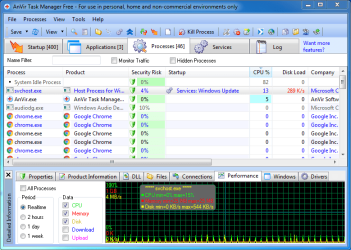
I think the main issue is svchost PID 2756. When Windows Update is enabled, it appears as below, spiking at around 15% CPU every 15 seconds or so:

Windows Update.PNG

When WU is disabled though, Windows Management Instrumentation appears in the Startup description of svchost 2756 as shown below, with identical spiking:

WMI.PNG

However, when both of these processes are disabled, the spiking still occurs. In fact, I've disabled all of the other processes apart from Task Scheduler (wasn't able to) associated with svchost 2756, but the 15% spiking every 15 seconds still occurs (Process Explorer shows the same).

So it would seem the process description Anvir gives in the Startup column doesn't necessarily relate to the process that's causing the spiking. I'm wondering if it's some automated task in Task Scheduler that's responsible. I've had a look and there's nothing that runs every 15 seconds.

Any thoughts would be very welcome.

PS - only a few sites seem to be resource hogs - for some reason MalwareTips is one of the worst. I was also reluctant to use Mem History. VoodooShield flagged it as a threat mainly because it wasn't signed. Probably fine but played it safe.

Also, I'm using High Performance power plan, and no core parking or freq scaling changes (that I'm aware of).

I also had one instance of a problematic Zemana update but a clean install, uninstalling with Geek Uninstaller, sorted it. Otherwise just updating via ZAL's UI has been sufficient.
 
Last edited:

My Computer

Computer type
Laptop
Computer Manufacturer/Model Number
Acer Aspire 6930G
OS
W7 Home Premium x86 SP1 Build 7601
CPU
Intel Mobile Core 2 Duo P7450 @ 2.13GHz
Motherboard
Acer Makalu U2E1
Memory
4.00GB Dual-Channel DDR2 @ 332MH
Graphics Card(s)
1024MB NVIDIA GeForce 9600M GT
Monitor(s) Displays
Generic PnP
Screen Resolution
1024x768@60Hz
Hard Drives
298GB Western Digital WDC WD3200BEVT-22ZCT0 (SATA)
Antivirus
Kaspersky Security Cloud Free / VoodooShield
Browser
Brave / Firefox
Other Info
uBlockOrigin / Bidefender Trafficlight / HitmanPro
I'd assume that Zemana Antilogger (now includes ZAM) will still update definitions every 5 minutes just like ZAM does. That appears to be normal.

As for svchost see if these help:

Svchost Process Analyzer

svcHostViewer

RE: VoodooShield and MemHistory. I use VS Pro ans obviously it's going to flag little known unsigned files as unsafe. That just really means do your own research before running the file.

https://www.virustotal.com/en/file/...bb0168e20b6b7127bd6d5c52fa001f91769/analysis/

SigcheckGUI.jpg

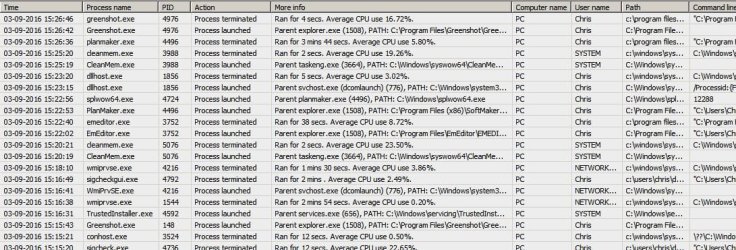
Anyway it probably won't help if you don't have a high ram usage problem by one or more particular processes. I'd say spikes are normal but you probably need software that logs all process launches/ terminations and see if you can match times to spikes. Like this:

Processes.jpg

However I can't really recommend the software shown in the screenshot as configuration is a tricky issue to explain. Maybe someone else knows of something that is simple to use?

Anyway since it seems like a service might be reponsible perhaps look at disabling services that you don't need to be running. (svchost is windows grouping services under the same svchost.exe process)
 

My Computer

Computer type
Laptop
Computer Manufacturer/Model Number
ASUS
OS
Microsoft Windows 7 Home Premium 64-bit 7601 Multiprocessor Free Service Pack 1
CPU
AMD C-60 APU with Radeon(tm) HD Graphics
Motherboard
ASUSTeK COMPUTER INC. X501U
Memory
4.00 GB
Graphics Card(s)
AMD Radeon HD 6290 Graphics
Sound Card
(1) AMD High Definition Audio Device (2) Realtek High Defi
Screen Resolution
1366 x 768 x 32 bits (4294967296 colors) @ 60 Hz
Hard Drives
Hitachi HTS545050A7E380 SATA Disk Device
Antivirus
Comodo CIS & FW, SecureAplus App Whitelisting, Threatfire
Browser
Cyberfox 64bit, Opera 64bit, Airfox
Other Info
Spy-The-Spy, HitmanPro.Alert, Norton Connect Safe, MJRegWatcher, BitDefender TrafficLight, Voodoo Shield, Zemana AntiMalware
Back
Top