Solved High cpu use while computer is idle

Atom

New member
Member
Local time
12:36 AM
Messages
81
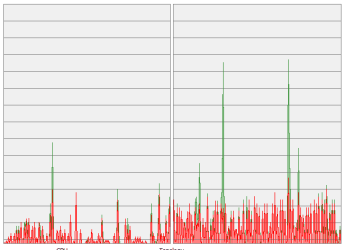
I have an older computer (intel E6700;8gb ram, Win7-64). It's usually not doing anything, but it's on and connected to the network. I received a windows message that I was running low on memory and then I noticed that cpu use was 100%. I did a restart and got a prompt that the page file size had been changed. Now, if I run the machine with nothing being done, the cpu use does not go to a low value and line out; it's constantly oscillating between 0 and 10%.

I am seeking help in identifying which processes or services are causing this behavior and/or which hardware, if any may be at fault. I did a full virus scan and there was nothing.

Thanks for any assistance.
 

My Computer

OS
win7 64 Home Premium

I tried that to no effect. Today I noticed that the machine would no longer turn off it's display or put itself to sleep. Now I've done a complete reinstall of Windows 7 and the cpu activity is still there with nothing else installed. I've also tried disconnecting all the peripherals and the network cable and this had no effect. One other thing I tried was a different hard drive running Windows 8; in this case the cpu runs much quieter and not regularly cycling between 0 and 10%. Possibly it's the SSD with the Win 7 on it; it's an OCZ Agility 3?
 

My Computer

OS
win7 64 Home Premium
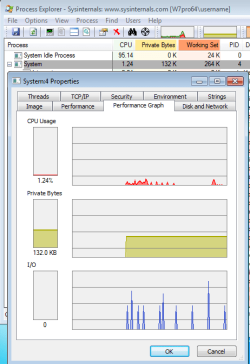
Try Process Explorer and see if you can determine what EXE/DLL is causing the activity.
 

My Computer

Computer type
Laptop
Computer Manufacturer/Model Number
Employer provided Dell Latitude
OS
W7 Pro SP1 64bit
CPU
i7
Memory
8GB
Graphics Card(s)
Intel HD Graphics
Hard Drives
crappy SSD
Antivirus
Employer mandated Symantec Endpoint Protection
Browser
Pale Moon 64bit, IE11 64bit & Chrome 64bit

My Computer

Computer type
PC/Desktop
Computer Manufacturer/Model Number
Alienware Aurora ALX R4
OS
Windows 10 Pro (x64)
CPU
Intel Core i7-3930K (3.2GHz - 4.5GHz)
Motherboard
Alienware Aurora-R4 x79
Memory
4x Samsung 4GB PC3-12800 DDR3 (16GB 1600MHz)
Graphics Card(s)
Nvidia Geforce GTX 690
Sound Card
SteelSeries Siberia Elite
Monitor(s) Displays
Dell UltraSharp U3011
Screen Resolution
2560x1600
Hard Drives
Samsung 850 Pro 256 GB, Seagate 1TB Desktop Hybrid HDD, 2x Western Digital 4TB Green HDD
PSU
875W Some Dell PSU <.<
Case
Alienware Aurora ALX
Cooling
Custom Liquid Cooling (EK CPU & GPU blocks) dual EK 480RAD
Keyboard
Logitech G710+ Mechanical
Mouse
Logitech G700s
Internet Speed
Verizon Fios (50 mbps average)
Other Info
Server: Intel NUC D54250WYK: i5-4250U, 16GB, 256 GB mSATA, Windows Server 2012 R2

My Computer

OS
win7 64 Home Premium
Is it due to IO activity?

pe-system.png
 

My Computer

Computer type
Laptop
Computer Manufacturer/Model Number
Employer provided Dell Latitude
OS
W7 Pro SP1 64bit
CPU
i7
Memory
8GB
Graphics Card(s)
Intel HD Graphics
Hard Drives
crappy SSD
Antivirus
Employer mandated Symantec Endpoint Protection
Browser
Pale Moon 64bit, IE11 64bit & Chrome 64bit
Bummer, having a corresponding IO spike would have made things easier to track down.

AVG antivirus used to load their signature files into the System process. This caused a lot of IO traffic to/from that process. Which is why I asked about the IO activity.

Does this CPU activity show up while in the safe mode? (just the safe mode, not safe mode with networking or any of the other safe mode variants)
 

My Computer

Computer type
Laptop
Computer Manufacturer/Model Number
Employer provided Dell Latitude
OS
W7 Pro SP1 64bit
CPU
i7
Memory
8GB
Graphics Card(s)
Intel HD Graphics
Hard Drives
crappy SSD
Antivirus
Employer mandated Symantec Endpoint Protection
Browser
Pale Moon 64bit, IE11 64bit & Chrome 64bit
Bummer, having a corresponding IO spike would have made things easier to track down.

AVG antivirus used to load their signature files into the System process. This caused a lot of IO traffic to/from that process. Which is why I asked about the IO activity.

Does this CPU activity show up while in the safe mode? (just the safe mode, not safe mode with networking or any of the other safe mode variants)

In safe mode, the cpu activity will stay at zero.
 

My Computer

OS
win7 64 Home Premium
I had a similar issue, mine was an audio driver that somehow didnt install correctly. Once i found out i uninstalled. Ran CCleaner and Driver Fusion to remove all traces of it. And reinstall BAM problem solved.

So what drivers have you updated after fresh installation?
 

My Computer

Computer type
PC/Desktop
OS
windows 7 home premium 64bit
CPU
Amd phenom ii 560 3.30ghz
Motherboard
Asus m4a785td-v evo
Memory
Corsair TwinX 8GB (4x2)
Graphics Card(s)
AMD radeon HD 5670 1GB
Sound Card
None
Monitor(s) Displays
Hp
Hard Drives
WD Black Caviar 1TB 7200rpm
PSU
Corsair 500W
Case
CM Enforcer
Cooling
Stock HS, 200mm Front fan + 120mm Exhaust
Keyboard
Cyborg v7
Mouse
Laser Microsoft 6000
Internet Speed
5mb/s
Antivirus
Norton
Browser
Chrome
I had a similar issue, mine was an audio driver that somehow didnt install correctly. Once i found out i uninstalled. Ran CCleaner and Driver Fusion to remove all traces of it. And reinstall BAM problem solved.

So what drivers have you updated after fresh installation?

All of them. I've also tried disabling/uninstalling the audio device, but I'll take another look at that. I may also take a look at just installing the drivers that came with the mobo to see if the problem is present there.

edit: Turns out it's the printer port(LPT1). I just started disabling devices and it turned out to be that one. Since I don't need that I'll just leave it disabled.

That was easy...
 

My Computer

OS
win7 64 Home Premium
Drivers do my head in. I cant install one now without using safe mode first and cleaning any old traces lol.

Install it properly and it should be fine.

Assuming that it is the driver anyway.
 

My Computer

Computer type
PC/Desktop
OS
windows 7 home premium 64bit
CPU
Amd phenom ii 560 3.30ghz
Motherboard
Asus m4a785td-v evo
Memory
Corsair TwinX 8GB (4x2)
Graphics Card(s)
AMD radeon HD 5670 1GB
Sound Card
None
Monitor(s) Displays
Hp
Hard Drives
WD Black Caviar 1TB 7200rpm
PSU
Corsair 500W
Case
CM Enforcer
Cooling
Stock HS, 200mm Front fan + 120mm Exhaust
Keyboard
Cyborg v7
Mouse
Laser Microsoft 6000
Internet Speed
5mb/s
Antivirus
Norton
Browser
Chrome
Drivers do my head in. I cant install one now without using safe mode first and cleaning any old traces lol.

Install it properly and it should be fine.

Assuming that it is the driver anyway.

Drivers have sure used up a lot of my time too. I'm just putting the parallel port and the two com ports on the disabled list until further notice. I can't imagine why I'd ever need them.

Thanks to everyone for your help.
 

My Computer

OS
win7 64 Home Premium
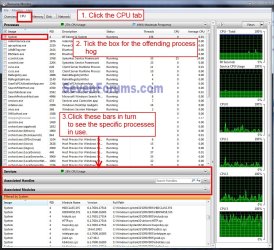
Atom, try this: In the :orb:Start box type resmon / Enter. The Resource Monitor will open, follow the numbers in the snip to find specific CPU processes in use. Note it may have two scroll bars to see the bottom bars, this is a composite image.
resmon.jpg
 

My Computer

Computer type
PC/Desktop
Computer Manufacturer/Model Number
Home Built Desktop By DataTech
OS
Windows 7 Ultimate X64 SP1
CPU
Intel i5-2550K, Differing ~4.4-4.8GHz No built in GPU
Motherboard
ASUS P8Z68-V PRO/GEN3
Memory
16GB G.Skill Sniper 1866MHz @ 2133MHz 2x8GB
Graphics Card(s)
ASUS GTX650TIB-DC2OC-2GD5, (650TI Boost)
Sound Card
Onboard Realtek 5-1
Monitor(s) Displays
Samsung P2570HD
Screen Resolution
1920x1080
Hard Drives
Samsung 840 Pro 256GB SSD for OS, 500GB Seagate Constellation (Enterprise drive) for Data
PSU
Corsair HX650W
Case
Inwin Dragon Rider
Cooling
Hyper 212 EVO w/two Noctua fans, push-pull, @1300 RPM
Keyboard
E-Z Eyes, bright yellow keys with large characters
Mouse
steelseries SENSEI Laser Pro Gaming
Internet Speed
48-51Mbs Mbs down, 11 Mbs up Xfinity Cable
Antivirus
Norton Internet Security 2013
Browser
IE 10, Opera, Pale Moon if needed
Other Info
4 case fans, LG BluRay-RE, ASUS DVD-RW, Mr. Fusion power supply, 1.21 gigawatts.
Atom, try this: In the :orb:Start box type resmon / Enter. The Resource Monitor will open, follow the numbers in the snip to find specific CPU processes in use. Note it may have two scroll bars to see the bottom bars, this is a composite image.

View attachment 267219

I use Process Explorer for this, but was unable to determine anything from it. Did you see my previous post. I'm marking this solved.
 

My Computer

OS
win7 64 Home Premium
Yeah I saw it, that's why I made my suggestion, you get more than a graph. :huh:
 

My Computer

Computer type
PC/Desktop
Computer Manufacturer/Model Number
Home Built Desktop By DataTech
OS
Windows 7 Ultimate X64 SP1
CPU
Intel i5-2550K, Differing ~4.4-4.8GHz No built in GPU
Motherboard
ASUS P8Z68-V PRO/GEN3
Memory
16GB G.Skill Sniper 1866MHz @ 2133MHz 2x8GB
Graphics Card(s)
ASUS GTX650TIB-DC2OC-2GD5, (650TI Boost)
Sound Card
Onboard Realtek 5-1
Monitor(s) Displays
Samsung P2570HD
Screen Resolution
1920x1080
Hard Drives
Samsung 840 Pro 256GB SSD for OS, 500GB Seagate Constellation (Enterprise drive) for Data
PSU
Corsair HX650W
Case
Inwin Dragon Rider
Cooling
Hyper 212 EVO w/two Noctua fans, push-pull, @1300 RPM
Keyboard
E-Z Eyes, bright yellow keys with large characters
Mouse
steelseries SENSEI Laser Pro Gaming
Internet Speed
48-51Mbs Mbs down, 11 Mbs up Xfinity Cable
Antivirus
Norton Internet Security 2013
Browser
IE 10, Opera, Pale Moon if needed
Other Info
4 case fans, LG BluRay-RE, ASUS DVD-RW, Mr. Fusion power supply, 1.21 gigawatts.
Back
Top