
Solved High memory Usage @ Idle

LarryA

New member
Local time
3:01 PM
Messages
20
Amount of information provided you can have a understanding of the system. Cannot figure out why using 2.08 Gb of memory at idle? Checking under Task Manager Performance. OS installed thru Elevated Command prompt at Language Option F-10. Hard Drives Clean All. H.D checked and verified.

Example: Tap/Start/Documents/Right Tap Favorites/Tap Location/Moved To Drive I: Moved the following folders: Down Loads, Favorites, My Documents, My Music, My Videos, My Pictures,

A.V. Norton Internet Security 2015 Running a Trial version looking for a good A.V. Turned off every possible option under advanced settings.

All software installed Auto Up-Dates disabled.

All of the hardware recently tested including memory with MemTest86_V5.00 10 Pass on each memory module then 10 Pass all modules installed.

System Specifications:

O.S. windows 7 Ultimate 64 Bit. Full administrator use. Tweaked the OS following NickN Guide for Flight Simulator X. All of the bells and whistles for the O.S. are disabled.

THE FSX COMPUTER SYSTEM: THE BIBLE - BY: NickN - SimForums.com Discussion

Computer Case CaseLabs Magnum 8 Double Wide

Case Fans x 11 Noctua NFS-12A 4 Pin connected to 7 Fan Headers on the M/Board controlled thru BIOS. Could take off the M/Board and connect to a Power Distribution Blocks. The 2 x fans on the NH-D14 connect to CPU fan header and AUX CPU Fan Header. Could this be using more memory resources? Fan Controller software none. Fan RPM is controlled thru the BIOS Only Advanced User Mode.

Computer Specifications:

PSU: Corsair AX 1500I
M/Board LGA 2011 Asus Rampage 4 Black Edition Have not up dated the BIOS. Up dated the the Chip Set Drivers. Do not think the BIOS is the issue unless I missed a setting in BIOS.
CPU: I 7 4930K @ 4.4 GHZ Cooling Noctua NH-D14 Max temp Prime 95 24 Hour test 79c Pass All, BSOD None. Base Clock 100 x 44 V-Core 1.29v. Off Set Mode -0.010.
Memory G-Skill Z Series 2133 MHz Timing 9-11-10-28-2n @ 1.65v Manually set in BIOS.
GPU x 2 Evga GTX 780 S.C. Editions with Back Plates SLI No. (Factory Settings).
C: Drive Intel 730 Series SSD 250Gb

4 x Western Digital Velocity Raptors
D: Programs
E: Programs
F: Flight Simulator X
G: Flight Simulator X Add On

2 x Western Digital Black Caviar 2 Tb
H: Partition 5 GB Page Files
I: USERTEMP, WINTEMP, Media, My Documents and Storage.
J: Back Up 2 Tb.

Optic Drive None
 

Attachments
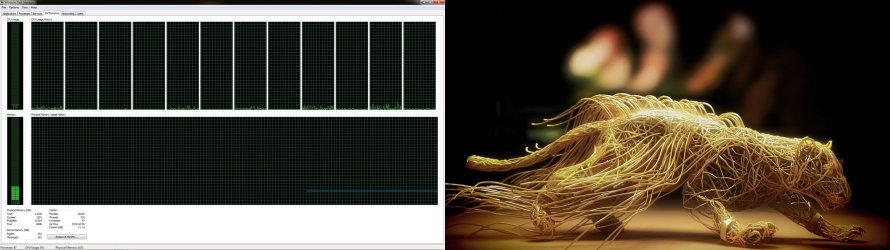
  • Performance Task manager.jpg
    Performance Task manager.jpg
    328.8 KB · Views: 6

My Computer

Computer type
PC/Desktop
Computer Manufacturer/Model Number
Custom Build
OS
Windows 7 Ultimate 64 BIT
CPU
I 7 4930K @ 4.4 GHz
Motherboard
Asus Rampage lV Black Edition
Memory
G Skill Z Series 2133 MHz 16 Gb
Graphics Card(s)
Evga GTX 780 S.C. x 2 SLI
Sound Card
Peach Tree Nova 125SE DAC & Amp D-5 Speakers/Audeze LCD 2
Monitor(s) Displays
Dell Ultra Sharp Curved U3415W
Screen Resolution
3440 X 1440
Hard Drives
C: Intel 730 Series 250Gb
4 x Western Digital Velocity Raptors 300 GB Each
1 x Western Digital Black Caviar 2 Tb Storage 5 GB Page Files & Temp Files moved from C: Drive, Media Files.
1 x Western Digital Black Caviar 2 Tb Removable back up.
PSU
Corsair AX 1500i
Case
CaseLabs Magnum 8
Cooling
Noctua Fans NFS12A x 11 & CPU Heat Sink Nh-D14
Keyboard
Enermax Aurora
Mouse
Logitech G3
Internet Speed
100 Mbps
Antivirus
Norton Security 2015
Browser
Internet Explorer 10
Other Info
Various programs installed on 4 hard drives depending on usage. Air filters are custom by DEMCIFILTERS. Optic Drives None. System is built for Flight Simulator X and other flight sims. 3 x PDB boards for the fans and LCD lights. Really helps with cable management. Case fan RPM is a constant 1350 rpm extremely quiet system cannot hear the system running.
I don't see this usage as either unusual or abnormal.

Memory usage is always under the control of the system memory manager, the primary goal being to maximize overall system performance. It usually works very well.The system will always try to find some use for as much memory as possible, even if it is only of trivial use. Within reasonable limits the more memory you have, the more it will use. This memory usage is of course higher than necessary, and that is a good thing. The memory manager is using the large amount of memory available to improve performance. But if a large application needs more memory this usage will automatically be trimmed back, drastically if necessary. With 12 GB RAM that isn't likely to happen very often.

Don't be concerned over the low value for "Free" memory that may occasionally show. This number is of little importance and is often misunderstood. The value of importance is "Available" and that is very high. And that is good.

Don't be concerned that adding up the memory usage in the process list doesn't add up to total usage. It was never intended that it would. The default configuration doesn't show all process usage and there are major users of memory that are not processes, not all of which are shown in Task Manager.
 

My Computer

Computer type
PC/Desktop
Computer Manufacturer/Model Number
HP
OS
Windows 7 Pro 64 bit
CPU
Xeon W3520
Memory
8 GB
Graphics Card(s)
Nvidia Geforce 210
I agree. Nothing to suggest that there's anything "wrong" with your memory reporting.

At idle (more or less I have FF and 8 tabs open) my commit is 3 GB.

You may have a problem (unlikely) but memory isn't it.
 

My Computer

Computer type
Laptop
Computer Manufacturer/Model Number
HP
OS
Dual Boot Win 8.1 x64; Win 7 SP1 x64
CPU
i7-3610QM @ 2.3 GHz
Motherboard
Hewlett-Packard 181C (U3E1)
Memory
8 GB Dual-Channel DDR3 @ 798MHz
Graphics Card(s)
Intel HD Graphics 4000
Hard Drives
Hitachi HTS547575A9E384 SCSI Disk Device;
WD Elements 1042 USB Device
Antivirus
Microsoft Security Essentials; Comodo Firewall w/ Defense +
Also, you run Norton. If I were looking for a "culprit" I would start there. Again, though, let me reiterate. There's nothing wrong with your rig. Windows is operating as intended, and from your original post appears to be running optimally (despite that you have Norton).
 

My Computer

Computer type
Laptop
Computer Manufacturer/Model Number
HP
OS
Dual Boot Win 8.1 x64; Win 7 SP1 x64
CPU
i7-3610QM @ 2.3 GHz
Motherboard
Hewlett-Packard 181C (U3E1)
Memory
8 GB Dual-Channel DDR3 @ 798MHz
Graphics Card(s)
Intel HD Graphics 4000
Hard Drives
Hitachi HTS547575A9E384 SCSI Disk Device;
WD Elements 1042 USB Device
Antivirus
Microsoft Security Essentials; Comodo Firewall w/ Defense +
You have way to much d**** memory to be concerned over 2GB, when it gets to 15GB at idle, then worry about it. Worrying about how much memory some program is using with so much RAM is just....pathetic. If you do not want your RAM to be used, pull it out of your machine.
 

My Computer

Computer type
PC/Desktop
Computer Manufacturer/Model Number
Alienware Aurora ALX R4
OS
Windows 10 Pro (x64)
CPU
Intel Core i7-3930K (3.2GHz - 4.5GHz)
Motherboard
Alienware Aurora-R4 x79
Memory
4x Samsung 4GB PC3-12800 DDR3 (16GB 1600MHz)
Graphics Card(s)
Nvidia Geforce GTX 690
Sound Card
SteelSeries Siberia Elite
Monitor(s) Displays
Dell UltraSharp U3011
Screen Resolution
2560x1600
Hard Drives
Samsung 850 Pro 256 GB, Seagate 1TB Desktop Hybrid HDD, 2x Western Digital 4TB Green HDD
PSU
875W Some Dell PSU <.<
Case
Alienware Aurora ALX
Cooling
Custom Liquid Cooling (EK CPU & GPU blocks) dual EK 480RAD
Keyboard
Logitech G710+ Mechanical
Mouse
Logitech G700s
Internet Speed
Verizon Fios (50 mbps average)
Other Info
Server: Intel NUC D54250WYK: i5-4250U, 16GB, 256 GB mSATA, Windows Server 2012 R2
I like you.
 

My Computer

Computer type
Laptop
Computer Manufacturer/Model Number
HP
OS
Dual Boot Win 8.1 x64; Win 7 SP1 x64
CPU
i7-3610QM @ 2.3 GHz
Motherboard
Hewlett-Packard 181C (U3E1)
Memory
8 GB Dual-Channel DDR3 @ 798MHz
Graphics Card(s)
Intel HD Graphics 4000
Hard Drives
Hitachi HTS547575A9E384 SCSI Disk Device;
WD Elements 1042 USB Device
Antivirus
Microsoft Security Essentials; Comodo Firewall w/ Defense +
You have way to much d**** memory to be concerned over 2GB, when it gets to 15GB at idle, then worry about it. Worrying about how much memory some program is using with so much RAM is just....pathetic. If you do not want your RAM to be used, pull it out of your machine.


:thumbsup:
 

My Computer

Computer type
PC/Desktop
Computer Manufacturer/Model Number
Home made Desktop
OS
Windows 10 Pro. 64/ version 1709 Windows 7 Pro/64
CPU
Intel i7-6800K @ 4.3
Motherboard
ASUS X-99 Deluxe II
Memory
Corsair Platinum 16 gig @2400
Graphics Card(s)
EVGA GTX 1070 OC
Monitor(s) Displays
Asus 27" LED LCD/VE278Q
Screen Resolution
1920-1080 or 1280-720 HDMI
Hard Drives
INTEL SSD 730-240 Gb Sata 3.0/
PSU
EVGA Platium 1200W
Case
Phanteks Luxe Tempered Glass 8 fans/ one radiator
Cooling
XSPC/ Water Cooled CPU
Keyboard
Das 4 Professional
Mouse
Logitech M705/MX Anywhere 2-S
Internet Speed
100 mbits
Antivirus
Microsoft Security Essentials/ Malwarebytes Premium 3.0/ SAS
Browser
I.E. 11 default/Firefox/ ISP Time Warner Cable/Spectrum
Other Info
LG BluRay Burner/
Sound system-KLipsch-THX/
Icy Dock ssd Hot Swap bays.
Sorry if my earlier post was to harsh/rash. But I ran Windows XP to Windows Vista to Windows 7, several years without issue on 2 GBs of RAM from 2007 to mid-2013. It annoys me to no end when someone who has 4+ GB to play with, tries to micromanage it.
 

My Computer

Computer type
PC/Desktop
Computer Manufacturer/Model Number
Alienware Aurora ALX R4
OS
Windows 10 Pro (x64)
CPU
Intel Core i7-3930K (3.2GHz - 4.5GHz)
Motherboard
Alienware Aurora-R4 x79
Memory
4x Samsung 4GB PC3-12800 DDR3 (16GB 1600MHz)
Graphics Card(s)
Nvidia Geforce GTX 690
Sound Card
SteelSeries Siberia Elite
Monitor(s) Displays
Dell UltraSharp U3011
Screen Resolution
2560x1600
Hard Drives
Samsung 850 Pro 256 GB, Seagate 1TB Desktop Hybrid HDD, 2x Western Digital 4TB Green HDD
PSU
875W Some Dell PSU <.<
Case
Alienware Aurora ALX
Cooling
Custom Liquid Cooling (EK CPU & GPU blocks) dual EK 480RAD
Keyboard
Logitech G710+ Mechanical
Mouse
Logitech G700s
Internet Speed
Verizon Fios (50 mbps average)
Other Info
Server: Intel NUC D54250WYK: i5-4250U, 16GB, 256 GB mSATA, Windows Server 2012 R2
Sorry if my earlier post was to harsh/rash. But I ran Windows XP to Windows Vista to Windows 7, several years without issue on 2 GBs of RAM from 2007 to mid-2013. It annoys me to no end when someone who has 4+ GB to play with, tries to micromanage it.

Not a problem, I understand and do appreciate your reply thank you.

In order to run FSX hardware installation and windows 7 64 bit set up is critical if you do not want FSX to crash to the desk top or a BSOD. That is the purpose of the post I new I would get a straight answer concerning memory usage on Windows Seven Forums greatly appreciated. After reading the replies learned a few things.

Just seamed to me the amount of memory usage at idle was high. FSX is CPU bound, does not recognize Hyper Threading and High Memory usage can be an issue.
 

My Computer

Computer type
PC/Desktop
Computer Manufacturer/Model Number
Custom Build
OS
Windows 7 Ultimate 64 BIT
CPU
I 7 4930K @ 4.4 GHz
Motherboard
Asus Rampage lV Black Edition
Memory
G Skill Z Series 2133 MHz 16 Gb
Graphics Card(s)
Evga GTX 780 S.C. x 2 SLI
Sound Card
Peach Tree Nova 125SE DAC & Amp D-5 Speakers/Audeze LCD 2
Monitor(s) Displays
Dell Ultra Sharp Curved U3415W
Screen Resolution
3440 X 1440
Hard Drives
C: Intel 730 Series 250Gb
4 x Western Digital Velocity Raptors 300 GB Each
1 x Western Digital Black Caviar 2 Tb Storage 5 GB Page Files & Temp Files moved from C: Drive, Media Files.
1 x Western Digital Black Caviar 2 Tb Removable back up.
PSU
Corsair AX 1500i
Case
CaseLabs Magnum 8
Cooling
Noctua Fans NFS12A x 11 & CPU Heat Sink Nh-D14
Keyboard
Enermax Aurora
Mouse
Logitech G3
Internet Speed
100 Mbps
Antivirus
Norton Security 2015
Browser
Internet Explorer 10
Other Info
Various programs installed on 4 hard drives depending on usage. Air filters are custom by DEMCIFILTERS. Optic Drives None. System is built for Flight Simulator X and other flight sims. 3 x PDB boards for the fans and LCD lights. Really helps with cable management. Case fan RPM is a constant 1350 rpm extremely quiet system cannot hear the system running.
Also, you run Norton. If I were looking for a "culprit" I would start there. Again, though, let me reiterate. There's nothing wrong with your rig. Windows is operating as intended, and from your original post appears to be running optimally (despite that you have Norton).

Thanks, I take it you are not found of Norton. Note trial ware. Back to reading the Seven forums to find a A.V. for a permanent installation.
 

My Computer

Computer type
PC/Desktop
Computer Manufacturer/Model Number
Custom Build
OS
Windows 7 Ultimate 64 BIT
CPU
I 7 4930K @ 4.4 GHz
Motherboard
Asus Rampage lV Black Edition
Memory
G Skill Z Series 2133 MHz 16 Gb
Graphics Card(s)
Evga GTX 780 S.C. x 2 SLI
Sound Card
Peach Tree Nova 125SE DAC & Amp D-5 Speakers/Audeze LCD 2
Monitor(s) Displays
Dell Ultra Sharp Curved U3415W
Screen Resolution
3440 X 1440
Hard Drives
C: Intel 730 Series 250Gb
4 x Western Digital Velocity Raptors 300 GB Each
1 x Western Digital Black Caviar 2 Tb Storage 5 GB Page Files & Temp Files moved from C: Drive, Media Files.
1 x Western Digital Black Caviar 2 Tb Removable back up.
PSU
Corsair AX 1500i
Case
CaseLabs Magnum 8
Cooling
Noctua Fans NFS12A x 11 & CPU Heat Sink Nh-D14
Keyboard
Enermax Aurora
Mouse
Logitech G3
Internet Speed
100 Mbps
Antivirus
Norton Security 2015
Browser
Internet Explorer 10
Other Info
Various programs installed on 4 hard drives depending on usage. Air filters are custom by DEMCIFILTERS. Optic Drives None. System is built for Flight Simulator X and other flight sims. 3 x PDB boards for the fans and LCD lights. Really helps with cable management. Case fan RPM is a constant 1350 rpm extremely quiet system cannot hear the system running.
Norton may not be the devil, but it certainly lies with Beelzebub.
 

My Computer

Computer type
Laptop
Computer Manufacturer/Model Number
HP
OS
Dual Boot Win 8.1 x64; Win 7 SP1 x64
CPU
i7-3610QM @ 2.3 GHz
Motherboard
Hewlett-Packard 181C (U3E1)
Memory
8 GB Dual-Channel DDR3 @ 798MHz
Graphics Card(s)
Intel HD Graphics 4000
Hard Drives
Hitachi HTS547575A9E384 SCSI Disk Device;
WD Elements 1042 USB Device
Antivirus
Microsoft Security Essentials; Comodo Firewall w/ Defense +
Back
Top