High memory usage?

Status
Not open for further replies.

ShaggyJefe

New member
Local time
12:28 PM
Messages
14
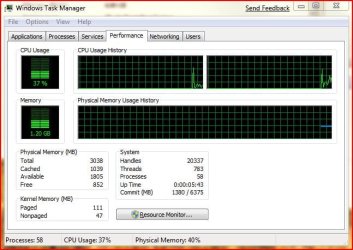
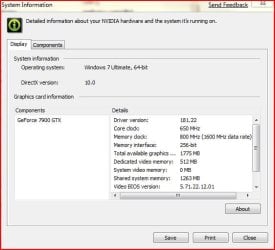
Is 1.36 GB memory used abnormally high for 7? i was scouting through what little system information i could find (never had vista, kinda lost on some things) and i saw that my video card is sharing some system memory. then on the performance tab of the task manager i only see 3038 MB of RAM total, but i've got 4 GB installed.

My system isn't running slow or anything like that i just thought it odd that the memory usage was hovering at a near constant 46% used. The amount that my video card says is shared is like 1263 MB, is that counted towards the total used memory (cached included)? or is that 1263 MB sitting in the page file for later use?

I've got a FX-60, 4 GB of RAM, and a 500 MB 7900 GTX OC, does my video card really need to have another 1.2 GB shared from system memory?
 

My Computer

Computer Manufacturer/Model Number
Me
OS
Windows 7 Beta
CPU
AMD Athlon FX60
Motherboard
A8N32-SLI Deluxe
Memory
Corsair TWINX2048-3500LLPRO x2 (PC 3500, 4 GB)
Graphics Card(s)
BFG 7900 GTX OC (was x2 but lost the need for the second)
Sound Card
On Board sound (Audigy 4 died of heat between video cards)
Monitor(s) Displays
Samsung SyncMaster 930B, Sony SDM-Hs73
Screen Resolution
2560x1024
Hard Drives
Western Digital 150 GB Raptor x2 in a RAID 0
PSU
PC Power and Cooling 1KW
Case
Lian-Li PC-V1200B PLUS BLK
Cooling
plain old fans, reason sound card died, lol
Keyboard
Logitech 920-000021
Mouse
Logitech G7
It's pretty normal I suppose. The reason it's only accessing 3.3 gb of memory and not the full 4 is normal for a 32 bit OS. If you had 64 bit it would be like mine shown here.

View attachment 4456
 

My Computer

Computer type
PC/Desktop
Computer Manufacturer/Model Number
Airbot 2.0
OS
Windows 7 Ultimate x64 SP1
CPU
Core i7 920 (D0) @ 4Ghz, *26c idle *65c full load on air
Motherboard
Asus P6X58D Premium - Sata 6Gb/s - USB 3.0
Memory
12GB DDR3 Corsair Dominator -CMD12GX3M6A1600C8 at 1600MHz
Graphics Card(s)
Zotac Geforce GTX 770
Sound Card
ASUS Xonar D2X
Monitor(s) Displays
1 LG 24" Flatron W2453V-PF 1 Samsung 24" P2450H both 2ms RT
Screen Resolution
1920x1080@60hz
Hard Drives
1 Samsung 250GB 840 Evo SSD
1 OCZ Vertex2 180GB SSD
1 TB Samsung Spinpoint F1 7200RPM 32MB cache
2 500GB WD Caviar Blacks 7200RPM 32MB cache (WD5001AALS)

Pioneer DVD Burner DVR-S18M
PSU
Corsair HX1000W
Case
Cooler Master HAF 932
Cooling
Case Fans *3 230mm, *1 140mm/CPU - *Tuniq Tower 120 Extreme
Keyboard
Logitech Wireless MK700
Mouse
Logitech Wireless MK700
Internet Speed
DL 15 Mbps UL 0.98 Mbps
Antivirus
None
Browser
Firefox Nightly
Other Info
Processor-7.7 *RAM- 7.9 *Graphics-7.9 *Gaming Graphics- 7.9 *SSD- 7.8 W.E.I final score= 7.7
*Phone- LG Nexus 5
yeah, i forgot to mention that, i'm using the 64 bit version of 7. I can't imagine that shared memory being locked in, but i also can't imagine needing more than 512 MB of video memory. is there a way to disable it, or would leaving it alone be advised?

Slightly off topic, why can't i copy paste the system info from that screen, lol.
 

My Computer

Computer Manufacturer/Model Number
Me
OS
Windows 7 Beta
CPU
AMD Athlon FX60
Motherboard
A8N32-SLI Deluxe
Memory
Corsair TWINX2048-3500LLPRO x2 (PC 3500, 4 GB)
Graphics Card(s)
BFG 7900 GTX OC (was x2 but lost the need for the second)
Sound Card
On Board sound (Audigy 4 died of heat between video cards)
Monitor(s) Displays
Samsung SyncMaster 930B, Sony SDM-Hs73
Screen Resolution
2560x1024
Hard Drives
Western Digital 150 GB Raptor x2 in a RAID 0
PSU
PC Power and Cooling 1KW
Case
Lian-Li PC-V1200B PLUS BLK
Cooling
plain old fans, reason sound card died, lol
Keyboard
Logitech 920-000021
Mouse
Logitech G7
err, well, if you have 64 bit, then it wouldn't be normal. Should be like mine with 4gb reporting lie 4093MB. I think there was an older thread talking about it, lemme see if I can find it.

If you're talking about posting a screenshot of something, you can use the snipping tool to do it. Here is a tutorial on how to use it.
How to use the Snipping Tool in Vista - Vista Forums
 

My Computer

Computer type
PC/Desktop
Computer Manufacturer/Model Number
Airbot 2.0
OS
Windows 7 Ultimate x64 SP1
CPU
Core i7 920 (D0) @ 4Ghz, *26c idle *65c full load on air
Motherboard
Asus P6X58D Premium - Sata 6Gb/s - USB 3.0
Memory
12GB DDR3 Corsair Dominator -CMD12GX3M6A1600C8 at 1600MHz
Graphics Card(s)
Zotac Geforce GTX 770
Sound Card
ASUS Xonar D2X
Monitor(s) Displays
1 LG 24" Flatron W2453V-PF 1 Samsung 24" P2450H both 2ms RT
Screen Resolution
1920x1080@60hz
Hard Drives
1 Samsung 250GB 840 Evo SSD
1 OCZ Vertex2 180GB SSD
1 TB Samsung Spinpoint F1 7200RPM 32MB cache
2 500GB WD Caviar Blacks 7200RPM 32MB cache (WD5001AALS)

Pioneer DVD Burner DVR-S18M
PSU
Corsair HX1000W
Case
Cooler Master HAF 932
Cooling
Case Fans *3 230mm, *1 140mm/CPU - *Tuniq Tower 120 Extreme
Keyboard
Logitech Wireless MK700
Mouse
Logitech Wireless MK700
Internet Speed
DL 15 Mbps UL 0.98 Mbps
Antivirus
None
Browser
Firefox Nightly
Other Info
Processor-7.7 *RAM- 7.9 *Graphics-7.9 *Gaming Graphics- 7.9 *SSD- 7.8 W.E.I final score= 7.7
*Phone- LG Nexus 5
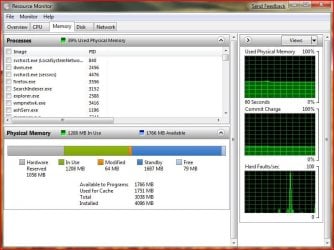
ok, looking again, in the Resource Monitor it lists that i've got 1597 MB available to programs, 1584 MB used for cache, 3038 MB total, and 4096 MB installed. so its seeing the full 4 GB, but its not counting it towards the total? that doesn't make any sense.
 

My Computer

Computer Manufacturer/Model Number
Me
OS
Windows 7 Beta
CPU
AMD Athlon FX60
Motherboard
A8N32-SLI Deluxe
Memory
Corsair TWINX2048-3500LLPRO x2 (PC 3500, 4 GB)
Graphics Card(s)
BFG 7900 GTX OC (was x2 but lost the need for the second)
Sound Card
On Board sound (Audigy 4 died of heat between video cards)
Monitor(s) Displays
Samsung SyncMaster 930B, Sony SDM-Hs73
Screen Resolution
2560x1024
Hard Drives
Western Digital 150 GB Raptor x2 in a RAID 0
PSU
PC Power and Cooling 1KW
Case
Lian-Li PC-V1200B PLUS BLK
Cooling
plain old fans, reason sound card died, lol
Keyboard
Logitech 920-000021
Mouse
Logitech G7
no not a screenshot, like copy paste text, used to be able to do it from the system properties in windows xp. again, i'm learning, i never used vista.
 

My Computer

Computer Manufacturer/Model Number
Me
OS
Windows 7 Beta
CPU
AMD Athlon FX60
Motherboard
A8N32-SLI Deluxe
Memory
Corsair TWINX2048-3500LLPRO x2 (PC 3500, 4 GB)
Graphics Card(s)
BFG 7900 GTX OC (was x2 but lost the need for the second)
Sound Card
On Board sound (Audigy 4 died of heat between video cards)
Monitor(s) Displays
Samsung SyncMaster 930B, Sony SDM-Hs73
Screen Resolution
2560x1024
Hard Drives
Western Digital 150 GB Raptor x2 in a RAID 0
PSU
PC Power and Cooling 1KW
Case
Lian-Li PC-V1200B PLUS BLK
Cooling
plain old fans, reason sound card died, lol
Keyboard
Logitech 920-000021
Mouse
Logitech G7

My Computer

Computer type
PC/Desktop
Computer Manufacturer/Model Number
Airbot 2.0
OS
Windows 7 Ultimate x64 SP1
CPU
Core i7 920 (D0) @ 4Ghz, *26c idle *65c full load on air
Motherboard
Asus P6X58D Premium - Sata 6Gb/s - USB 3.0
Memory
12GB DDR3 Corsair Dominator -CMD12GX3M6A1600C8 at 1600MHz
Graphics Card(s)
Zotac Geforce GTX 770
Sound Card
ASUS Xonar D2X
Monitor(s) Displays
1 LG 24" Flatron W2453V-PF 1 Samsung 24" P2450H both 2ms RT
Screen Resolution
1920x1080@60hz
Hard Drives
1 Samsung 250GB 840 Evo SSD
1 OCZ Vertex2 180GB SSD
1 TB Samsung Spinpoint F1 7200RPM 32MB cache
2 500GB WD Caviar Blacks 7200RPM 32MB cache (WD5001AALS)

Pioneer DVD Burner DVR-S18M
PSU
Corsair HX1000W
Case
Cooler Master HAF 932
Cooling
Case Fans *3 230mm, *1 140mm/CPU - *Tuniq Tower 120 Extreme
Keyboard
Logitech Wireless MK700
Mouse
Logitech Wireless MK700
Internet Speed
DL 15 Mbps UL 0.98 Mbps
Antivirus
None
Browser
Firefox Nightly
Other Info
Processor-7.7 *RAM- 7.9 *Graphics-7.9 *Gaming Graphics- 7.9 *SSD- 7.8 W.E.I final score= 7.7
*Phone- LG Nexus 5
you've never used copy and paste? i'm talking about ctrl+c for copy and ctrl+v for paste, unless you never copy and pasted from the system properties dialog box, which i can understand. and yes, i like the snippet tool, do you need to post images on something like photobucket to include them in your posts here?
 

My Computer

Computer Manufacturer/Model Number
Me
OS
Windows 7 Beta
CPU
AMD Athlon FX60
Motherboard
A8N32-SLI Deluxe
Memory
Corsair TWINX2048-3500LLPRO x2 (PC 3500, 4 GB)
Graphics Card(s)
BFG 7900 GTX OC (was x2 but lost the need for the second)
Sound Card
On Board sound (Audigy 4 died of heat between video cards)
Monitor(s) Displays
Samsung SyncMaster 930B, Sony SDM-Hs73
Screen Resolution
2560x1024
Hard Drives
Western Digital 150 GB Raptor x2 in a RAID 0
PSU
PC Power and Cooling 1KW
Case
Lian-Li PC-V1200B PLUS BLK
Cooling
plain old fans, reason sound card died, lol
Keyboard
Logitech 920-000021
Mouse
Logitech G7
Yeah, I've used copy and paste. I though you were talking about something straight from the sys properties box. :o Although I rarely ever have used it anyways, the shortcut keys that is. lol
That tutorial will show you how to upload a screenshot, preferably in jpeg format.
Basically when you're replying to a thread with the post reply button, you'd go to the little paperclip icon at the top of the reply box. The paperclip says manage attachments. you browse for it from there, in your pictures or wherever you save it and upload it. Then come back to the paperclip and it will be in the little drop down from the paperclip.

View attachment 4459

The paperclip's at the quick reply box too now, I don't think it was before.
 

My Computer

Computer type
PC/Desktop
Computer Manufacturer/Model Number
Airbot 2.0
OS
Windows 7 Ultimate x64 SP1
CPU
Core i7 920 (D0) @ 4Ghz, *26c idle *65c full load on air
Motherboard
Asus P6X58D Premium - Sata 6Gb/s - USB 3.0
Memory
12GB DDR3 Corsair Dominator -CMD12GX3M6A1600C8 at 1600MHz
Graphics Card(s)
Zotac Geforce GTX 770
Sound Card
ASUS Xonar D2X
Monitor(s) Displays
1 LG 24" Flatron W2453V-PF 1 Samsung 24" P2450H both 2ms RT
Screen Resolution
1920x1080@60hz
Hard Drives
1 Samsung 250GB 840 Evo SSD
1 OCZ Vertex2 180GB SSD
1 TB Samsung Spinpoint F1 7200RPM 32MB cache
2 500GB WD Caviar Blacks 7200RPM 32MB cache (WD5001AALS)

Pioneer DVD Burner DVR-S18M
PSU
Corsair HX1000W
Case
Cooler Master HAF 932
Cooling
Case Fans *3 230mm, *1 140mm/CPU - *Tuniq Tower 120 Extreme
Keyboard
Logitech Wireless MK700
Mouse
Logitech Wireless MK700
Internet Speed
DL 15 Mbps UL 0.98 Mbps
Antivirus
None
Browser
Firefox Nightly
Other Info
Processor-7.7 *RAM- 7.9 *Graphics-7.9 *Gaming Graphics- 7.9 *SSD- 7.8 W.E.I final score= 7.7
*Phone- LG Nexus 5
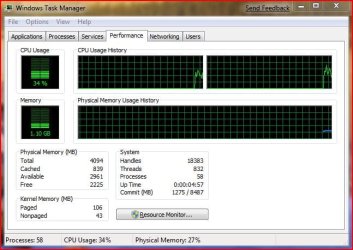
ok that makes sense, and i think i figured out what the deal is, my BIOS is only saying that ~3 GB is available for use out of the 4 GB i have installed. i read that other post about remapping memory, but i didn't see the option in my BIOS, so i'm gonna look for a BIOS flash for the firmware on my MB.

and just for clarification, these are the three screens that confused me. the forth is the video card thing i mentioned.
 

Attachments

  • resourcemonitor.jpg
    resourcemonitor.jpg
    69.6 KB · Views: 997
  • sysinfo.jpg
    sysinfo.jpg
    66.2 KB · Views: 827
  • taskmanager.jpg
    taskmanager.jpg
    57.5 KB · Views: 770
  • vidcard.jpg
    vidcard.jpg
    40.8 KB · Views: 515

My Computer

Computer Manufacturer/Model Number
Me
OS
Windows 7 Beta
CPU
AMD Athlon FX60
Motherboard
A8N32-SLI Deluxe
Memory
Corsair TWINX2048-3500LLPRO x2 (PC 3500, 4 GB)
Graphics Card(s)
BFG 7900 GTX OC (was x2 but lost the need for the second)
Sound Card
On Board sound (Audigy 4 died of heat between video cards)
Monitor(s) Displays
Samsung SyncMaster 930B, Sony SDM-Hs73
Screen Resolution
2560x1024
Hard Drives
Western Digital 150 GB Raptor x2 in a RAID 0
PSU
PC Power and Cooling 1KW
Case
Lian-Li PC-V1200B PLUS BLK
Cooling
plain old fans, reason sound card died, lol
Keyboard
Logitech 920-000021
Mouse
Logitech G7

My Computer

Computer type
PC/Desktop
Computer Manufacturer/Model Number
Airbot 2.0
OS
Windows 7 Ultimate x64 SP1
CPU
Core i7 920 (D0) @ 4Ghz, *26c idle *65c full load on air
Motherboard
Asus P6X58D Premium - Sata 6Gb/s - USB 3.0
Memory
12GB DDR3 Corsair Dominator -CMD12GX3M6A1600C8 at 1600MHz
Graphics Card(s)
Zotac Geforce GTX 770
Sound Card
ASUS Xonar D2X
Monitor(s) Displays
1 LG 24" Flatron W2453V-PF 1 Samsung 24" P2450H both 2ms RT
Screen Resolution
1920x1080@60hz
Hard Drives
1 Samsung 250GB 840 Evo SSD
1 OCZ Vertex2 180GB SSD
1 TB Samsung Spinpoint F1 7200RPM 32MB cache
2 500GB WD Caviar Blacks 7200RPM 32MB cache (WD5001AALS)

Pioneer DVD Burner DVR-S18M
PSU
Corsair HX1000W
Case
Cooler Master HAF 932
Cooling
Case Fans *3 230mm, *1 140mm/CPU - *Tuniq Tower 120 Extreme
Keyboard
Logitech Wireless MK700
Mouse
Logitech Wireless MK700
Internet Speed
DL 15 Mbps UL 0.98 Mbps
Antivirus
None
Browser
Firefox Nightly
Other Info
Processor-7.7 *RAM- 7.9 *Graphics-7.9 *Gaming Graphics- 7.9 *SSD- 7.8 W.E.I final score= 7.7
*Phone- LG Nexus 5
here's mine...with superfetch disabled, prefetch folder emptied, all startup programs disabled...with the startup programs...it hangs around 2.05 GB

yeah i think something is wrong, but all my games/programs run fine..so i try not to pull my hairs about it.

capturemj1.jpg
 

My Computer

OS
Windows 7 Beta x64 Build 7000
ok, i have an update. after flashing the BIOS on my A8N32-SLI Deluxe to the 1405 beta i still wasn't able to get the BIOS to report 4 GB as usable, so i enabled the memory remapping and it sees it now. my question now is, does leaving the memory remapping enabled have any detrimental effects on the system? I'd hate to have to turn it off, but i can't find any other way to get BIOS to recognize all 4 GB as being available for use (I paid for it dammit, i want to use it, after 2 years its high time too).
 

Attachments

  • fixedtaskmanager.jpg
    fixedtaskmanager.jpg
    57.8 KB · Views: 156

My Computer

Computer Manufacturer/Model Number
Me
OS
Windows 7 Beta
CPU
AMD Athlon FX60
Motherboard
A8N32-SLI Deluxe
Memory
Corsair TWINX2048-3500LLPRO x2 (PC 3500, 4 GB)
Graphics Card(s)
BFG 7900 GTX OC (was x2 but lost the need for the second)
Sound Card
On Board sound (Audigy 4 died of heat between video cards)
Monitor(s) Displays
Samsung SyncMaster 930B, Sony SDM-Hs73
Screen Resolution
2560x1024
Hard Drives
Western Digital 150 GB Raptor x2 in a RAID 0
PSU
PC Power and Cooling 1KW
Case
Lian-Li PC-V1200B PLUS BLK
Cooling
plain old fans, reason sound card died, lol
Keyboard
Logitech 920-000021
Mouse
Logitech G7
I don't see where it says it will have any negative effects. Glad you got it sorted.
 

My Computer

Computer type
PC/Desktop
Computer Manufacturer/Model Number
Airbot 2.0
OS
Windows 7 Ultimate x64 SP1
CPU
Core i7 920 (D0) @ 4Ghz, *26c idle *65c full load on air
Motherboard
Asus P6X58D Premium - Sata 6Gb/s - USB 3.0
Memory
12GB DDR3 Corsair Dominator -CMD12GX3M6A1600C8 at 1600MHz
Graphics Card(s)
Zotac Geforce GTX 770
Sound Card
ASUS Xonar D2X
Monitor(s) Displays
1 LG 24" Flatron W2453V-PF 1 Samsung 24" P2450H both 2ms RT
Screen Resolution
1920x1080@60hz
Hard Drives
1 Samsung 250GB 840 Evo SSD
1 OCZ Vertex2 180GB SSD
1 TB Samsung Spinpoint F1 7200RPM 32MB cache
2 500GB WD Caviar Blacks 7200RPM 32MB cache (WD5001AALS)

Pioneer DVD Burner DVR-S18M
PSU
Corsair HX1000W
Case
Cooler Master HAF 932
Cooling
Case Fans *3 230mm, *1 140mm/CPU - *Tuniq Tower 120 Extreme
Keyboard
Logitech Wireless MK700
Mouse
Logitech Wireless MK700
Internet Speed
DL 15 Mbps UL 0.98 Mbps
Antivirus
None
Browser
Firefox Nightly
Other Info
Processor-7.7 *RAM- 7.9 *Graphics-7.9 *Gaming Graphics- 7.9 *SSD- 7.8 W.E.I final score= 7.7
*Phone- LG Nexus 5
@dcommand3r I'm not sure as to why you would clear prefetch data, it's a good thing, really.

Anyways.. after a clean install of the 64-bit version of Windows 7, I booted up and clocked the memory usage at 700~800MB. Now that I've been using W7 for a month or so, the needs have grown, and it boots up with 950MB of memory being used. I've never actually seen W7 go beyond 2GB, considering my Vista install boots up to 1.2GB.

I'm not sure if this affects my memory, but I do have a 1GB ReadyBoost implementation in place, alongside my 8GB of memory.

I haven't disabled any core features of W7, either :P
 

My Computer

OS
Windows 7 x64
CPU
AMD Phenom X4 9850 Black Edition @ 2.65GHz
Motherboard
NVIDIA nForce 720
Memory
8 GB
Graphics Card(s)
NVIDIA 9800 GT 512MB
Sound Card
Creative XTreme-Gamer
Monitor(s) Displays
22" ViewSonic
Screen Resolution
1680x1050
Hard Drives
750 GB
500 GB
PSU
500 watt
Keyboard
Razer Lycosa (Mirror)
Mouse
Razer DeathAdder
Internet Speed
1.5Mbps
Other Info
5.1 surround sound
Cant remember where I found this but its good for a laugh.

Decca
 

Attachments

  • 256lp-hpsuperdome.jpg
    256lp-hpsuperdome.jpg
    144.2 KB · Views: 455

My Computer

Computer Manufacturer/Model Number
Home Made - Myself
OS
Dual Boot Windows 7 Ultimate 7600 x86 and x64
CPU
Intel(R) Core(TM)2 Duo CPU E8500 @ 3.16GHz
Motherboard
ASUSTeK P5Q TURBO
Memory
OCZ DDR2 PC2-8500 Platinum 4GB Edition Dual Channel
Graphics Card(s)
MSI R4870-MD1G ATI Radeon HD 4870/1GB/GDDR5
Sound Card
Creative SB X-FI , MAUDIO 2496
Monitor(s) Displays
SAMSUNG T240 HD 24'' HDTV widescreen
Screen Resolution
1920x1200
Hard Drives
1TB Seagate Barracuda 7200.12 SATA
3.0GB/s 32MB Cache
PSU
550 Watt
Keyboard
Microsoft Keyboard with Fingerprint Reader
Mouse
MS Wirelss
Internet Speed
Bell High Speed
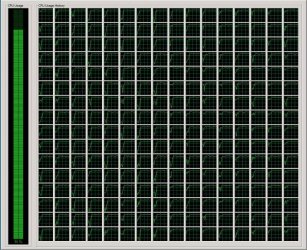
What is that, like a 100 core processor? lol
 

My Computer

Computer type
PC/Desktop
Computer Manufacturer/Model Number
Airbot 2.0
OS
Windows 7 Ultimate x64 SP1
CPU
Core i7 920 (D0) @ 4Ghz, *26c idle *65c full load on air
Motherboard
Asus P6X58D Premium - Sata 6Gb/s - USB 3.0
Memory
12GB DDR3 Corsair Dominator -CMD12GX3M6A1600C8 at 1600MHz
Graphics Card(s)
Zotac Geforce GTX 770
Sound Card
ASUS Xonar D2X
Monitor(s) Displays
1 LG 24" Flatron W2453V-PF 1 Samsung 24" P2450H both 2ms RT
Screen Resolution
1920x1080@60hz
Hard Drives
1 Samsung 250GB 840 Evo SSD
1 OCZ Vertex2 180GB SSD
1 TB Samsung Spinpoint F1 7200RPM 32MB cache
2 500GB WD Caviar Blacks 7200RPM 32MB cache (WD5001AALS)

Pioneer DVD Burner DVR-S18M
PSU
Corsair HX1000W
Case
Cooler Master HAF 932
Cooling
Case Fans *3 230mm, *1 140mm/CPU - *Tuniq Tower 120 Extreme
Keyboard
Logitech Wireless MK700
Mouse
Logitech Wireless MK700
Internet Speed
DL 15 Mbps UL 0.98 Mbps
Antivirus
None
Browser
Firefox Nightly
Other Info
Processor-7.7 *RAM- 7.9 *Graphics-7.9 *Gaming Graphics- 7.9 *SSD- 7.8 W.E.I final score= 7.7
*Phone- LG Nexus 5
I think it was 256 (16X16)
I do know its real though I cant remember where I grabbed it from.
They were talking about mutiple installs etc.

Memory usage is getting pretty high there...lol

Decca
 

My Computer

Computer Manufacturer/Model Number
Home Made - Myself
OS
Dual Boot Windows 7 Ultimate 7600 x86 and x64
CPU
Intel(R) Core(TM)2 Duo CPU E8500 @ 3.16GHz
Motherboard
ASUSTeK P5Q TURBO
Memory
OCZ DDR2 PC2-8500 Platinum 4GB Edition Dual Channel
Graphics Card(s)
MSI R4870-MD1G ATI Radeon HD 4870/1GB/GDDR5
Sound Card
Creative SB X-FI , MAUDIO 2496
Monitor(s) Displays
SAMSUNG T240 HD 24'' HDTV widescreen
Screen Resolution
1920x1200
Hard Drives
1TB Seagate Barracuda 7200.12 SATA
3.0GB/s 32MB Cache
PSU
550 Watt
Keyboard
Microsoft Keyboard with Fingerprint Reader
Mouse
MS Wirelss
Internet Speed
Bell High Speed
What is that, like a 100 core processor? lol

16 columns multiplied by 16 rows yields 256 processors.

They're not running Windows 7, as W7 only supports up to 64 logical processors -- however, Windows Server 2008 does support up to 256 logical processors (which they're most likely running) :geek:
 

My Computer

OS
Windows 7 x64
CPU
AMD Phenom X4 9850 Black Edition @ 2.65GHz
Motherboard
NVIDIA nForce 720
Memory
8 GB
Graphics Card(s)
NVIDIA 9800 GT 512MB
Sound Card
Creative XTreme-Gamer
Monitor(s) Displays
22" ViewSonic
Screen Resolution
1680x1050
Hard Drives
750 GB
500 GB
PSU
500 watt
Keyboard
Razer Lycosa (Mirror)
Mouse
Razer DeathAdder
Internet Speed
1.5Mbps
Other Info
5.1 surround sound
Yeah, I didn't count it, just guessed. Looks like I was pretty far off. lol
 

My Computer

Computer type
PC/Desktop
Computer Manufacturer/Model Number
Airbot 2.0
OS
Windows 7 Ultimate x64 SP1
CPU
Core i7 920 (D0) @ 4Ghz, *26c idle *65c full load on air
Motherboard
Asus P6X58D Premium - Sata 6Gb/s - USB 3.0
Memory
12GB DDR3 Corsair Dominator -CMD12GX3M6A1600C8 at 1600MHz
Graphics Card(s)
Zotac Geforce GTX 770
Sound Card
ASUS Xonar D2X
Monitor(s) Displays
1 LG 24" Flatron W2453V-PF 1 Samsung 24" P2450H both 2ms RT
Screen Resolution
1920x1080@60hz
Hard Drives
1 Samsung 250GB 840 Evo SSD
1 OCZ Vertex2 180GB SSD
1 TB Samsung Spinpoint F1 7200RPM 32MB cache
2 500GB WD Caviar Blacks 7200RPM 32MB cache (WD5001AALS)

Pioneer DVD Burner DVR-S18M
PSU
Corsair HX1000W
Case
Cooler Master HAF 932
Cooling
Case Fans *3 230mm, *1 140mm/CPU - *Tuniq Tower 120 Extreme
Keyboard
Logitech Wireless MK700
Mouse
Logitech Wireless MK700
Internet Speed
DL 15 Mbps UL 0.98 Mbps
Antivirus
None
Browser
Firefox Nightly
Other Info
Processor-7.7 *RAM- 7.9 *Graphics-7.9 *Gaming Graphics- 7.9 *SSD- 7.8 W.E.I final score= 7.7
*Phone- LG Nexus 5
Status
Not open for further replies.
Back
Top