High RAM usage - don't know why

Renik

New member
Local time
6:16 AM
Messages
22
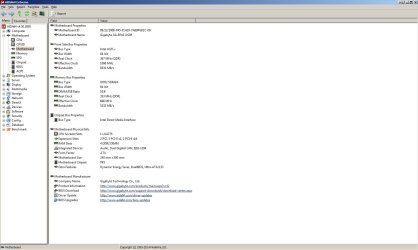
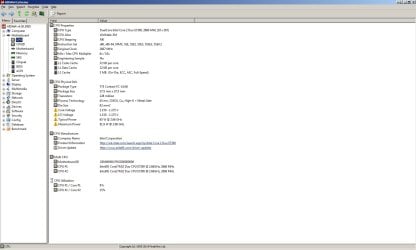
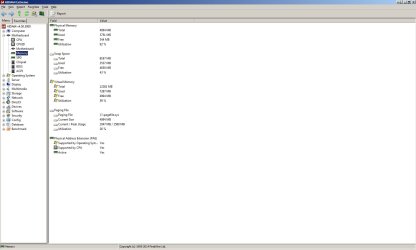
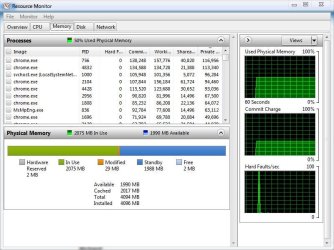
Hello, have older computer (see screenshots).

I have Win 7 x64 Ultimate and my RAM cries. I have this problem for about 2 months. Last week I formatted HDD and install clean Windows again. After some days I have this problem again. I think, this is problem:
If I go away from PC, and come back after 15-20 minutes, RAM usage is 90-100%. Have turned off HDD sleep, only monitor turns off after 5 minutes.

Have you got any solution for me? Will be very thankful.

BTW don't know why I have a lot of chrome processes, I have only 3 tabs opened.
Thank you very much.
 

Attachments
  • 1.jpg
    1.jpg
    76.7 KB · Views: 51
  • 2.jpg
    2.jpg
    162.7 KB · Views: 21
  • 11.jpg
    11.jpg
    121.7 KB · Views: 9
  • 22.jpg
    22.jpg
    113.4 KB · Views: 3
  • 33.jpg
    33.jpg
    84.6 KB · Views: 4

My Computer

Computer type
PC/Desktop
OS
Windows 7 Ultimate 64bit
CPU
Intel Core 2 Duo E7300, 2666 MHz
Motherboard
Gigabyte GA-EP45-DS3R
Memory
Kingston HyperX 4096 MB (DDR2-667 DDR2 SDRAM
Graphics Card(s)
ATI Radeon HD 4850
Sound Card
ATI Radeon HDMI @ ATI RV770
Monitor(s) Displays
Samsung 22"
Screen Resolution
1680x1050
Hard Drives
ST31000340AS ATA Device (1000 GB, 7200 RPM, SATA-II)
Case
Thermaltake Bach VX
Internet Speed
300/30mbps
Antivirus
Avira Free
Browser
Chrome
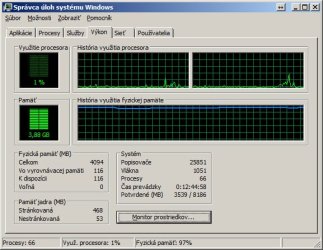
What is really needed is a screenshot of Task Manager - Performance tab. There is information there that is found nowhere else.
 

My Computer

Computer type
PC/Desktop
Computer Manufacturer/Model Number
HP
OS
Windows 7 Pro 64 bit
CPU
Xeon W3520
Memory
8 GB
Graphics Card(s)
Nvidia Geforce 210
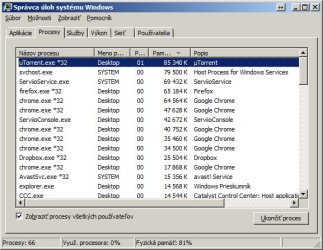
Sorry, here is it
 

Attachments

  • Untitled-1.jpg
    Untitled-1.jpg
    71 KB · Views: 44

My Computer

Computer type
PC/Desktop
OS
Windows 7 Ultimate 64bit
CPU
Intel Core 2 Duo E7300, 2666 MHz
Motherboard
Gigabyte GA-EP45-DS3R
Memory
Kingston HyperX 4096 MB (DDR2-667 DDR2 SDRAM
Graphics Card(s)
ATI Radeon HD 4850
Sound Card
ATI Radeon HDMI @ ATI RV770
Monitor(s) Displays
Samsung 22"
Screen Resolution
1680x1050
Hard Drives
ST31000340AS ATA Device (1000 GB, 7200 RPM, SATA-II)
Case
Thermaltake Bach VX
Internet Speed
300/30mbps
Antivirus
Avira Free
Browser
Chrome
any help please?
 

My Computer

Computer type
PC/Desktop
OS
Windows 7 Ultimate 64bit
CPU
Intel Core 2 Duo E7300, 2666 MHz
Motherboard
Gigabyte GA-EP45-DS3R
Memory
Kingston HyperX 4096 MB (DDR2-667 DDR2 SDRAM
Graphics Card(s)
ATI Radeon HD 4850
Sound Card
ATI Radeon HDMI @ ATI RV770
Monitor(s) Displays
Samsung 22"
Screen Resolution
1680x1050
Hard Drives
ST31000340AS ATA Device (1000 GB, 7200 RPM, SATA-II)
Case
Thermaltake Bach VX
Internet Speed
300/30mbps
Antivirus
Avira Free
Browser
Chrome
Well considering that you are torrenting I am not surprised. Utorrent is showing the highest ram usage.

People with torrent programs usually have virus infections. Uninstall utorrent though and reboot, report what happens.
 

My Computer

Computer type
PC/Desktop
Computer Manufacturer/Model Number
Custom Built
OS
Windows 10 Pro
CPU
AMD Ryzen 5 2400G Processor with Radeon RX Vega 11 Graphics
Motherboard
ASRock X470 Master SLI/AC AM4 AMD Promontory X470 SATA 6Gb/s
Memory
G.SKILL Ripjaws V Series 16GB (2 x 8GB) 288-Pin DDR4 SDRAM D
Graphics Card(s)
2047MB NVIDIA GeForce GTX 1060 6GB (EVGA)
Sound Card
Motherboard Built in
Monitor(s) Displays
Acer R240HY bidx 23.8-Inch IPS HDMI DVI VGA (1920 x 1080) Wi
Screen Resolution
1920 x 1080
Hard Drives
1TB Sandisk SSD PLUS (Main drive)
500 GB Seagate 7200 RPM (Games)
500 GB Western Digital 7200 RPM (Virtual Machines)
PSU
CORSAIR TX Series TX650M 650W 80+ Gold Modular Power Supply
Case
CORSAIR CARBIDE SPEC-02 Mid-Tower Gaming Case, Red LED Fan
Cooling
220mm, two 120mm, and four 60mm fans
Keyboard
Wired Dell keyboard
Mouse
Wireless Logitech mouse
Internet Speed
250mb down, 30mb up
Antivirus
Panda Cloud Antivirus
Browser
Chrome-ish x64
Other Info
Your awesome for reading this.
with turned off uTorrent I have the same problem.. and I don't have any virus, don't download from public sites :)
 

My Computer

Computer type
PC/Desktop
OS
Windows 7 Ultimate 64bit
CPU
Intel Core 2 Duo E7300, 2666 MHz
Motherboard
Gigabyte GA-EP45-DS3R
Memory
Kingston HyperX 4096 MB (DDR2-667 DDR2 SDRAM
Graphics Card(s)
ATI Radeon HD 4850
Sound Card
ATI Radeon HDMI @ ATI RV770
Monitor(s) Displays
Samsung 22"
Screen Resolution
1680x1050
Hard Drives
ST31000340AS ATA Device (1000 GB, 7200 RPM, SATA-II)
Case
Thermaltake Bach VX
Internet Speed
300/30mbps
Antivirus
Avira Free
Browser
Chrome
How did you turn off utorrent? By just exiting it by the tray? Make sure you stop its services as well. I suggest turning off every program in your startup list until you find the culprit. In reality only your antivirus should be running at boot. It has got to be an actively running program.
 

My Computer

Computer type
PC/Desktop
Computer Manufacturer/Model Number
Custom Built
OS
Windows 10 Pro
CPU
AMD Ryzen 5 2400G Processor with Radeon RX Vega 11 Graphics
Motherboard
ASRock X470 Master SLI/AC AM4 AMD Promontory X470 SATA 6Gb/s
Memory
G.SKILL Ripjaws V Series 16GB (2 x 8GB) 288-Pin DDR4 SDRAM D
Graphics Card(s)
2047MB NVIDIA GeForce GTX 1060 6GB (EVGA)
Sound Card
Motherboard Built in
Monitor(s) Displays
Acer R240HY bidx 23.8-Inch IPS HDMI DVI VGA (1920 x 1080) Wi
Screen Resolution
1920 x 1080
Hard Drives
1TB Sandisk SSD PLUS (Main drive)
500 GB Seagate 7200 RPM (Games)
500 GB Western Digital 7200 RPM (Virtual Machines)
PSU
CORSAIR TX Series TX650M 650W 80+ Gold Modular Power Supply
Case
CORSAIR CARBIDE SPEC-02 Mid-Tower Gaming Case, Red LED Fan
Cooling
220mm, two 120mm, and four 60mm fans
Keyboard
Wired Dell keyboard
Mouse
Wireless Logitech mouse
Internet Speed
250mb down, 30mb up
Antivirus
Panda Cloud Antivirus
Browser
Chrome-ish x64
Other Info
Your awesome for reading this.
before I install uTorrent I had this problem too
 

My Computer

Computer type
PC/Desktop
OS
Windows 7 Ultimate 64bit
CPU
Intel Core 2 Duo E7300, 2666 MHz
Motherboard
Gigabyte GA-EP45-DS3R
Memory
Kingston HyperX 4096 MB (DDR2-667 DDR2 SDRAM
Graphics Card(s)
ATI Radeon HD 4850
Sound Card
ATI Radeon HDMI @ ATI RV770
Monitor(s) Displays
Samsung 22"
Screen Resolution
1680x1050
Hard Drives
ST31000340AS ATA Device (1000 GB, 7200 RPM, SATA-II)
Case
Thermaltake Bach VX
Internet Speed
300/30mbps
Antivirus
Avira Free
Browser
Chrome
Let's see what this looks like,
 

Attachments

  • resource.JPG
    resource.JPG
    83.5 KB · Views: 1

My Computer

Computer type
PC/Desktop
Computer Manufacturer/Model Number
Self Built
OS
Win 10 Pro x64
CPU
Intel I5-2500K @3.3GHz
Motherboard
Asrock P67 Extreme4
Memory
16GB G.Skill Ripjaws X (4x4GB)
Graphics Card(s)
EVGA GeForce 750 Ti SC 2GB
Sound Card
ASUS Xonar DG 5.1 Channels 24-bit 96KHz PCI Interface Sound
Monitor(s) Displays
auria eq2367
Screen Resolution
1920 x 1080
Hard Drives
250GB Samsung 850 EVO SSD
1TB WD Blue
1TB Hitachi
PSU
SeaSonic X 650W 80 Plus Gold
Case
Corsair Obsidian 750D
Cooling
Corsair H60, Three 140mm case fans
Keyboard
Logitech Wireless Keyboard K520
Mouse
Logitech Wireless Mouse M310
Internet Speed
Wave Broadband ~ 100 dn 5 up
Antivirus
Windows Defender, Malwarebytes Premium
Browser
Edge, IE11, Chrome
Other Info
Laptop specs: HP g7-1365dx /
CPU: AMD A6-3420M APU with Radeon(tm) HD Graphics /
RAM: Crucial 8Gb (2x4Gb) /
SSD: Crucial M4-CT128M4SSD2 ATA Device/ FW 000F /
GFX: AMD Radeon HD 6520G /
OS: Windows 10 Pro x64
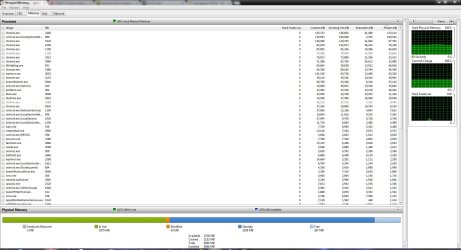
Still don't know how to fix my problem
 

My Computer

Computer type
PC/Desktop
OS
Windows 7 Ultimate 64bit
CPU
Intel Core 2 Duo E7300, 2666 MHz
Motherboard
Gigabyte GA-EP45-DS3R
Memory
Kingston HyperX 4096 MB (DDR2-667 DDR2 SDRAM
Graphics Card(s)
ATI Radeon HD 4850
Sound Card
ATI Radeon HDMI @ ATI RV770
Monitor(s) Displays
Samsung 22"
Screen Resolution
1680x1050
Hard Drives
ST31000340AS ATA Device (1000 GB, 7200 RPM, SATA-II)
Case
Thermaltake Bach VX
Internet Speed
300/30mbps
Antivirus
Avira Free
Browser
Chrome
post a resource monitor screenshot of ram usage. like stated above
 

My Computer

Computer type
PC/Desktop
Computer Manufacturer/Model Number
Custom Built
OS
Windows 10 Pro
CPU
AMD Ryzen 5 2400G Processor with Radeon RX Vega 11 Graphics
Motherboard
ASRock X470 Master SLI/AC AM4 AMD Promontory X470 SATA 6Gb/s
Memory
G.SKILL Ripjaws V Series 16GB (2 x 8GB) 288-Pin DDR4 SDRAM D
Graphics Card(s)
2047MB NVIDIA GeForce GTX 1060 6GB (EVGA)
Sound Card
Motherboard Built in
Monitor(s) Displays
Acer R240HY bidx 23.8-Inch IPS HDMI DVI VGA (1920 x 1080) Wi
Screen Resolution
1920 x 1080
Hard Drives
1TB Sandisk SSD PLUS (Main drive)
500 GB Seagate 7200 RPM (Games)
500 GB Western Digital 7200 RPM (Virtual Machines)
PSU
CORSAIR TX Series TX650M 650W 80+ Gold Modular Power Supply
Case
CORSAIR CARBIDE SPEC-02 Mid-Tower Gaming Case, Red LED Fan
Cooling
220mm, two 120mm, and four 60mm fans
Keyboard
Wired Dell keyboard
Mouse
Wireless Logitech mouse
Internet Speed
250mb down, 30mb up
Antivirus
Panda Cloud Antivirus
Browser
Chrome-ish x64
Other Info
Your awesome for reading this.
You're running Chrome which will hog RAM resources. The CCC (Catalyst Control Center) is a very big hog as well and not really needed, you can use w7 tools for display adjustments.
Your system has been up for more than 12 hours in the snip, reboot and see what you get.

Type msconfig in the start search and tap enter. In the Startup tab, uncheck everything except your Anit Virus and firewall, reboot and test.
 

My Computer

Computer type
PC/Desktop
Computer Manufacturer/Model Number
Home Built Desktop By DataTech
OS
Windows 7 Ultimate X64 SP1
CPU
Intel i5-2550K, Differing ~4.4-4.8GHz No built in GPU
Motherboard
ASUS P8Z68-V PRO/GEN3
Memory
16GB G.Skill Sniper 1866MHz @ 2133MHz 2x8GB
Graphics Card(s)
ASUS GTX650TIB-DC2OC-2GD5, (650TI Boost)
Sound Card
Onboard Realtek 5-1
Monitor(s) Displays
Samsung P2570HD
Screen Resolution
1920x1080
Hard Drives
Samsung 840 Pro 256GB SSD for OS, 500GB Seagate Constellation (Enterprise drive) for Data
PSU
Corsair HX650W
Case
Inwin Dragon Rider
Cooling
Hyper 212 EVO w/two Noctua fans, push-pull, @1300 RPM
Keyboard
E-Z Eyes, bright yellow keys with large characters
Mouse
steelseries SENSEI Laser Pro Gaming
Internet Speed
48-51Mbs Mbs down, 11 Mbs up Xfinity Cable
Antivirus
Norton Internet Security 2013
Browser
IE 10, Opera, Pale Moon if needed
Other Info
4 case fans, LG BluRay-RE, ASUS DVD-RW, Mr. Fusion power supply, 1.21 gigawatts.
Good catches, Gary. I strongly agree with all.

Servilo Service is also suspect. Never install streaming software which is really spyware in disguise, and can be as pernicious as porn players. Anything that's legit should play in the browser, on Windows Media Player or VLC open-source player. This is an example of sneakware that gets in during torrenting which can also lace files with malware and spyware.

So I would run not only a full Malwarebytes scan but also full SUPERAntiSpyware
scan to root out any of this crap lodged in registry. Check your browser for add-ons allowing none but Flash and Reader. I do not use Chrome because it's pernicious spyware and too heavy on resources. Firefox is the opposite.

If it doesn't settle down after everything but AV is unchecked in msconfig>Startup and >Services (after Hiding All MS Services) then I'd swap out Avast for MSE to see the difference. Avast has bloated up to where it is no longer co-recommended here with MSE.
 
Last edited:
Sorry, I may have started this by asking for the resource monitor when it was already in the first post.

321478d1402607243t-high-ram-usage-don-t-know-why-2.jpg
 

My Computer

Computer type
PC/Desktop
Computer Manufacturer/Model Number
Self Built
OS
Win 10 Pro x64
CPU
Intel I5-2500K @3.3GHz
Motherboard
Asrock P67 Extreme4
Memory
16GB G.Skill Ripjaws X (4x4GB)
Graphics Card(s)
EVGA GeForce 750 Ti SC 2GB
Sound Card
ASUS Xonar DG 5.1 Channels 24-bit 96KHz PCI Interface Sound
Monitor(s) Displays
auria eq2367
Screen Resolution
1920 x 1080
Hard Drives
250GB Samsung 850 EVO SSD
1TB WD Blue
1TB Hitachi
PSU
SeaSonic X 650W 80 Plus Gold
Case
Corsair Obsidian 750D
Cooling
Corsair H60, Three 140mm case fans
Keyboard
Logitech Wireless Keyboard K520
Mouse
Logitech Wireless Mouse M310
Internet Speed
Wave Broadband ~ 100 dn 5 up
Antivirus
Windows Defender, Malwarebytes Premium
Browser
Edge, IE11, Chrome
Other Info
Laptop specs: HP g7-1365dx /
CPU: AMD A6-3420M APU with Radeon(tm) HD Graphics /
RAM: Crucial 8Gb (2x4Gb) /
SSD: Crucial M4-CT128M4SSD2 ATA Device/ FW 000F /
GFX: AMD Radeon HD 6520G /
OS: Windows 10 Pro x64
Can you read that type? I can't, even if I increase size or magnify. Only thing readable here is Processes.
 
If I enlarge the original in the first post it's a little easier, I still don't see any obvious reason it's using that much RAM.

I know Chrome is a hog but I'm still not using half my RAM,
 

Attachments

  • my resource.JPG
    my resource.JPG
    180.1 KB · Views: 3

My Computer

Computer type
PC/Desktop
Computer Manufacturer/Model Number
Self Built
OS
Win 10 Pro x64
CPU
Intel I5-2500K @3.3GHz
Motherboard
Asrock P67 Extreme4
Memory
16GB G.Skill Ripjaws X (4x4GB)
Graphics Card(s)
EVGA GeForce 750 Ti SC 2GB
Sound Card
ASUS Xonar DG 5.1 Channels 24-bit 96KHz PCI Interface Sound
Monitor(s) Displays
auria eq2367
Screen Resolution
1920 x 1080
Hard Drives
250GB Samsung 850 EVO SSD
1TB WD Blue
1TB Hitachi
PSU
SeaSonic X 650W 80 Plus Gold
Case
Corsair Obsidian 750D
Cooling
Corsair H60, Three 140mm case fans
Keyboard
Logitech Wireless Keyboard K520
Mouse
Logitech Wireless Mouse M310
Internet Speed
Wave Broadband ~ 100 dn 5 up
Antivirus
Windows Defender, Malwarebytes Premium
Browser
Edge, IE11, Chrome
Other Info
Laptop specs: HP g7-1365dx /
CPU: AMD A6-3420M APU with Radeon(tm) HD Graphics /
RAM: Crucial 8Gb (2x4Gb) /
SSD: Crucial M4-CT128M4SSD2 ATA Device/ FW 000F /
GFX: AMD Radeon HD 6520G /
OS: Windows 10 Pro x64
Could be system instability caused by infection or damaged System files causing monitor to misreport. If he's running utorrent streaming then he's been at their mercy to put anything they want on his system.
 
One thing i would try if you can is to up the amount of ram in your system as doing that will help quite a bit. Also completely exit and stop all processes for utorrent as that is showing up as using the biggest amount of ram.
 

My Computer

Computer type
PC/Desktop
Computer Manufacturer/Model Number
custom built
OS
Windows 7 ultimate 64-bit
CPU
Intel I7 2600K 3.4ghz
Motherboard
Asus Evo P8P67
Memory
Corsair 16gb ddr3 1600mhz
Graphics Card(s)
Nvidia Geforce gt 430
Sound Card
Sound Blaster Titanium x-fi pci express
Monitor(s) Displays
Dell E198WFP
Hard Drives
1 western digital 2TB drive.
PSU
Antec 1200 watt
Case
Inwin Dragon Rider
Cooling
6 case supplied cooling fans
Keyboard
logitech mk700
Mouse
logitech m705
Internet Speed
25-50mbps download; 10mbps upload(i think)
Antivirus
avg free 2014
Browser
mozilla firefox
Other Info
Also have a pretty bad speaker setup which is a klipsch promedia 5.1 surround speaker setup with huge subwoofer and lg blu ray player/writer. Also a hp officejet pro 8600 plus wireless all in one and a logitech s7500 webcam.
Back
Top