High RAM usage

Firefighter

New member
Member
Local time
2:37 AM
Messages
29
Hello I'm new to this forum and I joined because I wanna ask this question

Windows 7 is using 1.7 GB of my ram (2.0 Installed) and is that normal?

Thanks
 

My Computer

Computer Manufacturer/Model Number
ThinkPad x61, ThinkPad T420i, ThinkPad Edge E430, ThinkPad x230t
OS
Windows 7 Professional 64Bit
CPU
Intel Core i7 3612QM (2.1Ghz)
Memory
4GB DDR3 1600
Graphics Card(s)
nVidia GT 630M
Sound Card
Dolby Home Theater V4
Monitor(s) Displays
LG 72' 3D Smart TV/ Thinkpad 1366x768
Screen Resolution
1920x1080/1366x768
Hard Drives
1 TB Hitachi/320GB Hitachi 7200 RPM
Internet Speed
1000MB Fibre
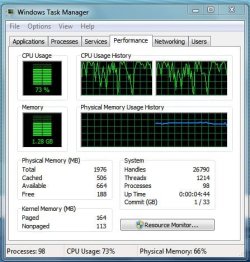
I use 1.2 GB at idle. Give us a shot of task manager, and we can tell if it looks ok.
 

My Computer

Computer type
PC/Desktop
Computer Manufacturer/Model Number
Dell XPS 420
OS
Windows 10, Home Clean Install
CPU
Intel Core2 processsor Q8200(2.33Ghz 1333FSB) Quad Core Tech
Motherboard
Dell
Memory
6 gb
Graphics Card(s)
ATI Radeon 256MB HD3650
Sound Card
Intergrated 7.1 Channel Audio
Monitor(s) Displays
Dell SP2009W 20"
Hard Drives
640 GB Serial ATA Hard drive
Cooling
Fan
Keyboard
Dell USB Keyboard
Mouse
Dell Premium Optical USB
Internet Speed
DSL 2.85
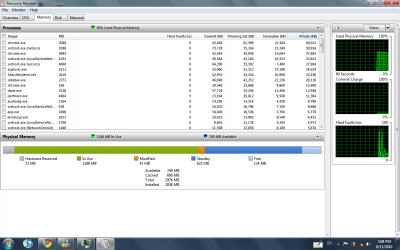
With 2GBs total, that is slightly high. I also have 1.7GBs used at time, but with 4GBs total. In addition of what Richard suggests you should also look at Resource Monitor > Memory tab. A snip of the color bar would be useful. There may be a big chunk used by the hardware.
 

My Computer

Computer Manufacturer/Model Number
HP, Dell, Gateway, Toshiba - 4 laptops and 2 desktops
OS
Vista, Windows7, Mint Mate, Zorin, Windows 8
CPU
from 1.6GHz Duo to i7
Monitor(s) Displays
2x HP w2207
Hard Drives
5x HDD, 7x SSD, 12x Externals
Keyboard
with trackball - no mices
Mouse
Trackball mice
Internet Speed
DSL 6000
fwiw, unused RAM is wasted RAM.
 

My Computer

Computer Manufacturer/Model Number
HAL-9000
OS
Windows 7 Ultimate 64bit
CPU
Intel i7 3770K
Motherboard
Asus Sabertooth Z77
Memory
16GB DDR3 1333 Corsair XMS3
Graphics Card(s)
XFX HD6950 2GB EyeFinity
Sound Card
Logitech G35 & Sennheiser PC135 & VIA HD
Monitor(s) Displays
23" HP 2310e, 23" Samsung B2230, 21.5" Viewsonic
Screen Resolution
5760x1080
Hard Drives
16TB of Storage
128GB & 256GB Crucial M4 SSD's, 2X 1TB WD Black, 3x 2TB WD, 3x 2TB Samsung F4, 1.5TB Seagate, WD 500GB,
PSU
Antec True Power New 650watt
Case
Cooler Master HAF-932
Cooling
Corsair H60 Hydro Cooler, 3x 230mm Fans, 2x120mm Fan
Keyboard
Logitech G15 and G13
Mouse
Logitech G700 Gaming Mouse
Internet Speed
50/10 Mbit
Other Info
Speakers : Alesis M1 Active Mk2 Studio Monitors , APC RS 1200 UPS, HP 4500DN Color Laser, HP P1006 mono Laser, Kodak 8500 Dye-Sub, Epson 1280 inkjet, Epson Worforce 610 MFC
Guys want to know what should be an ideal RAM usage when no external program/application is being run like word,music player,video player etc....on an avg. my RAM usage is 35-40% while being on the network but it shoots upto 65-70% when use couple of application like watching movie & downloading from net...i did took the Op.Events log as well....i'm attaching please check & let me know bcz there were some problems listed which i couldn't understand....
 

My Computer

Computer Manufacturer/Model Number
Acer Aspire 4530
OS
windows 7 Ultimate x86
CPU
AMD Athlon x2 QL60 1900Mhz 1 MB L2 cache
Motherboard
Acer Grasmoor
Memory
2GB DDR2
Graphics Card(s)
nVidia GeForce 9100M G
Sound Card
Onboard
Monitor(s) Displays
14.1"
Screen Resolution
1280*800
Hard Drives
160 GB
PSU
Onboard
Case
Onboard
Cooling
Onboard
Keyboard
Standard laptop keyboard
Mouse
Touchpad & external iball usb mouse
Internet Speed
its slower then SNAIL
Here is the Op.Events log

Level Date & Time Source Id Task category
Warning 02-05-2010 05:22:13 Diagnostics-Performance 201 Shutdown Performance Monitoring
Warning 02-05-2010 05:22:13 Diagnostics-Performance 200 Shutdown Performance Monitoring
Warning 01-05-2010 04:16:06 Diagnostics-Performance 100 Boot Performance Monitoring
Warning 01-05-2010 04:16:06 Diagnostics-Performance 203 Shutdown Performance Monitoring
Error 01-05-2010 04:16:06 Diagnostics-Performance 203 Shutdown Performance Monitoring
Warning 01-05-2010 04:16:06 Diagnostics-Performance 201 Shutdown Performance Monitoring
Warning 01-05-2010 04:16:06 Diagnostics-Performance 200 Shutdown Performance Monitoring
Warning 30-04-2010 23:38:18 Diagnostics-Performance 107 Boot Performance Monitoring
Error 30-04-2010 23:38:18 Diagnostics-Performance 101 Boot Performance Monitoring
Error 30-04-2010 23:38:18 Diagnostics-Performance 100 Boot Performance Monitoring
Warning 30-04-2010 23:38:18 Diagnostics-Performance 200 Shutdown Performance Monitoring
Warning 30-04-2010 18:50:18 Diagnostics-Performance 110 Boot Performance Monitoring
Error 30-04-2010 18:50:18 Diagnostics-Performance 106 Boot Performance Monitoring
Warning 30-04-2010 18:50:18 Diagnostics-Performance 101 Boot Performance Monitoring
Error 30-04-2010 18:50:18 Diagnostics-Performance 100 Boot Performance Monitoring
Warning 30-04-2010 18:50:18 Diagnostics-Performance 200 Shutdown Performance Monitoring
Warning 30-04-2010 11:05:43 Diagnostics-Performance 110 Boot Performance Monitoring
Warning 30-04-2010 11:05:43 Diagnostics-Performance 107 Boot Performance Monitoring
Critical 30-04-2010 11:05:43 Diagnostics-Performance 106 Boot Performance Monitoring
Warning 30-04-2010 11:05:43 Diagnostics-Performance 103 Boot Performance Monitoring
Warning 30-04-2010 11:05:43 Diagnostics-Performance 100 Boot Performance Monitoring
 

My Computer

Computer Manufacturer/Model Number
Acer Aspire 4530
OS
windows 7 Ultimate x86
CPU
AMD Athlon x2 QL60 1900Mhz 1 MB L2 cache
Motherboard
Acer Grasmoor
Memory
2GB DDR2
Graphics Card(s)
nVidia GeForce 9100M G
Sound Card
Onboard
Monitor(s) Displays
14.1"
Screen Resolution
1280*800
Hard Drives
160 GB
PSU
Onboard
Case
Onboard
Cooling
Onboard
Keyboard
Standard laptop keyboard
Mouse
Touchpad & external iball usb mouse
Internet Speed
its slower then SNAIL
ok ill post another Screenshot tomorrow cuz Im using my other laptop. (lenovo thinkpad X61)
 

My Computer

Computer Manufacturer/Model Number
ThinkPad x61, ThinkPad T420i, ThinkPad Edge E430, ThinkPad x230t
OS
Windows 7 Professional 64Bit
CPU
Intel Core i7 3612QM (2.1Ghz)
Memory
4GB DDR3 1600
Graphics Card(s)
nVidia GT 630M
Sound Card
Dolby Home Theater V4
Monitor(s) Displays
LG 72' 3D Smart TV/ Thinkpad 1366x768
Screen Resolution
1920x1080/1366x768
Hard Drives
1 TB Hitachi/320GB Hitachi 7200 RPM
Internet Speed
1000MB Fibre
Double-post somehow. Oops!
 

My Computer

Computer type
PC/Desktop
Computer Manufacturer/Model Number
Custom
OS
Windows 10 Pro x64
CPU
Intel Core i7 4790K @ 4.5GHz
Motherboard
Asus Maximus Hero VII
Memory
32GB DDR3
Graphics Card(s)
Nvidia GeForce GTX970
Sound Card
Realtek HD Audio
Screen Resolution
1920x1200
Hard Drives
1x Samsung 250GB SSD
4x WD RE 2TB (RAIDZ)
PSU
Corsair AX760i
Case
Fractal Design Define R4
Cooling
Noctua NH-D15
Yes, both a task manager (performance tab) and resmon (memory tab) screenshot would be quite helpful.
 

My Computer

Computer type
PC/Desktop
Computer Manufacturer/Model Number
Custom
OS
Windows 10 Pro x64
CPU
Intel Core i7 4790K @ 4.5GHz
Motherboard
Asus Maximus Hero VII
Memory
32GB DDR3
Graphics Card(s)
Nvidia GeForce GTX970
Sound Card
Realtek HD Audio
Screen Resolution
1920x1200
Hard Drives
1x Samsung 250GB SSD
4x WD RE 2TB (RAIDZ)
PSU
Corsair AX760i
Case
Fractal Design Define R4
Cooling
Noctua NH-D15
Is it the faster the ram stick you have, the lesser the ram usage? Because my friend's computer he has 4 GB of fast ddr2 (don't know the name and model) use less than 1 GB of ram after he starts up. And for me, my pc has 8 GB of DDR2 (slow ram) and my pc uses mor than 1 GB of ram at start up and we both have similar programs at start-up.
 

My Computer

Computer type
PC/Desktop
Computer Manufacturer/Model Number
Acer M802
OS
Win 7 & 10 x64
CPU
Intel(R) Core(TM)2 Quad CPU Q8400 @ 2.66GHz (4 CPUs), ~2.7GH
Motherboard
MB.SCQ07.002 MB KIT G43 ICH10R HMII EUPLOT6 ECS R
Memory
8GB DDR2
Graphics Card(s)
HD 6970 2 GB
Sound Card
Realtek ALC 888s
Monitor(s) Displays
AOC
Screen Resolution
1920x1080 60hz
Hard Drives
WD Black 1 TB

WD My Book Essential 1 TB external HDD
PSU
Corsair TX650m
Case
CM 690 II Advanced mid tower
Cooling
fan
Not really, no - the more RAM you have (and the smaller the paging file), the more RAM windows will use and cache data into. Having Windows use more RAM (especially for caching) is actually a good thing, not a bad thing.
 

My Computer

Computer type
PC/Desktop
Computer Manufacturer/Model Number
Custom
OS
Windows 10 Pro x64
CPU
Intel Core i7 4790K @ 4.5GHz
Motherboard
Asus Maximus Hero VII
Memory
32GB DDR3
Graphics Card(s)
Nvidia GeForce GTX970
Sound Card
Realtek HD Audio
Screen Resolution
1920x1200
Hard Drives
1x Samsung 250GB SSD
4x WD RE 2TB (RAIDZ)
PSU
Corsair AX760i
Case
Fractal Design Define R4
Cooling
Noctua NH-D15
The speed of your RAM has nothing to do with how much RAM is used. Sometimes, a portion of your RAM is utilized for your video card...so that will show in use. In addition, things you have installed and are starting at boot time will eat some of the RAM. Your choice of applications like AV and such have an effect. Also, 64bit code takes more space.

What is important is how much ram you have available...not free. Windows 7 will load things proactively to the RAM from the hard drive and this gives you much faster access when you launch these apps. These apps are cached...and that RAM can be used for other things the instant it's needed. So, while this RAM isn't technically "free", for all intents and purposes it is.

I'd say with a shared video card potential that 1.7GB used seems reasonable.
 

My Computer

Computer Manufacturer/Model Number
Self-Built in July 2009
OS
Windows 7 Ultimate x64
CPU
Intel Q9550 2.83Ghz OC'd to 3.40Ghz
Motherboard
Gigabyte GA-EP45-UD3R rev. 1.1, F12 BIOS
Memory
8GB G.Skill PI DDR2-800, 4-4-4-12 timings
Graphics Card(s)
EVGA 1280MB Nvidia GeForce GTX570
Sound Card
Realtek ALC899A 8 channel onboard audio
Monitor(s) Displays
23" Acer x233H
Screen Resolution
1920x1080
Hard Drives
Intel X25-M 80GB Gen 2 SSD
Western Digital 1TB Caviar Black, 32MB cache. WD1001FALS
PSU
Corsair 620HX modular
Case
Antec P182
Cooling
stock
Keyboard
ABS M1 Mechanical
Mouse
Logitech G9 Laser Mouse
Internet Speed
15/2 cable modem
Other Info
Windows and Linux enthusiast. Logitech G35 Headset.
here are the photos
 

Attachments

  • Task Manager.JPG
    Task Manager.JPG
    49.7 KB · Views: 19
  • image001.png
    image001.png
    49.5 KB · Views: 32

My Computer

Computer Manufacturer/Model Number
ThinkPad x61, ThinkPad T420i, ThinkPad Edge E430, ThinkPad x230t
OS
Windows 7 Professional 64Bit
CPU
Intel Core i7 3612QM (2.1Ghz)
Memory
4GB DDR3 1600
Graphics Card(s)
nVidia GT 630M
Sound Card
Dolby Home Theater V4
Monitor(s) Displays
LG 72' 3D Smart TV/ Thinkpad 1366x768
Screen Resolution
1920x1080/1366x768
Hard Drives
1 TB Hitachi/320GB Hitachi 7200 RPM
Internet Speed
1000MB Fibre
uhh it sortta went down but it is still very high right?
 

My Computer

Computer Manufacturer/Model Number
ThinkPad x61, ThinkPad T420i, ThinkPad Edge E430, ThinkPad x230t
OS
Windows 7 Professional 64Bit
CPU
Intel Core i7 3612QM (2.1Ghz)
Memory
4GB DDR3 1600
Graphics Card(s)
nVidia GT 630M
Sound Card
Dolby Home Theater V4
Monitor(s) Displays
LG 72' 3D Smart TV/ Thinkpad 1366x768
Screen Resolution
1920x1080/1366x768
Hard Drives
1 TB Hitachi/320GB Hitachi 7200 RPM
Internet Speed
1000MB Fibre
Well...it appears your computer is processing stuff so obviously the RAM usage is justified. According to your screenshots
 

My Computer

Computer type
PC/Desktop
Computer Manufacturer/Model Number
Alienware Aurora ALX R4
OS
Windows 10 Pro (x64)
CPU
Intel Core i7-3930K (3.2GHz - 4.5GHz)
Motherboard
Alienware Aurora-R4 x79
Memory
4x Samsung 4GB PC3-12800 DDR3 (16GB 1600MHz)
Graphics Card(s)
Nvidia Geforce GTX 690
Sound Card
SteelSeries Siberia Elite
Monitor(s) Displays
Dell UltraSharp U3011
Screen Resolution
2560x1600
Hard Drives
Samsung 850 Pro 256 GB, Seagate 1TB Desktop Hybrid HDD, 2x Western Digital 4TB Green HDD
PSU
875W Some Dell PSU <.<
Case
Alienware Aurora ALX
Cooling
Custom Liquid Cooling (EK CPU & GPU blocks) dual EK 480RAD
Keyboard
Logitech G710+ Mechanical
Mouse
Logitech G700s
Internet Speed
Verizon Fios (50 mbps average)
Other Info
Server: Intel NUC D54250WYK: i5-4250U, 16GB, 256 GB mSATA, Windows Server 2012 R2
Your RAM usage looks normal. The CPU nums are a little high, but that depends on what you were running at the time. My CPU gets only up that high when I do video editing - but then it is a quad core.
 

My Computer

Computer Manufacturer/Model Number
HP, Dell, Gateway, Toshiba - 4 laptops and 2 desktops
OS
Vista, Windows7, Mint Mate, Zorin, Windows 8
CPU
from 1.6GHz Duo to i7
Monitor(s) Displays
2x HP w2207
Hard Drives
5x HDD, 7x SSD, 12x Externals
Keyboard
with trackball - no mices
Mouse
Trackball mice
Internet Speed
DSL 6000
+1 for looks normal - your system is doing something (and looks like it has been for a bit, given those CPU graphs), so I expect you're gonna see RAM usage increase. I'm with whs - what is the system doing at the time?
 

My Computer

Computer type
PC/Desktop
Computer Manufacturer/Model Number
Custom
OS
Windows 10 Pro x64
CPU
Intel Core i7 4790K @ 4.5GHz
Motherboard
Asus Maximus Hero VII
Memory
32GB DDR3
Graphics Card(s)
Nvidia GeForce GTX970
Sound Card
Realtek HD Audio
Screen Resolution
1920x1200
Hard Drives
1x Samsung 250GB SSD
4x WD RE 2TB (RAIDZ)
PSU
Corsair AX760i
Case
Fractal Design Define R4
Cooling
Noctua NH-D15
That looks very similar to my computer's ram usage at start up, but it's around 1.72 GB
 

My Computer

Computer type
PC/Desktop
Computer Manufacturer/Model Number
Acer M802
OS
Win 7 & 10 x64
CPU
Intel(R) Core(TM)2 Quad CPU Q8400 @ 2.66GHz (4 CPUs), ~2.7GH
Motherboard
MB.SCQ07.002 MB KIT G43 ICH10R HMII EUPLOT6 ECS R
Memory
8GB DDR2
Graphics Card(s)
HD 6970 2 GB
Sound Card
Realtek ALC 888s
Monitor(s) Displays
AOC
Screen Resolution
1920x1080 60hz
Hard Drives
WD Black 1 TB

WD My Book Essential 1 TB external HDD
PSU
Corsair TX650m
Case
CM 690 II Advanced mid tower
Cooling
fan
Also worth noting that almost 45% of that "used" RAM is actually just cache - it can actually be made available if a running application needed it.
 

My Computer

Computer type
PC/Desktop
Computer Manufacturer/Model Number
Custom
OS
Windows 10 Pro x64
CPU
Intel Core i7 4790K @ 4.5GHz
Motherboard
Asus Maximus Hero VII
Memory
32GB DDR3
Graphics Card(s)
Nvidia GeForce GTX970
Sound Card
Realtek HD Audio
Screen Resolution
1920x1200
Hard Drives
1x Samsung 250GB SSD
4x WD RE 2TB (RAIDZ)
PSU
Corsair AX760i
Case
Fractal Design Define R4
Cooling
Noctua NH-D15
At that time, I just opened google chrome 2 Tabs and nothing else
 

My Computer

Computer Manufacturer/Model Number
ThinkPad x61, ThinkPad T420i, ThinkPad Edge E430, ThinkPad x230t
OS
Windows 7 Professional 64Bit
CPU
Intel Core i7 3612QM (2.1Ghz)
Memory
4GB DDR3 1600
Graphics Card(s)
nVidia GT 630M
Sound Card
Dolby Home Theater V4
Monitor(s) Displays
LG 72' 3D Smart TV/ Thinkpad 1366x768
Screen Resolution
1920x1080/1366x768
Hard Drives
1 TB Hitachi/320GB Hitachi 7200 RPM
Internet Speed
1000MB Fibre
Back
Top