Solved History tab missing

magnolia44

New member
Local time
6:08 PM
Messages
5
Location
Iowa
Our desktop computer is missing the Feeds and History tabs from the Favorites folder. We found History on the upper right of the screen, the gold star, but that does not divide history into days and weeks. How did it happen? Can I get them back? My laptop does have the 3 tabs in the Favorites folder, and I'm using Windows 7 on both.
 

My Computer My Computer

At a glance

Windows 7 Home Premium 64 bitIntel Core i5 CPU and Intel Core Duo CPU4.00 GB and 3.00 GBIntel
Computer Manufacturer/Model Number
Acer Veriton M498G and Dell laptop - Studio 1745
OS
Windows 7 Home Premium 64 bit
CPU
Intel Core i5 CPU and Intel Core Duo CPU
Memory
4.00 GB and 3.00 GB
Graphics Card(s)
Intel
Sound Card
ADM High Def.
Hello Magnolia, welcome to SF!

we'd like to help but you give us little to go on...
Can you be as complete as possible by giving us:
1. Browser name and version
2. Maybe upload a snip of an example?

We'll get back to you as soon as possible..

An example snip:

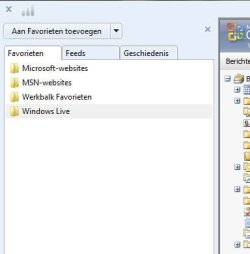
favorite.JPG

Is this what you mean?
 

My Computer My Computer

At a glance

Windows 7 64b UltimateI7-2600 3.40GHz - testing various OC levels..2x 4Gb DDR3/1333GTX570 - testing OC levels
Computer Manufacturer/Model Number
custom build
OS
Windows 7 64b Ultimate
CPU
I7-2600 3.40GHz - testing various OC levels..
Motherboard
ASUS Sabretooth
Memory
2x 4Gb DDR3/1333
Graphics Card(s)
GTX570 - testing OC levels
Sound Card
motherboard 7.1 DIG.
Monitor(s) Displays
2x Ilyama 24" E2409HDS-B1 2ms/DVI
Screen Resolution
1920 x 1080
Hard Drives
120 GB Intel Elmcrest SSD
1 TB SATAII 7200RPM/32MB
External 2TB USB3
PSU
Corsair Pro HX850W
Cooling
Coolermaster Hyper V8
Keyboard
Logitech G110
Mouse
Logitech G700
Internet Speed
25Mb
Other Info
CPU: 7,7 RAM: 7,7 GTX: 7,9 GTX 3D : 7,9 SSD 7,6
Overall 7,6 ...... now to speed up the SSD... ;)

Also use a Dell XPS M1710 on Vista 32b
Asus LT on Vista 32
3 older machines still doing fine on Linux/ubuntu but not used much anymore...
Our desktop computer is missing the Feeds and History tabs from the Favorites folder. We found History on the upper right of the screen, the gold star, but that does not divide history into days and weeks. How did it happen? Can I get them back? My laptop does have the 3 tabs in the Favorites folder, and I'm using Windows 7 on both.


No guarantees.Try this.....

Close Internet Explorer
Open the command prompt and type ... regsvr32 oleacc.dll > Press Enter
Do you see ...DLLRegisterServer in oleacc.dll Succeeded .... on the screen ?

If yes, close cmd window.
Try your Favorites button again.

Editing from my initial reply.....

Command prompt :
Start >search box, type cmd > top left corner, right click at cmd.exe > click Run as Administrator > at the flashing prompt, copy/paste the command line I gave you.....
 

My Computer My Computer

At a glance

Windows 7 Home Premium 64-bit, SP1Intel Pentium P6200, Cores 2, 2.13 GHz4 GBIntel HD
Computer Manufacturer/Model Number
Acer Aspire 7741Z
OS
Windows 7 Home Premium 64-bit, SP1
CPU
Intel Pentium P6200, Cores 2, 2.13 GHz
Memory
4 GB
Graphics Card(s)
Intel HD
Sound Card
unknown
Monitor(s) Displays
17.3 inches
Screen Resolution
1600 x 900
Hard Drives
640 GB, 5400 PRM
On the desktop we use Windows Explorer, newer version, but I don't see a number anywhere.

I tried your suggestion with the register server and got a message "module.... was loaded but the call to Dll Register Server failed with error code Ox8002807c"

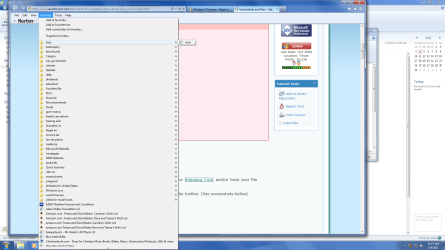
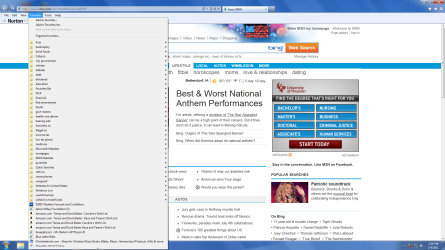
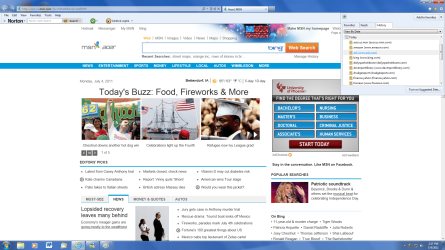
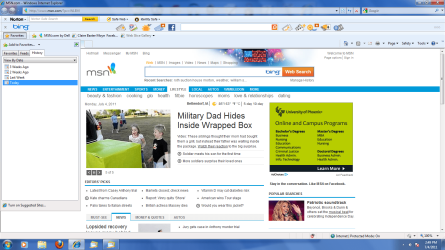
Here is the screen shot. On the left when I clicked Favorites we used to get 3 tabs - Favorites, Feeds and History. The History was divided by Today, Yesterday, Last week, etc. It was easy to find things.

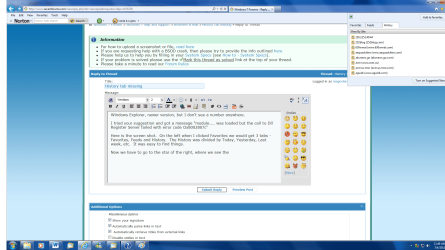
Now we have to go to the star on the right, where we see the star, and the 3 tabs. But History is not divided by date, etc. It's just a long list. On my laptop the 3 tabs are under Favorites on the right of the screen.

Is more clarification needed?

Thanks for any help you can give.
 

Attachments

  • Favorites.png
    Favorites.png
    116.5 KB · Views: 21
  • Screen shot 2.png
    Screen shot 2.png
    122.7 KB · Views: 18

My Computer My Computer

At a glance

Windows 7 Home Premium 64 bitIntel Core i5 CPU and Intel Core Duo CPU4.00 GB and 3.00 GBIntel
Computer Manufacturer/Model Number
Acer Veriton M498G and Dell laptop - Studio 1745
OS
Windows 7 Home Premium 64 bit
CPU
Intel Core i5 CPU and Intel Core Duo CPU
Memory
4.00 GB and 3.00 GB
Graphics Card(s)
Intel
Sound Card
ADM High Def.
Looks like two different IE versions to me... are you sure its the same version? The one on the right looks like IE 9, the other older...but , what happens if you press the same star on the one on the left....
 

My Computer My Computer

At a glance

Windows 7 64b UltimateI7-2600 3.40GHz - testing various OC levels..2x 4Gb DDR3/1333GTX570 - testing OC levels
Computer Manufacturer/Model Number
custom build
OS
Windows 7 64b Ultimate
CPU
I7-2600 3.40GHz - testing various OC levels..
Motherboard
ASUS Sabretooth
Memory
2x 4Gb DDR3/1333
Graphics Card(s)
GTX570 - testing OC levels
Sound Card
motherboard 7.1 DIG.
Monitor(s) Displays
2x Ilyama 24" E2409HDS-B1 2ms/DVI
Screen Resolution
1920 x 1080
Hard Drives
120 GB Intel Elmcrest SSD
1 TB SATAII 7200RPM/32MB
External 2TB USB3
PSU
Corsair Pro HX850W
Cooling
Coolermaster Hyper V8
Keyboard
Logitech G110
Mouse
Logitech G700
Internet Speed
25Mb
Other Info
CPU: 7,7 RAM: 7,7 GTX: 7,9 GTX 3D : 7,9 SSD 7,6
Overall 7,6 ...... now to speed up the SSD... ;)

Also use a Dell XPS M1710 on Vista 32b
Asus LT on Vista 32
3 older machines still doing fine on Linux/ubuntu but not used much anymore...
It's IE version 9. Two shots of same page. One shows Favorites on the left with the Feeds and History tabs missing. On the right, I did discover I could show History by date. So I changed it, and my husband will be happy.

That doesn't explain why the 2 tabs are missing on the left under Favorites, though. The 3 tabs are there on the left under Favorites on my laptop.
 

Attachments

  • Screen shot 1.png
    Screen shot 1.png
    160.9 KB · Views: 15
  • Screen shot 2.png
    Screen shot 2.png
    247.1 KB · Views: 14

My Computer My Computer

At a glance

Windows 7 Home Premium 64 bitIntel Core i5 CPU and Intel Core Duo CPU4.00 GB and 3.00 GBIntel
Computer Manufacturer/Model Number
Acer Veriton M498G and Dell laptop - Studio 1745
OS
Windows 7 Home Premium 64 bit
CPU
Intel Core i5 CPU and Intel Core Duo CPU
Memory
4.00 GB and 3.00 GB
Graphics Card(s)
Intel
Sound Card
ADM High Def.
Ok that's good... At least you've got it working one way... To see if I understand correctly could you show me the example of what you mean on your laptop?
 

My Computer My Computer

At a glance

Windows 7 64b UltimateI7-2600 3.40GHz - testing various OC levels..2x 4Gb DDR3/1333GTX570 - testing OC levels
Computer Manufacturer/Model Number
custom build
OS
Windows 7 64b Ultimate
CPU
I7-2600 3.40GHz - testing various OC levels..
Motherboard
ASUS Sabretooth
Memory
2x 4Gb DDR3/1333
Graphics Card(s)
GTX570 - testing OC levels
Sound Card
motherboard 7.1 DIG.
Monitor(s) Displays
2x Ilyama 24" E2409HDS-B1 2ms/DVI
Screen Resolution
1920 x 1080
Hard Drives
120 GB Intel Elmcrest SSD
1 TB SATAII 7200RPM/32MB
External 2TB USB3
PSU
Corsair Pro HX850W
Cooling
Coolermaster Hyper V8
Keyboard
Logitech G110
Mouse
Logitech G700
Internet Speed
25Mb
Other Info
CPU: 7,7 RAM: 7,7 GTX: 7,9 GTX 3D : 7,9 SSD 7,6
Overall 7,6 ...... now to speed up the SSD... ;)

Also use a Dell XPS M1710 on Vista 32b
Asus LT on Vista 32
3 older machines still doing fine on Linux/ubuntu but not used much anymore...
Here's the laptop screen shot. I don't see a star on the right side of the screen. Maybe this is a different version if IE. I couldn't find a number. I guess we're set, but I'm still curious about the difference.

Thanks.
 

Attachments

  • Laptop screen shot.png
    Laptop screen shot.png
    157.1 KB · Views: 26

My Computer My Computer

At a glance

Windows 7 Home Premium 64 bitIntel Core i5 CPU and Intel Core Duo CPU4.00 GB and 3.00 GBIntel
Computer Manufacturer/Model Number
Acer Veriton M498G and Dell laptop - Studio 1745
OS
Windows 7 Home Premium 64 bit
CPU
Intel Core i5 CPU and Intel Core Duo CPU
Memory
4.00 GB and 3.00 GB
Graphics Card(s)
Intel
Sound Card
ADM High Def.
Not necesarily a different version, just one with a toolbar on and the window of the favorites pasted left instead of right... But that's just a click on the little arrow pointing left on you husbands favorites screen....
 

My Computer My Computer

At a glance

Windows 7 64b UltimateI7-2600 3.40GHz - testing various OC levels..2x 4Gb DDR3/1333GTX570 - testing OC levels
Computer Manufacturer/Model Number
custom build
OS
Windows 7 64b Ultimate
CPU
I7-2600 3.40GHz - testing various OC levels..
Motherboard
ASUS Sabretooth
Memory
2x 4Gb DDR3/1333
Graphics Card(s)
GTX570 - testing OC levels
Sound Card
motherboard 7.1 DIG.
Monitor(s) Displays
2x Ilyama 24" E2409HDS-B1 2ms/DVI
Screen Resolution
1920 x 1080
Hard Drives
120 GB Intel Elmcrest SSD
1 TB SATAII 7200RPM/32MB
External 2TB USB3
PSU
Corsair Pro HX850W
Cooling
Coolermaster Hyper V8
Keyboard
Logitech G110
Mouse
Logitech G700
Internet Speed
25Mb
Other Info
CPU: 7,7 RAM: 7,7 GTX: 7,9 GTX 3D : 7,9 SSD 7,6
Overall 7,6 ...... now to speed up the SSD... ;)

Also use a Dell XPS M1710 on Vista 32b
Asus LT on Vista 32
3 older machines still doing fine on Linux/ubuntu but not used much anymore...
Thanks, again. I think I marked it as solved. :)
 

My Computer My Computer

At a glance

Windows 7 Home Premium 64 bitIntel Core i5 CPU and Intel Core Duo CPU4.00 GB and 3.00 GBIntel
Computer Manufacturer/Model Number
Acer Veriton M498G and Dell laptop - Studio 1745
OS
Windows 7 Home Premium 64 bit
CPU
Intel Core i5 CPU and Intel Core Duo CPU
Memory
4.00 GB and 3.00 GB
Graphics Card(s)
Intel
Sound Card
ADM High Def.
Back
Top