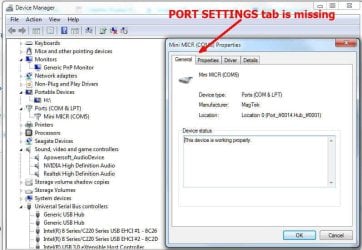
Port Settings Tab Missing

EddieC312

New member
Local time
4:45 PM
Messages
2
I am needing to change the COM Port for one of my printers from COM5 to COM4. However, when going to this port in Device Manager I am finding that the tab for PORT SETTINGS is missing. I would rather make this change in device manager rather than editing the registry. How do I get this tab back? OR, any other advice on how to make this change? See attached screen shot.
 

Attachments

My Computer

Computer type
PC/Desktop
Computer Manufacturer/Model Number
PowerSpec
OS
Windows 7 Professional SP1 64 bit
Memory
32GB
Hard Drives
500GB SSD
4TB Segate
Antivirus
Norton
Browser
Chrome
Try going into the control panel | Devices and Printers. Double click you device | chose the Hardware tab | double click the USB device | chose the port Settings tab and Advanced.

If you can't change it via Windows, then perhaps the option is in the printer software its self.

Question: why do you need to change the port? Usually Windows assigns them when there is availability.
 

My Computer

Computer type
PC/Desktop
OS
Windows 7 Ultimate x64
My problem is when I get to "choose port settings tab", this tab is not there (see attached file with screenshot). The device (that I've used successfully for years) is a MICR reader that I use for depositing checks into my company's bank account. Until now it's always been on COM4, but for some reason it changed to COM5. When trying to use I get an error message saying it's looking for COM4. The documentation for the device says it must run between COM1 and COM4. Any advice on how to get the Port Settings Tab back?
 

Attachments

  • Port-Settings.jpg
    Port-Settings.jpg
    64.8 KB · Views: 1

My Computer

Computer type
PC/Desktop
Computer Manufacturer/Model Number
PowerSpec
OS
Windows 7 Professional SP1 64 bit
Memory
32GB
Hard Drives
500GB SSD
4TB Segate
Antivirus
Norton
Browser
Chrome
Is it possible that the COM ports have been disabled in BIOS, since installation of the MICR reader?

Also, have you installed any other Hardware recently, that might be using the COM1-4 Interrupts? If you could unplug any unnecessary peripheral, then reboot the computer and see what happens, see if there is any difference.
 

My Computer

Computer type
PC/Desktop
OS
Windows 7 x64, Vista x64, 8.1 smartphone
CPU
Intel E8400 65W 64-bit
Motherboard
Gigabyte EP45-UD3LR
Memory
DDR2 2 x 2GB, 1GB x 2
Graphics Card(s)
XFX Radeon HD5750
Sound Card
AMD High Definition Audio; Realtek High Definition Audio
Monitor(s) Displays
iiyama prolite X2377HDS
Screen Resolution
1920 x 1080
Hard Drives
500GB 7200 rpm Seagate ST3500413AS 16MB, 500GB 5400 rpm Toshiba MQ02ABF050H 32MB, 200GB 7200 rpm Seagate ST3200820AS 8MB, 2TB 7200 rpm Western Digital WD20EZRX 64MB
PSU
Enermax Liberty Modular
Case
Antec P193 Midi Tower
Keyboard
Mionix ZIBAL 60
Mouse
Razer USB 2.0 Diamondback Mouse or Huion Graphics Tablet
Browser
Internet Explorer, Lunascape, Firefox, Opera, Avast Safezone
Back
Top